
Perixx PERIMICE-713R
Perixx PERIMICE-713R Wireless Rechargeable Vertical Mouse User Manual
Model: PERIMICE-713R | Brand: Perixx
Introduction
This manual provides detailed instructions for the setup, operation, and maintenance of your Perixx PERIMICE-713R Wireless Rechargeable Vertical Mouse. Please read this manual thoroughly before using the product to ensure proper functionality and to maximize your user experience.
Package Contents
Verify that all items are present in your package:
- 1 x Perixx PERIMICE-713R Wireless Rechargeable Vertical Mouse
- 1 x USB Nano Receiver
- 1 x USB-C to A Charging Cable
- 1 x User Manual

Image: Contents of the Perixx PERIMICE-713R retail package, showing the vertical mouse, USB receiver, USB-C charging cable, and the user manual.
Product Overview
The Perixx PERIMICE-713R is an ergonomic vertical mouse designed for right-handed users, featuring dual charging capabilities and adjustable sensitivity. Its design promotes a natural hand position to reduce wrist strain.

Image: The Perixx PERIMICE-713R vertical mouse shown with its USB-C charging port connected to a cable, highlighting its sleek black design.
Key Features:
- Ergonomic Vertical Design: Promotes a natural handshake grip, reducing wrist pronation.
- Dual Rechargeable Options: Supports both wired USB-C charging and wireless charging (wireless charging pad not included).
- Adjustable DPI: Cycle through 1000, 1600, and 2400 DPI settings for precise control.
- Quiet Clicking: Designed for silent operation, suitable for quiet environments.
- 6-Button Design: Includes left/right click, scroll wheel, DPI button, and two thumb buttons for enhanced productivity.
- 2.4GHz Wireless Connectivity: Reliable connection up to 10 meters with a Nano USB receiver.
Setup Guide
1. Charging the Mouse
The mouse features a built-in rechargeable battery. It can be charged via two methods:
- Wired Charging: Connect the included USB-C to A cable to the USB-C port on the front of the mouse and to a USB-A port on your computer or a USB wall adapter.
- Wireless Charging: Place the mouse on a compatible wireless charging pad (not included). Ensure the mouse is correctly positioned for charging to initiate.

Image: Demonstrates connecting the USB-C cable for wired charging of the mouse.

Image: The vertical mouse resting on a wireless charging pad, illustrating its wireless charging capability.
2. Connecting the USB Receiver
- Locate the Nano USB receiver, typically stored in a compartment on the underside of the mouse.
- Remove the receiver and plug it into an available USB-A port on your computer.
- Your computer should automatically detect and install the necessary drivers.

Image: The underside of the mouse, illustrating the power switch and the compartment for storing the USB Nano receiver.
3. Powering On/Off
On the underside of the mouse, locate the power switch. Slide the switch to the "ON" position to activate the mouse. Slide it to "OFF" when not in use to conserve battery life.
Operating Instructions
Button Functions
The PERIMICE-713R features 6 buttons:
- Left Click Button: Standard primary click function.
- Right Click Button: Standard secondary click function.
- Scroll Wheel: For vertical scrolling. Can also be pressed for middle-click functionality.
- DPI Button: Located behind the scroll wheel, cycles through DPI settings.
- Forward Button: (Thumb button) Navigates forward in web browsers or file explorers.
- Backward Button: (Thumb button) Navigates backward in web browsers or file explorers.
Adjusting DPI (Sensitivity)
Press the DPI button to cycle through the available sensitivity settings: 1000 DPI, 1600 DPI, and 2400 DPI. Select the setting that best suits your preference and task requirements.

Image: The DPI button on the mouse, illustrating its function to adjust sensitivity between 1000, 1600, and 2400 DPI.
Ergonomic Grip
Hold the mouse with your hand in a natural handshake position. This vertical orientation is designed to align your wrist and forearm in a more neutral posture, reducing strain compared to traditional horizontal mice.

Image: A user's hand holding the vertical mouse, showcasing the ergonomic 47-degree tilt that promotes a natural wrist posture.
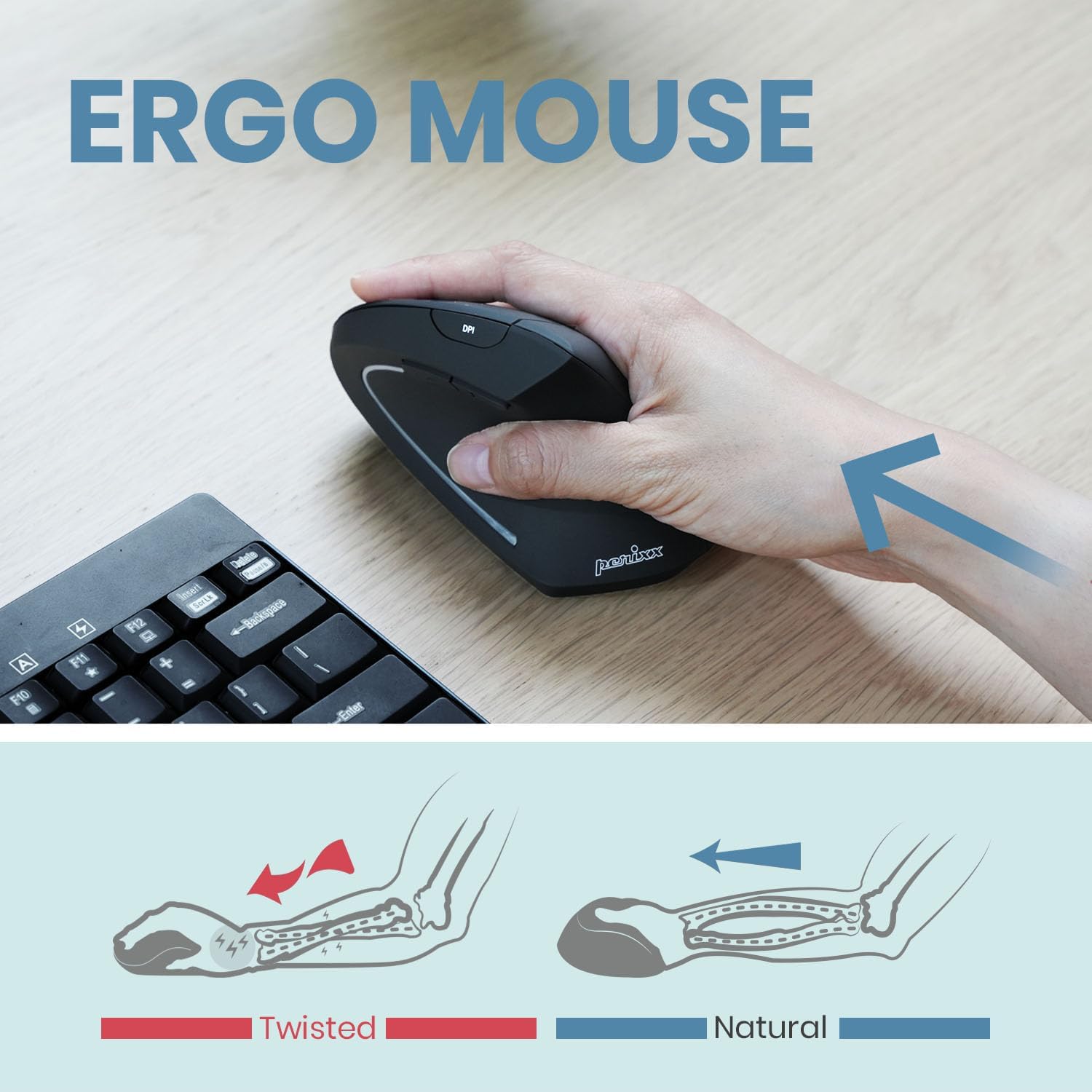
Image: An illustration comparing the "twisted" wrist position often associated with standard mice to the "natural" wrist position achieved with a vertical ergonomic mouse.
Maintenance
Cleaning
To clean your mouse, gently wipe the surface with a soft, damp cloth. Avoid using harsh chemicals, abrasive cleaners, or excessive moisture, as these can damage the device. Ensure the mouse is powered off before cleaning.
Battery Care
The mouse contains a Lithium Polymer battery. For optimal battery life:
- Avoid fully discharging the battery frequently.
- Charge the mouse regularly, especially if it will be stored for an extended period.
- Do not expose the mouse to extreme temperatures.
Troubleshooting
Mouse Not Responding:
- Ensure the mouse is powered on using the switch on the underside.
- Check the battery level and charge the mouse if necessary.
- Verify that the USB Nano receiver is securely plugged into a working USB port on your computer.
- Try plugging the receiver into a different USB port.
- Restart your computer.
Intermittent Connection:
- Ensure the mouse is within the 10-meter operating range of the USB receiver.
- Minimize interference from other wireless devices (e.g., Wi-Fi routers, cordless phones).
- Ensure there are no large metal objects between the mouse and the receiver.
Cursor Movement is Erratic or Inaccurate:
- Clean the optical sensor on the underside of the mouse.
- Ensure you are using the mouse on a suitable surface. Highly reflective or transparent surfaces may affect performance.
- Adjust the DPI setting using the DPI button to find a comfortable sensitivity.
Specifications
| Brand | Perixx |
| Model Number | PERIMICE-713R (Item model number: 12361) |
| Connectivity Technology | 2.4GHz Wireless (via USB Receiver) |
| Movement Detection Technology | Optical |
| DPI Settings | 1000 / 1600 / 2400 |
| Number of Buttons | 6 |
| Power Source | Battery Powered (1 Lithium Polymer battery, included) |
| Charging Options | Wired (USB-C) and Wireless (Qi-compatible, pad not included) |
| Operating System Compatibility | Windows 7, 8, 10, 11, Linux |
| Color | Black |
| Item Weight | 3.17 ounces |
| Product Dimensions (LxWxH) | 4.92 x 2.44 x 0.04 inches |
| Certifications | FCC, CE, RoHS |
Warranty and Support
Perixx products are manufactured to high-quality standards. For warranty information, please refer to the specific warranty card included with your product or visit the official Perixx website.
For technical support, troubleshooting assistance, or any inquiries regarding your Perixx PERIMICE-713R mouse, please contact Perixx Customer Service:
- Email: shop@perixx.com
- Website: www.perixx.com
Please have your product model number (PERIMICE-713R) and purchase details ready when contacting support.
Related documentsPERIMICE-713R


Ask a question about this manual
Ask about setup, troubleshooting, compatibility, parts, safety, or missing instructions. Manuals+ will review the question and use this page’s manual context to help answer it.