
1. Introduction
This manual provides detailed instructions for the installation, operation, and maintenance of the PPOZYLPC DDS662 110V Single Phase LCD Digital Energy Meter. This device is designed to measure active energy (kWh), voltage, current, and power consumption in single-phase AC circuits. Please read this manual thoroughly before installation and use to ensure safe and correct operation.
2. Safety Information
- Installation must be performed by qualified personnel in accordance with local electrical codes and regulations.
- Ensure the power supply is disconnected before any installation, wiring, or maintenance work.
- Do not operate the meter in environments with excessive moisture, dust, or corrosive gases.
- Do not attempt to disassemble or repair the meter. Contact qualified service personnel if repair is needed.
- Verify the voltage and current ratings of the meter match your application before installation.
3. Product Overview
The PPOZYLPC DDS662 is a compact, single-phase digital energy meter designed for DIN rail mounting. It features an LCD display for clear readings of various electrical parameters.
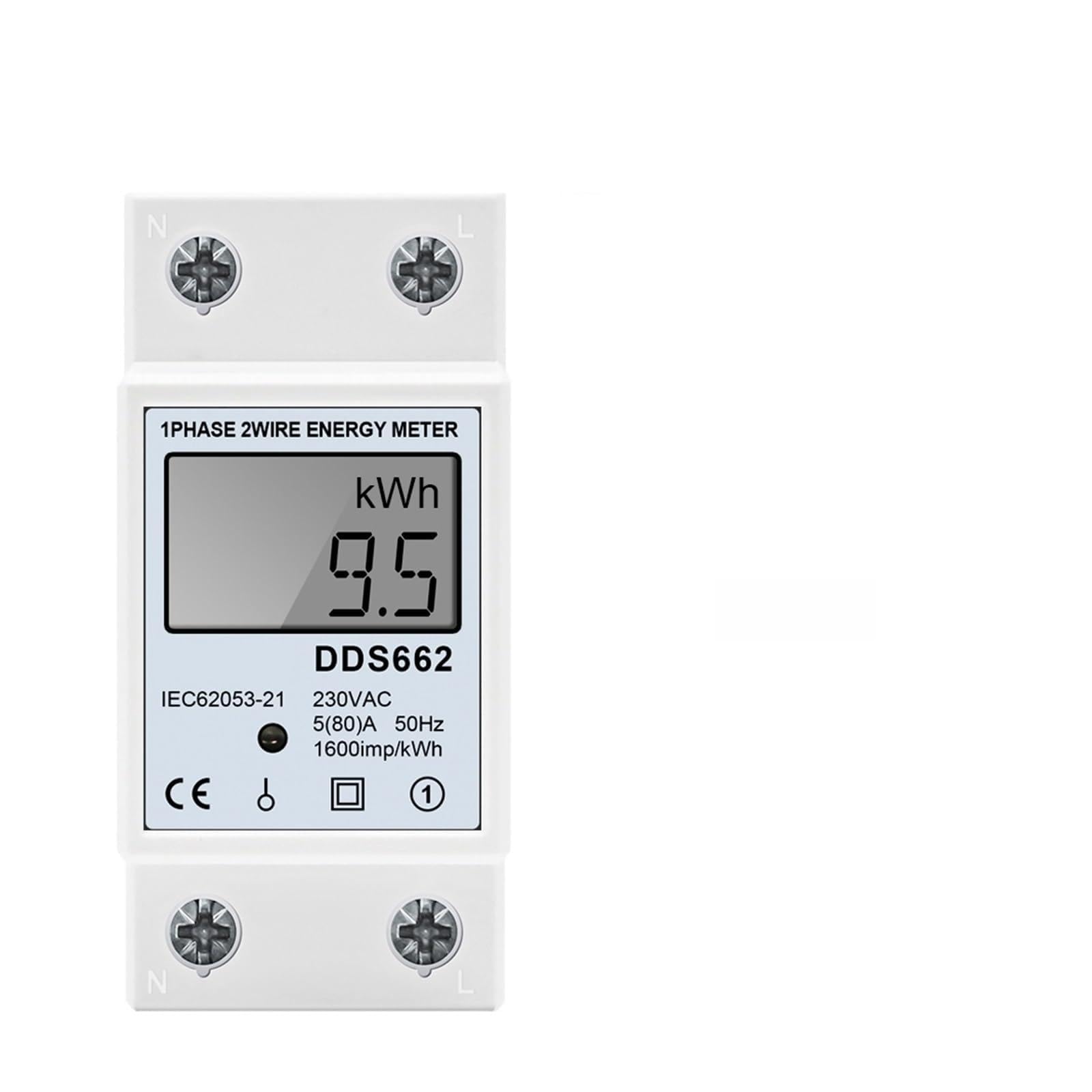
Figure 1: Front view of the PPOZYLPC DDS662 110V Single Phase LCD Digital Energy Meter. The meter features an LCD screen for displaying measurements and terminals for electrical connections.
The meter provides real-time measurements and can display kWh, Voltage (V), Current (A), Power (W), Frequency (Hz), and Power Factor (PF) depending on the model. The DDS662 model specifically focuses on kWh, Voltage, Current, and Power.

Figure 2: Overview of different DDS series energy meters and their respective display capabilities. The DDS662 model displays kWh, Voltage, Current, and Power.
4. Specifications
| Parameter | Value |
|---|---|
| Model | DDS662 |
| Rated Voltage | AC110V, 50Hz/60Hz (Voltage Universal) |
| Item Weight | 111 Grams (3.92 ounces) |
| Package Dimensions | 1.18 x 0.79 x 0.39 inches |
| Mounting Type | DIN Rail |
| Number of Pieces | 1 |

Figure 3: Physical dimensions of the energy meter and a table detailing rated voltage parameters for various DDS models, including the DDS662.
5. Setup and Installation
Follow these steps for proper installation of the DDS662 energy meter:
- Preparation: Ensure the main power supply to the circuit where the meter will be installed is completely turned off. Use appropriate safety equipment.
- Mounting: Mount the DDS662 meter onto a standard 35mm DIN rail. Ensure it is securely fastened.
- Wiring: Refer to the wiring diagram typically found on the meter itself or in the product packaging. For a single-phase 2-wire meter, connect the live (L) and neutral (N) wires from the incoming power supply to the designated input terminals. Connect the load's live (L) and neutral (N) wires to the designated output terminals. Ensure all connections are tight and secure to prevent loose contacts and overheating.
- Verification: Double-check all wiring connections for correctness and security.
- Power On: Restore power to the circuit. The meter's LCD display should illuminate, indicating it is operational.
Note: Incorrect wiring can damage the meter or cause electrical hazards. If unsure, consult a qualified electrician.
6. Operating Instructions
Once installed and powered on, the DDS662 meter will automatically begin measuring and displaying electrical parameters.
6.1 Display Readings
The LCD display cycles through various parameters. For the DDS662, these typically include:
- kWh: Total active energy consumption.
- V: Real-time voltage.
- A: Real-time current.
- W: Real-time active power.
The display will automatically switch between these readings at regular intervals.
6.2 Resetting kWh (If Applicable)
Some models of this meter series may feature a reset function for the kWh reading. If your DDS662 model includes a 'RESET' button or a similar mechanism (often a small button requiring a pointed object to press), follow these steps:
- Ensure the meter is displaying the kWh reading.
- Press and hold the 'RESET' button (or equivalent) for approximately 3-5 seconds.
- The kWh reading should reset to zero.
Note: Not all models support user-initiated kWh resets. Refer to your specific model's features.
7. Maintenance
The DDS662 energy meter requires minimal maintenance.
- Cleaning: Use a soft, dry cloth to clean the meter's exterior. Do not use abrasive cleaners, solvents, or liquids that could seep into the meter.
- Inspection: Periodically inspect the wiring connections to ensure they remain tight and free from corrosion or damage.
- Environment: Ensure the operating environment remains within the specified temperature and humidity ranges to prolong the meter's lifespan.
8. Troubleshooting
If you encounter issues with your DDS662 meter, refer to the following common problems and solutions:
| Problem | Possible Cause | Solution |
|---|---|---|
| No display/Meter not powering on | No power supply; Incorrect wiring; Faulty meter | Check power supply to the circuit; Verify wiring connections; If power is present and wiring is correct, the meter may be faulty and require replacement. |
| Incorrect readings | Incorrect wiring; Overload; Meter malfunction | Recheck wiring against the diagram; Ensure the load does not exceed the meter's maximum current rating; If issues persist, contact support. |
| kWh not accumulating | No load connected; Incorrect current direction; Meter malfunction | Ensure a load is connected and drawing power; Verify current flow direction if applicable (check wiring); Contact support if problem persists. |
9. Warranty and Support
For warranty information and technical support, please refer to the documentation provided with your purchase or contact the manufacturer directly. Keep your purchase receipt as proof of purchase for warranty claims.
Manufacturer: PPOZYLPC