
1. Introduction
Thank you for choosing the Asuwish Phone Case for your Samsung Galaxy S22 Ultra 5G. This protective case is designed to safeguard your device from daily wear and tear, drops, and impacts. It features a liquid glitter design and comes with a tempered glass screen protector for comprehensive protection. Please read this manual carefully to ensure proper installation and use.
2. Compatibility
This phone case is specifically designed for the Samsung Galaxy S22 Ultra 5G (6.8 inch). It is NOT compatible with other Samsung Galaxy models, including the S22 Plus (6.6 inch) or S22 (6.1 inch).

Image: Compatibility chart illustrating that the case fits the Samsung S22 Ultra 5G (6.8") but not the S22 Plus (6.6") or S22 (6.1").
3. Package Contents
- 1 x Asuwish Phone Case for Samsung Galaxy S22 Ultra 5G
- 1 x Tempered Glass Screen Protector
4. Installation Guide
4.1. Screen Protector Installation
- Clean your phone screen thoroughly with the provided cleaning wipes to remove dust, smudges, and fingerprints.
- Use the dust-absorber sticker to remove any remaining dust particles from the screen.
- Carefully peel off the protective film from the adhesive side of the tempered glass screen protector.
- Align the screen protector with your phone's screen, ensuring the cutouts for the camera and sensors match perfectly.
- Gently lower the screen protector onto the screen. It will adhere automatically.
- Use a clean cloth or your finger to gently press out any air bubbles from the center outwards.
4.2. Phone Case Installation
The Asuwish phone case features a multi-layer design for enhanced protection.
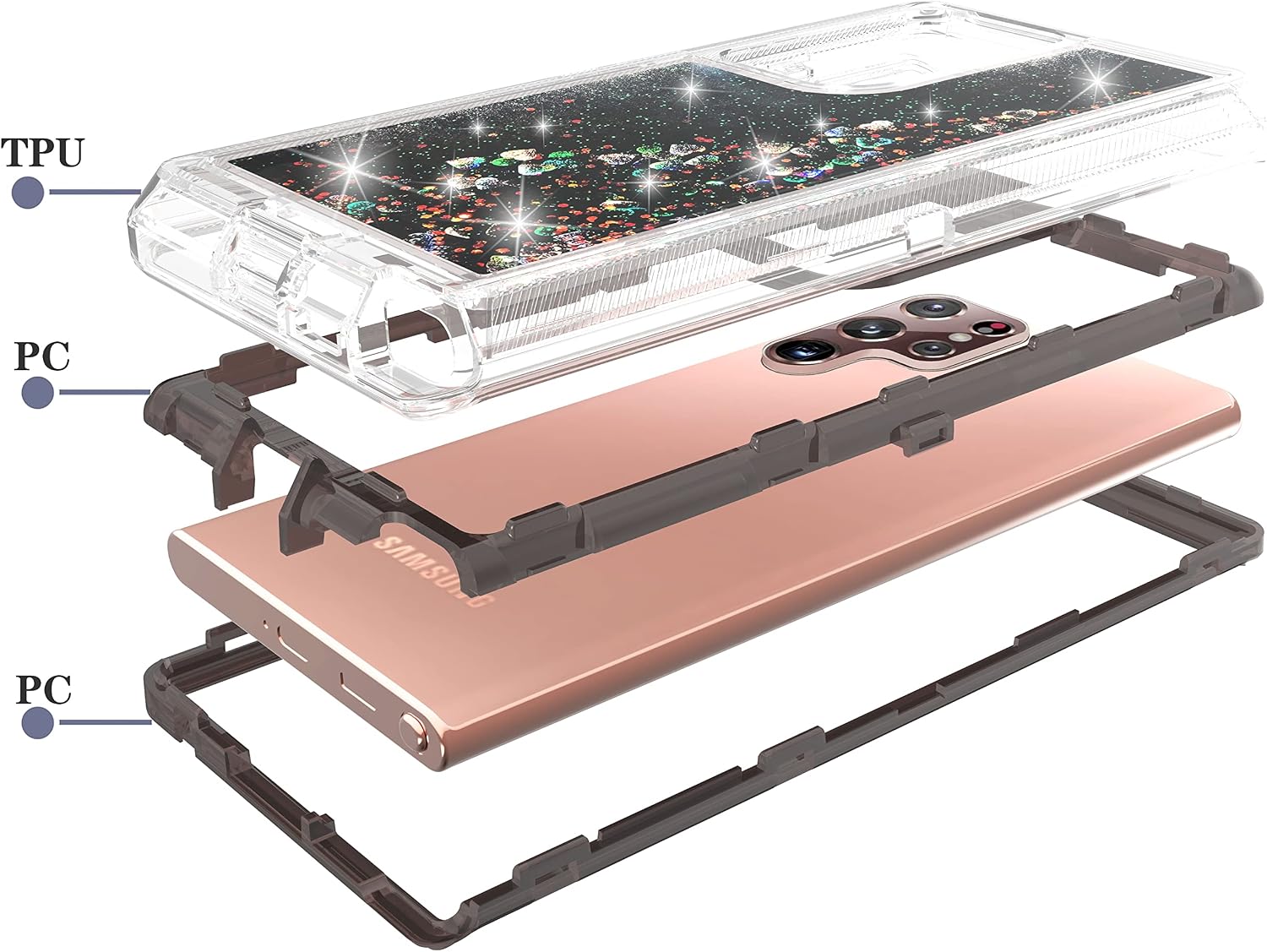
Image: An exploded diagram illustrating the three-layer construction of the phone case, consisting of a soft TPU layer and two rigid PC layers that encase the phone.
- Separate the outer soft TPU layer from the inner hard PC frame.
- Place your Samsung Galaxy S22 Ultra 5G into the inner hard PC frame, ensuring it fits snugly.
- Carefully re-attach the soft TPU outer layer around the hard PC frame, making sure all edges and corners are securely covered.
- Verify that all buttons and ports are accessible and functional.
5. Product Features
- Liquid Glitter Design: The case features a dynamic liquid glitter design with floating sequins, adding a unique visual effect.
- Hybrid Military Grade Protection: Constructed from a 3-layer hybrid material (shock-absorbing rubber and durable hard plastic) to provide robust protection against drops, bumps, and scratches.
- Screen & Camera Protection: Raised front edge lips and lens lips offer additional protection for your phone's screen and camera lenses when placed on flat surfaces or during accidental falls.
- Wireless Charging Compatible: The case supports wireless charging. However, please note that the glitter design may interfere with some wireless chargers, potentially causing intermittent charging.

Image: The phone case showcasing its liquid glitter design and highlighting its 360-degree total protection feature.

Image: A close-up of the phone case illustrating its shock absorption bumper design, which helps to mitigate impact from drops.
Video: A demonstration of the liquid glitter floating effect within the phone case, showcasing its dynamic visual appeal.
6. Maintenance and Care
- To clean the case, gently wipe it with a soft, damp cloth. Avoid using harsh chemicals or abrasive materials.
- Ensure the case is completely dry before re-installing your phone.
- Periodically check the case for any signs of wear or damage that might compromise its protective capabilities.
7. Troubleshooting
| Issue | Possible Cause | Solution |
|---|---|---|
| Wireless charging not working or intermittent | The liquid glitter design may interfere with some wireless charging pads. | Try repositioning the phone on the wireless charger. If the issue persists, use a wired charger. |
| Screen protector bubbles | Dust particles or improper alignment during installation. | Gently lift the nearest edge of the screen protector and reapply, ensuring no dust is trapped. Use a clean cloth to push out bubbles. |
| Case feels loose | Improper installation of the multi-layer case. | Remove the case and re-install it, ensuring both the inner PC frame and outer TPU layer are securely fitted around the phone. |
8. Specifications
| Feature | Detail |
|---|---|
| Compatible Model | Samsung Galaxy S22 Ultra 5G (6.8 inch) |
| Material | 3-layer Hybrid (TPU and PC Plastic) |
| Color | Black (with liquid glitter) |
| Additional Features | Heavy Duty Protection, Raised Bezels for Screen & Camera, Wireless Charging Compatible |
| Included Accessory | Tempered Glass Screen Protector |
| Model Number | Samsung-S22-Ultra-LSJQR-US |
9. Warranty and Support
Asuwish provides 24-hour professional customer service. For defective products, a *FREE REPLACEMENT* or *REFUND* is available. If you have any questions or concerns, please contact Asuwish customer service via email for a satisfied solution.