
1. Introduction
The ARCCAPTAIN MIG250 is a versatile 250A multi-process welding machine designed for a wide range of welding applications. This 6-in-1 welder supports Gas MIG, Flux Core Gasless MIG, Lift TIG, MMA (Stick), Spot Welding, and Spool Gun welding modes. Featuring synergic control and IGBT inverter technology, it offers ease of use for both beginners and experienced welders, making it suitable for home DIY, outdoor repairs, automotive maintenance, and various fabrication tasks.
This manual provides essential information for the safe and effective operation, setup, and maintenance of your ARCCAPTAIN MIG250 welder. Please read it thoroughly before use.
2. Safety Information
WARNING: Welding can be dangerous. Always follow safety precautions to prevent injury or death.
- Always wear appropriate personal protective equipment (PPE), including a welding helmet with proper shade, flame-resistant clothing, welding gloves, and safety shoes.
- Ensure adequate ventilation to avoid inhaling welding fumes.
- Protect bystanders from arc rays and sparks.
- Never touch live electrical parts.
- Ensure the welding machine is properly grounded.
- Keep a fire extinguisher nearby.
- Disconnect power before performing any maintenance or changing accessories.
3. Package Contents
Upon unpacking, verify that all items are present and undamaged:
- 1 x ARCCAPTAIN MIG250 Welder
- 1 x MIG Torch (attached)
- 1 x Electrode Holder (for MMA)
- 1 x Ground Clamp
- 1 x Power Cable (attached)
- User Manual
- Consumables (e.g., contact tips, nozzles)
Note: Lift TIG torch and Spool Gun are sold separately.
4. Setup
4.1 Power Connection
The ARCCAPTAIN MIG250 welder supports both 110V and 220V input voltages. Ensure the correct power plug is used and connected to a suitable power outlet with adequate amperage capacity. Do not power on the machine until the screen turns off and the fan stops after initial connection, as indicated by the manufacturer.
4.2 Wire Spool Installation
To install the welding wire spool:
- Open the side panel of the welder.
- Unscrew the spool knob counter-clockwise to remove it.
- Place the wire spool onto the spool spindle, ensuring the wire unwinds in the correct direction (usually from the bottom).
- Secure the spool with the knob, turning clockwise.
- Feed the wire through the wire feed mechanism, ensuring it passes through the correct groove for the wire diameter.
- Close the wire feed roller and adjust tension.
- Carefully feed the wire into the MIG torch liner until it exits the contact tip.

Figure 1: Overview of the ARCCAPTAIN MIG250 6-in-1 Welder, showing various welding modes.
5. Operating Modes
The ARCCAPTAIN MIG250 offers six distinct welding processes. Select the desired mode using the control panel.
Video 1: Demonstrates the various welding modes and features of the ARCCAPTAIN MIG250 welder, including wire spool setup, synergic control, and different welding processes.
5.1 Synergic Control
The synergic control feature simplifies setup by automatically matching the recommended current and wire feeding speed once the welding wire diameter is selected. This makes the machine user-friendly, especially for beginners.

Figure 2: The control panel displaying the synergic settings for MIG welding.
5.2 Gas MIG Welding
For welding with shielding gas, connect your gas cylinder to the welder. This mode is ideal for achieving clean, high-quality welds on various metals, including carbon steel and stainless steel.
5.3 Flux Core Gasless MIG Welding
This mode uses flux-cored wire, eliminating the need for an external shielding gas. It is particularly suitable for outdoor repairs, rusty metal, and applications where gas cylinders are impractical.
5.4 MMA (Stick) Welding
The MMA mode allows for welding with coated electrodes (stick welding). The MIG250 is compatible with electrodes such as 7018 and 6013, suitable for various material thicknesses.
5.5 Lift TIG Welding
The Lift TIG mode provides precise welding control for thinner materials and intricate work. An external Lift TIG torch is required and sold separately.
5.6 Spot Welding
This mode allows for quick, localized welds, useful for joining sheet metal or creating tack welds. The spot time can be adjusted for different applications.
5.7 Spool Gun Welding
For welding softer metals like aluminum, a spool gun (sold separately) can be connected. This provides a dedicated wire feed system for aluminum wire, preventing feeding issues.

Figure 3: Demonstrates aluminum welding using the ARCCAPTAIN MIG250 with an external spool gun.

Figure 4: Examples of typical applications for the ARCCAPTAIN MIG250 welder, including home DIY, automotive, furniture, and engineering tasks.
6. Maintenance
Regular maintenance ensures the longevity and optimal performance of your welding machine.
- Cleaning: Periodically clean the machine's exterior and ventilation openings to prevent dust and debris buildup. Use compressed air to clear internal components if necessary, ensuring the machine is unplugged.
- Torch and Cable Inspection: Regularly inspect the MIG torch, electrode holder, ground clamp, and all cables for wear, damage, or loose connections. Replace worn parts immediately.
- Consumables: Check and replace contact tips, nozzles, and diffusers as they wear out to maintain arc stability and weld quality.
- Wire Feed System: Keep the wire feed rollers clean and ensure proper tension. Inspect the liner for blockages or damage.
7. Troubleshooting
This section addresses common issues you might encounter with your ARCCAPTAIN MIG250 welder.
| Problem | Possible Cause | Solution |
|---|---|---|
| No power | Loose power connection, tripped circuit breaker, machine fault | Check power cable, reset circuit breaker, contact support if fault persists. |
| Poor arc start/stability | Incorrect settings, worn contact tip, poor ground connection, wrong wire feed speed | Adjust settings, replace contact tip, ensure good ground, adjust wire feed speed. |
| Wire feeding issues | Incorrect roller tension, clogged liner, wrong roller groove, tangled wire | Adjust roller tension, clean/replace liner, use correct groove, untangle wire. |
| Overheating protection | Exceeded duty cycle, blocked ventilation | Allow machine to cool down, ensure clear ventilation. |
8. Specifications
| Feature | Detail |
|---|---|
| Model | MIG250 |
| Manufacturer | ARCCAPTAIN |
| Input Voltage | 110V / 220V |
| Max Current | 250A |
| Welding Modes | Gas MIG, Flux Core Gasless MIG, Lift TIG, MMA (Stick), Spot, Spool Gun |
| Technology | IGBT Inverter, Synergic Control |
| Product Dimensions | 37.85 x 13.46 x 24.64 cm |
| Item Weight | 15.7 kg (approx. 34.6 lbs) |
| Date First Available | Aug. 14 2024 |
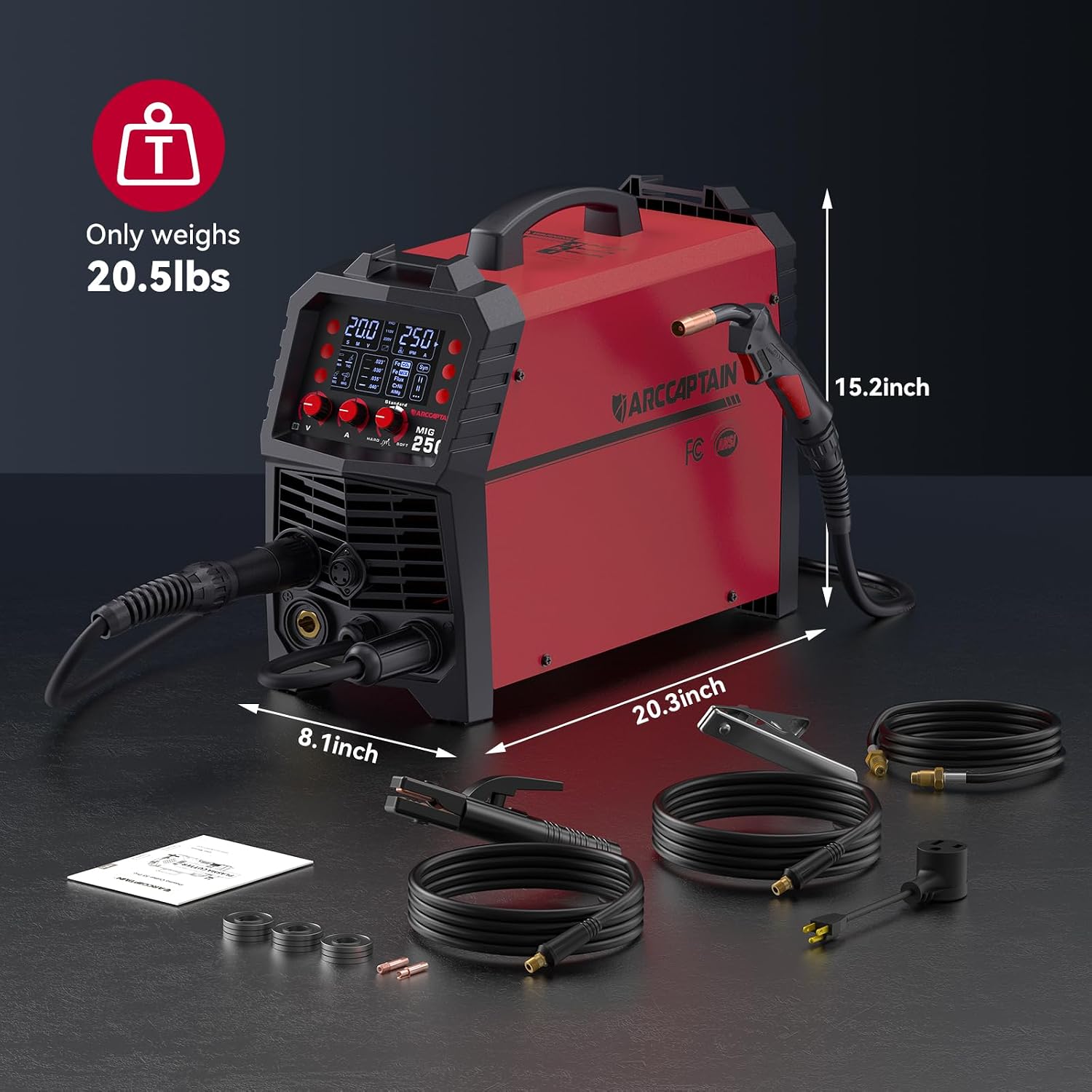
Figure 5: Physical dimensions and components of the ARCCAPTAIN MIG250 welder.
9. Warranty and Support
ARCCAPTAIN products are designed for reliability and performance. For warranty information, technical support, or service inquiries, please refer to the official ARCCAPTAIN website or contact their customer service directly. Keep your purchase receipt as proof of purchase for warranty claims.
For further assistance, visit the ARCCAPTAIN Store on Amazon.


