GoveeLife Smart Humidifier H7149 User Manual
Model: H7149 | Brand: GoveeLife
1. Introduction
The GoveeLife Smart Humidifier H7149 is designed to enhance your indoor environment by providing efficient and controlled humidification. Featuring a 6-liter capacity and smart control options, this cool mist humidifier is suitable for large rooms and offers a quiet operation for undisturbed use. It integrates with the Govee Home App and voice assistants for convenient management of humidity levels and other functions.

Image 1: GoveeLife Smart Humidifier H7149 with its digital display and companion app interface.
2. Setup
2.1 Unpacking and Placement
- Carefully remove all components from the packaging.
- Place the humidifier on a firm, flat, and waterproof surface. Ensure it is not placed directly on carpet or near heat sources.
2.2 Filling the Water Tank
The humidifier features a top-fill design for easy refilling. It has a 6-liter capacity, providing up to 60 hours of continuous operation on the lowest mist setting.
- Remove the top cover of the humidifier.
- Pour purified or distilled water directly into the tank. Do not fill water into the mist tube.
- Fill up to the 'MAX' line indicated on the tank.
- Replace the top cover securely.
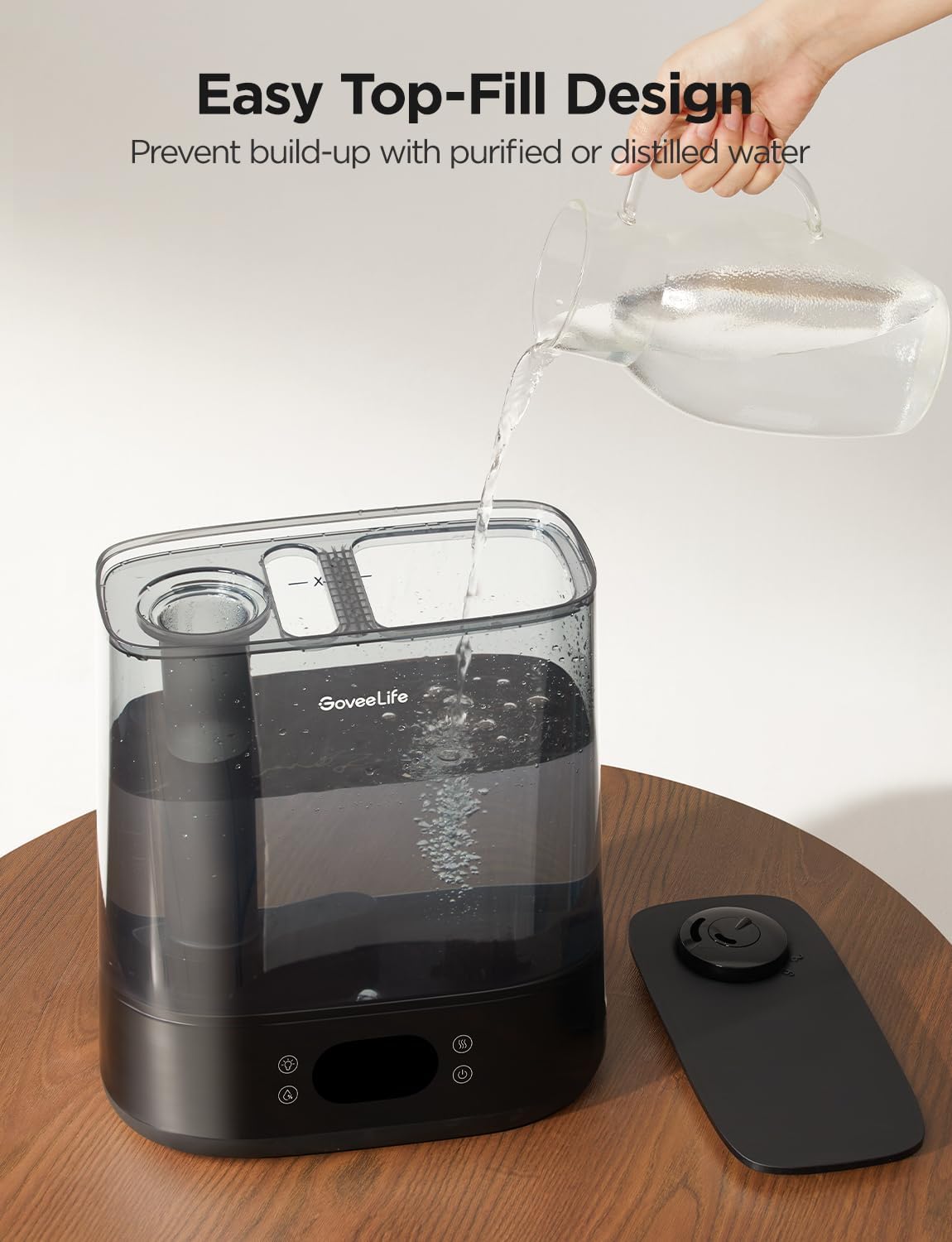
Image 2: Demonstrating the easy top-fill design of the humidifier, allowing direct water pouring into the tank.
2.3 Essential Oil Diffuser Setup
The humidifier includes an aroma box for essential oils. Only add essential oils to the aroma box, not directly into the water tank, to prevent damage to the unit.
- Locate the aroma box on the side of the humidifier base.
- Pull out the aroma box tray.
- Add a few drops of your preferred essential oil onto the aroma pad.
- Slide the tray back into the aroma box until it clicks into place.
2.4 Power Connection
- Connect the power adapter to the humidifier and then plug it into a standard 120V AC outlet.
- The LED display will illuminate, indicating the device is ready for operation.
3. Operating Instructions
3.1 Control Panel Overview
The humidifier features an intuitive control panel with touch-sensitive buttons and an LED display for real-time humidity monitoring.
- Power Button: Turns the humidifier on/off.
- Mist Level Button: Adjusts mist output levels (1-9) or activates Auto Mode.
- Light Button: Controls the night light function.
- Wi-Fi Indicator: Shows Wi-Fi connection status.
3.2 Govee Home App & Voice Control
For full smart functionality, download the Govee Home App and connect your humidifier via 2.4GHz Wi-Fi. The app enables remote control and advanced features.
- Smart Control: Adjust mist levels, set schedules, and control the night light from your smartphone.
- Voice Control: Compatible with Alexa and Google Home. Use voice commands to turn the humidifier on/off, adjust settings, or activate modes.
- Auto Mode: Utilizes a built-in high-precision sensor to automatically adjust humidity to your target level. Can be paired with a GoveeLife Thermo-hygrometer (not included) for expanded range and precise adjustments based on temperature.
- Scheduling & Timer: Set custom schedules for operation or use the 1-24 hour timer function.
- Preset Humidity Scenes: Choose from various preset scenes (e.g., Gardening, Baby Room) to ensure optimal humidity for specific environments.
- Water-lack Notification: Receive smart reminders via the app when the water level is low.

Image 3: User interacting with the GoveeLife app and using voice commands with a smart assistant to control the humidifier.
3.3 Mist Output and Direction
- The humidifier offers a maximum mist output of 350ml/h, covering areas up to 600 ft².
- The 360° dual rotating nozzle allows you to direct the mist in any desired direction.
Image 4: Close-up of the humidifier's top showing the 360° customizable mist nozzle.
3.4 Night Light Function
The integrated RGB night light can be controlled via the app or the device's control panel. Choose from various colors and preset scenes to create a relaxing atmosphere.

Image 5: Humidifier displaying an RGB nightlight in a bedroom setting, enhancing the ambiance.
4. Maintenance
4.1 Regular Cleaning
Regular cleaning is essential to maintain optimal performance and prevent mineral buildup. Clean the humidifier every 3 days.
- Unplug the humidifier and remove the water tank from the base. Pour out any remaining water from both the tank and the base chamber.
- Remove the cleaning brush from the water tank cover and set it aside. Remove the nozzle.
- Fill the tank with 3 cups (710 mL) of distilled white vinegar. Let it sit for 15-20 minutes to loosen scale deposits.
- Swirl the vinegar in the tank and pour it out. Rinse the tank thoroughly with water to clear any remaining vinegar.
- Pour out any vinegar from the base chamber. Use the attached brush to clean the inner base, especially the transducer and the float.
- Rinse the base chamber and all parts with water to clear off any remaining vinegar.
- Clean the aroma box, nozzle, and filter using the attached brush. Rinse all accessories under running water.
- After cleaning, reassemble all parts in the following order: aroma box, absorption pad, filter, nozzle, and cleaning brush to the water tank cover.
CAUTION: When cleaning the humidifier, avoid getting any water/vinegar into the mist tube or air outlet. Do not fill water directly into the mist tube or base.
Video 1: Step-by-step guide on how to clean the GoveeLife Smart Humidifier H7149.
4.2 Water Quality
- Always use purified or distilled water to prevent white dust buildup and prolong the life of the humidifier.
- Avoid using tap water, which can contain minerals that lead to scale and affect mist output.
5. Troubleshooting
- No Mist/Low Mist Output: Check water level, ensure the unit is plugged in, clean the transducer if there's mineral buildup, or adjust mist level settings.
- Humidifier Not Connecting to App: Ensure your Wi-Fi network is 2.4GHz. Restart the humidifier and your router. Follow in-app instructions for pairing.
- Leaking: Ensure the water tank is properly seated on the base. Check for cracks or damage to the tank. Do not overfill the tank.
- Unusual Noise: Ensure the humidifier is on a flat, stable surface. Check for any foreign objects in the water tank or base.
6. Specifications
| Brand | GoveeLife |
| Model Name | Smart Humidifier 2 Lite (6L) |
| Item Model Number | H7149 |
| Capacity | 6 Liters |
| Max Mist Output | 350ml/h |
| Max Runtime | Up to 60 hours |
| Noise Level | As low as 28dB |
| Coverage Area | Up to 600 ft² |
| Special Features | Auto Shut Off, Digital Display, Night Light, Water Level Window, Smart App & Voice Control, Top-Fill Design |
| Product Dimensions | 12.99"D x 7.48"W x 17.24"H |
| Item Weight | 6.03 pounds (2.74 Kilograms) |
| Voltage | 120 Volts (AC) |
| UPC | 810127733640 |
7. Warranty and Support
GoveeLife products typically come with a limited warranty. Please refer to the warranty card included in your product packaging or visit the official GoveeLife website for detailed warranty information and customer support contacts.


