
1. Introduction
Thank you for purchasing the chartustriable 47-inch Large Vanity Desk. This manual provides essential information for the safe assembly, operation, and maintenance of your new vanity desk. Please read these instructions carefully before beginning assembly and retain them for future reference.

Figure 1: The chartustriable vanity desk setup, showcasing its white finish, integrated lighted mirror, seven drawers with gold handles, six open shelves, and the accompanying storage stool.
2. Safety Information
Please observe the following safety precautions during assembly and use:
- Keep all small parts and packaging materials away from children and pets to prevent choking hazards.
- Assemble the unit on a soft, clean surface to prevent scratches.
- Ensure all screws and fasteners are securely tightened before use. Periodically check and re-tighten as necessary.
- Do not overload drawers or shelves. Distribute weight evenly.
- For electrical components (charging station, mirror lights), ensure proper connection to a grounded outlet. Do not use if cords are damaged.
- Avoid exposing the vanity desk to excessive moisture or direct sunlight.
- Always handle the mirror with care to prevent breakage.
3. Package Contents
Verify that all components are present before beginning assembly. If any parts are missing or damaged, please contact customer support.
- Vanity Desk Panels (various sizes)
- Lighted Mirror Unit
- 7 Drawer Units
- Cushion Stool Components
- Hardware Pack (screws, dowels, cam locks, drawer slides, handles)
- Charging Station Unit (pre-installed or separate)
- Hair Dryer Rack
- Assembly Instructions Manual
4. Assembly Instructions
Assembly of the chartustriable vanity desk requires careful attention to detail. All pieces are labeled for easier identification. An assembly video is typically available to guide you through the process step-by-step. Refer to the included printed instructions for detailed diagrams and part identification.
General Assembly Steps:
- Unpack and Identify: Carefully unpack all components and lay them out. Match each piece to the part list in the printed manual.
- Assemble Base Units: Begin by assembling the main side cabinets and the central desk section according to the diagrams.
- Install Drawers: Assemble the drawer boxes and install the drawer slides onto both the drawers and the cabinet frames.
- Attach Upper Shelving: Secure the upper shelving units to the main desk structure.
- Mount Mirror: Carefully attach the lighted mirror unit to the designated central section. Ensure electrical connections are made if required.
- Install Charging Station & Hair Dryer Rack: Secure the charging station and hair dryer rack in their respective positions.
- Assemble Stool: Put together the cushion stool, ensuring the storage compartment lid operates correctly.
- Final Checks: Verify all connections are tight and the vanity is stable.

Figure 2: Diagram illustrating the key measurements of the vanity desk, including its 47-inch width, 56-inch height, and 16-inch depth, along with the dimensions of the stool and individual storage compartments.
5. Operating Instructions
5.1 Lighted Mirror Operation
The integrated mirror features 3 lighting modes and adjustable brightness:
- Power On/Off: Gently touch the power button on the mirror to turn the lights on or off.
- Change Lighting Mode: With the lights on, short press the power button to cycle through the 3 color modes: warm light, natural light, and cool light.
- Adjust Brightness: To adjust brightness, long press the power button while the lights are on. The brightness will gradually increase or decrease. Release the button when the desired brightness is reached.
5.2 Charging Station Usage
The vanity desk includes a built-in charging station for your convenience.
- AC Outlets: Two standard 125V/12A AC outlets are provided for powering devices such as hair dryers, curling irons, or other beauty appliances.
- USB Ports: Two 5V/2A USB ports are available for charging smartphones, tablets, smartwatches, and other USB-powered devices.
- Power Cord: The charging station is connected via a 6.6-foot power cord. Ensure it is plugged into a functional wall outlet.

Figure 3: Detailed view of the built-in charging station, featuring two standard electrical outlets and two USB ports for convenient device charging, alongside a practical holder for a hair dryer.
5.3 Storage Utilization
The vanity desk offers ample storage solutions:
- 7 Drawers: Utilize the seven deep drawers for organizing cosmetics, skincare products, hair accessories, and other personal items.
- 6 Open Shelves: The six open shelves provide easy access and display space for frequently used items or decorative pieces.
- Stool Storage: The cushion stool features a hidden storage compartment, ideal for larger items or items you wish to keep out of sight.
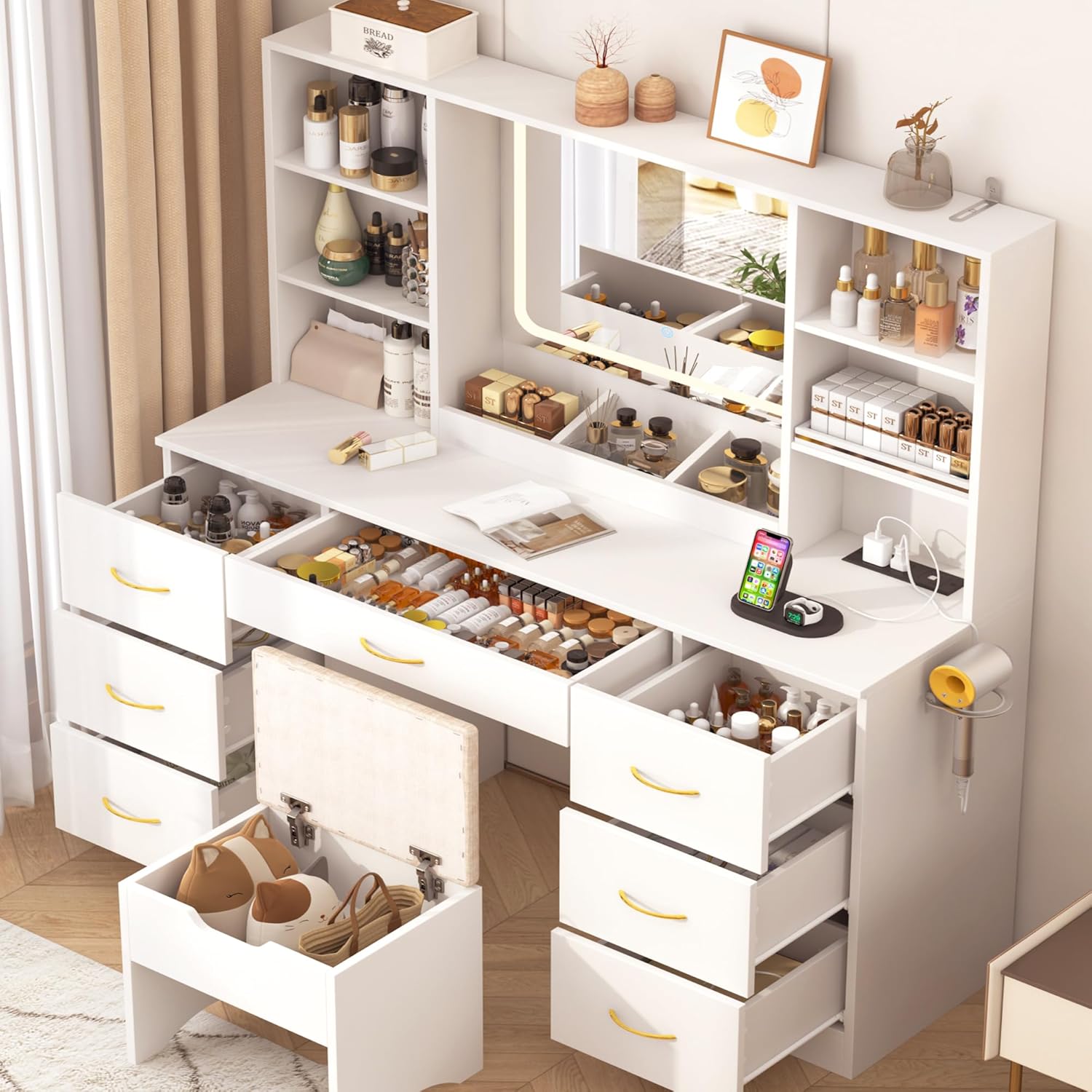
Figure 4: This image demonstrates the extensive storage capacity of the vanity desk, showing the seven drawers and the stool's hidden compartment open and organized with various beauty products and personal items.
6. Maintenance
To ensure the longevity and appearance of your vanity desk, follow these maintenance guidelines:
- Cleaning: Wipe surfaces with a soft, damp cloth. Avoid abrasive cleaners or harsh chemicals that may damage the finish.
- Spills: Clean up spills immediately to prevent staining or damage to the engineered wood.
- Mirror Care: Use a glass cleaner specifically designed for mirrors. Spray cleaner onto a cloth, not directly onto the mirror, to avoid liquid seeping into the edges.
- Hardware: Periodically check and tighten all screws and fasteners to maintain stability.
- Electrical Components: Keep the charging station free from dust and debris. Do not attempt to repair electrical components yourself.
7. Troubleshooting
If you encounter issues with your vanity desk, refer to the following common problems and solutions:
| Problem | Possible Cause | Solution |
|---|---|---|
| Mirror lights not working | Power cord not plugged in; loose connection; faulty power outlet; mirror unit damage. | Ensure the vanity's power cord is securely plugged into a working outlet. Check all internal connections to the mirror unit. If the issue persists, contact customer support. |
| Charging station not providing power | Vanity power cord unplugged; faulty device cable; charging station damage. | Verify the vanity's main power cord is connected. Test with a different device cable. If still no power, contact customer support. |
| Drawers are stiff or do not close properly | Incorrect drawer slide installation; obstruction; loose screws. | Review assembly instructions for drawer slide installation. Check for any objects obstructing the drawer path. Ensure all screws on drawer slides are tightened. |
| Vanity feels unstable or wobbly | Loose fasteners; uneven floor. | Check and tighten all assembly screws and bolts. If the floor is uneven, use furniture levelers (not included) under the base. |
| Missing parts upon delivery | Packaging error; transit damage. | Immediately contact customer support with your purchase details and a list of missing parts. Do not attempt to assemble with incomplete components. |
8. Specifications
| Feature | Detail |
|---|---|
| Brand | chartustriable |
| Model Number | vanity desk set with stool |
| Product Dimensions | 16"D x 47"W x 56"H (40.6 cm D x 119.4 cm W x 142.2 cm H) |
| Item Weight | 138 pounds (62.6 kg) |
| Frame Material | Engineered Wood |
| Furniture Finish | Oak (White color variant) |
| Lighting Modes | 3 (Warm, Natural, Cool) with adjustable brightness |
| Charging Station | 2 AC Outlets (125V/12A), 2 USB Ports (5V/2A), 6.6-foot Power Cord |
| Storage | 7 Drawers, 6 Open Shelves, Stool with Storage |
9. Warranty and Support
chartustriable products are designed for quality and durability. For specific warranty information, please refer to the documentation included with your purchase or contact the retailer. If you require assistance with assembly, missing parts, or have any questions regarding your vanity desk, please contact chartustriable customer support through your point of purchase.