
Keychron K17 Max
Keychron K17 Max User Manual
Model: K17 Max | Brand: Keychron
Introduction
The Keychron K17 Max is an ultra-slim, 96% layout mechanical keyboard designed for versatility and performance. It supports multiple connection modes including 2.4 GHz wireless, Bluetooth 5.1, and wired USB-C, making it compatible with a wide range of devices such as Mac, Windows, and Linux systems. Powered by QMK open-source firmware and the Keychron Launcher web app, this keyboard offers extensive customization and a responsive typing experience with low-profile Gateron mechanical switches and durable double-shot PBT keycaps.

Image: The Keychron K17 Max mechanical keyboard, showcasing its compact 96% layout and a close-up of a Gateron low-profile brown switch.
Setup
Package Contents
- 1x Fully Assembled Keyboard
- 1x Type-A to Type-C Cable
- 1x Extension Adapter for Receiver
- 1x Type-A 2.4GHz Receiver
- 1x Keycap Puller

Image: A visual representation of the Keychron K17 Max package contents, including the keyboard, cables, receiver, and keycap puller.
Connecting Your Keyboard
The Keychron K17 Max offers three versatile connection modes:
- 2.4 GHz Wireless: For high-performance gaming and low-latency connectivity, use the included 2.4 GHz receiver. Plug the receiver into an available USB-A port on your computer. Ensure the keyboard's mode switch is set to 2.4G.
- Bluetooth 5.1: Connect up to three devices simultaneously via Bluetooth. Switch the keyboard's mode to Bluetooth. On your device, search for 'Keychron K17 Max' in Bluetooth settings and pair. You can switch between paired devices using the designated function keys.
- USB Wired: For a direct and stable connection, use the provided Type-A to Type-C cable to connect the keyboard to your computer. The keyboard will automatically switch to wired mode when connected.

Image: The Keychron K17 Max keyboard illustrating its three connection modes for flexible use.
Operating System Compatibility
The K17 Max features a multi-OS toggle switch, allowing seamless switching between macOS/iOS and Windows/Android modes. Locate the switch on the side of the keyboard and set it according to your operating system for optimal key mapping and functionality.

Image: A close-up view of the multi-OS toggle switch on the Keychron K17 Max, indicating settings for Windows and macOS.
Operating
Key Functions and Layout
The K17 Max features a compact 96% layout, retaining most of the functionality of a full-sized keyboard while saving desk space. It includes a dedicated number pad and essential navigation keys. The keyboard is equipped with low-profile Gateron mechanical switches, which are 31% thinner than standard switches, providing a satisfying tactile response. The keycaps are made from durable double-shot PBT material, offering excellent oil resistance for long-term use.
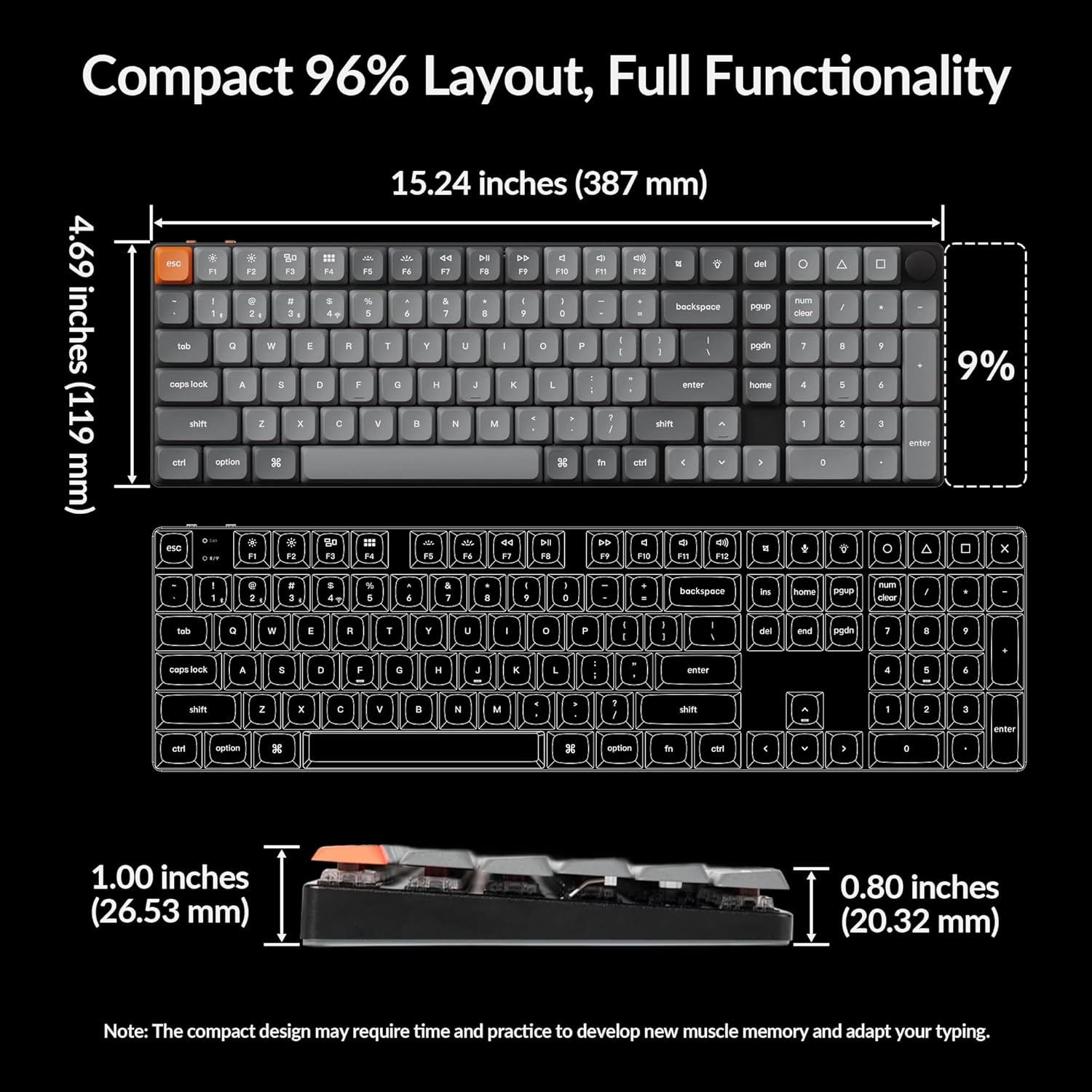
Image: A diagram illustrating the compact 96% layout and physical dimensions of the Keychron K17 Max keyboard.

Image: A detailed view of the low-profile double-shot PBT keycaps, highlighting their LSA profile.
Backlighting
The K17 Max features white LED backlighting with 14 different lighting effects to suit your preference. While the keycaps are double-shot PBT for durability, they are not shine-through, meaning the backlight illuminates around the keys rather than through the legends. This design choice prioritizes keycap longevity and feel.

Image: The Keychron K17 Max keyboard with its white LED backlighting active, showing the illumination around the keys.
Keychron Launcher Web App
Customize your keyboard's keymaps, macros, and lighting effects using the Keychron Launcher, a cross-platform, web-based tool. No installation is needed; simply connect your keyboard via USB-C and access the launcher through your web browser. This ensures you always have access to the latest features and updates for an optimized experience.

Image: A visual representation of the Keychron Launcher web app interface, demonstrating its key remapping and customization capabilities.
Maintenance
Cleaning
To clean your Keychron K17 Max, gently wipe the keycaps and keyboard frame with a soft, lint-free cloth. For deeper cleaning, you may use a slightly damp cloth with mild soap, ensuring no liquid enters the keyboard. Use the included keycap puller to remove keycaps for cleaning underneath, if necessary. Avoid using harsh chemicals or abrasive materials.
Storage
When not in use, store your keyboard in a dry, dust-free environment. Avoid exposing it to extreme temperatures or direct sunlight, which can affect the materials and internal components.
Troubleshooting
Common Issues
- Connectivity Problems: Ensure the mode switch (2.4G/BT/Cable) is set correctly. For Bluetooth, ensure the keyboard is in pairing mode and your device's Bluetooth is enabled. For 2.4 GHz, try replugging the receiver. For wired, ensure the cable is securely connected.
- Backlight Not Visible Through Keys: The K17 Max uses double-shot PBT keycaps that are not shine-through. The backlight illuminates around the keys, not through the legends. This is by design.
- No Caps Lock/Num Lock Indicator: The K17 Max does not feature a dedicated LED indicator for Caps Lock or Num Lock status.
- Keyboard Not Responding: Try connecting the keyboard via USB-C cable to ensure it's receiving power. If using wireless, check battery level.
For more detailed troubleshooting steps, please refer to the official Troubleshooting Guide (PDF) available online.
Specifications
| Feature | Detail |
|---|---|
| Brand | Keychron |
| Model | K17 Max |
| Layout | 96% |
| Connectivity Technology | 2.4 GHz Wireless, Bluetooth 5.1, USB Wired (Type-C) |
| Switches | Low-Profile Gateron Mechanical (Brown Switch) |
| Keycaps | Low-Profile Double-shot PBT |
| Backlighting | White LED (14 effects, non-shine-through keycaps) |
| Polling Rate | 1000 Hz (2.4 GHz mode) |
| Compatible Devices | PC (Mac, Windows, Linux) |
| Number of Keys | 100 |
| Item Weight | 2.35 pounds |
| Package Dimensions | 16.38 x 6.77 x 1.65 inches |
| Batteries | 1 AAA batteries required (for wireless operation) |
Warranty and Support
For information regarding product warranty, please refer to the documentation included with your purchase or visit the official Keychron website. Additional support and resources, including the full user guide, can be found via the links below:
Related documentsK17 Max


Ask a question about this manual
Ask about setup, troubleshooting, compatibility, parts, safety, or missing instructions. Manuals+ will review the question and use this page’s manual context to help answer it.