
1. Introduction
This manual provides comprehensive instructions for the installation, operation, and maintenance of your ARPHA SP300L Keyless Entry Door Lock. This advanced smart lock integrates multiple access methods, including palm vein recognition, app control, voice commands, passcodes, NFC fobs, and traditional mechanical keys. It features built-in Wi-Fi for seamless remote management and smart home integration.

Image 1.1: Overview of ARPHA SP300L Smart Door Lock features including Built-in Wi-Fi, Palm Vein Unlock, App Remote Operation, Full Scene Coverage, Fob Unlock, Long Battery Life, Google and Alexa Support, and Anti-Hijacking Function.
2. Product Overview
2.1 Components
- Deadbolt mechanism
- Exterior keypad assembly with palm vein scanner
- Interior assembly with thumb turn and battery compartment
- Handleset (2 Knobs, Latch)
- 2 Backup Keys
- 2 NFC Fobs
- Installation hardware (screws, strike plate)
- Rechargeable Lithium Polymer battery
2.2 Product Diagram

Image 2.1: Visual representation of the ARPHA SP300L Keyless Entry Door Lock, including the exterior keypad, interior unit, handleset, and a smartphone displaying the control app.
3. Installation and Setup
The ARPHA SP300L is designed for straightforward installation, typically completed within 15 minutes. No specialized technical knowledge is required.
3.1 Pre-Installation Check
Before beginning installation, ensure your door meets the following specifications:
- Door Thickness: 1.38" - 2.17" (35mm - 55mm)
- Bore Hole Diameter: 1.5" or 2.13" (38mm or 54mm)
- Bore Hole Backset: 2.36" or 2.76" (60mm or 70mm)
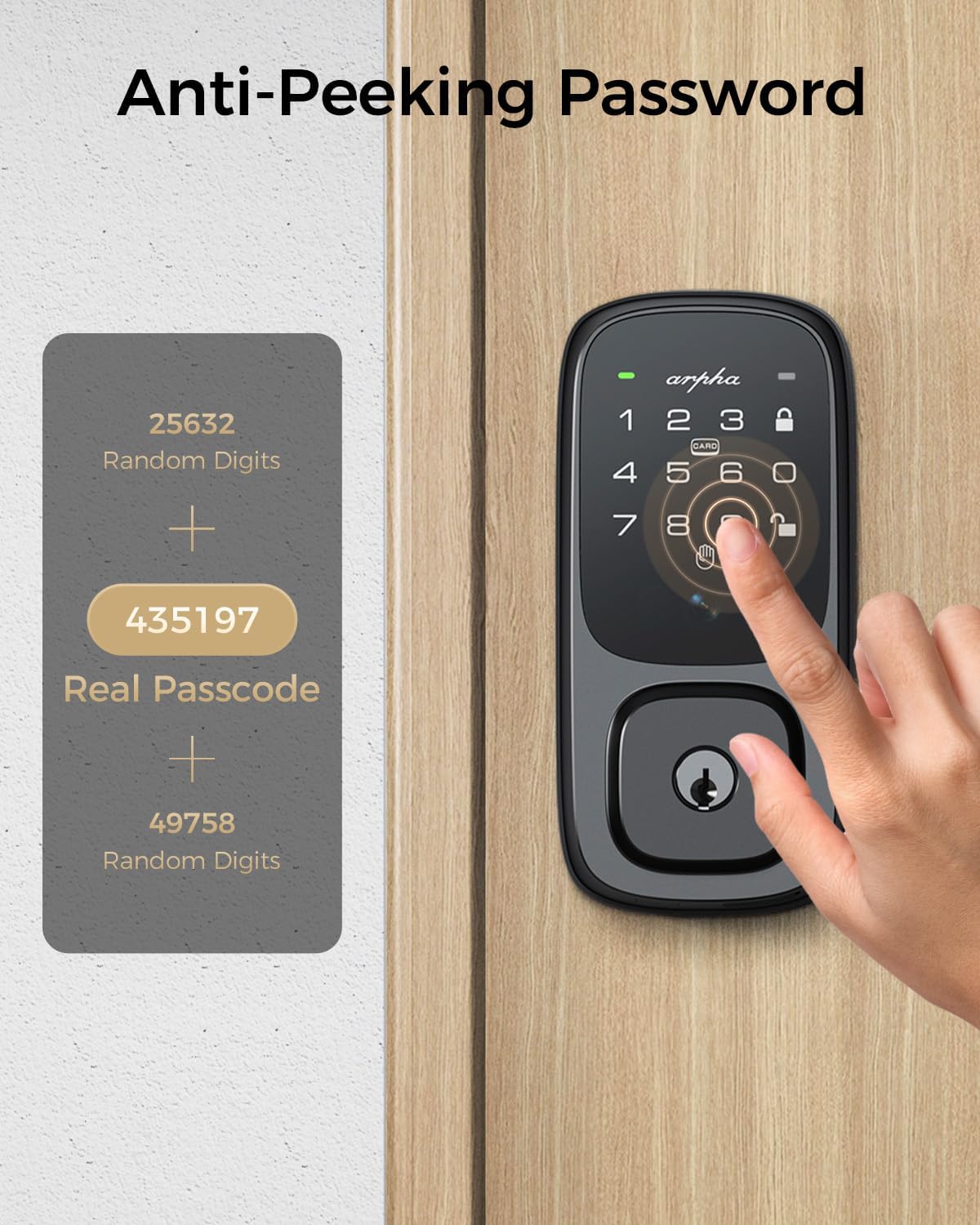
Image 3.1: Diagram illustrating required door measurements (thickness, bore hole diameter, backset) for ARPHA SP300L installation.
3.2 Installation Steps
- Prepare the Door: Use the provided installation template to mark and drill holes if necessary. Ensure the latch tongue length is correctly set for your door.
- Install the Latch and Strike Plate: Secure the latch into the door edge and the strike plate onto the door frame.
- Install the Exterior Assembly: Mount the exterior keypad assembly, feeding the cable through the door.
- Install the Interior Assembly: Connect the cable from the exterior assembly to the interior assembly. Secure the interior assembly to the door using the provided screws.
- Install the Handleset: Attach the handleset according to the instructions.
- Insert Battery: Place the fully charged Lithium Polymer battery into the interior unit's battery compartment.
- App Configuration: Download the companion app, scan the QR code on the lock, and follow the in-app instructions for initial setup, Wi-Fi connection, and user registration (palm vein, passcodes, fobs).

Image 3.2: A person performing the installation of the ARPHA SP300L smart door lock, demonstrating the ease of the process.
4. Operating Instructions
The ARPHA SP300L offers multiple convenient and secure ways to unlock your door.
4.1 Palm Vein Recognition
This method uses infrared imaging to scan your unique palm vein patterns for authentication. It is highly accurate (99% recognition rate) and fast (under 1 second unlocking speed).
- To Register: Follow the instructions in the companion app to enroll your palm vein pattern.
- To Unlock: Position your palm approximately 5-15cm in front of the scanner on the exterior keypad. The lock will verify your pattern and unlock. This method is contactless and works reliably even with dry, wet, or dirty hands, and is suitable for all ages.

Image 4.1: A hand being scanned by the ARPHA SP300L for palm vein recognition, highlighting the contactless and rapid unlocking process.

Image 4.2: Visual demonstrating the versatility of palm vein recognition, working with dirty/sweaty hands, dry/aged skin, no age restrictions, and offering contactless unlocking.
4.2 App Control
Manage and control your lock remotely using the dedicated smartphone app via built-in Wi-Fi.
- Remote Unlocking: Unlock your door from anywhere using the app.
- Temporary Passcodes: Generate and send one-time or time-limited passcodes to visitors or service providers.
- Real-time Notifications: Receive alerts for all lock movements and access events.
- Audit Trail: View a complete history of who accessed your door and when.

Image 4.3: A smartphone displaying the ARPHA app interface for remote unlocking, with the smart lock visible on a door in the background, connected via 2.4G Wi-Fi.
4.3 Voice Control
Integrate your ARPHA SP300L with Amazon Alexa or Google Assistant for convenient voice-activated control.
- To Enable: Link your ARPHA account within the Alexa or Google Home app.
- Voice Commands: Use commands such as "Alexa, unlock the front door" or "Hey Google, lock the front door."
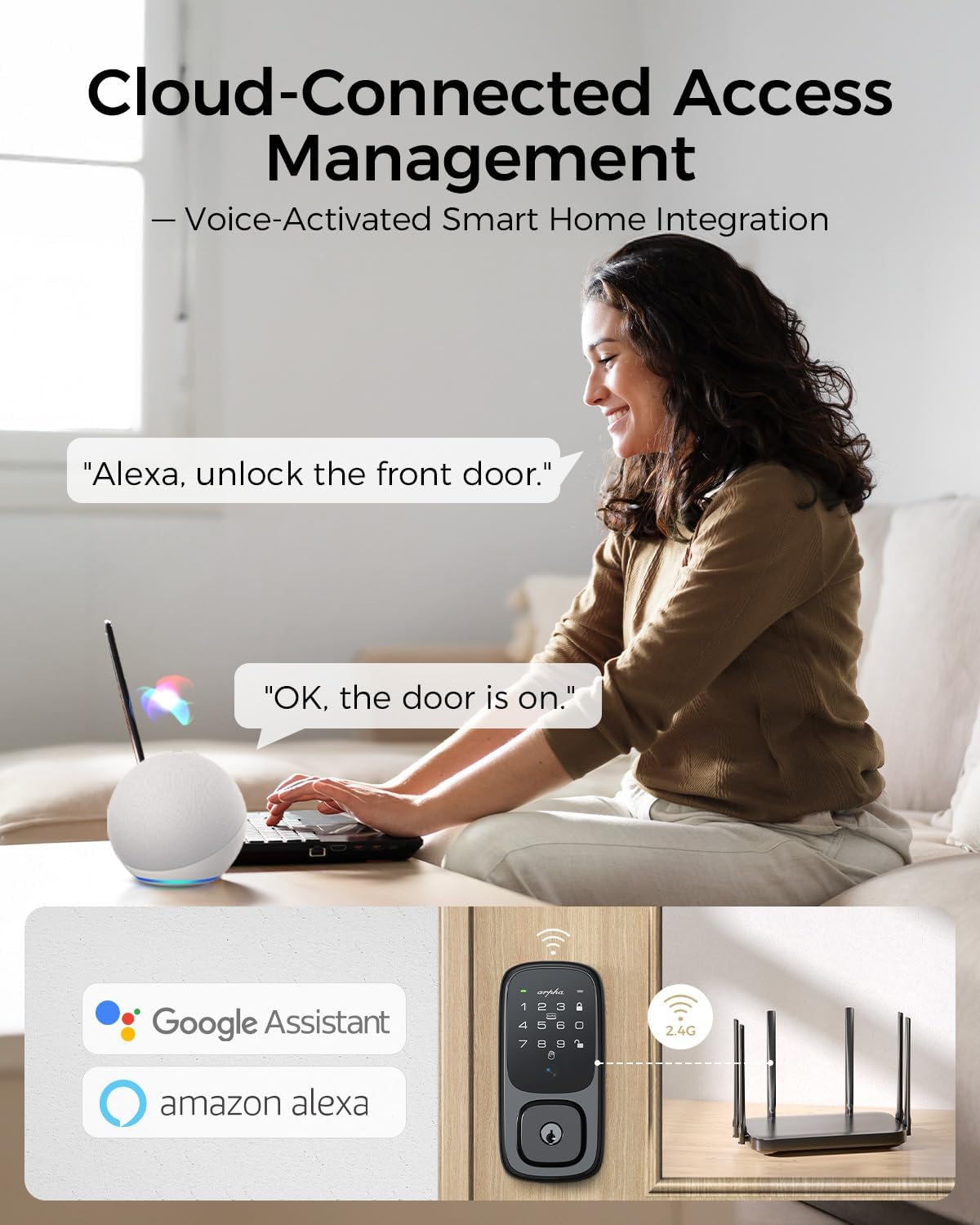
Image 4.4: A user interacting with Amazon Alexa to unlock the ARPHA SP300L, demonstrating seamless voice control integration.
4.4 Passcode Entry
Use the keypad to enter a numerical passcode for access.
- Anti-Peeping Feature: Enter random digits before or after your actual passcode to prevent others from guessing your code. For example, if your code is 435197, you can enter 25632 + 435197 + 49758.
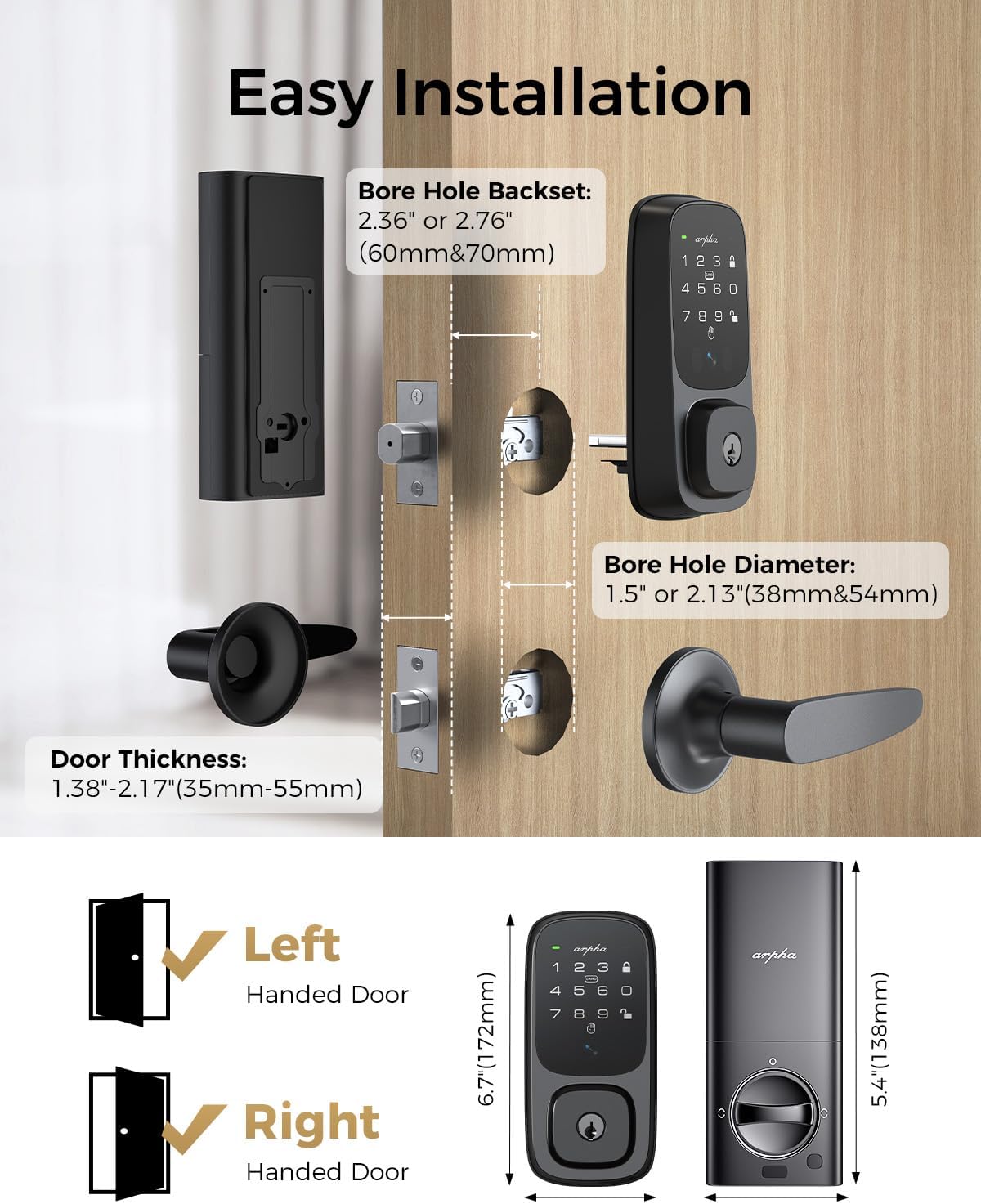
Image 4.5: A hand entering a passcode on the ARPHA SP300L keypad, illustrating the anti-peeping function with random digits surrounding the real passcode.
4.5 NFC Fob Unlock
For quick and convenient access, use the provided NFC fobs.
- To Unlock: Simply touch or wave the NFC fob in front of the designated area on the lock's exterior keypad.

Image 4.6: A hand using an NFC fob to unlock the ARPHA SP300L smart lock, demonstrating the tap-to-unlock functionality.
4.6 Mechanical Key
A traditional mechanical key is provided for backup access in case of battery depletion or electronic malfunction.
- To Unlock: Insert the backup key into the keyhole located on the exterior keypad and turn to unlock.

Image 4.7: A hand inserting a mechanical key into the ARPHA SP300L smart lock, illustrating the traditional backup unlocking method.
4.7 Auto-Lock and One-Touch Lock
- Auto-Lock: The deadbolt can be configured to automatically lock after a set period (e.g., 10 seconds to 3 minutes) once the door is closed.
- One-Touch Lock: Press the lock button on the keypad to instantly lock the door from the outside.

Image 4.8: A woman standing by a door with the ARPHA SP300L installed, illustrating the auto-lock feature with a timer icon.
5. Maintenance
5.1 Battery Management
The ARPHA SP300L is powered by a long-lasting 7800mAh rechargeable Lithium Polymer battery, providing approximately 8 months of use on a single charge.
- Charging: The battery is removable and can be charged via USB-C.
- Low-Power Alert: The lock will provide a low-power alert through the app and on the device when the battery needs recharging.
- Emergency Power: In case of complete battery depletion, an emergency power port (USB-C) is available on the exterior unit to temporarily power the lock for access.

Image 5.1: Illustration of the ARPHA SP300L's 7800mAh rechargeable battery, highlighting its 8-month lifespan, eco-friendliness, low-power alert, and emergency power port.
5.2 Cleaning
Wipe the exterior keypad and handleset with a soft, damp cloth. Avoid abrasive cleaners or solvents that could damage the finish or electronic components.
6. Troubleshooting
- Lock not responding: Check battery level. Recharge or replace the battery. Use the emergency power port if needed.
- Palm vein recognition failure: Ensure your palm is positioned correctly (5-15cm from scanner). Re-enroll your palm vein pattern in the app if issues persist.
- App connectivity issues: Ensure your home Wi-Fi network is active and the lock is within range. Restart the lock and your router if necessary. Verify app permissions on your smartphone.
- Difficulty with manual locking: The lock is primarily designed for electronic operation. Ensure the deadbolt mechanism is clear of obstructions.
- Programming complexity: All settings are managed through the companion app. Refer to the app's guided setup and help sections for detailed programming instructions.
7. Specifications
| Feature | Detail |
|---|---|
| Brand | ARPHA |
| Model Name | SP300L |
| Lock Type | Combination Lock, Deadbolt, Keypad |
| Special Features | Anti-Peeping Password, Fob Unlock, Rechargeable Battery, Wi-Fi, Palmar Vein Recognition |
| Material | Zinc |
| Color | Black |
| Finish Type | Polished |
| Item Dimensions (L x W x H) | 3 x 4 x 5 inches |
| Item Weight | 3 Pounds |
| Controller Type | Amazon Alexa, App Control, Google Assistant, Mechanical handle, Touch |
| Control Method | App, Touch, Voice |
| Connectivity Protocol | BLE, Wi-Fi |
| Battery Type | 1 Lithium Polymer battery (included) |
| Operating Temperature | -4°F to 140°F (-20°C to 60°C) (Front lock only) |
| Water Resistance | IP54 rated (Front lock only) |
| Certifications | ANSI Grade 3 |

Image 7.1: Visual representation of the ARPHA SP300L's durability, highlighting its IP65 rating (note: product specs state IP54) and performance in extreme temperatures, along with various test results (keypad life, salt spray, impact, humidity).
8. Warranty and Support
ARPHA is committed to providing excellent customer service and product assurance.
- Money-Back Guarantee: 30-day money-back policy.
- Product Assurance: 18-month assurance period.
- Technical Support: Lifetime technical support is available.
- Customer Service: A dedicated support team is available 24/7 via email for assistance.
For any inquiries or support needs, please contact ARPHA customer service.


