1. Introduction
This manual provides essential information for the safe and efficient use of your Samsung Galaxy L300 40mm Smart Watch 7. Please read this manual thoroughly before using the device to ensure proper operation and to maximize its features. Keep this manual for future reference.
2. What's in the Box
- Samsung Galaxy L300 40mm Smart Watch 7
- Charging Cable
- Quick Start Guide
- Warranty Card
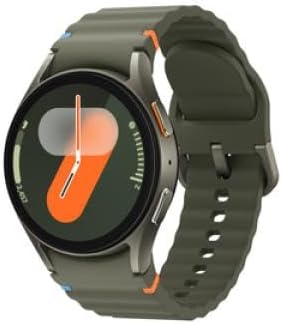
This image shows the Samsung Galaxy L300 40mm Smart Watch 7. The watch features a circular display with a digital watch face, housed in a green casing with a matching green silicone band. Two physical buttons are visible on the right side of the watch.
3. Setup
3.1 Charging the Device
Before initial use, fully charge your Galaxy Watch 7. Connect the charging cable to the watch's charging port and to a compatible power adapter. The watch display will indicate charging status. A full charge typically takes approximately 90 minutes.
3.2 Pairing with a Smartphone
- Ensure your smartphone has the Galaxy Wearable app installed. If not, download it from the Google Play Store or Samsung Galaxy Store.
- Turn on your Galaxy Watch 7 by pressing and holding the Power key.
- Open the Galaxy Wearable app on your smartphone.
- Follow the on-screen instructions in the app to connect your watch. Your watch's unique code will appear on both devices for verification.
- Once paired, complete the initial setup, including granting necessary permissions and configuring basic settings.
3.3 Initial Configuration
During the initial setup, you will be prompted to:
- Select your preferred language.
- Agree to terms and conditions.
- Sign in to your Samsung account for full feature access and data synchronization.
- Set up Wi-Fi and mobile network (if applicable).
4. Operating the Device
4.1 Basic Navigation
- Touchscreen: Swipe left/right to navigate widgets, swipe down for Quick Panel, swipe up for Apps screen. Tap to select.
- Home Key (Top Button): Press to go to the Watch face. Double-press for a customizable shortcut. Press and hold to activate Bixby or power options.
- Back Key (Bottom Button): Press to go back to the previous screen.
4.2 Key Features
- Health Monitoring: Track heart rate, blood oxygen, sleep patterns, and daily activity. Access these features via the Samsung Health app on your watch.
- Notifications: Receive and manage notifications from your paired smartphone directly on your watch.
- Calls and Messages: Make and receive calls, and send messages directly from your watch when connected to your phone or a cellular network (if applicable).
- Applications: Download and use various apps from the Google Play Store directly on your watch.
4.3 Customization
- Watch Faces: Change your watch face through the Galaxy Wearable app or directly on the watch by pressing and holding the watch face.
- Widgets: Add or remove widgets to quickly access information like weather, calendar, or health summaries.
- Quick Panel: Customize the quick settings available by swiping down from the top of the screen.
5. Maintenance
5.1 Cleaning Your Watch
Regularly clean your watch and band to prevent skin irritation and maintain performance.
- Wipe the watch body and screen with a soft, lint-free cloth. For stubborn smudges, slightly dampen the cloth with water.
- Clean the band with a mild soap and water solution, then rinse thoroughly and dry completely before reattaching to the watch.
- Avoid using harsh chemicals, abrasive materials, or compressed air.
5.2 Software Updates
Keep your watch's software updated to ensure optimal performance, security, and access to new features. Updates can be managed through the Galaxy Wearable app on your smartphone.
5.3 Battery Care
- Avoid extreme temperatures, which can degrade battery life.
- For long-term storage, charge the battery to about 50%.
- Use only Samsung-approved chargers and cables.
6. Troubleshooting
| Issue | Possible Solution |
|---|---|
| Watch does not turn on | Ensure the watch is fully charged. Press and hold the Power key for at least 7 seconds. |
| Cannot pair with smartphone | Check Bluetooth on both devices. Restart both the watch and smartphone. Ensure the Galaxy Wearable app is updated. |
| Inaccurate health readings | Ensure the watch is worn snugly on your wrist, not too tight or too loose. Clean the sensor on the back of the watch. |
| Short battery life | Reduce screen brightness, disable Always On Display, limit background app refresh, and turn off unnecessary features like Wi-Fi or GPS when not in use. |
7. Specifications
- Model Number: SM-L300NZGAEUE
- Product Dimensions: 11.02 x 1.18 x 2.36 inches
- Item Weight: 7 ounces (0.2 Kilograms)
- Screen Size: 40 Millimeters
- Wireless Communication Standard: Bluetooth
- Batteries: 1 Lithium Ion battery required
- Band Material Type: Aluminum
- Water Resistance Level: Water Resistant
- Compatible Devices: SM-L300N
8. Warranty and Support
Your Samsung Galaxy L300 40mm Smart Watch 7 is covered by a limited warranty. For detailed warranty information, please refer to the warranty card included in your product packaging or visit the official Samsung website. For technical support, software updates, or service inquiries, please visit Samsung Support or contact Samsung customer service.


