
1. Introduction
The Spider Farmer G1500 LED Grow Light is designed for efficient and effective indoor plant cultivation. This manual provides detailed instructions for setting up, operating, and maintaining your G1500 grow light to ensure optimal plant growth and yield. With its advanced features like smart app control, full spectrum lighting, and robust heat dissipation, the G1500 is an ideal solution for growers seeking high performance and reliability.

Figure 1: Spider Farmer G1500 LED Grow Light, showcasing its bar-style design and integrated control unit.
2. Key Features
- Maximum Efficiency and Uniform Light: The G1500 features a unique elongated light bar design for uniform canopy coverage, especially at edges. It draws 150 watts with Bridgelux diodes, achieving 2.85 umol/J PPE, covering 2x2 feet or 2.3x2.3 feet for full-cycle growth.

Figure 2: Close-up view of the G1500's ultra-dense Bridgelux diodes, highlighting its high PPE and PPF for supreme cost-effectiveness.
- Dimmable with Digital Display: Easily adjust brightness for all growth stages. The built-in digital display shows the current brightness level. Lights can be daisy-chained to control up to 50 units from one master light, ideal for commercial setups.

Figure 3: The digital display and dimming knob on the G1500, allowing for precise brightness adjustments from 0% to 100%.
- Full Spectrum for Full-Cycle Growth: Provides a complete full spectrum (2800-3000K, 4800-5000K, and 660-665nm) to support plants from seed to harvest, ensuring healthy growth, boosted yields, and enhanced crop quality.
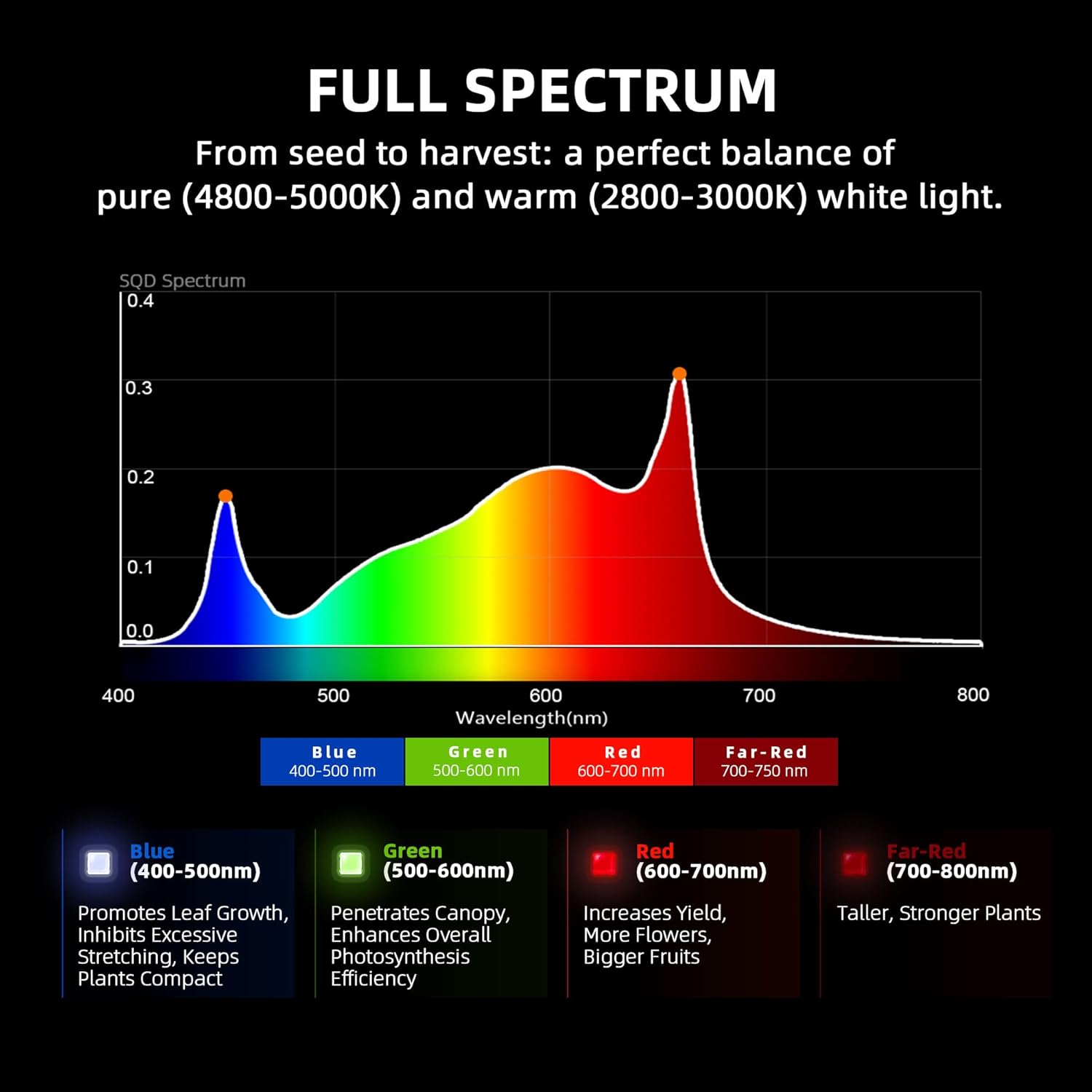
Figure 4: Spectral distribution graph of the G1500, illustrating its balanced output across blue, green, red, and far-red wavelengths for comprehensive plant development.
- Double Heat Dissipation: Heavy aluminum heatsinks and a bar-style design enhance heat dissipation, making the unit run up to 30% cooler.
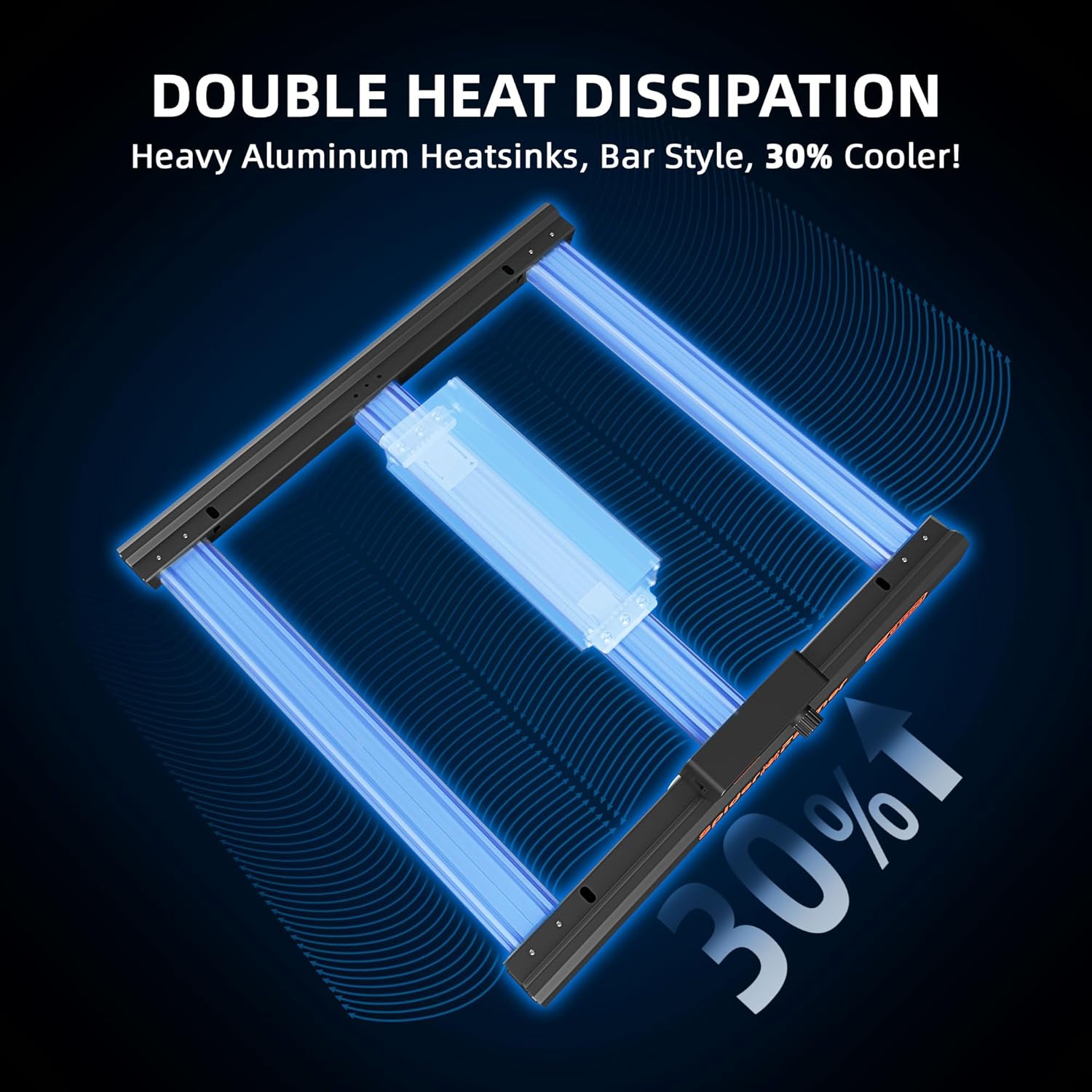
Figure 5: Diagram illustrating the double heat dissipation design of the G1500, emphasizing the heavy aluminum heatsinks for efficient cooling.
3. Setup Instructions
Before setting up your Spider Farmer G1500, ensure you have all components: the LED grow light fixture, power cord, and hanging kits. It is recommended to install the light in a well-ventilated area, such as a grow tent, to maintain optimal environmental conditions for your plants.
- Unpack Components: Carefully remove all items from the packaging. Inspect for any damage during transit.
- Assemble Hanging Kit: Attach the hanging ropes or chains to the designated points on the grow light fixture. Ensure they are securely fastened.
- Mount the Light: Hang the grow light from a sturdy support structure within your grow space. Adjust the height according to the growth stage of your plants (refer to the "Operating Instructions" for recommended distances).
- Connect Power: Plug the power cord into the grow light's control unit, then plug the other end into a compatible power outlet (110 Volts).
- Initial Power On: Turn on the light using the integrated control unit. The digital display will illuminate, showing the current brightness level.

Figure 6: The G1500 LED Grow Light properly installed within a grow tent, demonstrating typical setup for indoor plant cultivation.
4. Operating Instructions
The Spider Farmer G1500 offers versatile control options, including manual dimming and smart app control for advanced scheduling and monitoring.
4.1 Manual Control
The integrated digital display and knob allow for direct brightness adjustment. Rotate the knob to increase or decrease light intensity. The display will show the percentage of brightness (0-100%).
4.2 Smart App Control
Take full control of your G1500 grow light anytime, anywhere using the Spider Farmer App. The app is available on both the Apple App Store and Google Play Store.

Figure 7: Screenshot of the Spider Farmer App interface, showing remote brightness adjustment and control options for the grow light.
App Features:
- Custom Light Schedules: Set precise on/off times for each day to match your plants' needs.
- Sunrise and Sunset Simulation: Gradually changes brightness at sunrise and sunset, mimicking natural light patterns for healthier plant development.
- Remote Brightness Adjustments: Adjust light intensity from your smartphone or tablet.
- High Temperature Protection: Enable this feature to automatically dim or turn off the light if the temperature exceeds a set limit, protecting your plants and equipment.
- PPFD Mode (with GGS Sensor Pro): If you have a GGS Sensor Pro, you can set a target PPFD level, and the light will automatically adjust brightness to maintain it, ensuring ideal light for your plants.
4.3 Official Product Video: Smart App Control
Video 1: Demonstrates how to use the Spider Farmer App to control G and SE series LED grow lights, including manual mode, time slot mode, and PPFD mode with a GGS Sensor Pro. This video highlights features like brightness adjustment, setting precise on/off times, high-temperature protection, and sunrise/sunset simulation.
4.4 Growing Tips (Recommended Settings)
The following table provides general guidelines for light intensity and distance based on plant growth stages. These are starting points and may need adjustment based on specific plant needs and environmental conditions.

Figure 8: Recommended time, distance, and dimming settings for the G1500 LED Grow Light across different plant growth stages: Seedling, Vegetative, and Flowering.
5. Maintenance
Regular maintenance ensures the longevity and optimal performance of your Spider Farmer G1500 LED Grow Light.
- Cleaning: Periodically wipe the light fixture and LED surface with a soft, dry cloth to remove dust and debris. Ensure the light is unplugged before cleaning. Do not use liquid cleaners directly on the LEDs.
- Ventilation: Ensure adequate airflow around the light to facilitate heat dissipation. Keep the heatsinks clear of obstructions.
- Cable Inspection: Regularly check the power cord and connections for any signs of wear, damage, or loose connections.
- Environmental Control: Maintain stable temperature and humidity levels in your grow space to prevent excessive strain on the light and promote plant health.
6. Troubleshooting
If you encounter issues with your Spider Farmer G1500, refer to the following common problems and solutions:
| Problem | Possible Cause | Solution |
|---|---|---|
| Light does not turn on | No power, loose connection, faulty power supply. | Check power outlet, ensure all cables are securely connected. Verify power supply is functioning. |
| Light dims unexpectedly | High temperature protection activated, app setting. | Check grow space temperature. Adjust high temperature protection settings in the app. Verify app brightness settings. |
| App control not working | Bluetooth/Wi-Fi connectivity issues, app malfunction. | Ensure Bluetooth/Wi-Fi is enabled on your device. Restart the app and the grow light. Re-pair the device if necessary. |
| Digital knob unresponsive (0% reading) | Temporary software glitch. | Press the knob again to reactivate. If issue persists, power cycle the light. |
If problems persist, please contact Spider Farmer customer support.
7. Product Specifications
| Attribute | Detail |
|---|---|
| Model Number | Spider Farmer G1500 |
| Power Draw | 150 Watts |
| PPE | 2.85 umol/J |
| Coverage Area | 2x2 feet or 2.3x2.3 feet |
| Light Source Type | LED (Bridgelux Diodes) |
| Spectrum | Full Spectrum (2800-3000K, 4800-5000K, 660-665nm) |
| Voltage | 110 Volts |
| Material | Aluminum |
| Item Weight | 5.34 Pounds |
| Product Dimensions | 16.09"L x 16.05"W x 2.65"H |
| Bulb Features | Dimmable, Smart Control |
8. Warranty and Support
The Spider Farmer G series LED grow light comes with an impressive 5-year coverage, ensuring long-lasting performance and reliability. This warranty covers defects in materials and workmanship under normal use.
For technical assistance, troubleshooting, or warranty claims, please contact our U.S.-based service center. Our dedicated support team is available to provide quick and efficient local assistance.
For more information, visit the official Spider Farmer website or refer to the contact details provided with your product packaging.