1. Introduction
This manual provides essential instructions for the proper use, setup, and maintenance of your Herda K1 2-Pin Noise Reduction Walkie Talkie Earpiece. Please read this manual thoroughly before using the product to ensure optimal performance and safety.
2. Safety Information
- Do not expose the earpiece to extreme temperatures, moisture, or direct sunlight.
- Avoid dropping or subjecting the earpiece to severe impact.
- Keep out of reach of children.
- Use only the provided Type-C cable for charging the noise reduction microphone.
- Ensure the K1 2-pin connector is correctly aligned before inserting it into your radio to prevent damage.
3. Package Contents
Verify that all items are present in your package:
- Herda K1 2-Pin Noise Reduction Walkie Talkie Earpiece × 1
4. Product Overview
The Herda K1 2-Pin Noise Reduction Walkie Talkie Earpiece is designed for clear communication in various environments. It features a G-shaped earhook for comfortable wear and an active noise reduction microphone.

Figure 4.1: Overview of the Herda K1 2-Pin Noise Reduction Walkie Talkie Earpiece components.
4.1 Key Features
- Active Noise Reduction Microphone: Equipped with an integrated chip to filter out background noise, ensuring clear voice transmission.
- Durable Construction: TPU cable with high-strength fiber for flexibility and wear resistance.
- Comfortable Design: G-shaped earhook earpiece designed for long-term wear, fitting either ear.
- Rechargeable: Type-C charging port for the noise reduction microphone, offering approximately 60 hours of battery life.
- K1 2-Pin Connector: Compatible with a wide range of two-way radios.

Figure 4.2: Active Noise Reduction Microphone functionality. Note: The earpiece itself does not have Active Noise Cancelling (ANC) functionality.

Figure 4.3: Features of the microphone unit, including PTT button and charging port.
5. Compatibility
The Herda K1 2-Pin Earpiece is designed with a K1 2-pin connector, making it compatible with many two-way radio models from various brands. It is crucial to verify your radio's connector type before use.

Figure 5.1: K1 2-Pin Connector dimensions for compatibility verification.
5.1 Compatible Brands and Models (Partial List)
This earpiece is compatible with many radios from brands such as:
- Baofeng/Pofung/BTech/BaofengTech: BF Series (e.g., BF-A5, BF-F8HP, BF-888S), UV Series (e.g., UV-5R, UV-82), A Series, GT Series, DM Series.
- Kenwood: KPG Series, Nexedge Series (e.g., NX-220), TK Series (e.g., TK-208, TK-2100, TK-3107), TH Series (e.g., TH-D7, TH-F6, TH-K2).
- Retevis: H Series (e.g., H-777), R Series, RA Series, RB Series, RT Series (e.g., RT1, RT3S, RT5, RT22).
- Hytera/HYT: TC Series (e.g., TC268, TC368).
- Linton: LT Series (e.g., LT-2188, LT-3288).
- Wouxun: KG Series (e.g., KG-639, KG-UV2D).
- Puxing: PX Series (e.g., PX328, PX777).
- Quansheng: TG Series (e.g., TG-2AT), UV Series.
- TYT: TH Series (e.g., TH-F8, TH-UVF8D), MD Series.
- Arcshell: AR Series.
- TIDRADIO: TD Series.
For a complete list of compatible models, please refer to the product's official documentation or contact customer support.
6. Setup
6.1 Charging the Noise Reduction Microphone
The noise reduction microphone requires charging to function. Use the provided Type-C cable to charge the unit. A full charge provides approximately 60 hours of operation under typical 5/5/90 usage (5% transmit, 5% receive, 90% standby).
- Locate the Type-C charging port on the side of the microphone unit (refer to Figure 4.3).
- Connect the Type-C cable to the port and the other end to a standard USB power source.
- The indicator light will illuminate during charging. It will change or turn off once fully charged.
Note: The microphone unit does not support USB-PD (Power Delivery) and requires a standard USB-A to USB-C charging method.
6.2 Connecting to Your Radio
- Ensure your radio is turned off before connecting the earpiece.
- Align the K1 2-pin connector with the corresponding ports on your two-way radio. The larger pin (3.5mm) goes into the larger jack, and the smaller pin (2.5mm) into the smaller jack.
- Gently push the connector firmly into the radio's ports until it is securely seated. Do not force the connector.
- Turn on your radio.

Figure 6.1: Earpiece connected to a two-way radio.
7. Operating Instructions
7.1 Wearing the Earpiece
The G-shaped earhook is designed for comfortable wear on either the left or right ear.
- Gently place the earhook over your ear.
- Adjust the earpiece so the speaker rests comfortably in your ear canal.
- Position the microphone unit for optimal voice pickup. The 360° swivel clip allows you to attach it to your collar or clothing.
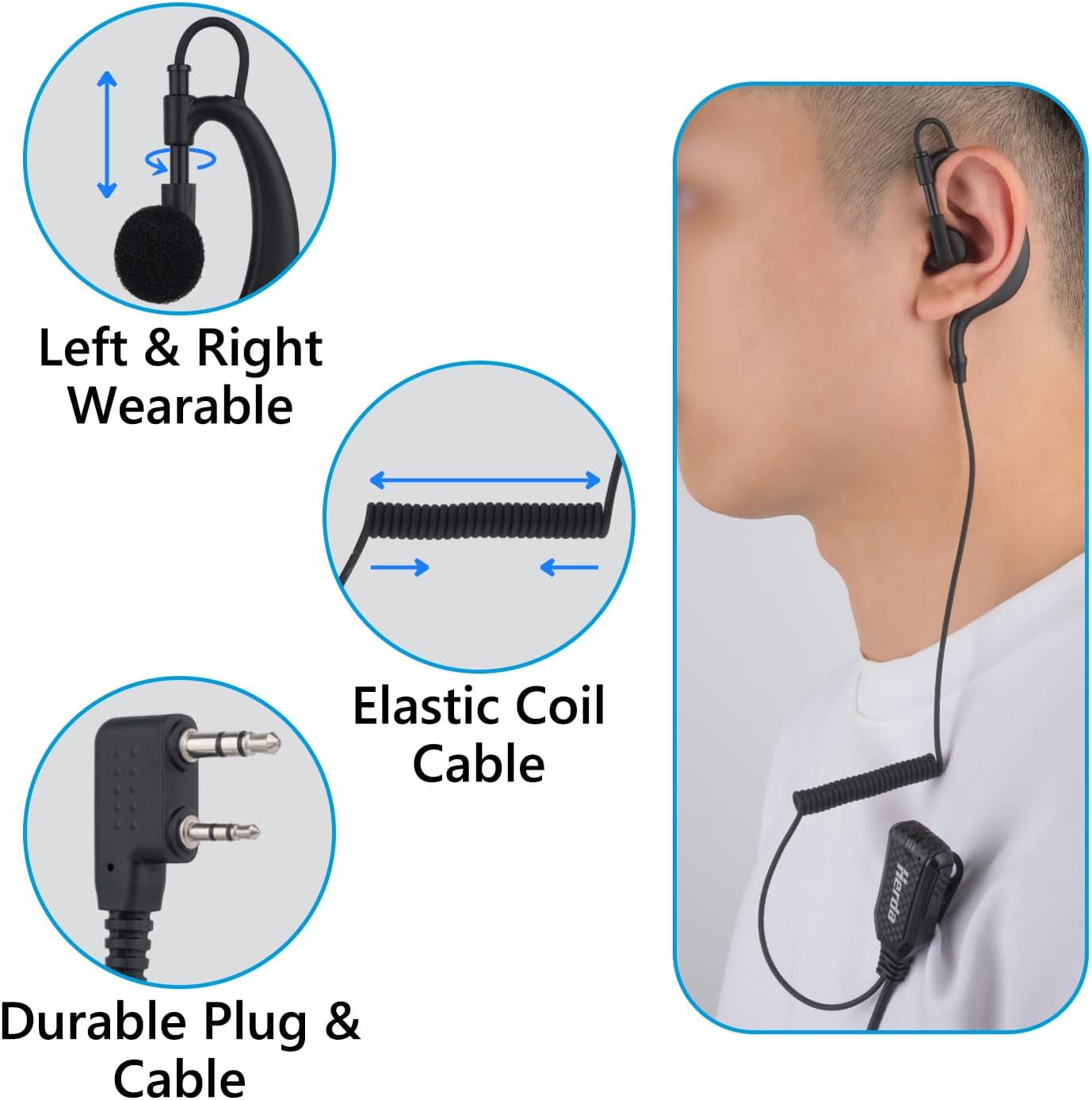
Figure 7.1: Earpiece wearability and cable features.
7.2 Transmitting and Receiving
- To receive audio, ensure the earpiece is properly connected and your radio is on. Audio will be directed through the earpiece.
- To transmit, press and hold the Push-To-Talk (PTT) button on the microphone unit. Speak clearly into the microphone.
- Release the PTT button to return to receive mode.
7.3 Noise Reduction Function
The integrated noise reduction microphone actively filters out ambient background noise during transmission, ensuring your voice is transmitted clearly to the receiving party. This feature is particularly effective in noisy environments such as construction sites, factories, or crowded events.
8. Maintenance
8.1 Cleaning
- Wipe the earpiece and microphone unit with a soft, dry cloth.
- Do not use harsh chemicals, cleaning solvents, or strong detergents.
- Avoid getting moisture into the charging port or microphone grille.
8.2 Storage
- Store the earpiece in a cool, dry place away from direct sunlight.
- Avoid tangling the cable.
9. Troubleshooting
- No audio from earpiece:
- Ensure the K1 connector is fully inserted into the radio.
- Check radio volume settings.
- Verify radio is powered on and functioning correctly.
- Poor transmission quality / Noise not reduced:
- Ensure the noise reduction microphone is charged.
- Speak directly into the microphone.
- Confirm the earpiece is compatible with your radio model.
- Earpiece uncomfortable:
- Adjust the position of the G-shaped earhook.
- Ensure the earpiece is not pulled by tension from the coiled cable.
- Charging issue:
- Verify the Type-C cable is securely connected to both the microphone and the power source.
- Try a different USB power adapter or cable.
10. Specifications
| Feature | Specification |
|---|---|
| Model Name | HENG-K |
| Connectivity Technology | Wired |
| Input Device Interface | K1 2-pin connector |
| Special Feature | Noise Isolation, Rechargeable Battery |
| Battery Life | 60 Hours (approx.) |
| Charging Port | Type-C |
| Earpiece Shape | G Shape Earhook |
| Frequency Range | 200 Hz - 3400 Hz |
| Item Weight | 1.76 ounces |
| Manufacturer | Herda Electronic Technology Co., Ltd. |
11. Warranty and Support
For warranty information or technical support, please refer to the product packaging or contact Herda customer service directly. Keep your purchase receipt as proof of purchase.


