1. Introduction
Thank you for choosing the HITIME XVX Shine Through PBT Keycaps. This set is designed to enhance your mechanical keyboard with a unique aesthetic and improved typing experience. Featuring a 131-key Cherry profile with a Blue Kanagawa Theme, these keycaps are crafted using dye-sublimation and double-shot techniques for durability and vibrant, long-lasting legends. This manual provides essential information for installation, usage, maintenance, and troubleshooting.
2. Product Features
- Imaginative Design: Artwork painted on side-printed keycaps provides a unique aesthetic. Optimized for keyboards with south-facing LEDs to allow light to shine through the legends.
- Dye-Sublimated PBT: Made from high-grade, textured PBT material for enhanced durability and resistance to shine buildup over time.
- Double Shot Legends: Ensures legends will not wear out and allows keyboard backlighting to shine through clearly.
- Cherry Profile: Engineered for an ergonomic and comfortable typing experience, reducing fatigue during extended use.
- Wide Compatibility: This 131-key set is compatible with most 60%, 65%, 75%, 80%, 96%, and 100% mechanical keyboards (e.g., 61/64/68/84/75/87/96/980/104/108 key layouts).
Visual Overview

Figure 2.1: Overview of the XVX Shine Through PBT Keycaps installed on a mechanical keyboard, showcasing the Blue Kanagawa Theme.

Figure 2.2: Demonstration of the shine-through functionality with RGB lighting off (left) and RGB lighting on (right), highlighting the illuminated side-printed legends.

Figure 2.3: The keycaps integrated into a keyboard setup, illustrating the clean and minimalist design aesthetic.

Figure 2.4: A detailed view of the 5-sided dye-sublimated keycaps, showcasing the intricate theme design.
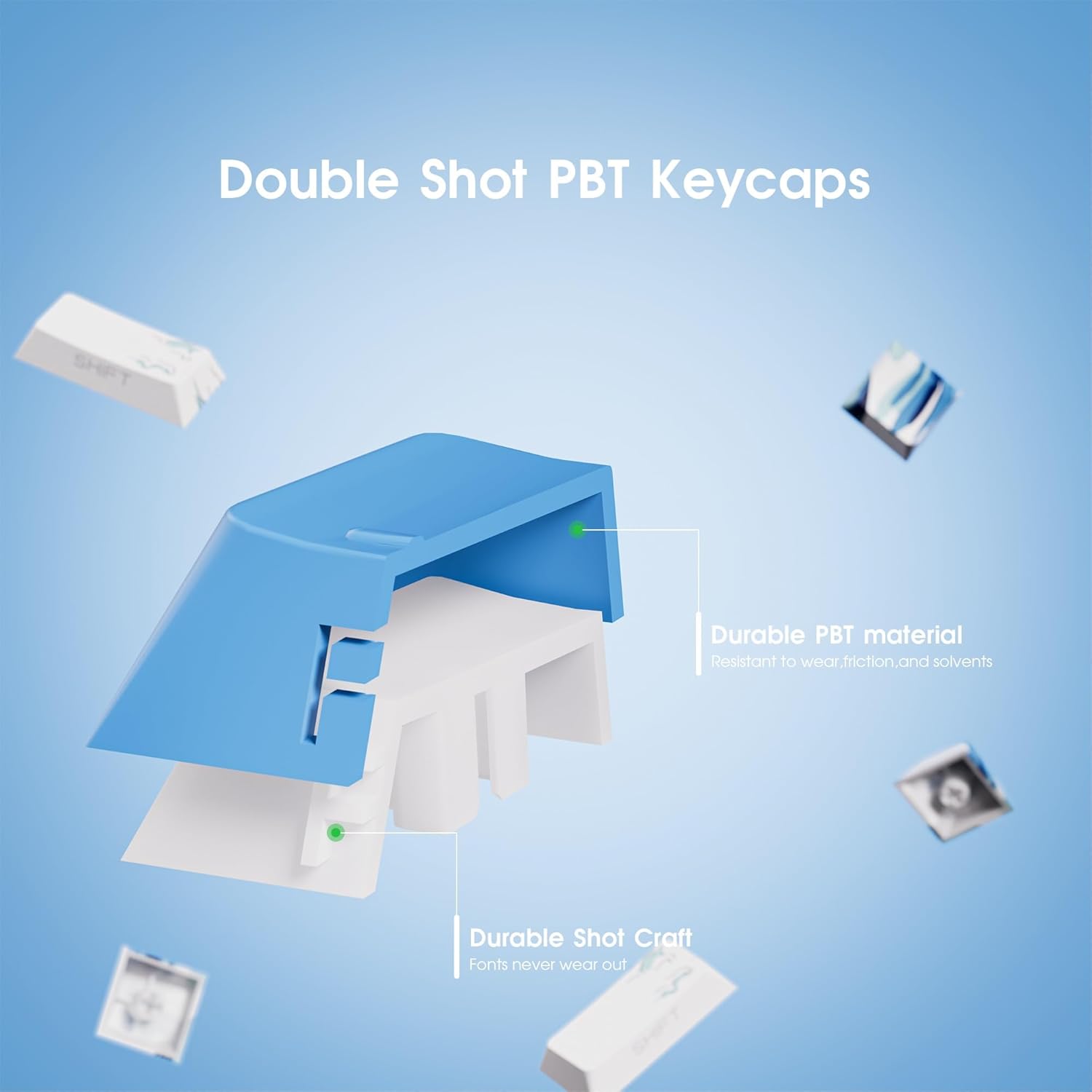
Figure 2.5: An exploded diagram demonstrating the durable double-shot construction of the PBT keycaps, ensuring legends do not wear out.

Figure 2.6: A comprehensive layout of the 131-keycap set, illustrating the side-printed legends and their shine-through capability.
3. Package Contents
Verify that all items are present in your package:
- 1x 131-key custom keycap set (Blue Kanagawa Theme)
- 1x Keycap Puller
4. Installation Guide
Follow these steps to install your new keycaps:
- Prepare Your Keyboard: Disconnect your mechanical keyboard from its power source.
- Remove Existing Keycaps: Use the included keycap puller to carefully remove your current keycaps. Grip the keycap firmly with the puller and pull straight up to avoid damaging the switch stem.
- Identify Keycap Placement: Refer to the layout diagram (Figure 2.6) and your keyboard's layout to correctly place each new keycap. Pay attention to the different sizes and profiles of keys (e.g., Spacebar, Shift, Enter, Ctrl, Alt).
- Install New Keycaps: Align each new keycap with the corresponding switch stem and press down gently until it clicks into place. Ensure the keycap is seated securely and evenly.
- Test Functionality: Once all keycaps are installed, reconnect your keyboard and test each key to ensure proper function and fit. Verify that backlighting shines through the side-printed legends as expected, especially if your keyboard has south-facing LEDs.
Note: This keycap set is designed for mechanical keyboards with standard Cherry MX style switches or compatible clones.
5. Usage and Operation
These keycaps are designed for standard typing and gaming use on compatible mechanical keyboards. The Cherry profile offers a comfortable and familiar typing angle, while the PBT material provides a durable, non-glossy surface. The side-printed, shine-through legends ensure visibility of characters, particularly in low-light conditions when backlighting is active.
6. Maintenance
To maintain the appearance and longevity of your keycaps:
- Regular Cleaning: Use a soft brush or compressed air to remove dust and debris from between the keycaps.
- Deep Cleaning: For more thorough cleaning, carefully remove the keycaps using the keycap puller. Wash them gently with mild soap and lukewarm water. Rinse thoroughly and allow them to air dry completely before re-installing. Avoid harsh chemicals or abrasive materials, which can damage the PBT material or legends.
- Avoid Excessive Force: When removing or installing keycaps, use the provided tool and apply even pressure to prevent damage to the keycaps or keyboard switches.
7. Troubleshooting
| Issue | Possible Cause | Solution |
|---|---|---|
| Keycap does not fit or feels loose. | Incorrect keycap size/profile for the switch or keyboard layout. Switch stem may be damaged. | Ensure the correct keycap is being used for its position. Verify your keyboard's layout compatibility. Inspect the switch stem for damage. |
| Legends do not shine through clearly. | Keyboard LEDs are not south-facing. Backlighting is off or too dim. | These keycaps are optimized for south-facing LEDs. Ensure keyboard backlighting is enabled and set to an appropriate brightness. |
| Keycap feels sticky or unresponsive. | Dirt or debris under the keycap. | Remove the keycap and clean the switch and keycap interior. |
8. Specifications
| Attribute | Detail |
|---|---|
| Brand | HITIME |
| Model Number | xh-ck-shh-ql |
| Material | Polybutylene Terephthalate (PBT) |
| Keycap Profile | Cherry Profile |
| Number of Keys | 131 |
| Printing Method | Dye-Sublimation (5-sided) & Double Shot |
| Color Theme | Blue Kanagawa Theme |
| Compatibility | Most 60%/65%/75%/80%/96%/100% mechanical keyboards |
| Item Weight | 13.4 ounces |
| Package Dimensions | 9.69 x 5.79 x 1.65 inches |
9. Warranty and Support
Your HITIME XVX Shine Through PBT Keycaps come with a worry-free 18-month warranty. If you encounter any issues or require assistance, please contact our customer service. We are committed to providing friendly and responsive support to ensure your satisfaction.
For further inquiries or support, please refer to the contact information provided with your purchase or visit the official HITIME store page on Amazon: HITIME Store.