
Introduction
Thank you for choosing the Mastfuyi FY372B Digital Clamp Meter. This True RMS 6000 counts multimeter is designed for accurate and rapid measurement of AC current, AC/DC voltage, capacitance, frequency, resistance, diode, continuity, and temperature. It features an auto-ranging smart mode and Non-Contact Voltage (NCV) detection, making it suitable for industrial, automotive, and household electrical troubleshooting. Please read this manual thoroughly before use to ensure safe and effective operation.
Safety Information
WARNING: Electricity can be dangerous. Always exercise extreme caution when working with electrical circuits. This device is designed for safe operation when used according to these instructions. Failure to follow safety guidelines may result in electric shock, injury, or damage to the meter or equipment under test.
- Safety Class: 600 V CAT III.
- Pollution Degree: 2.
- Maximum Permissible Voltage: 600 V DC or 600 V AC RMS.
- Overload Protection: Features effective 250V DC/AC PTC overload protection.
- Standards: Passed IEC 61010 safety standard and CAT III 600V safety regulations.
- Always inspect the meter, test leads, and accessories for damage before use. Do not use if damaged.
- Ensure the battery cover is securely closed before operation.
- Do not apply voltage or current that exceeds the maximum specified limits.
- Use caution when working with voltages above 30V AC RMS, 42V peak, or 60V DC, as these pose a shock hazard.
- Always disconnect power to the circuit and discharge all high-voltage capacitors before measuring resistance, continuity, diodes, or capacitance.
- Do not operate the meter in explosive gas, vapor, or dusty environments.
- Remove the test leads from the meter before opening the battery compartment.
Package Contents
Verify that all items listed below are included in your package. If any items are missing or damaged, please contact your retailer.
- 1 x Mastfuyi FY372B Digital Clamp Meter
- 2 x Test Leads
- 1 x K-Type Thermocouple
- 2 x 1.5V AAA Batteries
- 1 x Carrying Pouch
- 1 x User Manual
Product Overview
The Mastfuyi FY372B is a compact and versatile clamp meter designed for various electrical measurements. It features a large, self-luminous LCD display for clear readings and a jaw opening for non-contact current measurement.

Figure 1: Front view of the Mastfuyi FY372B Digital Clamp Meter, showing the display, function buttons, and clamp jaw.
Key Features:
- True RMS 6000 Counts: Provides accurate measurements for non-sinusoidal waveforms.
- Smart Mode: Automatic recognition and auto-ranging for simplified measurements.
- NCV (Non-Contact Voltage) Detection: Detects AC voltage without physical contact, with audible and visual alarms.
- Live Wire Test: Identifies live wires.
- Large LCD Display: 2.28-inch self-luminous LCD for clear readings, including dual display for frequency/AC current/voltage and Fahrenheit/Celsius for temperature.
- Data Hold: Freezes the current measurement on the display.
- Flashlight: Built-in illumination for working in dimly lit areas.
- Auto Power Off: Extends battery life by automatically shutting off after 10 minutes of inactivity.
- Low Battery Indicator: Alerts when battery voltage is low.
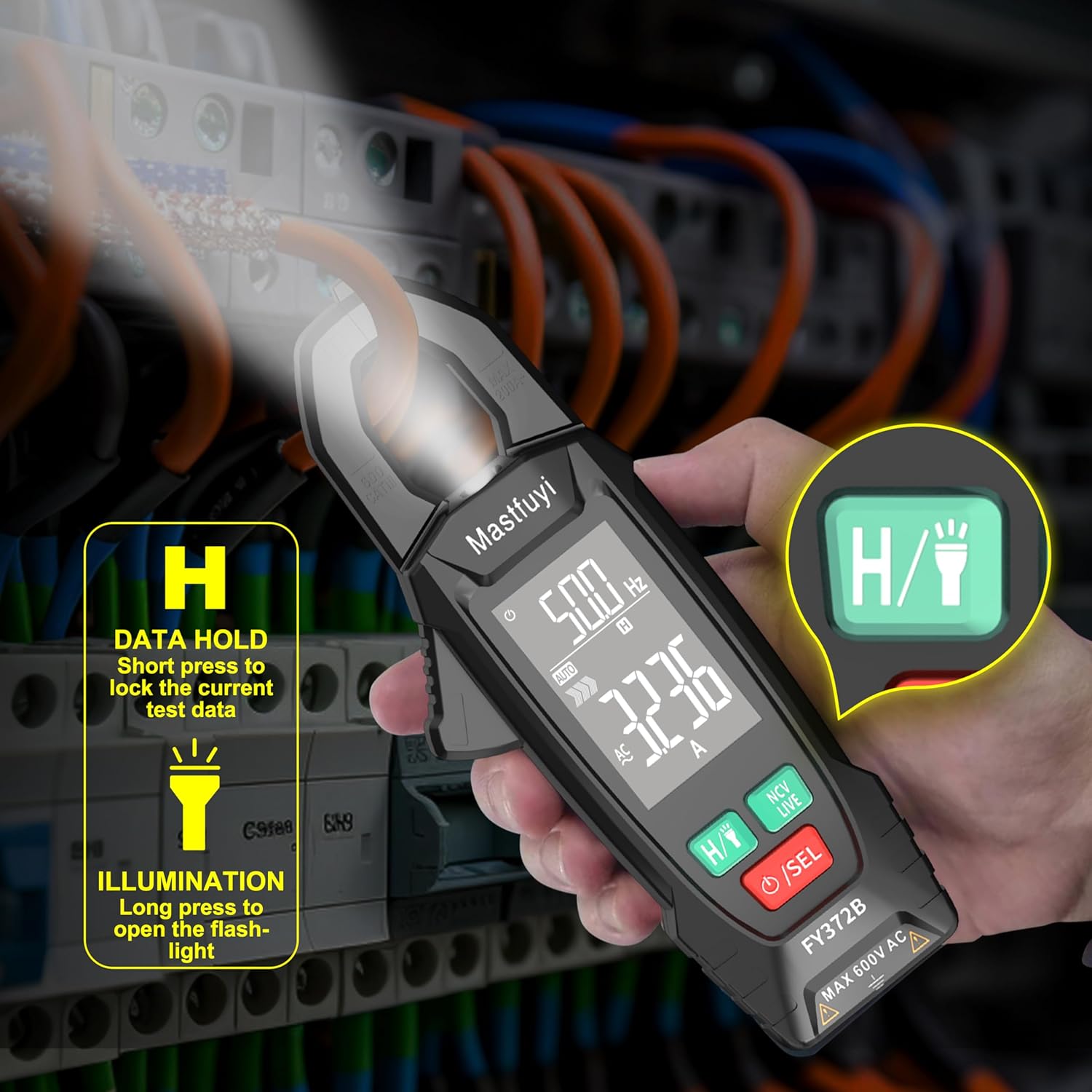
Figure 2: Dimensions of the Mastfuyi FY372B Digital Clamp Meter, showing its compact size (177mm height, 66mm width, 30mm thickness).
Setup
Battery Installation:
The Mastfuyi FY372B requires two 1.5V AAA batteries for operation. These are included in the package.
- Ensure the meter is turned off and no test leads are connected.
- Locate the battery compartment on the back of the meter.
- Use a screwdriver to open the battery compartment cover.
- Insert two 1.5V AAA batteries, observing the correct polarity (+/-) as indicated inside the compartment.
- Replace the battery compartment cover and secure it with the screw.
A low battery indicator will appear on the display when the battery voltage is low, signaling that the batteries need replacement.
Operating Instructions
The FY372B features a Smart Mode for automatic measurement recognition and an SEL button for manual function selection.

Figure 3: The Smart Mode automatically detects and ranges measurements. The NCV/LIVE button allows switching between Non-Contact Voltage detection and Live Wire testing.
1. Power On/Off and Smart Mode:
- Press the /SEL button to turn the meter on. It will default to Smart Mode.
- In Smart Mode, the meter automatically detects the measurement type (AC/DC voltage, resistance, continuity) and selects the appropriate range.
- Press and hold the /SEL button to turn the meter off.
2. Function Selection (SEL Button):
- From Smart Mode, short press the /SEL button to cycle through manual measurement functions such as Diode, Capacitance, Frequency, and Temperature.
- The selected function will be indicated on the LCD display.
3. AC Current Measurement (Clamp Jaw):
To measure AC current, use the clamp jaw. Do not use test leads for current measurement with the clamp.
- Turn on the meter.
- Open the clamp jaw and enclose a single conductor (not a bundle of wires) through which the AC current flows.
- The AC current reading will be displayed on the screen. The meter can simultaneously display frequency when measuring AC current.

Figure 4: Examples of the FY372B measuring AC voltage with test leads, AC current with the clamp jaw, resistance, and NCV detection.
4. AC/DC Voltage Measurement:
- Insert the red test lead into the "VΩHz" input jack and the black test lead into the "COM" input jack.
- Turn on the meter. In Smart Mode, it will automatically detect AC or DC voltage.
- Connect the test leads in parallel to the circuit or component you wish to measure.
- Read the voltage value on the display.
5. Resistance, Continuity, Diode, Capacitance, Frequency Measurement:
- Insert the red test lead into the "VΩHz" input jack and the black test lead into the "COM" input jack.
- Turn on the meter.
- For Resistance and Continuity, Smart Mode will automatically detect. For Diode, Capacitance, or Frequency, short press the /SEL button until the desired function is selected.
- Connect the test leads to the component or circuit. Ensure power is off and capacitors are discharged for resistance, continuity, and diode tests.
- Read the measurement on the display. For continuity, an audible beep indicates a continuous circuit.
6. Temperature Measurement:
The meter includes a K-type thermocouple for temperature measurements.
- Insert the K-type thermocouple into the "VΩHz" and "COM" input jacks, observing polarity.
- Turn on the meter and short press the /SEL button until the temperature function (indicated by °C/°F) is selected.
- Place the thermocouple tip on or near the object whose temperature you wish to measure.
- The display will show the temperature in both Celsius and Fahrenheit.

Figure 5: The FY372B measuring temperature using the included K-type thermocouple, showing dual display of Celsius and Fahrenheit.
7. NCV (Non-Contact Voltage) Detection:
NCV allows detection of AC voltage without direct contact.
- Short press the NCV/LIVE button to activate NCV mode.
- Move the meter's NCV sensor (located at the top of the clamp jaw) close to the conductor or outlet.
- If AC voltage is detected, the meter will emit audible beeps and the NCV indicator lights will flash. The frequency of beeps and flashes increases with stronger voltage signals.

Figure 6: The FY372B detecting non-contact voltage near an electrical outlet, indicated by audible alarms and visual signals.
8. LIVE Wire Test:
The LIVE function helps identify live wires.
- Short press the NCV/LIVE button again to switch from NCV to LIVE mode.
- Insert the red test lead into the "VΩHz" input jack. The black test lead is not used for this function.
- Touch the red test lead to the conductor you want to test.
- If the wire is live, the display will show "LIVE" and the meter will emit an audible alarm.

Figure 7: The FY372B performing a Live Wire test, showing "LIVE" on the display when a live conductor is detected.
9. Data Hold (H) and Illumination (Flashlight):
- Data Hold: Short press the H/ button to freeze the current reading on the display. Press again to release.
- Illumination (Flashlight): Long press the H/ button to turn on the built-in flashlight. Long press again to turn it off.

Figure 8: The FY372B demonstrating the Data Hold function (H) and the activated flashlight for improved visibility in dark environments.
Maintenance
Cleaning:
Wipe the meter with a damp cloth and mild detergent. Do not use abrasives or solvents. Keep the meter dry.
Battery Replacement:
When the low battery indicator appears, replace the batteries promptly to ensure accurate readings. Refer to the "Battery Installation" section for instructions.
Storage:
If the meter is not used for an extended period (e.g., more than one month), remove the batteries to prevent leakage and damage. Store the meter in a cool, dry place, away from direct sunlight and extreme temperatures.
- Storage Environment: -10°C to 50°C (14°F to 122°F), <70% RH (relative humidity).
Troubleshooting
If you encounter issues with your Mastfuyi FY372B, refer to the following common problems and solutions:
| Problem | Possible Cause | Solution |
|---|---|---|
| Meter does not power on. | Dead or incorrectly installed batteries. | Check battery polarity and replace with fresh 1.5V AAA batteries. |
| "OL" displayed on screen. | Over-range indication; the measured value exceeds the meter's maximum range. | Ensure the measurement is within the meter's specifications. If in manual mode, select a higher range if available, or use Smart Mode. |
| Inaccurate readings. | Low battery, dirty test leads, incorrect function selected, or external interference. | Replace batteries. Clean test leads. Ensure correct function is selected. Move away from strong electromagnetic fields. |
| NCV/LIVE not detecting voltage. | Weak signal, incorrect mode, or meter malfunction. | Ensure the sensor is close to the conductor. Verify NCV or LIVE mode is active. Test with a known live source. |
| Auto power off too soon. | Normal operation (10 minutes of inactivity). | This is a power-saving feature. To continue measuring, simply press any button to reactivate the meter. |
If the problem persists after trying these solutions, please contact Mastfuyi customer support.
Specifications
Detailed technical specifications for the Mastfuyi FY372B Digital Clamp Meter.
| Parameter | Value |
|---|---|
| Display | 6000 counts LCD display, auto-luminous |
| Sampling Rate | Approx. 3 times/second |
| Over-range Indication | "OL" displayed on LCD |
| Low Battery Indication | Battery icon displayed |
| Input Polarity Indication | "-" displayed automatically |
| Power Supply | 2 x 1.5V AAA Batteries |
| Dimensions (L x W x H) | 177 x 66 x 30 mm (6.97 x 2.6 x 1.18 inches) |
| Weight | Approx. 138 g (without batteries) |
| Operating Altitude | <2000 m |
| Operating Environment | 0°C to 40°C (32°F to 104°F), <80% RH (<10°C non-condensing) |
| Storage Environment | -10°C to 50°C (14°F to 122°F), <70% RH (remove battery) |
| Temperature Coefficient | 0.1 x accuracy/°C (<18°C or >28°C) |
| Safety Class | 600 V CAT III |
| Pollution Degree | 2 |
| Maximum Input Voltage | 600V DC or 600V AC RMS |
Warranty and Support
Warranty:
Mastfuyi offers a 48-month unconditional warranty for this product, ensuring long-term reliability and customer satisfaction.
Customer Support:
For any questions regarding the product, technical assistance, or warranty claims, Mastfuyi provides 24/7 online after-sales service. Please contact our support team for prompt assistance.
You can find more information and contact details on the official Mastfuyi brand store: Mastfuyi Brand Store.


