1. Introduction
The Roland AIRA Compact P-6 is a creative sampler designed for portable sound design and performance. It integrates Roland's sampling technology with granular synthesis capabilities and a powerful sequencer. The P-6 features an onboard microphone, intuitive controls, USB-C connectivity, and a range of built-in effects, making it suitable for various creative applications.

Figure 1.1: Front view of the Roland AIRA Compact P-6 Creative Sampler, showcasing its compact design and control layout.
2. Key Features
- Compact Design: A pocket-sized sampler powered by Roland technology.
- Built-in Microphone: For quick audio sample capture.
- Sample Editing: Includes a chop function for slicing samples into segments and step sampling for assigning individual samples to pads.
- Resampling: Ability to resample internal audio to create new sounds and custom loops.
- Keyboard Playback: Trigger samples chromatically and polyphonically using the onboard keyboard.
- Dedicated Effects: Features dedicated filters and envelopes for each sample.
- Granular Sound Parameters: Extensive controls including detuning, head position, head speed, spread, and grains.
- Software Integration: Compatible with the P-6 Sample Tool software for macOS and Windows for sample editing and import/export.

Figure 2.1: Diagram illustrating the P-6's key features, including sampling, granular synthesis, and effects.
3. Setup
3.1. Unboxing and Contents
Upon opening the package, ensure all components are present. The standard package for the Roland AIRA Compact P-6 includes:
- Roland AIRA Compact P-6 Creative Sampler unit
- USB Type-C to USB Type-A Cable

Figure 3.1: Visual representation of the items included in the P-6 package.
3.2. Powering On and Charging
The P-6 is powered via its USB-C port. Connect the provided USB Type-C to USB Type-A cable to the P-6 and a compatible USB power source (e.g., a computer USB port, a USB wall adapter). The unit will automatically power on and begin charging if the battery is low. A charge indicator light will typically be present near the USB port.
3.3. Connecting to Other Devices
The P-6 offers various connectivity options for integration into your setup:
- USB-C: Connect to a computer for power, MIDI communication, and audio streaming. This also allows for content creation and easy integration with music software without requiring additional drivers.
- IN-SYNC-OUT: Use these ports to synchronize the P-6 with other AIRA Compact instruments or compatible gear.
- IN-MIX-OUT: Connect external audio sources to the P-6 or output its audio to mixers, headphones, or other devices.
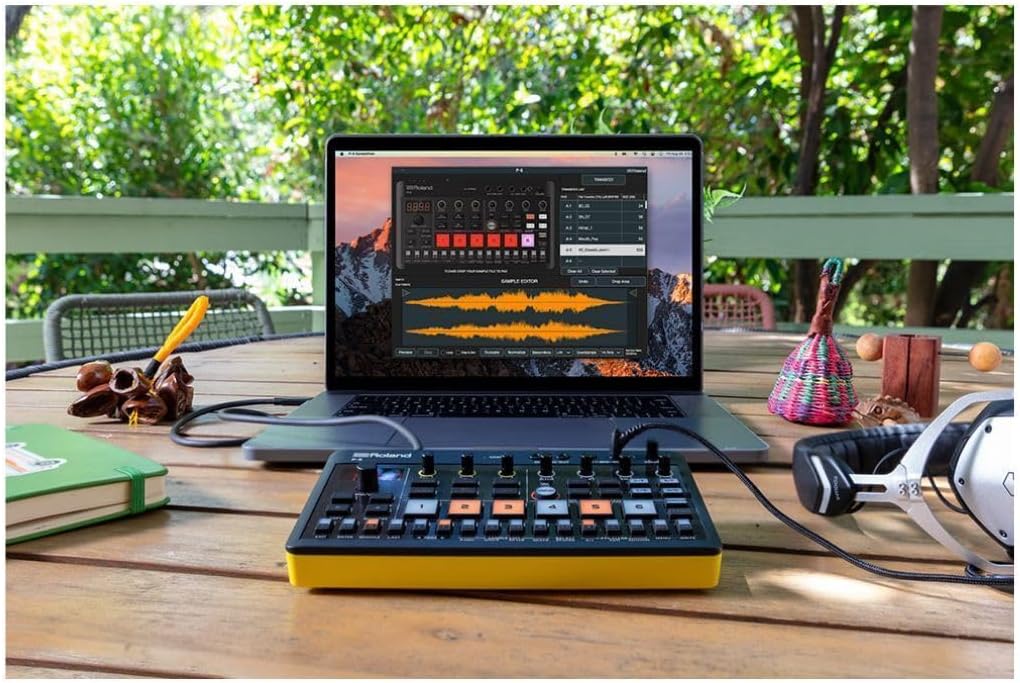
Figure 3.2: The P-6 integrated into a creative ecosystem with other Roland AIRA Compact instruments, demonstrating connectivity.
4. Operating Instructions
4.1. Sampling Audio
The P-6 allows for quick audio capture using its built-in microphone or external input. Press the SAMPLING button to enter sampling mode. Follow the on-screen prompts to record audio. The P-6 supports various sampling rates, which can affect sample quality and length.
- Chop Function: After sampling, use the chop function to divide a sample into multiple segments. These segments can then be assigned to individual pads for playback.
- Step Sampling: This feature allows you to quickly create and assign individual split samples to a single pad, which can then be played chromatically on the onboard keyboard.
- Resampling: To create new sounds or custom loops, you can resample the P-6's internal audio output, including any applied effects.
4.2. Granular Sound Design
The P-6 features an extensive granular synthesis engine. Access granular parameters to manipulate samples in unique ways. Key parameters include:
- Detuning: Adjust the pitch of individual grains.
- Head Position: Control the starting point of grain playback within the sample.
- Head Speed: Modify the playback speed of grains.
- Spread: Introduce randomness to grain parameters for textural variations.
- Grains: Adjust the density and size of the grains.
4.3. Sequencing
The onboard sequencer allows for pattern creation and arrangement. It supports up to 64 steps per pattern, with features such as microtiming and parameter locks for detailed control over your sequences.
4.4. Onboard Keyboard and Playback
The P-6 includes an onboard keyboard for triggering samples. Samples can be played back chromatically, allowing for melodic performance, or polyphonically, enabling chords and layered sounds.
4.5. Effects (MFX)
The P-6 features a versatile set of Multi-Effects (MFX) and dedicated filters and envelopes for each sample. These effects can be applied to individual samples or the overall mix to shape your sound.
4.6. Software Integration (P-6 Sample Tool)
For advanced sample management, the P-6 Sample Tool software (available for macOS and Windows) allows you to edit samples, import new sounds, and export your creations. Connect the P-6 to your computer via USB-C to utilize this software.

Figure 4.1: The P-6 connected to a laptop, demonstrating its integration with the P-6 Sample Tool software for advanced editing.
5. Maintenance
5.1. Cleaning
To clean the P-6, use a soft, dry cloth. For stubborn dirt, a slightly damp cloth with mild soap can be used, followed by a dry cloth. Avoid using abrasive cleaners, solvents, or excessive moisture, as these can damage the unit.
5.2. Storage
Store the P-6 in a cool, dry place away from direct sunlight, extreme temperatures, and high humidity. When transporting, consider using a protective case to prevent physical damage.
6. Troubleshooting
- No Power: Ensure the USB-C cable is securely connected to both the P-6 and a functioning power source. Check if the power source is active.
- No Sound Output: Verify that the volume knob is turned up. Check all audio cable connections. Ensure the correct output (e.g., headphones, mixer) is selected and functioning.
- USB Audio Issues (Noise/Artifacts): If experiencing noise or artifacts when connected via USB, particularly with Windows or Android devices, try adjusting the buffer size in your audio settings. Ensure all drivers are up to date.
- Difficulty with Button Combinations/Menu Navigation: Refer to the detailed Roland P-6 reference manual for specific button combinations and menu structures. Practice common operations to improve familiarity.
- Samples Not Playing Correctly: Check sample assignments to pads. Ensure samples are not corrupted and are within the P-6's supported specifications.
For further assistance, consult the official Roland support resources or contact customer service.
7. Specifications
| Brand | Roland |
| Model Name | P-6 |
| Body Material | Plastic |
| Color | Black |
| Item Weight | 10.7 ounces (approx. 303 grams) |
| Product Dimensions (L x W x H) | 7.44 x 3.19 x 1.44 inches (approx. 18.9 x 8.1 x 3.66 cm) |
| Connector Type | USB-C |
| UPC | 761294519707 |
8. Warranty and Support
For detailed warranty information, please refer to the warranty card included with your product or visit the official Roland website. Roland provides customer support and resources for product registration, software updates, and technical assistance.
Official Roland Website: www.roland.com


