
1. Introduction
The AI-Thinker RD-01 is a compact radar module developed by Shenzhen Anxinke Technology Co., LTD. This module integrates Wi-Fi and Bluetooth Low Energy (BLE) capabilities, making it suitable for various intelligent applications. The radar component utilizes the S3KM111L chip from Sidian Micro, an integrated monolithic single-wave sensor SoC based on FMCW radar technology, operating in the 24GHz band. It offers robust sensing capabilities for presence detection and ranging.
2. Key Features
- Integrated Radar, Wi-Fi, and BLE: Combines 24GHz FMCW radar with Wi-Fi and Bluetooth 5.0 for versatile connectivity.
- Compact Design: SMD-12 package, compatible with standard patch, pin, or socket assembly methods.
- High-Performance Radar: Operates in the 24GHz ISM frequency band with up to 1 GHz modulation bandwidth.
- Wide Sensing Range: Maximum sensing range of up to 5 meters with a wide angle of ±60 degrees.
- Intelligent Parameter Adjustment: Supports radar parameter tuning via Bluetooth for convenient configuration.
- Flexible Connectivity Modes: Supports Station + BLE and Station + SoftAP + BLE models.
- Robust Security: Features secure startup, QSPI/SPI Flash instant AES decryption (OTFAD), AES 128 CTR mode, and AES 128/192/256-bit encryption engine.
- Multiple Interfaces: Provides UART, GPIO, ADC, PWM, I2C, and SPI interfaces.
3. Technical Specifications
| Model | Rd-01 |
| Package | SMD-12 (Compatible with patch/pin/socket) |
| Dimensions (L×W×H) | 35.0 × 18.0 × 3.6 mm (±0.2mm) |
| Antenna | Radar: On-board antenna; Wi-Fi & BLE: IPEX |
| Frequency | Radar: 24G ~ 24.25GHz; Wi-Fi: 2400 ~ 2483.5MHz |
| Operating Temperature | -40°C ~ 85°C |
| Storage Environment | -40°C ~ 125°C, 90%RH |
| Power Supply | 3.0V ~ 3.6V (Current ≥500mA) |
| Interfaces | UART, GPIO, ADC, PWM, I2C, SPI |
| I/O Pins | 8 |
| UART Rate (Default) | 115200 bps |
| Security | WPS/WEP/WPA/WPA2 Personal/WPA2 Enterprise/WPA3 |
| Flash | Default 2MByte |
4. Setup Instructions
This section outlines the general steps for setting up your RD-01 module. Specific application requirements may vary.
- Power Connection: Connect the module to a stable power supply within the specified voltage range of 3.0V to 3.6V. Ensure the power supply can provide at least 500mA. Refer to the pinout diagram for correct voltage (3V3) and ground (GND) connections.
- Interface Connection: Depending on your application, connect the necessary interfaces (UART, GPIO, I2C, SPI) to your host microcontroller or development board. For initial communication and configuration, UART is commonly used.
- Firmware Upload (if applicable): If custom firmware is required, follow the manufacturer's guidelines for flashing the module. This typically involves using a UART-to-USB converter and specific flashing tools.
- Software Configuration: Install any required drivers or SDKs on your development environment. Use the provided tools or libraries to configure the Wi-Fi, Bluetooth, and radar parameters. Bluetooth Low Energy (BLE) can be used for intelligent parameter adjustment.
- Antenna Considerations: The module features an on-board antenna for radar and an IPEX connector for Wi-Fi & BLE. Ensure proper antenna connection for optimal wireless performance if using an external antenna for Wi-Fi/BLE.
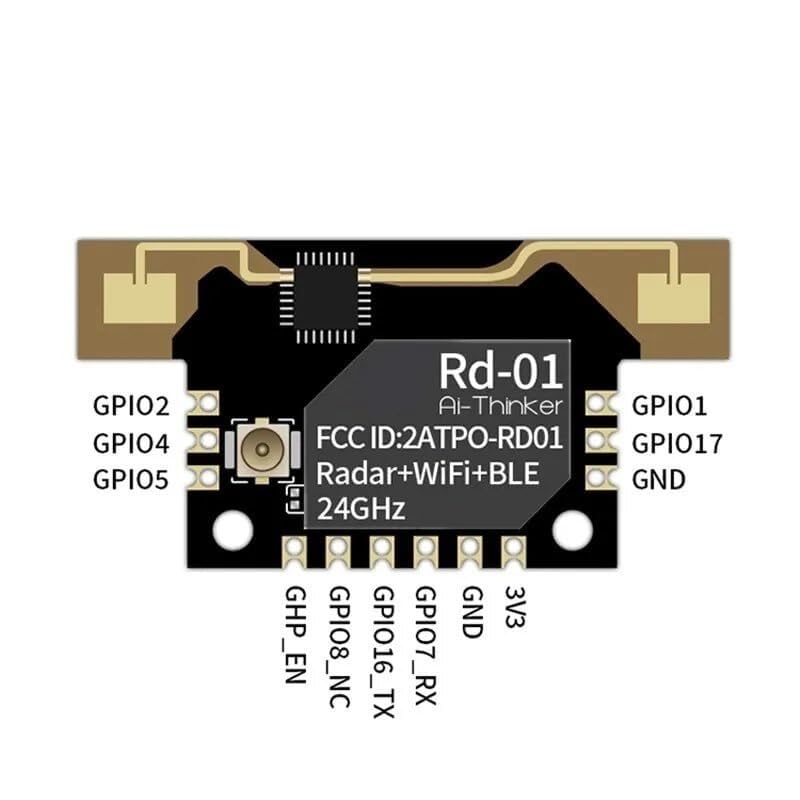
Figure 1: Front view of the AI-Thinker RD-01 module, illustrating the pin assignments for GPIO, power (3V3, GND), and the integrated radar, Wi-Fi, and BLE capabilities. The FCC ID is also visible.
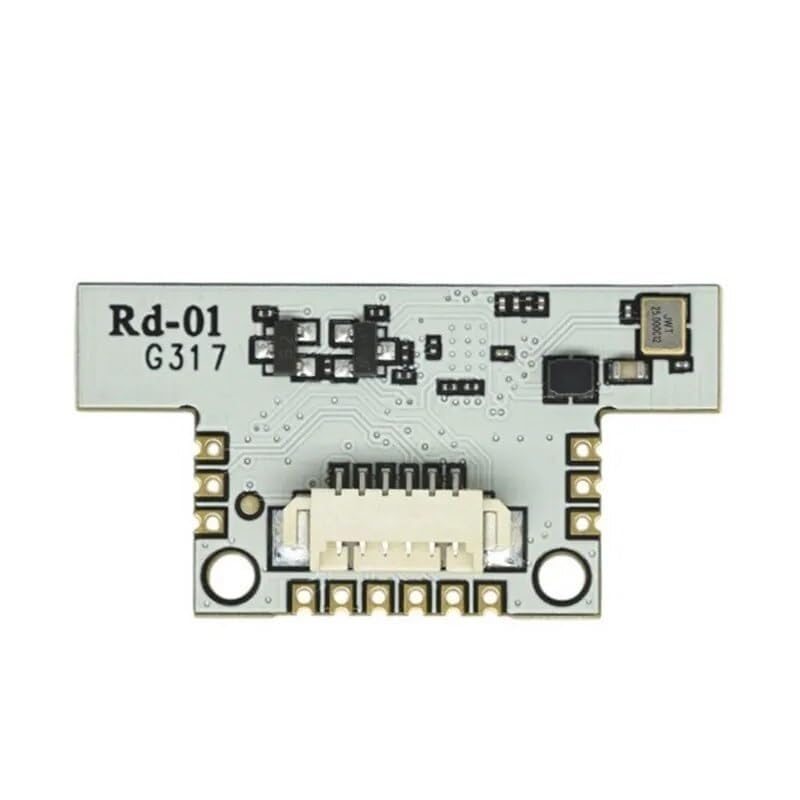
Figure 2: Back view of the AI-Thinker RD-01 module, highlighting the SMD-12 package and the connector interface for integration into a larger system.
5. Operating Instructions
Once the RD-01 module is powered and configured, it can perform its intended functions. The operation involves utilizing its radar, Wi-Fi, and Bluetooth capabilities.
- Radar Operation: The 24GHz FMCW radar continuously emits and receives signals to detect presence, motion, and distance of objects within its ±60 degree field of view and up to 5-meter range. The module processes these signals to provide raw data or processed information via its interfaces.
- Wi-Fi Connectivity: The module can connect to a Wi-Fi network (Station mode) or create its own access point (SoftAP mode). This allows for data transmission, remote control, and integration into IoT systems. Refer to the SDK documentation for Wi-Fi configuration and communication protocols.
- Bluetooth Low Energy (BLE) Usage: BLE 5.0 enables low-power wireless communication. It is particularly useful for initial setup, configuration, and intelligent parameter adjustment of the radar module using a compatible mobile application or host device.
- Data Output: Data from the radar, Wi-Fi, or BLE functions can be accessed through the UART, SPI, or I2C interfaces. The specific data format and commands will be detailed in the module's programming guide or SDK.
6. Maintenance
The RD-01 module is designed for reliable operation with minimal maintenance. Adhering to these guidelines will help ensure its longevity and performance:
- Environmental Conditions: Operate and store the module within the specified temperature and humidity ranges (-40°C to 85°C operating, -40°C to 125°C storage at 90%RH). Avoid exposure to extreme temperatures, direct sunlight, or high moisture.
- Physical Handling: Handle the module with care to prevent physical damage. Avoid bending or stressing the PCB. When soldering, ensure proper techniques to prevent damage to components.
- Cleaning: If necessary, gently clean the module with a soft, dry, anti-static cloth. Do not use liquid cleaners or solvents.
- Power Supply: Always use a stable and regulated power supply within the recommended voltage range (3.0V-3.6V) and current capacity (≥500mA). Incorrect power can damage the module.
- Firmware Updates: Periodically check the manufacturer's website for firmware updates. Applying updates can improve performance, add features, or fix bugs. Follow update instructions carefully.
7. Troubleshooting
If you encounter issues with your RD-01 module, refer to the following common troubleshooting steps:
| Problem | Possible Cause | Solution |
|---|---|---|
| Module not powering on / Not working |
|
|
| No Wi-Fi or Bluetooth connection |
|
|
| Radar not detecting objects |
|
|
| Communication errors via UART/SPI/I2C |
|
|
8. Warranty and Support
Specific warranty information for the AI-Thinker RD-01 module is not provided in this document. For details regarding warranty coverage, returns, or technical support, please contact the vendor or manufacturer directly. You may also refer to the official Robodo Store or the AI-Thinker official website for further assistance and resources.