
1. Introduction
The BFOUR BF-30 PRO is an advanced wireless meat thermometer designed to help you achieve perfectly cooked meals every time. Featuring a 100% wireless probe, Bluetooth connectivity, a large LCD display, and a smart app, it provides precise temperature monitoring for various cooking methods, including grilling, roasting, and smoking. This manual provides essential information for setting up, operating, and maintaining your device.
2. Safety Information
- Always handle the probe with care, especially after use, as it can become extremely hot. Use heat-resistant gloves if necessary.
- Do not immerse the booster unit in water. Only the probe is waterproof.
- Ensure the probe is inserted correctly into the thickest part of the meat, avoiding bones, for accurate readings.
- This thermometer is designed to measure internal food temperatures only. It is not intended for measuring ambient temperatures.
- Keep the device out of reach of children.
3. Package Contents
Verify that all items are present in your package:
- 1 x BFOUR BF-30 PRO Booster Unit
- 1 x Wireless Probe
- 1 x USB Type-C Charging Cable
- 1 x User Manual
- 1 x Quick Start Guide

Figure 3.1: Contents of the BFOUR BF-30 PRO package.
4. Product Overview
The BFOUR BF-30 PRO consists of two main components: the Booster Unit and the Wireless Probe.
- Booster Unit: This unit features a large LCD display that shows real-time temperature readings and preset targets. It also serves as the charging station for the probe and facilitates Bluetooth communication with your smartphone.
- Wireless Probe: The 100% wireless probe is inserted directly into your food. It contains multiple sensors for accurate temperature measurement and is designed to withstand high cooking temperatures and is IP67 waterproof.

Figure 4.1: BFOUR BF-30 PRO Booster unit, wireless probe, and smartphone app.
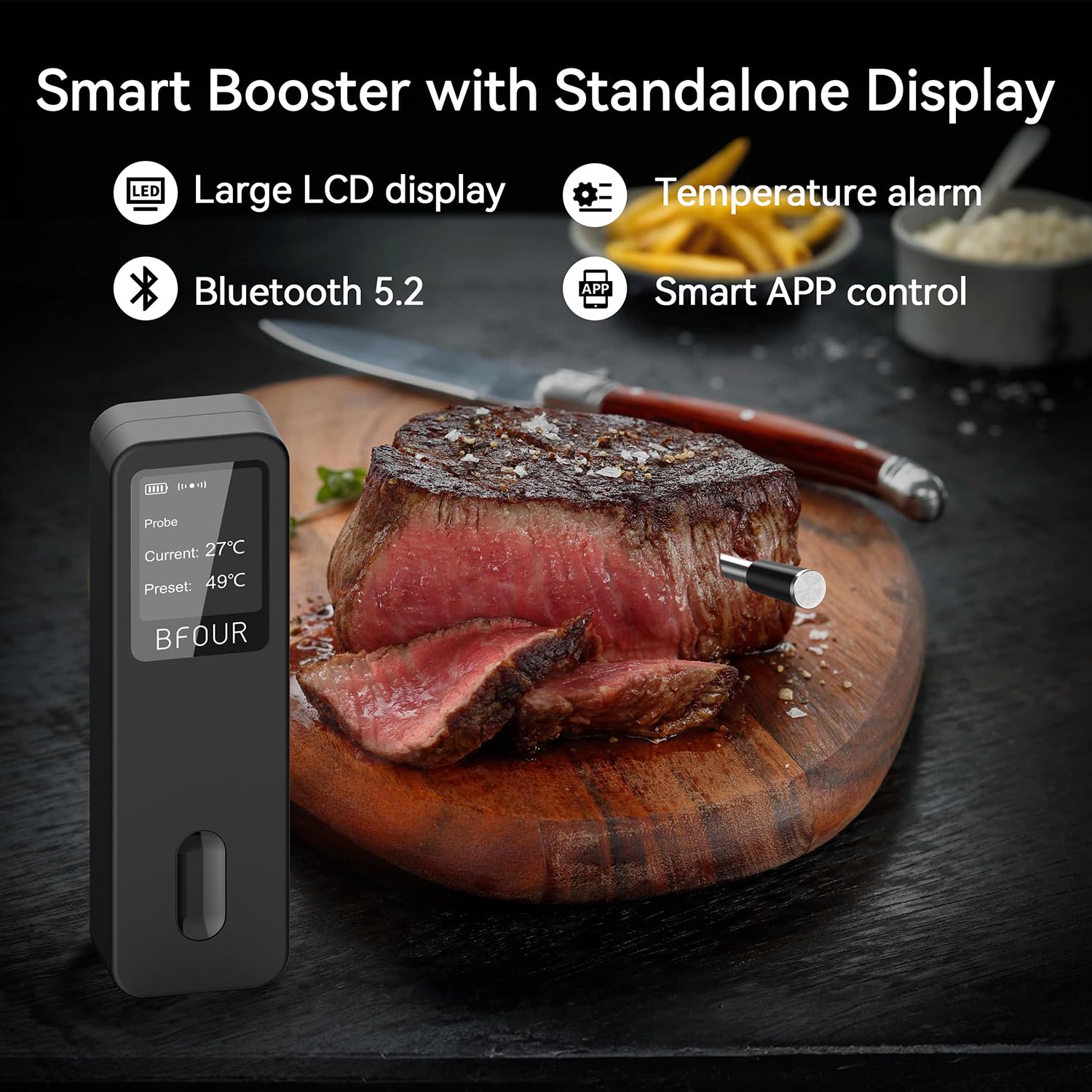
Figure 4.2: Smart Booster with Standalone Display features.

Figure 4.3: Large HD Display for convenient temperature tracking.
5. Setup
5.1 Charging the Device
Before first use, ensure both the probe and the booster unit are sufficiently charged. Connect the booster unit to a power source using the provided USB Type-C cable. The probe charges wirelessly when placed correctly into the booster unit.
- Probe: A 2-minute fast charge provides approximately 40 hours of operation.
- Booster: A full charge allows the booster to operate for over 90 hours.

Figure 5.1: Charging the probe and booster unit.
5.2 App Installation
Download the 'BF Home' app from your smartphone's app store (iOS App Store or Google Play Store). Search for 'BF Home' and follow the on-screen instructions to install.
5.3 Pairing with Your Smartphone
- Ensure Bluetooth is enabled on your smartphone.
- Open the 'BF Home' app.
- Power on the BFOUR BF-30 PRO booster unit.
- The app will automatically search for and connect to the device. Follow any prompts within the app to complete the pairing process.
The Bluetooth connection offers an extended range of up to 100 meters (328 feet) in open areas, allowing you flexibility while monitoring your cooking. Note that obstacles like oven walls can reduce this range.

Figure 5.2: Bluetooth connection range.
6. Operating Instructions
6.1 Using the Probe
Carefully insert the metal probe into the center of the thickest part of the food, ensuring the tip is not touching any bones or gristle. The probe has multiple sensors for accurate internal temperature measurement.

Figure 6.1: Proper probe insertion and sensor locations.
6.2 Monitoring Temperature
Once the probe is inserted and connected, you can monitor the temperature in two ways:
- Booster Display: The large LCD screen on the booster unit will show the current internal temperature of your food and the preset target temperature.
- BF Home App: For a more detailed overview and control, use the 'BF Home' app on your smartphone.
6.3 Smart App Features
The 'BF Home' app offers a range of intelligent features to enhance your cooking experience:
- Meat Type and Doneness Presets: Select from over 50 pre-programmed cooking protocols for various meat types (e.g., beef, chicken, lamb, pork, fish) and desired doneness levels (e.g., rare, medium, well-done).
- Custom Temperature Alarms: Set custom target temperatures, and the app will notify you when your food reaches the desired doneness.
- Real-time Temperature Graphs: View a live graph of the temperature changes throughout the cooking process, providing insights into your cooking progress.
- Timer Function: Utilize the built-in timer for precise cooking durations.
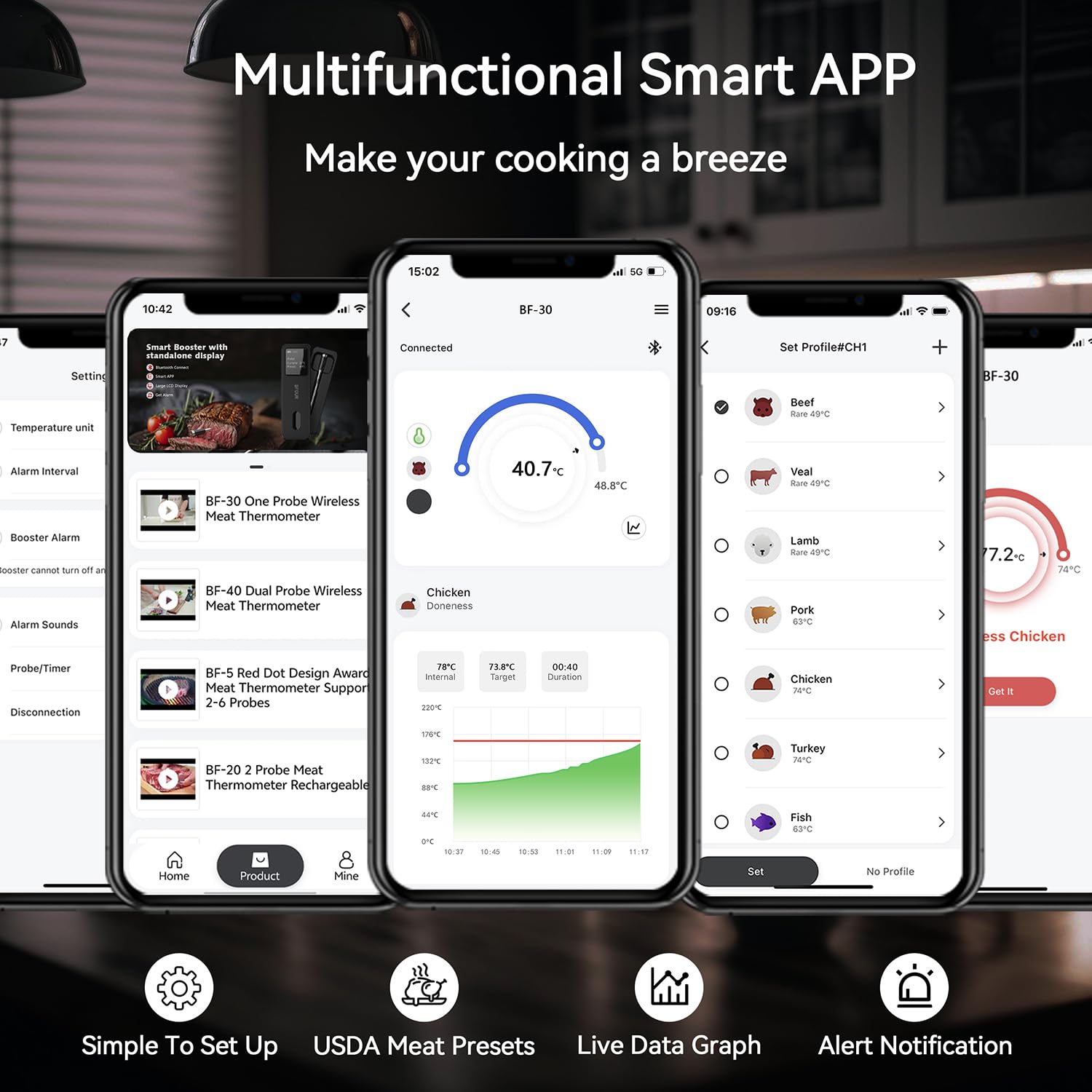
Figure 6.2: Multifunctional Smart App interface.
7. Maintenance
7.1 Cleaning
- Probe: The probe is IP67 waterproof and can be washed under running water or placed in a dishwasher for easy cleaning. Ensure it is completely dry before storing.
- Booster Unit: Wipe the booster unit with a soft, damp cloth. Do not immerse it in water or use abrasive cleaners.

Figure 7.1: Probe waterproof and heat resistant features.
7.2 Storage
Store the BFOUR BF-30 PRO in a clean, dry place when not in use. The booster unit has a magnetic attraction feature for convenient storage on metal surfaces.
8. Troubleshooting
If you encounter issues with your BFOUR BF-30 PRO, refer to the following common problems and solutions:
| Problem | Possible Cause / Solution |
|---|---|
| No Bluetooth Connection | Ensure Bluetooth is enabled on your phone. Make sure the booster unit is powered on and within range (up to 100m in open areas). Thick oven walls or other large metal objects can interfere with the signal. Try moving closer to the booster unit. |
| Inaccurate Temperature Readings | Ensure the probe is inserted correctly into the thickest part of the meat, avoiding bones. Check if the probe is clean and free from debris. Calibrate the thermometer if the app provides this option. |
| Probe Not Charging | Ensure the booster unit is connected to power and the probe is correctly seated in its charging slot. Check the USB-C cable and power adapter. |
| App Not Responding | Close and restart the 'BF Home' app. Ensure your phone's operating system is up to date. Reinstall the app if the issue persists. |
If you continue to experience issues, please contact BFOUR customer support for assistance.
9. Specifications
Key technical specifications for the BFOUR BF-30 PRO Wireless Meat Thermometer:
| Feature | Specification |
|---|---|
| Model Number | BF-30 PRO |
| Connectivity Technology | Bluetooth 5.2 |
| Wireless Range | Up to 100 meters (328 feet) in open areas |
| Probe Temperature Range | Internal Temp: Up to 100°C (212°F) |
| Probe Heat Resistance | Up to 400°C (752°F) |
| Accuracy | ±0.5°C (±0.9°F) |
| Waterproof Rating | Probe: IP67 |
| Probe Battery Life | Approx. 40 hours (after 2-min charge) |
| Booster Battery Life | Over 90 hours (full charge) |
| Display Type | Digital LCD |
| Dimensions (Booster) | 12.95 x 4.06 x 2.21 cm |
| Weight | 190 grams |
| Material | Plastic (exterior) |
| Certifications | CE, RoHS, WEEE |

Figure 9.1: BFOUR BF-30 PRO feature comparison.
10. Warranty and Support
BFOUR is committed to providing high-quality and precise products, backed by decades of experience in thermometer development and manufacturing. For any product-related inquiries, technical support, or warranty claims, please contact BFOUR customer service through the contact information provided in your product packaging or on the official BFOUR website.
Please retain your proof of purchase for any warranty-related services.