Introduction
This manual provides detailed instructions for the assembly, operation, and maintenance of your Zevemomo Queen Bed Frame. This bed frame features a durable metal construction, a 95-degree tilted upholstered headboard with integrated storage, a charging station, and adjustable LED lights. It also includes two under-bed storage drawers for added convenience.
Please read all instructions carefully before beginning assembly and retain this manual for future reference.
Important Safety Information
- Carefully follow all assembly instructions to prevent misalignment and ensure structural integrity.
- Do not exceed the maximum weight capacity of 800 pounds for the bed frame.
- Be cautious when using the tilted headboard to avoid injury. Ensure all connections are secure.
- Keep small parts and packaging materials away from children during assembly.
- Ensure the bed frame is placed on a level surface to prevent instability.
Package Contents
Before assembly, verify that all components are present and undamaged. If any parts are missing or damaged, please contact customer support.
- Bed Frame Components (metal slats, side rails, support legs)
- Upholstered Headboard with Storage Shelf
- Charging Station Module (pre-installed in headboard)
- LED Light Strip and Remote Control
- 2 Under-Bed Storage Drawers with Wheels and Locking Buckles
- Assembly Hardware (screws, bolts, washers, Allen wrench)
- Power Cord for Charging Station and LED Lights
Setup and Assembly
Assembly typically requires two adults. An Allen wrench is provided, but a power drill with a compatible bit may expedite the process. Follow the numbered steps in the included assembly guide for detailed diagrams.
Step 1: Unpack and Organize
Carefully unpack all components and lay them out on a clean, soft surface to prevent scratches. Identify each part by its label and separate the hardware.
Step 2: Assemble the Main Frame
Connect the side rails and support beams using the provided hardware. Ensure all connections are finger-tight before fully tightening with the Allen wrench. The frame is designed for stability and noise reduction.
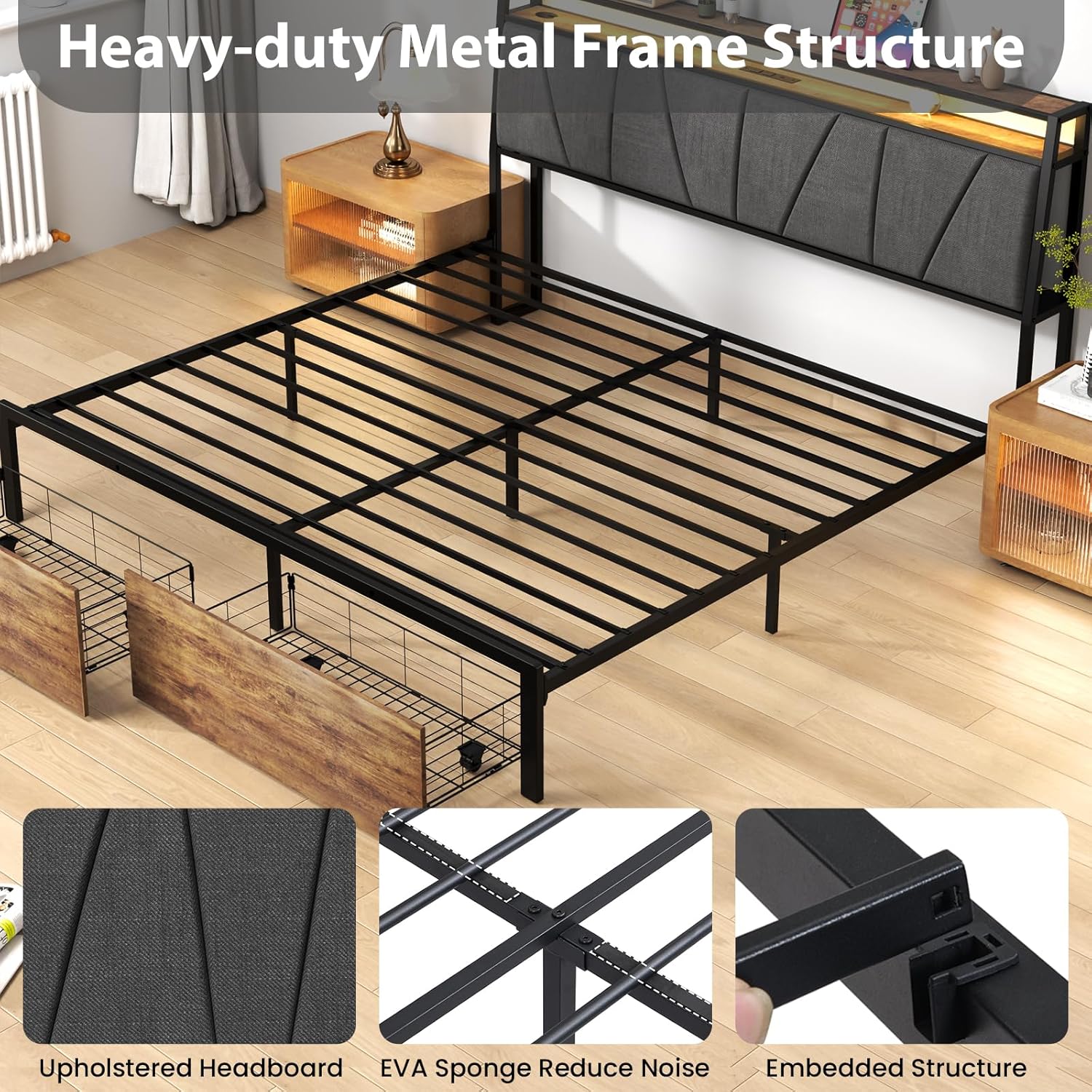
Image: The heavy-duty metal frame structure, showing the upholstered headboard, EVA sponge for noise reduction, and embedded structure for stability.
Step 3: Attach the Headboard
Secure the upholstered headboard to the main frame. Pay attention to the orientation of the headboard, ensuring the storage shelf and charging station face the desired direction. The headboard is designed with a 95-degree tilt for comfort and includes multi-space storage.
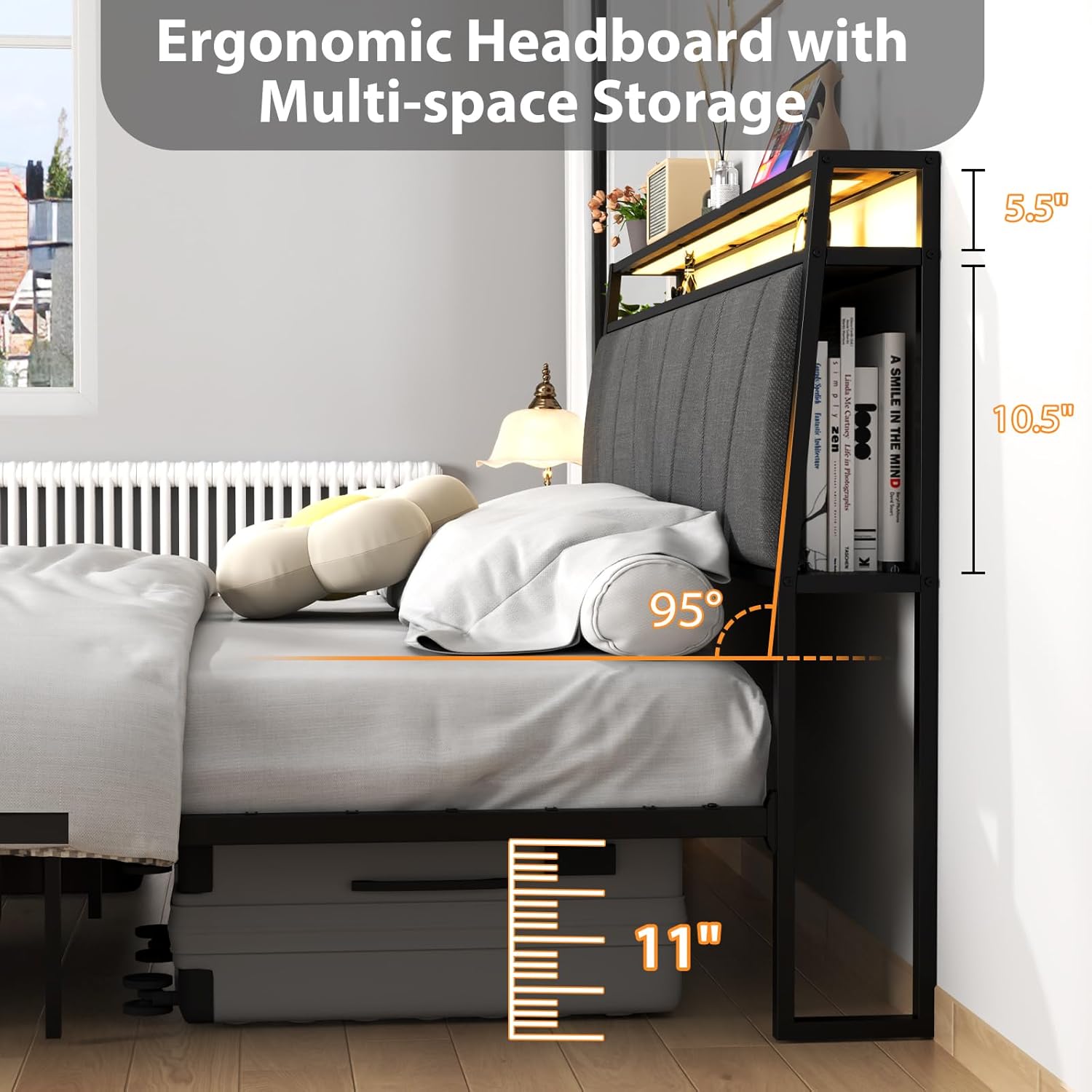
Image: Side view of the ergonomic headboard, highlighting the 95-degree tilt, the 5.5-inch deep top shelf, and the 10.5-inch high side storage compartment. Also shows 11 inches of under-bed clearance.
Step 4: Install Slats and Drawers
Place the metal slats onto the frame and secure them according to the instructions. Assemble the two storage drawers by attaching the wheels and locking buckles. Slide the assembled drawers into the designated spaces under the bed frame.

Image: Two under-bed storage drawers with wheels and locking buckles, demonstrating their smooth roll-in and roll-out functionality.
Step 5: Connect Power
Plug the power cord from the headboard's charging station into a wall outlet. Ensure the connection is secure.
Operating Instructions
Charging Station
The headboard is equipped with a convenient charging station. It includes:
- 1 USB-A Port (5V/2A)
- 1 Type-C Port (5V/3A)
- 2 AC Outlets (120V/15A)
Simply plug your devices into the appropriate ports for charging. The charging station is powered via a 5-foot power cord.

Image: Close-up of the headboard's charging station, detailing the USB-A, Type-C, and two AC outlets, along with the 5-foot power cord.
LED Lights
The integrated RGB LED lights can be controlled using the provided remote control. The lights offer:
- 3 Brightness Modes
- 20 Changing Modes
- 20 Static Colors
Use the remote to power the lights on/off, adjust brightness, change colors, or select dynamic modes to create your desired ambiance.

Image: The adjustable RGB LED lights in the headboard, accompanied by the remote control and icons representing 3 brightness modes, 20 changing modes, and 20 static colors.
Storage Drawers
The two under-bed storage drawers are equipped with wheels for easy access and locking buckles to keep them securely in place. Pull the drawers out to access your stored items and push them back in until the buckles engage to secure them.
Maintenance
- Cleaning: Wipe the metal frame and wooden surfaces with a soft, damp cloth. For the upholstered headboard, use a fabric cleaner suitable for the material, testing on an inconspicuous area first.
- Tightening: Periodically check all bolts and screws to ensure they remain tight. Re-tighten as necessary to maintain stability and prevent noise.
- Drawer Care: Keep the drawer wheels free of debris to ensure smooth operation.
- Electrical Components: Ensure the power cord is not pinched or damaged. Do not attempt to repair the charging station or LED lights yourself; contact qualified personnel if issues arise.
Troubleshooting
Bed Frame is Noisy/Squeaky
- Ensure all bolts and screws are fully tightened. Loose connections are a common cause of noise.
- Verify that the bed frame is on a level surface. Uneven flooring can cause stress on the frame.
- Check for any obstructions between the mattress and the frame.
LED Lights Not Working
- Confirm the power cord is securely plugged into both the headboard and a working wall outlet.
- Check the remote control battery. Replace if necessary.
- Ensure the remote control is pointed directly at the LED receiver.
Drawers Do Not Roll Smoothly or Stay Closed
- Inspect the wheels for any hair, dust, or debris that might be obstructing their movement.
- Ensure the drawers are correctly aligned within their tracks.
- Verify that the locking buckles are engaging properly.
Missing Parts or Damaged Components
- Refer to the package contents list. If any parts are missing or damaged upon arrival, contact Zevemomo customer support immediately for assistance.
Specifications
| Feature | Detail |
|---|---|
| Model Number | 87QSHLD |
| Size | Queen |
| Product Dimensions | 89"L x 60"W x 40"H |
| Weight Capacity | 800 LBS |
| Material | Metal + Wood |
| Headboard Material | Wood, Upholstered |
| Recommended Mattress Thickness | 8–12 inches |
| Charging Station | 1 USB-A Port (5V/2A), 1 Type-C Port (5V/3A), 2 AC Outlets (120V/15A) |
| LED Lights | RGB, Remote Control, 3 Brightness Modes, 20 Changing Modes, 20 Static Colors |
| Storage | 95° Tilted Headboard Storage, 2 Under-Bed Drawers |
| Item Weight | 58 pounds |

Image: Overview of the Queen size bed frame with key dimensions (89"L x 60.2"W x 39.8"H) and an 800 lbs weight capacity indicator.
Warranty and Support
For warranty information, please refer to your purchase documentation or contact Zevemomo customer service. If you encounter any issues or require assistance with your product, please reach out to Zevemomo support through the retailer where the product was purchased or visit the official Zevemomo website for contact details.
Zevemomo Customer Service: Visit the Zevemomo Store on Amazon