
WOOPKER AK45
WOOPKER AK45 Stereo Amplifier User Manual
Model: AK45
1. Introduction
The WOOPKER AK45 is a versatile 2-channel stereo amplifier designed for home audio systems. It features multiple input options including Bluetooth 5.0, AUX, USB, SD card, and FM radio, making it suitable for various audio sources and environments. This manual provides detailed instructions for setting up and operating your AK45 amplifier to ensure optimal performance.

Image 1.1: The WOOPKER AK45 Stereo Amplifier with its included remote control. This image displays the front panel controls and the compact design of the amplifier.
2. What's in the Box
Please verify that all items are present in the package:
- WOOPKER AK45 Stereo Amplifier x 1
- Remote Control x 1
- Power Cable x 1
- FM Antenna x 1
- User Manual x 1

Image 2.1: Visual representation of the items included in the WOOPKER AK45 amplifier package. This includes the amplifier unit, remote control, power cable, FM antenna, and user manual.
3. Product Overview
3.1 Front Panel

Image 3.1: Detailed view of the AK45 amplifier's front panel, highlighting the various controls and input ports such as USB, SD Card slot, display, microphone inputs, and adjustment knobs.
- Power Switch: Turns the amplifier on or off.
- USB Port: For connecting USB flash drives for audio playback.
- SD/MMC Card Slot: For inserting SD or MMC cards for audio playback.
- Display: Shows current mode, track information, or FM frequency.
- Treble Knob: Adjusts the high-frequency audio output.
- Bass Knob: Adjusts the low-frequency audio output.
- Mic/Vol Knob: Adjusts the microphone volume.
- MIC1/MIC2 Inputs: 6.35mm jacks for connecting microphones.
- Mode Button: Cycles through input sources (Bluetooth, AUX, USB, SD, FM).
- Navigation Buttons: For track control (previous/next), play/pause, and FM station tuning.
- Volume Knob: Main volume control for overall audio output.
3.2 Rear Panel
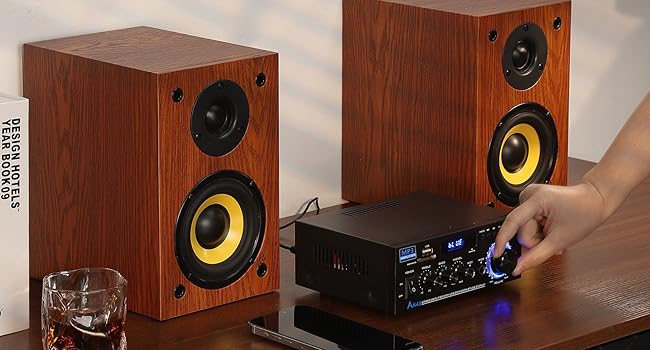
Image 3.2: Rear view of the AK45 amplifier, illustrating the speaker output terminals, RCA audio input, FM antenna connection, DC 12V input, and AC power input.
- FM ANT: Connection for the FM antenna.
- AUDIO INPUT (RCA): Red and white RCA jacks for connecting external audio devices (e.g., CD player, DVD player, TV).
- SPEAKERS OUTPUT: Terminals for connecting passive speakers (4-16 Ohms impedance).
- DC 12V/5A Power Input: For connecting a 12V DC power adapter (if applicable).
- AC Power Input: For connecting the main AC power cable (AC90-240V, 50-60Hz).
4. Setup
4.1 Speaker Connection
The AK45 amplifier is designed for passive speakers with an impedance of 4-16 Ohms. Follow these steps to connect your speakers:
- Identify the positive (+) and negative (-) terminals on your speakers and on the amplifier. Positive terminals are typically red, and negative terminals are black.
- Press the clasp on the amplifier's speaker output terminals.
- Insert the bare speaker wires into the corresponding terminals. Ensure a secure connection and that no stray wire strands are touching other terminals.
- Connect the right speaker to the 'RIGHT' output and the left speaker to the 'LEFT' output.

Image 4.1: Visual guide for connecting passive speakers to the rear panel of the AK45 amplifier, illustrating the correct polarity for left and right channels.
4.2 Power Connection
Connect the provided AC power cable to the AC Power Input on the rear panel of the amplifier, then plug it into a standard wall outlet. If using a DC 12V power source, connect it to the DC 12V/5A input.
4.3 FM Antenna Connection
Connect the included FM antenna to the 'FM ANT' port on the rear panel for improved FM radio reception.
5. Operating Instructions
5.1 Power On/Off
Flip the 'POWER' switch on the front panel to the 'ON' position to power on the amplifier. Flip it to 'OFF' to power down.
5.2 Input Selection
Press the 'MODE' button on the front panel or the remote control to cycle through available input sources: Bluetooth (BT), AUX, USB, SD Card, and FM Radio. The selected mode will be displayed on the front panel screen.
5.3 Bluetooth Pairing
- Switch the amplifier to 'BT' mode using the 'MODE' button. The display will show 'BLUE' and flash, indicating it's ready for pairing.
- On your mobile device (smartphone, tablet, etc.), enable Bluetooth and search for available devices.
- Select 'BT' from the list of devices to pair. Once connected, the 'BLUE' indicator on the amplifier will stop flashing.
- Begin playing audio from your device.
Note: Maintain a distance of less than 30 feet (10 meters) between the amplifier and your Bluetooth device for optimal connection. For TV or PC devices, keep the distance within 15 feet (5 meters).
Video 5.1: A demonstration of connecting speakers, powering on the AK45 amplifier, and pairing a mobile device via Bluetooth. This video also shows the amplifier playing music through connected speakers.
5.4 USB/SD Card Playback
Insert a USB flash drive or SD/MMC card containing audio files into the respective port/slot on the front panel. The amplifier will automatically switch to USB or SD mode and begin playback. Use the navigation buttons on the front panel or remote control to manage playback.
5.5 FM Radio Operation
In FM mode, use the navigation buttons to scan for radio stations. Press and hold the 'Play/Pause' button to auto-scan and save available stations. Use the 'Previous/Next' buttons to cycle through saved stations.
5.6 Microphone Usage
Connect up to two microphones to the 'MIC1' and 'MIC2' input jacks on the front panel. Adjust the microphone volume using the 'MIC/VOL' knob. The amplifier supports karaoke functions.

Image 5.2: The AK45 amplifier connected to two microphones, demonstrating its capability for karaoke or dual microphone use.
5.7 Audio Adjustments
Use the 'TREBLE', 'BASS', and 'MIC/VOL' knobs on the front panel to fine-tune the audio output to your preference. The main 'VOLUME' knob controls the overall sound level.
5.8 Remote Control Usage
The included remote control allows for convenient operation from a distance. Ensure the plastic isolation sheet is removed from the battery compartment before first use. The remote can control power, mode selection, volume, track navigation, and EQ settings.
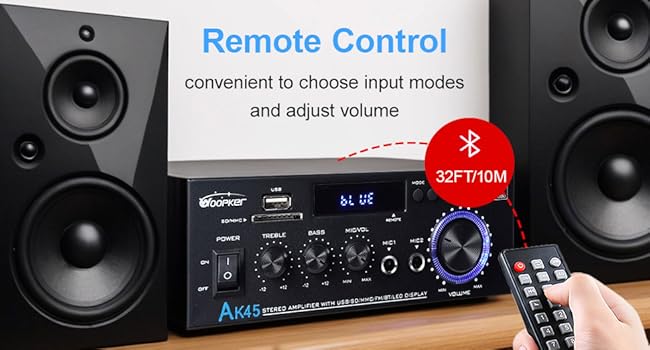
Image 5.3: The AK45 amplifier with its remote control, illustrating the convenience of remote operation for input mode selection and volume adjustments.
6. Specifications
| Feature | Specification |
|---|---|
| Model Number | AK45 |
| Brand | WOOPKER |
| Power Output | 40W + 40W (Rated), 300W + 300W (Max) |
| Bluetooth Version | 5.0 |
| Connectivity Technology | AUX, USB, SD Card, Bluetooth |
| Compatible Devices | Smartphone, Tablet, PC, TV, MP3 Player, CD Player, DVD Player, Projector |
| Audio Output Mode | Stereo (2.0 Channel) |
| Speaker Impedance | 4-16 Ohms |
| Item Weight | 9.6 ounces |
| Package Dimensions | 8.58 x 8.11 x 3.82 inches |
| Power Input | AC90-240V, 50-60Hz / DC 12V/5A |
7. Troubleshooting
If you encounter issues with your AK45 amplifier, refer to the following common problems and solutions:
- No Power:
- Ensure the power cable is securely connected to both the amplifier and a working power outlet.
- Check if the power switch on the front panel is in the 'ON' position.
- No Sound:
- Verify that speakers are correctly connected to the 'SPEAKERS OUTPUT' terminals with correct polarity.
- Check the volume level on both the amplifier and your audio source device.
- Ensure the correct input mode (Bluetooth, AUX, USB, SD, FM) is selected.
- If using AUX, ensure the audio cable is securely connected to both the amplifier's 'AUDIO INPUT' and your source device.
- Bluetooth Pairing Issues:
- Make sure the amplifier is in 'BT' mode and the 'BLUE' indicator is flashing.
- Ensure your device's Bluetooth is enabled and it's within the recommended range (30 feet/10 meters).
- Try unpairing and re-pairing the device.
- USB/SD Card Not Playing:
- Ensure the USB drive or SD card is inserted correctly.
- Check that the audio files are in a supported format.
- Try a different USB drive or SD card.
- Poor FM Radio Reception:
- Ensure the FM antenna is properly connected.
- Adjust the position of the FM antenna for better signal reception.
8. Maintenance
To ensure the longevity and optimal performance of your AK45 amplifier, follow these maintenance guidelines:
- Cleaning: Use a soft, dry cloth to clean the exterior of the amplifier. Do not use liquid cleaners or abrasive materials.
- Ventilation: Ensure the amplifier is placed in a well-ventilated area to prevent overheating. Do not block the ventilation openings.
- Storage: When not in use for extended periods, store the amplifier in a cool, dry place away from direct sunlight and extreme temperatures.
- Handling: Avoid dropping or subjecting the amplifier to strong impacts.
- Power Off: Always power off the amplifier before connecting or disconnecting any cables or accessories.
9. Warranty and Support
WOOPKER is committed to providing quality products and customer satisfaction. For any inquiries or support needs, please refer to the following:
- Customer Response: We aim to provide quick responses to customer inquiries within 24 hours.
- Return Policy: Products can be returned for an exchange or refund within 30 days of purchase.
- Technical Support: Lifetime technical customer support is available for your product.

Image 9.1: An overview of WOOPKER's customer support commitments, including response times, return policy, and technical support availability.
Related documentsAK45


Ask a question about this manual
Ask about setup, troubleshooting, compatibility, parts, safety, or missing instructions. Manuals+ will review the question and use this page’s manual context to help answer it.