
ByteTecpeak BT*2
ByteTecpeak Lightweight Foldable Electric Wheelchair BT*2 User Manual
Model: BT*2
1. Introduction and Overview
Thank you for choosing the ByteTecpeak Lightweight Foldable Electric Wheelchair BT*2. This manual provides essential information for the safe and efficient operation, maintenance, and care of your new electric wheelchair. Please read this manual thoroughly before initial use and keep it for future reference.
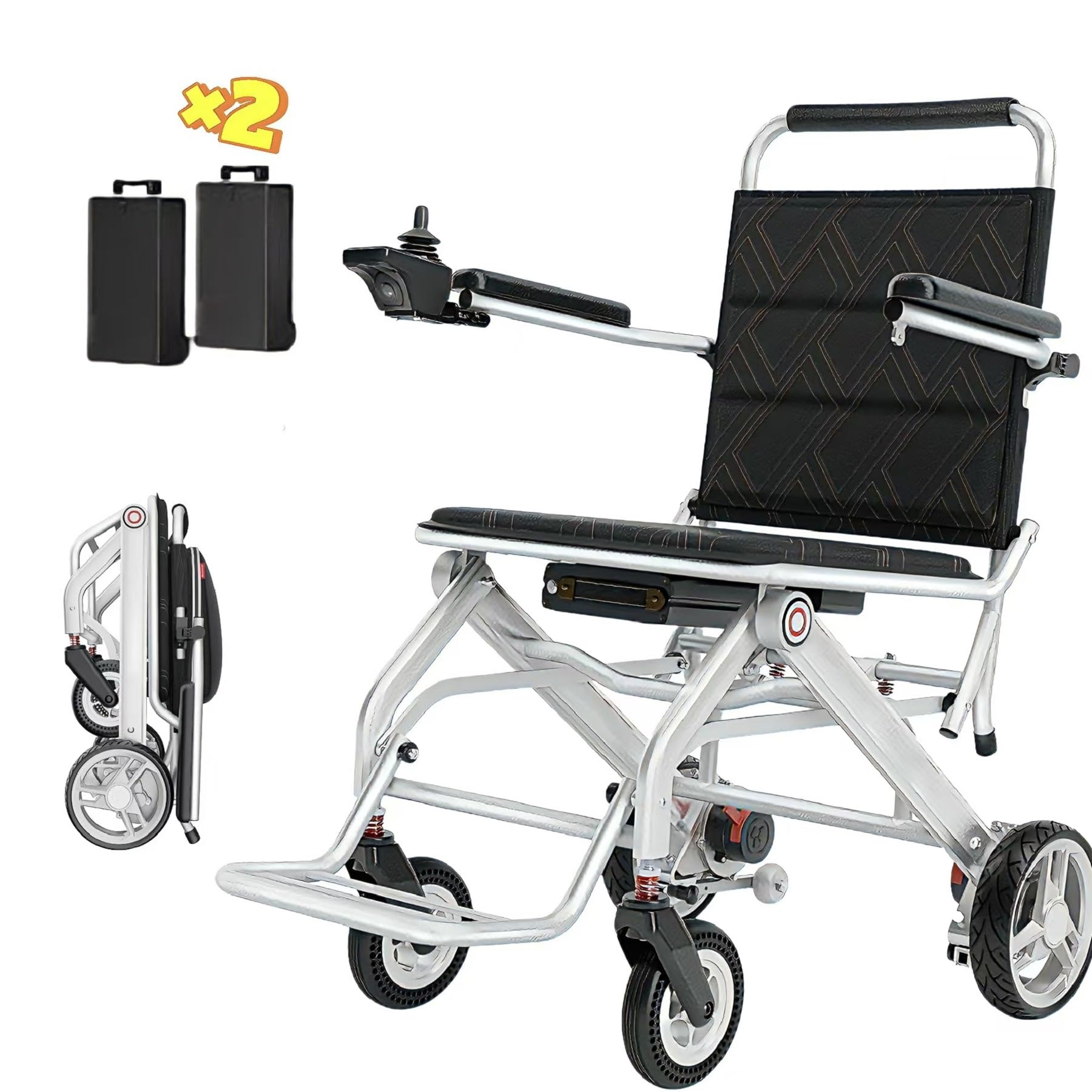
Image: The ByteTecpeak Lightweight Foldable Electric Wheelchair, showcasing its design.
Key Features:
- Powerful Dual Motors: Equipped with two 150W motors for efficient and strong propulsion.
- Long Battery Life: Two 12 Ah batteries provide an impressive range of up to 40 km.
- Ultra-Lightweight Design: Aerospace magnesium aluminum frame weighs only 9.6 kg (frame only).
- Compact and Portable: Folds easily to 65 x 25 cm for convenient transport and storage.
- Enhanced Safety: Features an EABS electromagnetic braking system and robust 6 and 8-inch wheels.
2. Safety Information
Your safety is paramount. Always adhere to the following guidelines to prevent injury or damage to the wheelchair.
- Always ensure the wheelchair is fully unfolded and locked before use.
- Do not exceed the maximum weight capacity of 150 kg.
- Avoid operating the wheelchair on excessively steep inclines or uneven terrain beyond its capabilities.
- Regularly check the brakes, tires, and battery for proper function.
- Keep hands and clothing clear of moving parts.
- Always use the seat belt provided.
- In case of power failure, the intelligent electromagnetic brake system will prevent the wheelchair from rolling.

Image: Illustration of the intelligent electromagnetic brake system preventing rolling on an incline and the anti-tip rear wheels for safer uphill driving.
3. Package Contents
Upon unpacking, please verify that all items listed below are present and undamaged:
- Electric Wheelchair (main unit)
- Joystick Controller
- 2 x 12 Ah Lithium Batteries
- Battery Charger
- User Manual (this document)
- Tool Kit (if included)
4. Setup and Assembly
Follow these steps to set up your ByteTecpeak electric wheelchair.
4.1 Unfolding the Wheelchair
- Place the folded wheelchair on a flat, stable surface.
- Gently pull the backrest upwards until the frame locks into place.
- Push down on the seat until it is fully flat and secured.
- Lower the footrest into position.
- Ensure all locking mechanisms are engaged before use.

Image: The wheelchair in its open and folded states, showing dimensions (Open: 85cm L x 51cm W x 67cm H; Folded: 75cm H x 25cm W).
4.2 Battery Installation and Charging
The wheelchair comes with two removable 12 Ah lithium batteries. Ensure they are fully charged before first use.
- Locate the battery compartment under the seat.
- Slide the battery into the compartment until it clicks securely into place.
- To charge, connect the charger to the charging port on the joystick or directly to the battery.
- A full charge typically takes approximately 4 hours.
- The battery can be easily removed for off-board charging.

Image: A hand demonstrating the easy removal of the battery from under the seat for convenient charging.

Image: Diagram showing multiple charging options: direct charging of the battery and direct charging via the remote control/joystick.
5. Operating Instructions
Familiarize yourself with the joystick controller and basic operation before driving.
5.1 Joystick Controller Overview

Image: Detailed diagram of the joystick controller, showing buttons for power, speed adjustment, battery level indicator, 360-degree joystick, light switch (short press), and horn button (long press).
- Power Button: Turns the wheelchair on/off.
- Speed Adjustment: Use '+' and '-' buttons to increase or decrease speed.
- Battery Level Indicator: Displays current battery charge.
- 360° Joystick: Controls direction and movement. Push forward to move forward, pull back to reverse, left to turn left, right to turn right.
- Light Switch: Short press to activate/deactivate lights (if applicable).
- Horn Button: Long press to sound the horn.
5.2 Driving the Wheelchair
- Ensure you are seated comfortably and the seat belt is fastened.
- Turn on the power using the power button on the joystick.
- Adjust the speed to a comfortable level using the '+' and '-' buttons. Start with a low speed.
- Gently push the joystick in the desired direction. The wheelchair will move smoothly.
- To stop, release the joystick. The electromagnetic brakes will engage automatically.
- Practice in an open, safe area before operating in crowded or challenging environments.
5.3 Navigating Different Terrains
The ByteTecpeak BT*2 is designed for various terrains, but caution is advised.

Image: Examples of road conditions the wheelchair can handle, including speed bumps, gravel roads, dirt roads, and grass.
- Smooth Surfaces: Ideal for indoor and paved outdoor areas.
- Gravel/Dirt Roads: The robust wheels and powerful motors allow for navigation on light gravel and dirt paths. Drive slowly and cautiously.
- Grass: Can be driven on flat, dry grass. Avoid wet or muddy areas.
- Inclines: The anti-tip rear wheels provide stability on gentle slopes. Always approach inclines directly, not at an angle.
6. Maintenance
Regular maintenance ensures the longevity and safe operation of your wheelchair.
6.1 Cleaning
- Wipe down the frame and seat with a damp cloth and mild detergent.
- Avoid using abrasive cleaners or solvents.
- Do not spray water directly onto electrical components.
6.2 Battery Care
- Charge batteries regularly, even if the wheelchair is not in frequent use.
- Store batteries in a cool, dry place.
- Do not expose batteries to extreme temperatures.
6.3 Wheel and Tire Inspection
The wheelchair is equipped with puncture-proof solid tires.

Image: Close-up of the puncture-proof solid tires, highlighting their durability, wear resistance, and strong grip.
- Regularly check wheels for any signs of damage or wear.
- Ensure all wheel bolts are tight.
- Clean any debris from the wheels and axles.
6.4 General Inspection
- Check all nuts, bolts, and fasteners for tightness.
- Inspect the frame for any cracks or damage.
- Ensure the joystick and all controls are functioning correctly.
7. Troubleshooting
This section addresses common issues you might encounter.
| Problem | Possible Cause | Solution |
|---|---|---|
| Wheelchair does not turn on. | Battery not installed correctly, battery discharged, power button not pressed. | Ensure battery is securely installed. Charge the battery. Press the power button firmly. |
| Wheelchair moves slowly or inconsistently. | Low battery charge, speed setting too low, motor issue. | Charge the battery. Increase speed setting on the joystick. Contact support if issue persists. |
| Brakes are not engaging properly. | Brake system malfunction. | Immediately stop using the wheelchair and contact customer support. |
| Unusual noises during operation. | Loose components, debris in wheels/motors. | Inspect for loose parts and tighten. Clean wheels and motors. Contact support if noise continues. |
If you encounter a problem not listed here or if the suggested solutions do not resolve the issue, please contact ByteTecpeak customer support.
8. Specifications
Detailed technical specifications for the ByteTecpeak BT*2 Electric Wheelchair.

Image: Labeled diagram of the wheelchair components, including push handle, headrest, armrest, control panel (joystick), battery, footrests, swivel wheels, drive wheels, and anti-tip wheels.
- Model Number: BT*2
- Manufacturer: ByteTecpeak
- Product Dimensions (L x W x H): 85 x 51 x 87 cm (Open)
- Folded Dimensions: Approximately 65 x 25 x 75 cm
- Item Weight (Frame only): 9.6 kg
- Total Item Weight: 13.5 kg
- Frame Material: Aerospace Magnesium Aluminum Alloy
- Maximum Weight Capacity: 150 kg
- Motors: 2 x 150W Powerful Dual Motors
- Batteries: 2 x 12 Ah Lithium Batteries
- Maximum Range: Up to 40 km
- Charging Time: Approximately 4 hours
- Maximum Speed: 6 km/h
- Wheel Size: 6 inches (front), 8 inches (rear)
- Wheel Type: Puncture-proof solid rubber
- Brake Type: EABS Electromagnetic Brake System
- Turning Radius: 51 cm
- Special Features: Compact folding mechanism, airline compatibility, adjustable handle type.
9. Warranty and Support
ByteTecpeak is committed to providing high-quality products and excellent customer service.
9.1 Warranty Information
Please refer to the warranty card included with your purchase for specific warranty terms and conditions. Generally, ByteTecpeak products come with a manufacturer's warranty covering defects in materials and workmanship under normal use.
9.2 Customer Support
For any questions, technical assistance, or warranty claims, please contact ByteTecpeak customer support. Our team is available to assist you.
- Email: support@bytetecpeak.com
- Phone: +1-XXX-XXX-XXXX
- Website: Visit ByteTecpeak Store on Amazon

Image: Customer support representatives ready to assist with inquiries.
We value your satisfaction and are dedicated to ensuring a positive experience with your ByteTecpeak electric wheelchair.
Ask a question about this manual
Ask about setup, troubleshooting, compatibility, parts, safety, or missing instructions. Manuals+ will review the question and use this page’s manual context to help answer it.