
1. Product Overview
The Brightever Under Cabinet Lights (Model YS-CGD35-02) are 14-inch rechargeable, battery-operated lights featuring motion sensing, dimmable settings, and multiple color temperatures. Designed for indoor use, these lights provide versatile illumination for various spaces.

Image: A 3-pack of Brightever Under Cabinet Lights, shown with their charging cables and visual examples of the three available color temperatures: warm white, natural white, and daylight white.
2. Setup
2.1. What's in the Box
- Brightever Under Cabinet Lights (3 units)
- USB-C Charging Cables (3 units)
- Adhesive Magnetic Iron Sheets (6 units)
- Mounting Hardware (screws and expansion grains)
- Instruction Manual
2.2. Charging the Lights
Before initial use, fully charge each light. The lights feature a built-in 3200mAh rechargeable battery. Use the provided USB-C charging cables for optimal performance. A red indicator light signifies charging, and it turns green when fully charged.
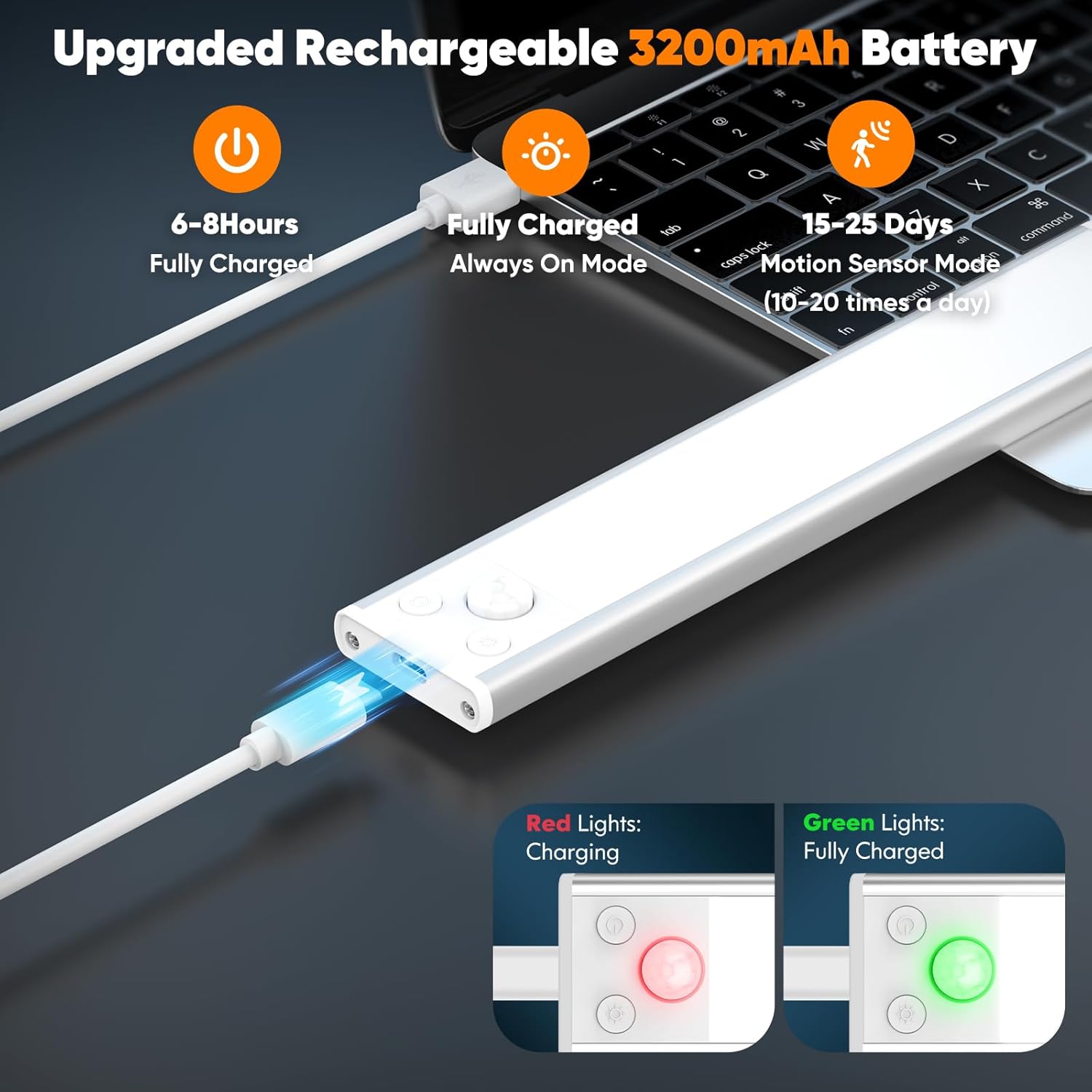
Image: A close-up view of the light's USB-C charging port, illustrating the charging process with a red light indicating charging and a green light indicating a full charge.
Important Tip: Please charge these under cabinet lights with the provided cables. Other cables may not be compatible and could affect battery performance. If not in use, charge the battery every 90 days to maintain its health.
2.3. Installation Methods
The Brightever Under Cabinet Lights offer three installation methods to suit various surfaces and preferences:
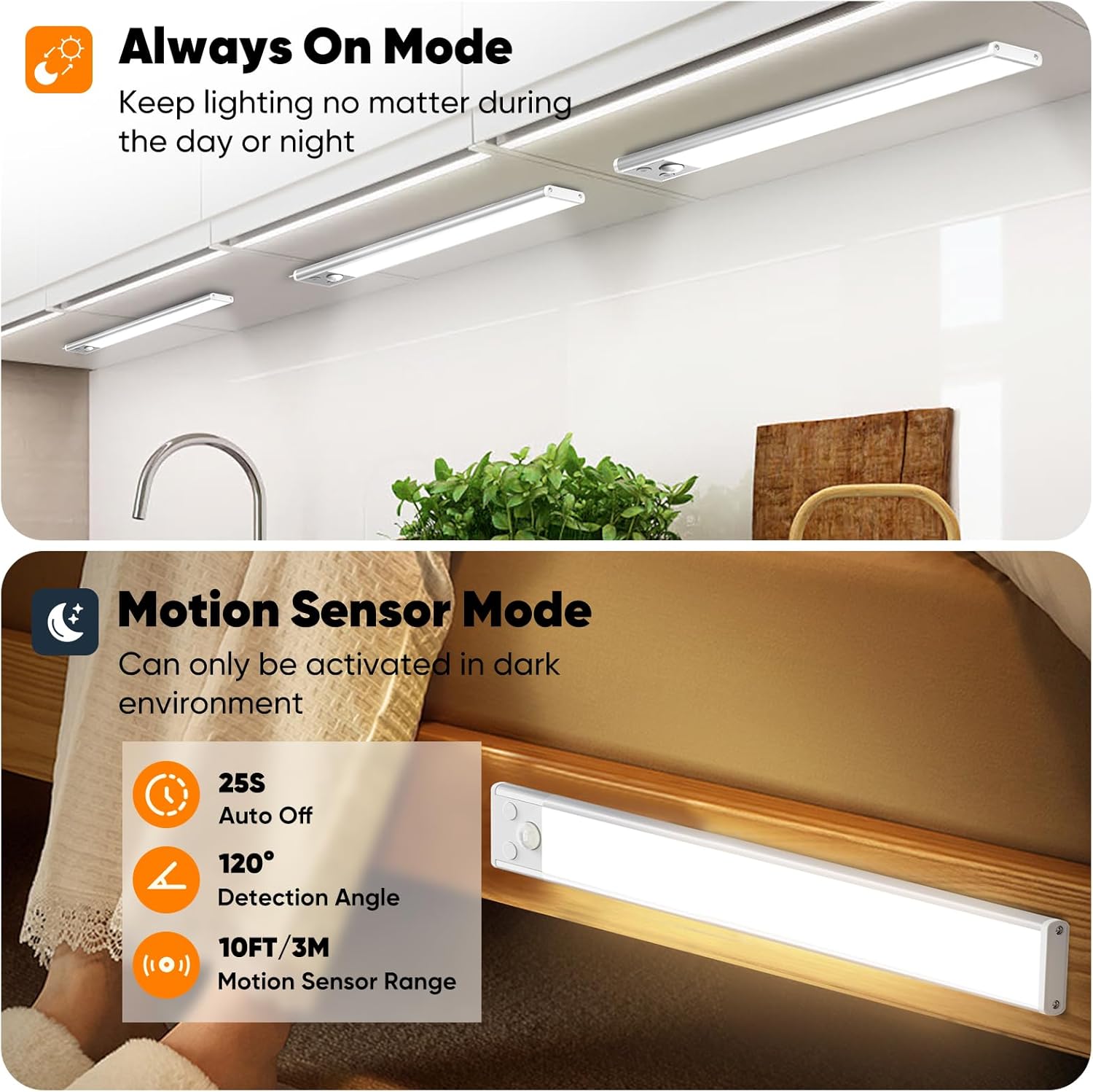
Image: A visual guide demonstrating the three installation methods for the under cabinet lights: direct magnetic attachment, using adhesive metal plates, and securing with screws.
- Method 1: Direct Magnetic Attachment
The lights have built-in magnets, allowing them to stick directly to any iron object or magnetic surface. Simply place the light onto the desired magnetic area.
- Method 2: Adhesive Metal Plate
For non-magnetic surfaces, use the included adhesive magnetic iron sheets. Clean the installation area, peel off the adhesive paper from the metal sheet, stick it to the desired location, and then attach the light magnetically to the sheet.
- Method 3: Drilling Holes
For a more permanent installation, use the included mounting hardware. Drill two holes with proper spacing at the mounting place (ensure spacing does not exceed the lamp body). Plug in the expansion grains, fix the adhesive iron piece with screws, and then attach the cabinet light to it.
Video: This video demonstrates the various installation methods for the Brightever Under Cabinet Lights, including magnetic attachment and using adhesive plates.
3. Operating the Lights
3.1. Control Buttons
Each light features a multi-function key and a switch button for easy control.
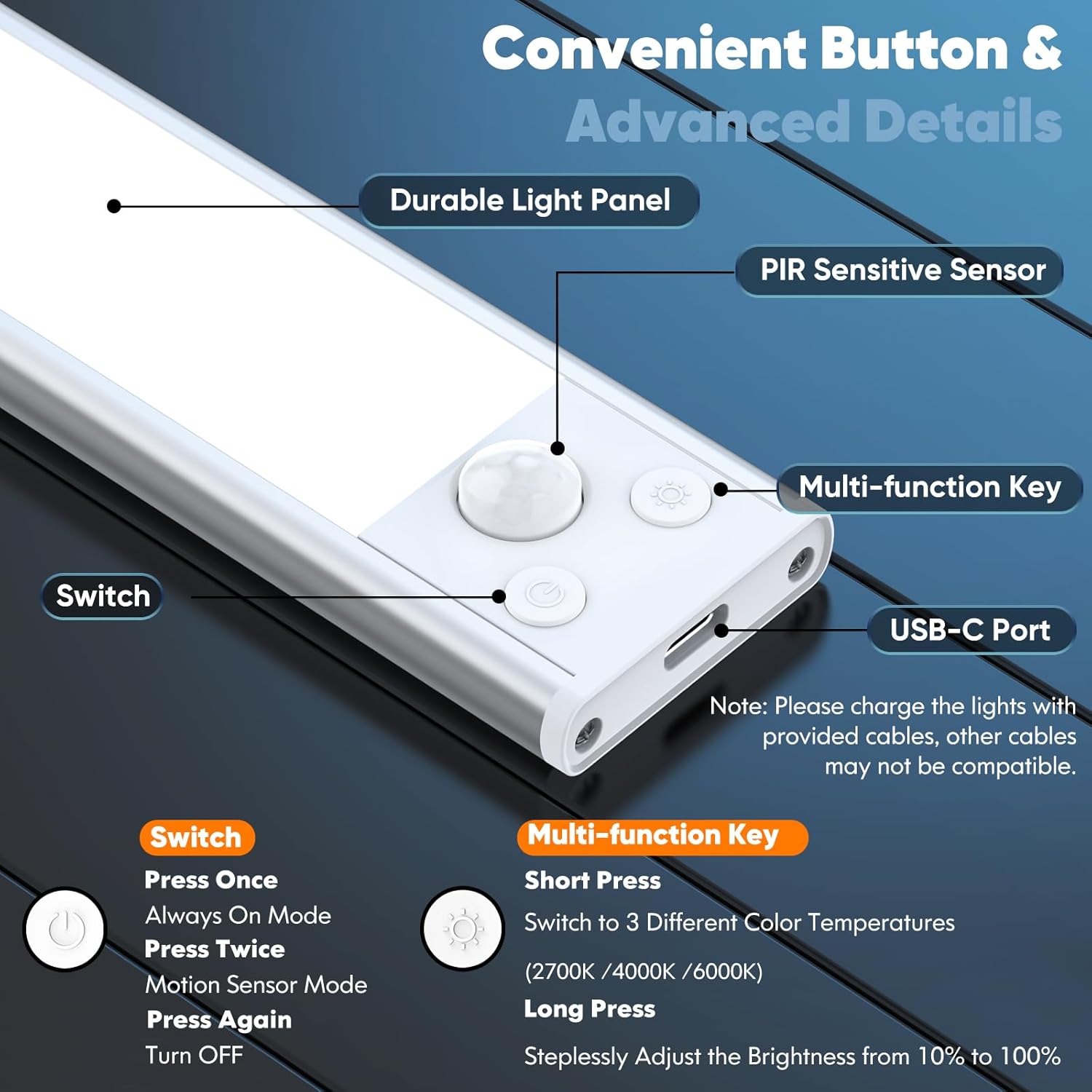
Image: A detailed view of the control panel on the light, highlighting the switch button, PIR motion sensor, multi-function key for color and brightness, and the USB-C charging port.
3.2. Working Modes
Control the working modes using the ON/OFF switch button:
- Always-On Mode: Short press the switch button once to activate this mode. The light will remain on continuously, regardless of ambient light or motion. This mode can last 5-80 hours depending on brightness settings.
- Motion Sensor Mode: Press the switch button again to enter this mode. The light will automatically turn on when it detects motion within a 120° detection angle and a 10ft (3m) range in dark environments. It will turn off after 25 seconds of no motion. This mode can last up to 25 days if sensing 10-20 times a day.
- Turn Off: Press the switch button a third time to turn the light off.
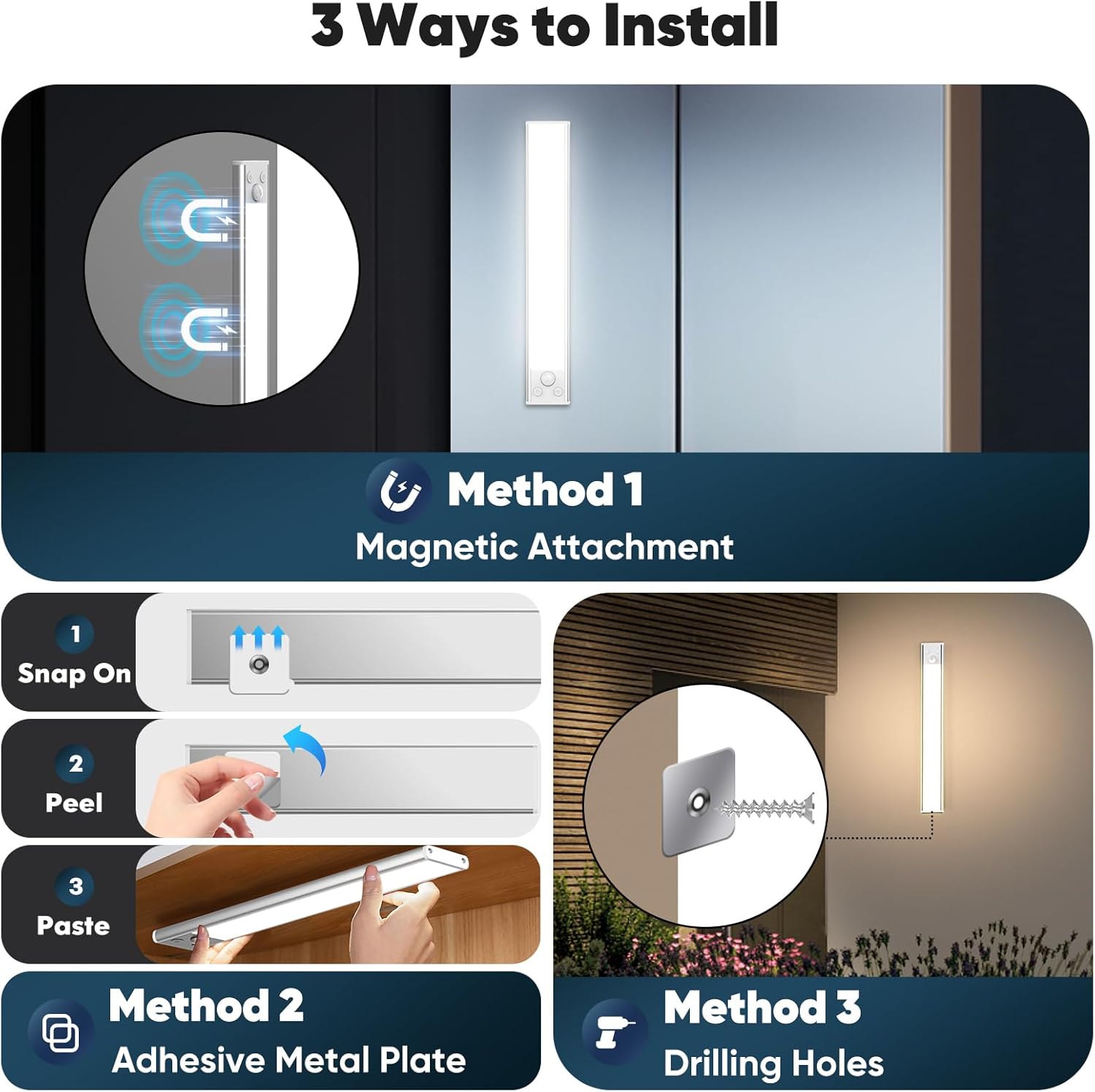
Image: A visual comparison of the Always-On mode, providing continuous illumination, and the Motion Sensor mode, which activates in dark environments upon detecting motion within a 120° angle and 10ft range.
Video: This video demonstrates the motion sensor functionality and various lighting modes of the Brightever Under Cabinet Lights.
3.3. Color Temperatures & Stepless Dimming
The multi-function key allows you to adjust the light's appearance:
- Color Temperature: Short press the multi-function key to cycle through three color temperatures: Warm White (2700K), Natural Light (4000K), and Daylight White (6000K).
- Stepless Dimming: Long press the multi-function key to smoothly adjust the brightness from 10% to 100%. Release the button when the desired brightness is achieved.
Memory Function: The lights are equipped with a memory function, retaining the last selected color temperature and brightness setting even after being turned off and on.

Image: This image displays the three distinct color temperatures (2700K Warm White, 4000K Natural White, 6000K Daylight White) and demonstrates the stepless dimming capability from 10% to 100% brightness.
4. Maintenance
- Cleaning: Wipe the lights with a soft, dry cloth. Avoid using abrasive cleaners or solvents.
- Battery Care: To prolong battery life, fully charge the lights every 90 days if they are not in regular use.
- Storage: Store the lights in a cool, dry place when not in use for extended periods.
5. Troubleshooting
- Light not turning on: Ensure the light is fully charged. Check the selected working mode (Always-On or Motion Sensor).
- Motion sensor not working effectively: Ensure the light is in Motion Sensor Mode. The sensor is designed to activate in dark environments; it may not activate in well-lit areas. Avoid placing two lights' sensors too close to each other, as this may cause malfunction. Ensure there are no obstructions blocking the sensor's detection range (120° angle, 10ft/3m).
- Battery draining quickly: Ensure the light is not continuously in Always-On mode if motion sensing is desired. Reduce brightness if extended battery life is needed.
- Charging issues: Use only the provided USB-C charging cables. Ensure the cable is securely connected to both the light and a power source.
6. Specifications
| Feature | Specification |
|---|---|
| Brand | Brightever |
| Model Name | YS-CGD35-02 |
| Product Dimensions | 13.78"L x 1.57"W x 0.39"H |
| Material | Acrylic, Aluminum, Plastic |
| Power Source | Battery Powered (3200mAh) |
| Light Source Type | LED (108 LEDs per light) |
| Brightness | Up to 800 Lumens |
| Color Temperatures | 2700K (Warm White), 4000K (Natural Light), 6000K (Daylight White) |
| Control Method | Touch / Push Button |
| Special Features | Adjustable Color Temperature, Cordless, Dimmable, Memory Function, Motion Sensor |
| Installation Type | Surface Mount (Magnetic, Adhesive, Screws) |
| Indoor/Outdoor Usage | Indoor |
7. Warranty and Support
Brightever products are designed for quality and reliability. For warranty information, product support, or to explore other Brightever products, please visit the official Brightever store on Amazon:
For specific inquiries or assistance, please refer to the warranty/explanation sheet included in your product packaging or contact Brightever customer service through the Amazon platform.