Introduction
Thank you for choosing the anysun SC516 3-in-1 Christmas Projector. This device is designed to enhance your holiday and event decorations with a variety of dynamic light patterns and effects. Please read this manual thoroughly before operation to ensure proper setup, safe use, and optimal performance.
Product Overview
Package Contents
- anysun SC516 3-in-1 Projector Unit
- 20 Customized Slides (160 patterns, 14 themes)
- Remote Controller
- Ground Stake
- User Guideline
Key Features
- 3-in-1 Projection: Combines 160 HD patterns, green firefly lights, and ocean wave lighting effects.
- Extensive Pattern Selection: Includes 20 slides with 160 unique patterns covering 14 holiday themes (Christmas, Halloween, Thanksgiving, Easter, Valentine's Day, New Year, Birthday, Independence Day, Carnival, Ramadan, St. Patrick's Day, Planet Decor, Party).
- Versatile Installation: Supports ground staking, flat surface placement, and wall mounting for both indoor and outdoor use.
- Durable and Weatherproof: Constructed from ABS plastic with an IP65 waterproof rating, designed to withstand temperatures from -31°F to 104°F.
- Remote Control with Timer: Features a remote for adjusting projection mode, brightness, speed, and a convenient auto-off timer (2H/4H/6H).
- Enhanced Brightness: Upgraded projection technology provides 60% brighter and clearer patterns.

The anysun SC516 projector unit, remote control, and ground stake, showcasing various holiday projection patterns.
Setup Instructions
1. Mounting Options
The projector offers three primary mounting methods:
- Ground Stake: For outdoor use, attach the ground stake to the projector base and insert it firmly into the soil.
- Flat Surface Stand: For indoor or patio use, attach the round base stand to the projector. Place it on a stable, flat surface.
- Wall Mount: Use the provided screws and mounting plate to securely attach the projector to a wall. Ensure the mounting surface is sturdy enough to support the unit.
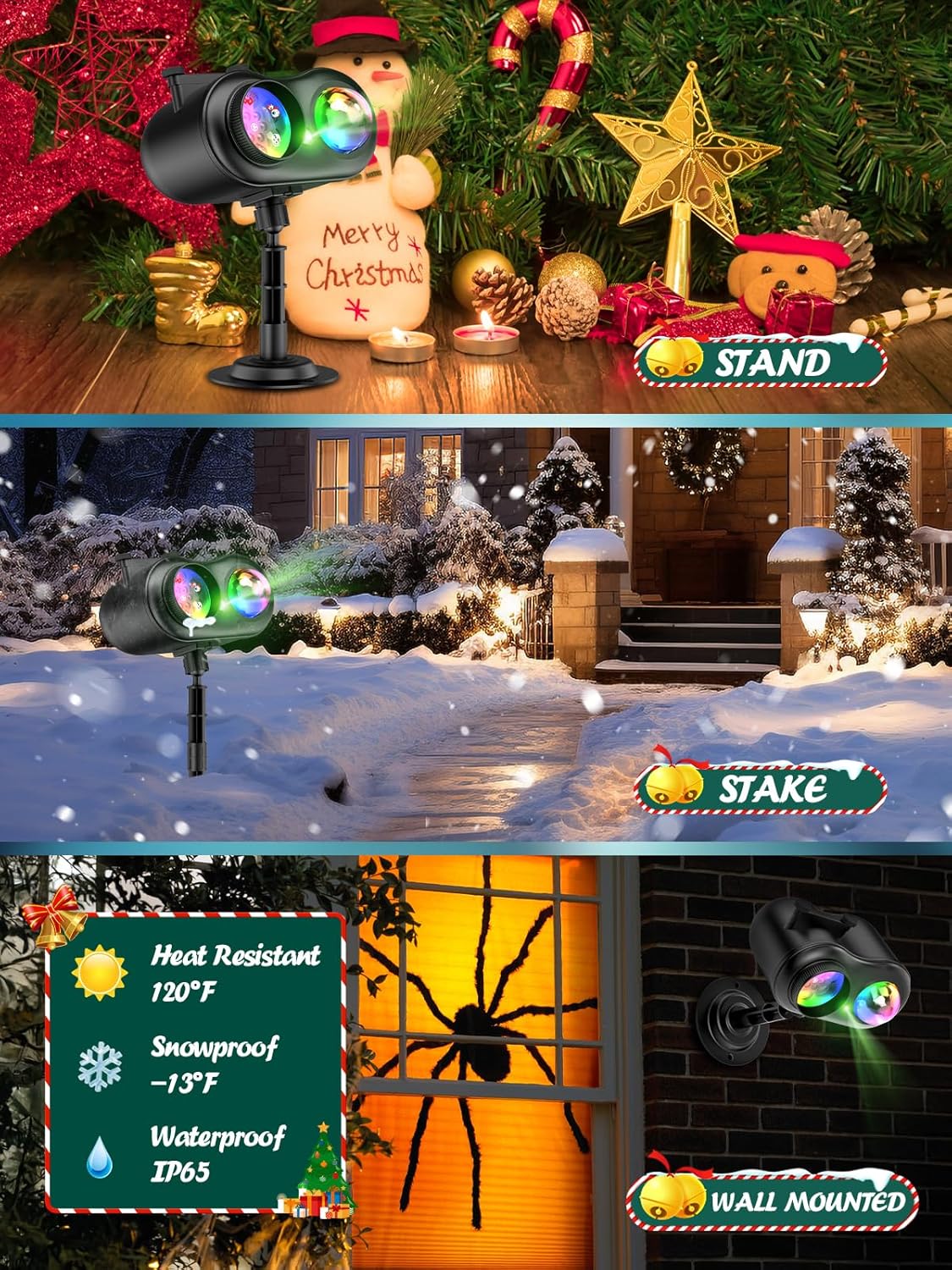
Illustrates the versatile mounting options for the projector: a flat stand for indoor use, a ground stake for outdoor garden placement, and a wall-mounted bracket. Also highlights its weather-resistant features.
2. Slide Installation
To change or install projection slides:
- Unscrew the two knobs on the side of the projector head.
- Carefully remove the cover.
- Insert the desired slide into the carriage, ensuring it faces the correct direction (refer to the user manual for specific orientation).
- Replace the cover and tighten the two knobs securely.

A visual representation of the 20 interchangeable slides, each containing multiple patterns, offering a total of 160 distinct designs for 14 different holiday themes.
3. Power Connection
Connect the power adapter to the projector and then plug it into a standard electrical outlet. Ensure the outlet is suitable for outdoor use if the projector is placed outside.
Operating Instructions
1. Remote Control Functions
The included remote control allows for convenient operation of all projector functions:
- ON/OFF: Power on/off the projector.
- F+/F-: Adjust the speed of the firefly light effect.
- LED ON/OFF: Turn the LED projection patterns on/off.
- W, R, G, B: Control individual colors (White, Red, Green, Blue) of the ocean wave light.
- M+/M-: Adjust the speed of the ocean wave light effect.
- 2H/4H/6H: Set the auto-off timer for 2, 4, or 6 hours.
- CYCLIC 1/2: Cycle through different color combinations or projection modes.
2. Adjusting Projection
Adjust the projection angle by loosening the adjustment knob on the support bracket, positioning the projector as desired, and then tightening the knob. For optimal clarity, ensure the projection surface is within the recommended distance (typically 10-33 feet).

Demonstrates the extensive projection coverage area of the anysun SC516 projector on a house, indicating optimal distances for various square footage.
3. Selecting Patterns and Effects
The projector offers a wide array of patterns and effects. Use the remote control to switch between different slides, activate the firefly light, or select various ocean wave colors and speeds. Experiment with combinations to create unique light shows.

A collage of various holiday projections, demonstrating the projector's versatility for events like Halloween, Christmas, Thanksgiving, Valentine's Day, birthdays, and New Year celebrations.
Official product video demonstrating Christmas projection patterns and effects from the anysun SC516 projector.
Official product video highlighting the dual-holiday functionality of the anysun SC516 projector, displaying both spooky Halloween and festive Christmas patterns and lighting effects.
Official product video showcasing various Christmas holiday projection scenes available with the anysun SC516 projector.
Maintenance
To ensure the longevity and optimal performance of your projector:
- Cleaning: Regularly wipe the lens and exterior with a soft, dry cloth. Avoid using abrasive cleaners or solvents.
- Storage: When not in use, store the projector in a cool, dry place away from direct sunlight and extreme temperatures.
- Slide Care: Handle slides carefully to avoid scratches. Store them in their protective packaging.
Troubleshooting
- No Projection: Ensure the power adapter is securely connected and plugged into a working outlet. Check if the projector is powered on via the remote.
- Dim or Unclear Projection: Verify the projection distance is within the optimal range (10-33 feet). Clean the lens if it appears dirty. Adjust the focus if applicable.
- Patterns Not Changing: Ensure the slides are correctly inserted. Check the remote control battery and ensure it's pointed directly at the projector.
- Remote Not Responding: Replace the remote control battery. Ensure there are no obstructions between the remote and the projector.
Specifications
| Model Number | SC516 |
| Material | Acrylonitrile Butadiene Styrene (ABS) |
| Light Source Type | LED (RGBW) |
| Power Source | Corded Electric |
| Waterproof Rating | IP65 |
| Operating Temperature | -31°F to 104°F |
| Product Dimensions | 6"L x 5"W x 6"H |
| Item Weight | 1.9 pounds |
| Number of Slides | 20 |
| Number of Patterns | 160 |
| Number of Themes | 14 |
Warranty and Support
For warranty information or technical support, please refer to the contact details provided in your product packaging or visit the official anysun website. Keep your purchase receipt for any warranty claims.


