
1. Introduction
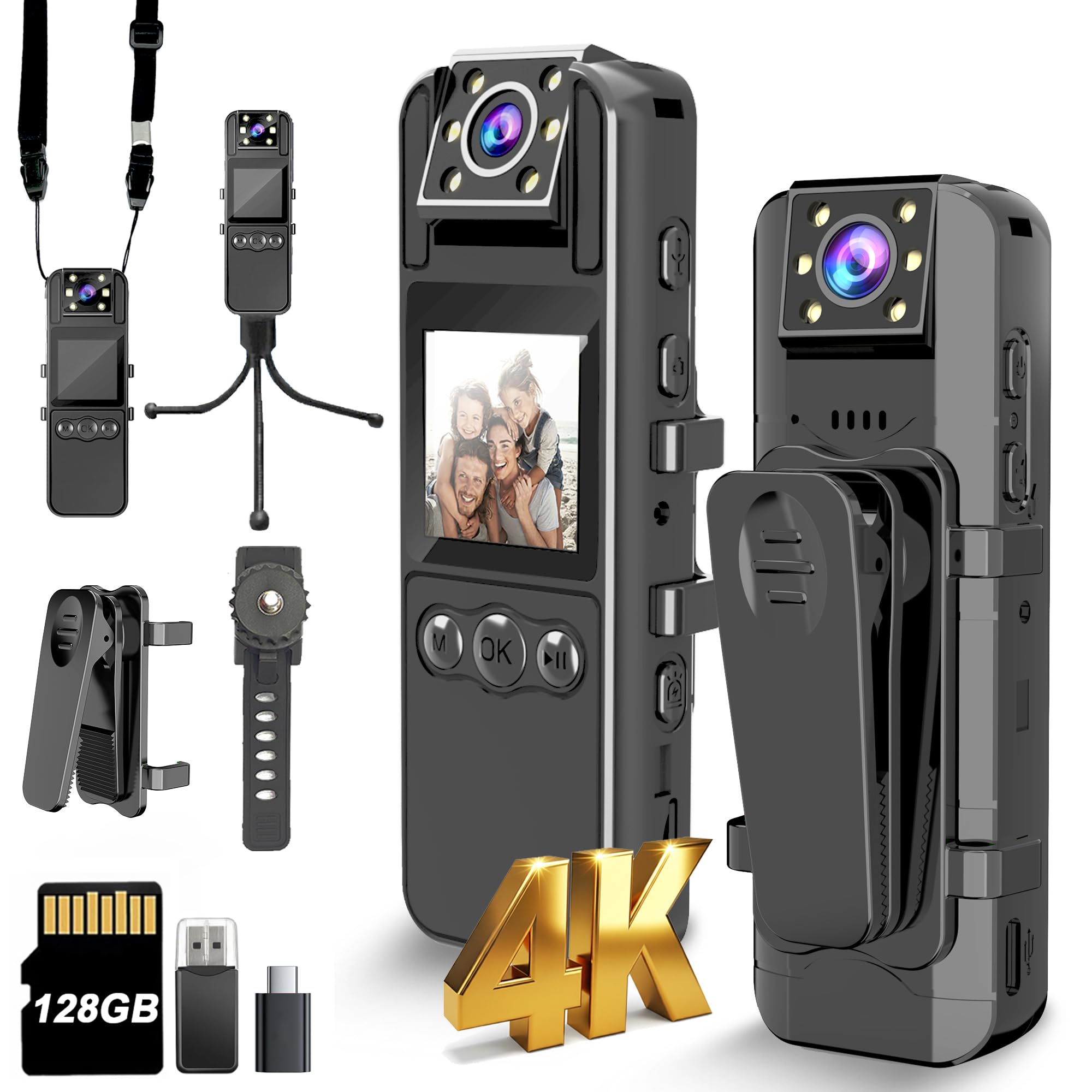
This manual provides detailed instructions for the operation and maintenance of your KSADBOSSBO H82 4K Body Camera. Designed for reliable audio and video recording, this device features an Ultra 4K resolution, a 180° rotating lens, 6-hour battery life, IR Cut auto night vision, and 128GB of internal storage. Please read this manual thoroughly before using the product to ensure proper function and longevity.
2. What's in the Box
- 4K Body Camera x 1
- Removable Clip x 1
- Lanyard + Camera Holder x 1
- Type-C Cable x 1
- User Manual x 1
- 1-year Guarantee Card x 1
3. Product Features
- 4K Recording with LCD Screen: Capture high-resolution video and replay footage instantly on the integrated high-quality LED screen. The screen supports inverted display mode and allows for quick settings adjustments.
- Ultra 4K Pixel Sensor: Equipped with a 4K sensor and high-quality optical glass, ensuring clear and accurate video recording. H.264 format optimizes storage efficiency.
- 180° Rotatable Lens & 120° Wide Angle: Adjust the lens direction to capture the desired angle, preventing missed evidence.
- Motion Detection: Conserves battery and memory space by recording only when movement is detected.
- Auto Night Vision: Features 6 IR lenses and IR-Cut technology for automatic night vision recording in low-light environments.
- Extended Battery Life & Storage: Built-in 1600mAh rechargeable battery provides 6-7 hours of continuous recording. Supports 24/7 recording when connected to a power bank. Includes a built-in 128GB card for extensive storage.
- Multiple Playback Options: View recordings directly on the camera screen, via computer with the provided Type-C cable/card reader, or through a mobile phone using a Type-C cable/adapter.
4. Setup
- Charging the Device: Connect the provided Type-C cable to the camera's USB port and to a power source. The battery indicator on the screen will show charging status.
- Power On/Off: Locate the power button on the side of the device. Press and hold to power on or off.
- Attaching Accessories: The removable clip can be attached to the back of the camera for various mounting options. The lanyard can be attached for neck-wearing.
- Initial Settings: Upon first use, navigate the menu to set the correct date and time for accurate timestamps on recordings.
5. Operating Instructions
- Video Recording: Press the dedicated video recording button to start/stop 4K or 1080P video capture.
- Audio Recording: Press the dedicated audio recording button to start/stop audio-only capture.
- Photo Capture: Press the dedicated photo button to take still images.
- Night Vision: The camera automatically activates night vision in low-light conditions using its IR-Cut technology. This can also be manually adjusted in the settings.
- Motion Detection: Enable motion detection in the menu settings to automatically start recording when movement is detected within the camera's field of view.
- Lens Rotation: Manually rotate the lens up to 180 degrees to adjust the recording angle as needed.
- Menu Navigation: Use the navigation buttons below the screen to access settings such as resolution, photo size, video length, date stamp, and stealth mode.
- Playback: Access recorded files through the camera's menu for on-device playback. For larger viewing, connect the camera to a computer or compatible mobile phone.
6. Media Integration Examples
Product Images


Official Product Videos
This video demonstrates the user experience of the KSADBOSSBO H82 4K Body Camera, highlighting its ease of use and various functions.
A detailed video showcasing the user experience and providing a preview of the KSADBOSSBO H82 4K Body Camera's capabilities.
This video offers quick guidance on how to use the KSADBOSSBO H82 4K Body Camera, covering essential operations.
A short instructional video demonstrating the correct method to attach the lanyard to the KSADBOSSBO H82 4K Body Camera.
This video provides step-by-step instructions on how to delete recorded files from the album on the KSADBOSSBO H82 4K Body Camera.
7. Maintenance
- Cleaning: Use a soft, dry cloth to clean the camera lens and body. Avoid abrasive materials or harsh chemicals.
- Storage: Store the camera in a cool, dry place away from direct sunlight and extreme temperatures.
- Battery Care: For optimal battery life, avoid fully discharging the battery frequently. Charge the device regularly, even when not in use for extended periods.
- Firmware Updates: Check the manufacturer's website periodically for any available firmware updates to ensure optimal performance and new features.
8. Troubleshooting
- Device Not Powering On: Ensure the battery is charged. Connect to a power source and attempt to power on again. If the issue persists, contact support.
- Recording Issues: Check if the internal storage is full. Ensure the lens is clean and unobstructed. Verify that the correct recording mode is selected.
- Playback Problems: If files are not playing back correctly on a computer or phone, ensure the device is connected properly and the necessary codecs are installed. Try playing on the camera's screen.
- Night Vision Not Activating: Check ambient light conditions. Ensure auto night vision is enabled in settings, or manually activate it.
9. Specifications
| Feature | Detail |
|---|---|
| Brand Name | KSADBOSSBO |
| Item Weight | 8.1 ounces |
| Product Dimensions | 0.7 x 1.25 x 4.1 inches |
| Item Model Number | H82 4K Body Camera |
| Batteries | 1 Lithium Ion batteries required (included) |
| Color Name | black |
| Special Features | 6pcs IR Lens for IR Cut Night Vision |
| Photo Sensor Technology | CMOS |
| Video Capture Resolution | 4K |
| Maximum Focal Length | 105 |
| Flash Memory Type | Micro SD |
| Video Capture Format | MOV |
| Supported Audio Format | MOV |
| Screen Size | 1.39 Inches |
| Connectivity Technology | USB |
10. Warranty and Support
The KSADBOSSBO H82 4K Body Camera comes with a 1-year guarantee from the manufacturer. For any product quality problems or missing accessories, please contact the KSADBOSSBO customer support team via email through Amazon. They aim to respond within 24 hours and are glad to offer replacements or refunds as applicable.
Seller: KSADBOSSBO CAMERA


