1. Introduction
This manual provides comprehensive instructions for the installation, operation, and maintenance of your NU Aqua Tankless Reverse Osmosis (RO) System. This advanced 4-stage UV filtration system is designed to provide high-quality purified water directly from your tap. Please read this manual thoroughly before installation and retain it for future reference.

Image 1.1: The NU Aqua Tankless Reverse Osmosis System, including the main unit, external UV filter, and smart faucet.
2. Safety Information
Observe the following safety precautions to prevent injury and damage to the system:
- Ensure all connections are secure to prevent leaks.
- Do not expose the system to freezing temperatures.
- Use only genuine NU Aqua replacement filters.
- Disconnect power before performing any maintenance or filter changes.
- The system operates under water pressure; turn off the water supply before any disconnections.
3. Product Features and Components
The NU Aqua Tankless RO System offers several key features for efficient water purification:
- Space-Saving Tankless Design: Compact unit fits easily under most sinks, eliminating the need for a bulky storage tank.
- 600 GPD Fast Flow: Provides up to 600 gallons per day of purified water, ensuring quick access without waiting.
- Smart LED Faucet: Features a color-changing LED indicator for filter status and water quality.
- 4-Stage Filtration with UV: Effectively removes up to 99% of contaminants, including a UV bulb for harmful particles.
- 2:1 Pure to Waste Water Ratio: Highly efficient, producing more pure water and less waste compared to traditional RO systems.

Image 3.1: Overview of the system's primary features.
3.1 Filtration Stages
The system utilizes a multi-stage filtration process:
- PP + CB Carbon Filter (Stage 1): Removes sediment, rust, chlorine, volatile organic compounds (VOCs), unpleasant tastes, and odors.
- Reverse Osmosis (RO) Membrane (Stage 2): Filters out PFAS, atrazine, salts, and heavy metals such as copper, chromium, and lead.
- UV Bulb (Stage 3, integrated): Removes harmful particles like bacteria and viruses.

Image 3.2: Detailed view of the 6-Stage PP + CB Filter, highlighting its function in removing suspended particles and improving water taste.
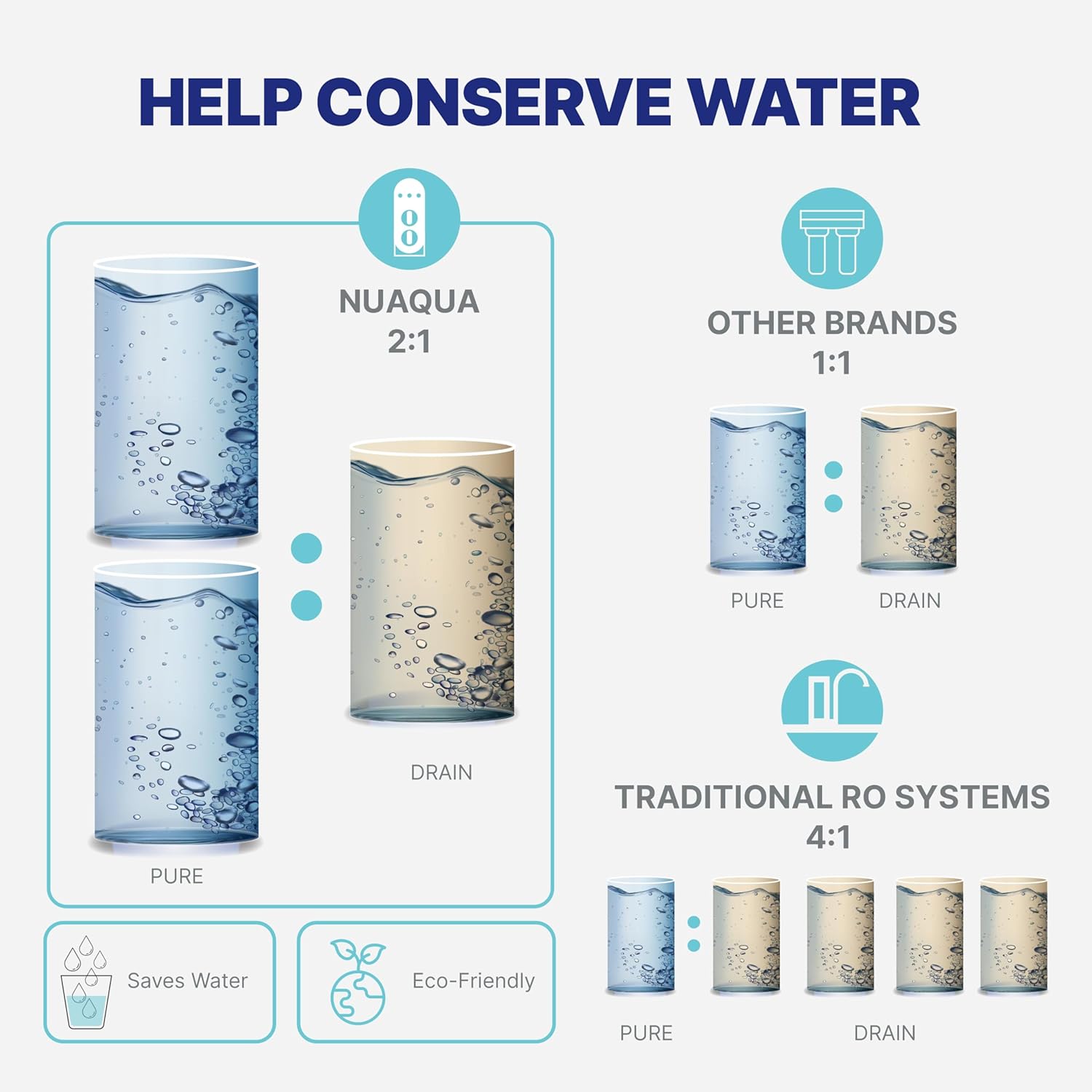
Image 3.3: Detailed view of the 600GPD Reverse Osmosis Membrane, illustrating its effectiveness against various contaminants.

Image 3.4: Illustration of the optional UV filter, demonstrating its role in eliminating 99% of harmful particles.
3.2 Smart LED Faucet
The included smart faucet provides visual cues regarding filter status and water quality:
- Solid Blue: Indicates excellent water quality.
- Flashing Blue: Indicates good water quality, but filter replacement may be approaching.
- Flashing Red: Indicates fair water quality, filter replacement is recommended soon.
- Solid Red: Indicates poor water quality, filter replacement is required immediately.

Image 3.5: Visual guide to the Smart LED Faucet's color indicators for water quality and filter status.
4. Installation and Setup
The NU Aqua Tankless RO System is designed for straightforward installation. While professional help is not typically required, basic plumbing knowledge is beneficial. Refer to the detailed installation video guide for visual assistance.
4.1 Pre-Installation Checklist
- Verify all components are present as per the packing list.
- Ensure adequate space under your sink for the main unit and faucet. Dimensions: 15.5"L x 5.5"W x 13.5"H.
- Locate a cold water supply line and a drain line for connection.
- Gather necessary tools: drill, wrench, screwdriver, Teflon tape.
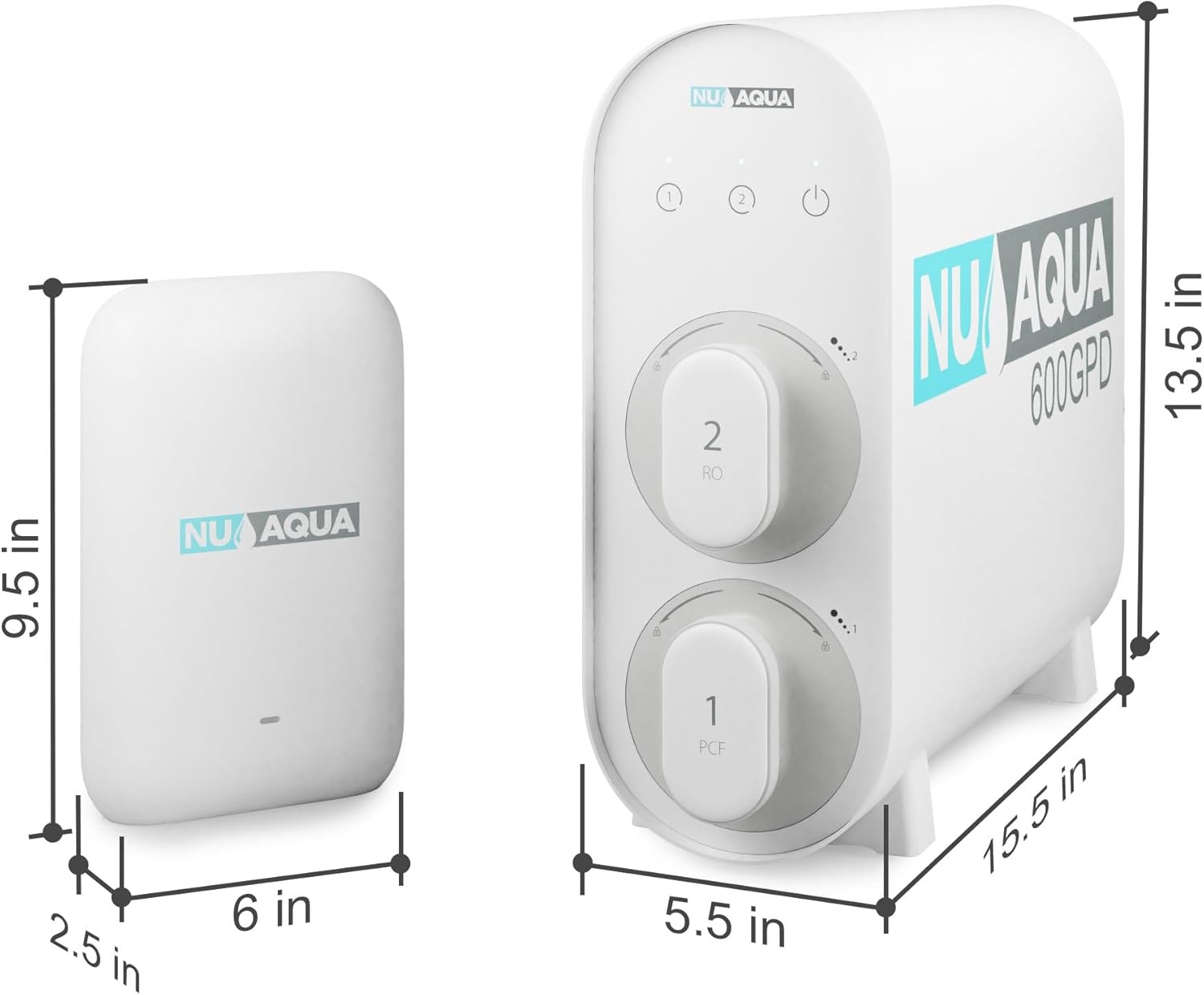
Image 4.1: Product dimensions for planning under-sink space.
4.2 General Installation Steps (Summary)
- Turn off the cold water supply and relieve pressure.
- Install the smart faucet on your countertop or sink.
- Connect the feed water adapter to your cold water line.
- Install the drain saddle on the drain pipe.
- Mount the main RO unit and external UV filter under the sink.
- Connect all tubing (inlet, outlet, drain) to the appropriate ports on the system and faucet.
- Insert the filters into their respective slots.
- Slowly turn on the cold water supply and check for leaks.
- Plug in the power adapter.
- Flush the system as per the initial startup instructions.

Image 4.2: The system is designed for easy installation, often completed within 30 minutes without professional assistance.
5. Operation
Once installed and flushed, operating your NU Aqua RO system is simple:
- Open the smart faucet handle to dispense purified water. The system will automatically activate.
- Observe the LED indicator on the faucet for real-time water quality and filter status.
- The tankless design ensures a continuous flow of water without storage, providing fresh water on demand.

Image 5.1: The compact tankless design saves significant under-sink space compared to traditional RO systems.
6. Maintenance
Regular filter replacement is crucial for maintaining optimal water quality and system performance. The smart LED faucet will indicate when filter changes are due.
6.1 Filter Replacement Schedule
| Filter Type | Recommended Replacement |
|---|---|
| PP + CB Carbon Filter | Every 12 months |
| Reverse Osmosis Membrane | Every 12 months |
| UV Bulb | Every 12 months |
Note: Actual filter lifespan may vary based on local water quality and usage.
6.2 Quick Filter Replacement
The system features a user-friendly design for quick and easy filter changes, typically requiring only one hand and minimal time.
- Turn off the water supply to the RO system.
- Twist the old filter cartridge counter-clockwise to unlock and remove it.
- Insert the new filter cartridge and twist clockwise to lock it into place.
- Turn on the water supply and check for leaks.
- Flush the system for a few minutes to remove any air or carbon fines.

Image 6.1: The tankless system allows for quick and easy filter replacement, significantly faster than traditional tank systems.
7. Troubleshooting
If you encounter issues with your system, refer to the table below for common problems and solutions.
| Problem | Possible Cause | Solution |
|---|---|---|
| Slow water flow from faucet | Clogged filters, low water pressure, kinked tubing. | Check LED faucet indicator for filter status; replace filters if needed. Verify water supply pressure. Inspect tubing for kinks. |
| Water has unusual taste/odor | Expired filters, improper flushing. | Replace PP + CB Carbon Filter. Ensure proper initial flushing or flush after filter replacement. |
| Leaks at connections | Loose fittings, damaged O-rings, incorrect tubing insertion. | Turn off water supply. Tighten all connections. Inspect O-rings and tubing; replace if damaged. Ensure tubing is fully inserted into quick-connect fittings. |
| Smart LED Faucet shows red | Filters require immediate replacement. | Replace the indicated filter cartridges (PP+CB, RO membrane, or UV bulb). |
If the problem persists after attempting these solutions, please contact NU Aqua customer support.
8. Specifications
| Feature | Detail |
|---|---|
| Brand | NU Aqua |
| Model Name | KF-600GPD-UV-2FTL |
| Filtration Stages | 4 Stage (PP+CB, RO Membrane, UV) |
| Water Production Rate | 600 Gallons Per Day (GPD) |
| Pure to Waste Ratio | 2:1 |
| Product Dimensions (Main Unit) | 15.5"L x 5.5"W x 13.5"H |
| Item Weight | 25 Pounds |
| Special Features | Compact Design, Easy to Install, Fast 600GPD, Removes 99% Of Contaminants, Smart LED Faucet |
| UPC | 023591215233 |
9. Warranty and Support
NU Aqua offers a lifetime warranty for this system, which typically requires registration for a replacement filter service. For specific warranty terms, registration details, or technical support, please refer to the official NU Aqua website or contact their customer service directly.
Customer Support: Please visit the NU Aqua Store on Amazon or their official website for contact information and further assistance.


