1. Introduction
Thank you for choosing the VERBANA PDB3060 60A Power Distribution Board. This board is designed to efficiently distribute power to various components of your 4-axis FPV RC racing drone or quadcopter, featuring an integrated BEC with adjustable voltage outputs. Please read this manual carefully before installation and operation to ensure proper use and longevity of your device.
2. Product Overview
The PDB3060 is a robust power distribution solution for your RC drone. It is engineered to handle up to 60A current and provides stable power to your flight controller, video transmitter, and other accessories through its adjustable BEC. The board supports multiple voltage outputs, making it versatile for various drone setups.
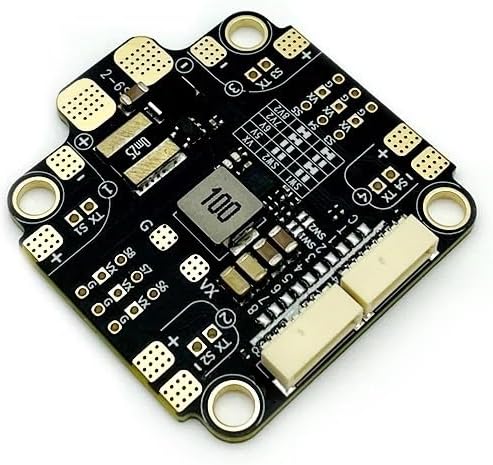
Figure 2.1: Top view of the PDB3060 board, highlighting the main components and solder pads.
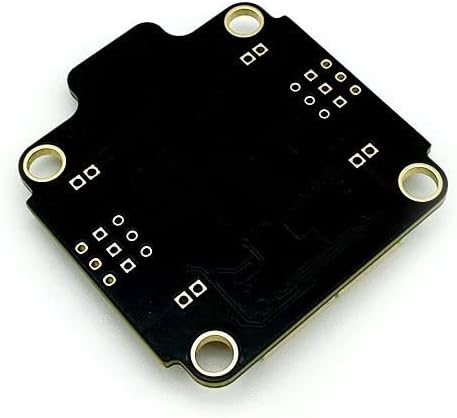
Figure 2.2: Bottom view of the PDB3060 board, showing mounting holes and solder pads.
3. Package Contents
- 1 x VERBANA PDB3060 60A Power Distribution Board
4. Specifications
| Feature | Description |
|---|---|
| Model | PDB3060 |
| Current Rating | 60A |
| BEC Output Voltage | Adjustable 5V, 6V, 7.2V, 8.2V |
| BEC Output Current | 3A |
| Dimensions | Approximately 3"L x 2"W x 1"H |
| Weight | Approximately 50 Grams (1.76 ounces) |
| Application | 4-axis FPV Racing Drones, Quadcopters |
5. Setup Instructions
Proper installation is crucial for the performance and safety of your drone. Always ensure power is disconnected before making any connections.
- Mounting: Securely mount the PDB3060 board onto your drone frame using appropriate standoffs and screws. Ensure it is isolated from any conductive surfaces to prevent short circuits.
- Main Power Input: Solder your main battery leads (positive and negative) to the designated large input pads on the PDB. Ensure correct polarity.
- ESC Connections: Solder the positive and negative power leads from each Electronic Speed Controller (ESC) to their respective output pads on the PDB. There are typically four sets of output pads for a 4-axis drone.
- BEC Output Voltage Selection: The PDB3060 features an adjustable BEC. Refer to the markings on the board to select the desired output voltage (5V, 6V, 7.2V, or 8.2V) for your flight controller or other accessories. This is usually done by soldering a jumper or bridging specific pads. Consult your flight controller's manual for its required input voltage.
- Accessory Connections: Connect your flight controller, video transmitter, camera, and other 5V/6V/7.2V/8.2V powered accessories to the corresponding BEC output pads. Double-check all polarities before powering on.

Figure 5.1: Example of the PDB3060 board mounted on a drone frame.
6. Operating Instructions
Once all connections are securely made and verified, you can power on your drone. The PDB will distribute power from your main battery to all connected components. Monitor for any unusual heat or smoke during initial power-up.
- Pre-Flight Check: Before each flight, visually inspect all solder joints and connections on the PDB for any signs of damage or loose wires.
- Voltage Monitoring: If your flight controller supports it, monitor the battery voltage and BEC output voltages to ensure stable operation.
- Current Draw: Be mindful of the total current draw of your components to ensure it does not exceed the PDB's 60A rating.
7. Maintenance
The PDB3060 is designed for durability, but regular maintenance can extend its lifespan.
- Cleaning: Keep the board clean from dust, dirt, and moisture. Use a soft brush or compressed air to remove debris.
- Inspection: Periodically inspect the board for any signs of physical damage, burnt components, or cold solder joints.
- Storage: When not in use, store the PDB in a dry, cool environment, away from direct sunlight and extreme temperatures.
8. Troubleshooting
If you encounter issues with your PDB3060, consider the following troubleshooting steps:
- No Power to Components:
- Check main battery connection and polarity.
- Verify all solder joints are solid and free of shorts.
- Ensure the BEC output voltage selection is correctly configured.
- Intermittent Power:
- Inspect for loose wires or cold solder joints.
- Check for vibrations that might affect connections.
- Overheating:
- Ensure the total current draw does not exceed the PDB's rating.
- Verify adequate airflow around the board.
- Check for any short circuits in connected components.
9. Warranty and Support
VERBANA products are manufactured to high standards. For specific warranty information or technical support, please refer to the retailer or the official VERBANA website. Keep your proof of purchase for warranty claims.
