
1. Product Overview
The SGNICS X13 Bluetooth Earbuds are designed for active lifestyles, featuring a secure ear hook design, IPX6 waterproof rating, and advanced Bluetooth 5.3 technology for stable connectivity and clear audio. These earbuds offer extended playtime and are suitable for various activities including sports, workouts, and daily use.

Image 1.1: SGNICS X13 Bluetooth Earbuds and Charging Case. The image displays two black earbuds with ear hooks and a sleek black charging case.
2. What's in the Box
Please verify that all items are present in the package:
- SGNICS X13 Bluetooth Earbuds (Left and Right)
- Charging Case
- USB-C Charging Cable
- Ear Cushions (S, M, L sizes)
3. Setup
3.1 Charging the Earbuds and Case
Before first use, fully charge the earbuds and the charging case. Connect the provided USB-C cable to the charging port on the case and a compatible USB power source. The LED display on the charging case will indicate the battery level. A full charge for the case takes approximately 1.5 hours. Fully charged earbuds provide up to 9 hours of playback, and the charging case extends total playtime to 48 hours.

Image 3.1: SGNICS X13 Earbuds inside the open charging case, displaying a '100' on the LED screen, indicating a full charge. The earbuds are black with ear hooks.
3.2 Bluetooth Pairing
- Ensure the earbuds are charged.
- Open the charging case. The earbuds will automatically enter pairing mode, indicated by a flashing light on the earbuds.
- On your device (smartphone, tablet, etc.), enable Bluetooth and search for available devices.
- Select "X13" from the list of detected devices to connect.
- Once connected, a voice prompt will confirm successful pairing.
3.3 Wearing the Earbuds
For optimal sound quality and a secure fit, choose the ear tip size that best suits your ears (S, M, L). The flexible ear hooks are designed to fit comfortably over your ears, ensuring the earbuds stay in place during strenuous activities.
- Select the appropriate ear tip size.
- Place the earbud into your ear canal.
- Adjust the ear hook over the top of your ear until it feels secure and comfortable.
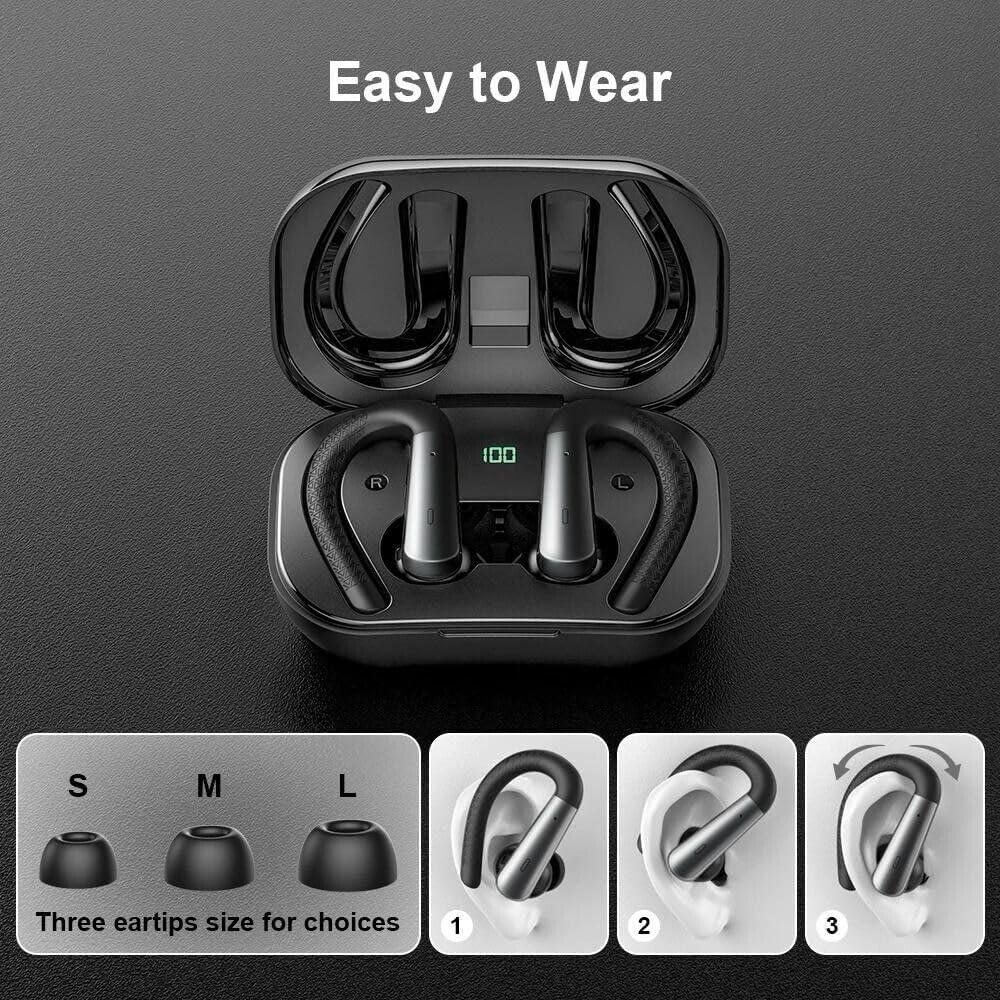
Image 3.2: Visual guide for wearing the SGNICS X13 Earbuds. It shows three ear tip sizes (S, M, L) and a three-step process for correctly positioning the earbud and ear hook for a secure fit.
4. Operating Instructions
4.1 Basic Controls
The earbuds feature touch controls for managing audio playback and calls:
- Play/Pause: Single tap on either earbud.
- Next Track: Double tap on the right earbud.
- Previous Track: Double tap on the left earbud.
- Volume Up: Triple tap on the right earbud.
- Volume Down: Triple tap on the left earbud.
4.2 Call Management
The integrated microphones with environmental noise canceling technology ensure clear communication during calls.
- Answer/End Call: Single tap on either earbud.
- Reject Call: Press and hold either earbud for 2 seconds.
- Activate Voice Assistant: Press and hold either earbud for 3 seconds (when not on a call).
5. Maintenance
5.1 Cleaning
Regularly clean your earbuds and charging case to maintain optimal performance and hygiene. Use a soft, dry, lint-free cloth. Do not use abrasive cleaners or immerse the earbuds or case in water.
5.2 Storage
When not in use, store the earbuds in their charging case to protect them from dust and damage. Store in a cool, dry place away from extreme temperatures.
5.3 Water Resistance (IPX6)
The SGNICS X13 Earbuds are IPX6 waterproof, meaning they are protected against high-pressure water jets from any direction. This makes them suitable for strenuous workouts and use in rainy conditions. However, they are not designed for submersion in water (e.g., swimming or showering). Ensure the earbuds are dry before placing them back into the charging case to prevent damage.

Image 5.1: SGNICS X13 Earbuds shown with water droplets, emphasizing their IPX6 waterproof and sweatproof capabilities.
6. Troubleshooting
If you encounter issues with your SGNICS X13 Earbuds, please refer to the following common solutions:
- Earbuds not pairing: Ensure both earbuds are charged. Place them back in the case, close it, then open it again to re-enter pairing mode. Delete previous pairings from your device's Bluetooth list and try connecting again.
- No sound from one earbud: Try resetting the earbuds by placing them in the charging case and then taking them out. Ensure both earbuds are connected to your device.
- Charging issues: Verify the USB-C cable is securely connected to both the case and the power source. Ensure the charging contacts on the earbuds and inside the case are clean and free of debris.
- Poor sound quality: Ensure the ear tips are correctly sized and sealed in your ear canal. Check your device's volume settings.
If the problem persists, please contact customer support.
7. Specifications
| Feature | Description |
|---|---|
| Model Name | X13 Earbuds |
| Connectivity Technology | Wireless (Bluetooth 5.3) |
| Water Resistance Level | IPX6 Waterproof |
| Earbud Playtime | Up to 9 hours |
| Total Playtime (with case) | Up to 48 hours |
| Charging Case Capacity | 500mAh |
| Charging Time (Case) | Approx. 1.5 hours (USB-C) |
| Material | ABS+PC |
| Microphone | Included, with Environmental Noise Canceling |
| Special Features | Lightweight, Sports & Exercise Design, Secure Ear Hooks |
| Compatible Devices | iOS 9.0/Android 4.4 or above (e.g., iPhone, Samsung Galaxy, Huawei, Xiaomi, etc.) |
8. Warranty Information
Specific warranty details for the SGNICS X13 Earbuds are provided by the manufacturer or seller at the time of purchase. Please refer to your purchase documentation or contact the seller directly for information regarding warranty coverage and terms. Standard return policies typically allow for returns or replacements within 30 days of purchase.
9. Support
For further assistance, technical support, or inquiries not covered in this manual, please contact SGNICS customer service or the retailer from whom you purchased the product. Please have your product model (X13) and purchase details ready when contacting support.