Introduction
Thank you for choosing the SGNICS X13 Bluetooth Earbuds. This manual provides detailed instructions on how to set up, operate, and maintain your new earbuds. Please read this manual carefully before use to ensure optimal performance and longevity of your device.
What's in the Box
- SGNICS X13 Bluetooth Earbuds (Left and Right)
- Charging Case
- USB-C Charging Cable
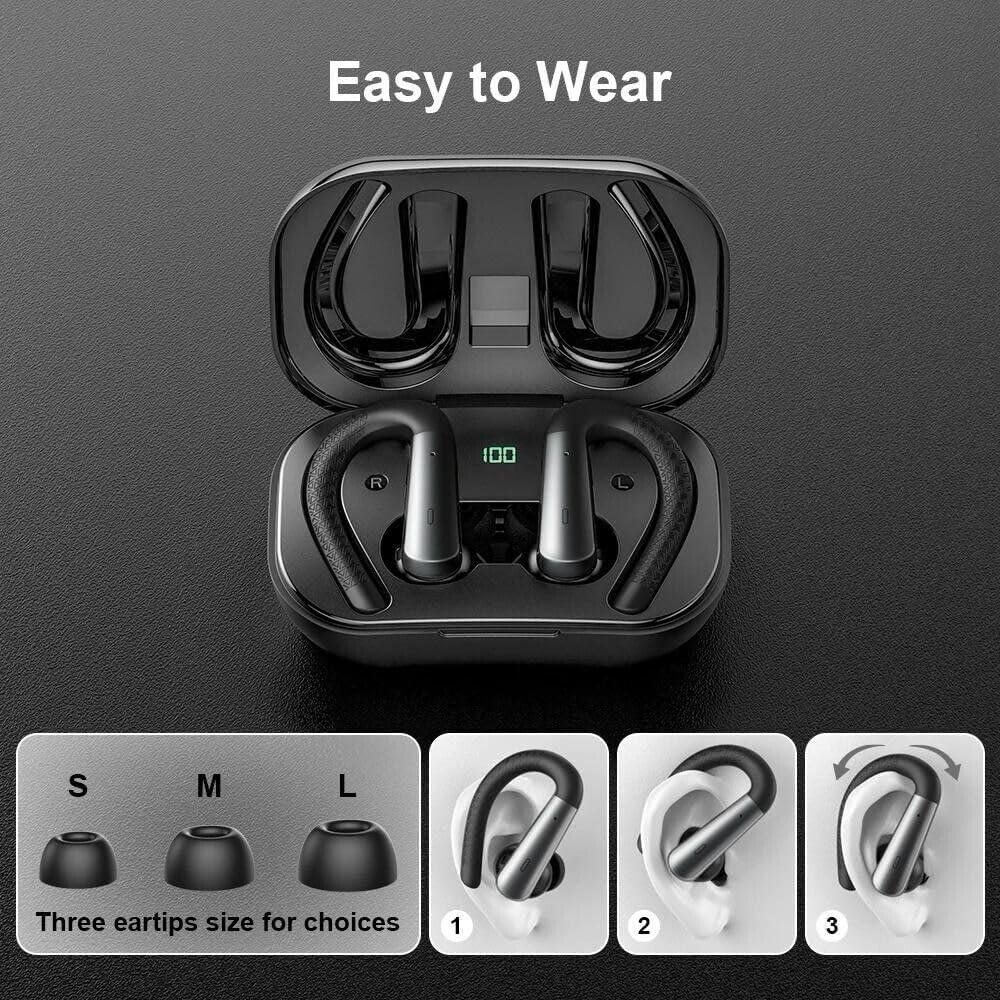
- Ear Cushions (S, M, L sizes)
Product Overview
The SGNICS X13 earbuds feature an ergonomic design with secure ear hooks, a charging case with an LED display, and touch controls for easy operation.

Setup
1. Charging the Earbuds and Case
Before first use, fully charge the earbuds and the charging case. Place the earbuds into the charging case. Connect the USB-C charging cable to the charging port on the case and plug the other end into a USB power adapter (not included). The LED display on the case will show the charging status. A full charge for the case takes approximately 1.5 hours.

2. Pairing with a Bluetooth Device
- Open the charging case. The earbuds will automatically power on and enter pairing mode.
- On your device (e.g., smartphone, tablet), enable Bluetooth.
- Search for available Bluetooth devices and select "SGNICS X13" from the list.
- Once connected, you will hear a confirmation tone, and the earbuds' indicator lights will turn off or flash slowly.
The earbuds will automatically reconnect to the last paired device when taken out of the case, if Bluetooth is enabled on the device.
Wearing the Earbuds
For optimal sound quality and comfort, choose the correct size ear tips (S, M, L) that provide a snug fit in your ear canal. The flexible ear hooks are designed to secure the earbuds during physical activity.
- Select the ear tip size that best fits your ears.
- Place the earbud into your ear canal.
- Adjust the ear hook over the top of your ear until it feels secure and comfortable.