
SGNICS X13
User Manual for SGNICS X13 Bluetooth Earbuds
Model: X13
Product Overview
The SGNICS X13 Bluetooth Earbuds are designed for an active lifestyle, offering a secure fit, high-quality audio, and robust connectivity. Featuring Bluetooth 5.3 technology, these earbuds provide stable connections and clear calls with environmental noise-canceling microphones. They are built to withstand sweat and rain with an IPX6 waterproof rating, making them ideal for sports and workouts. The included charging case extends playtime significantly, ensuring your music and calls are always available.

Image: SGNICS X13 Bluetooth Earbuds and their charging case, showcasing the sleek black design and ear hook form factor.
Setup and First Use
1. Charging the Earbuds and Case
Before first use, fully charge the earbuds and the charging case. The charging case has a 500mAh capacity and supports USB-C fast charging.
- Connect the provided USB-C cable to the charging port on the case and to a power source.
- The LED display on the charging case will indicate the charging status. A full charge takes approximately 1.5 hours for the case.
- Place the earbuds into the charging case. They will begin charging automatically.

Image: The SGNICS X13 earbuds inside their open charging case, displaying the battery percentage on the LED screen.
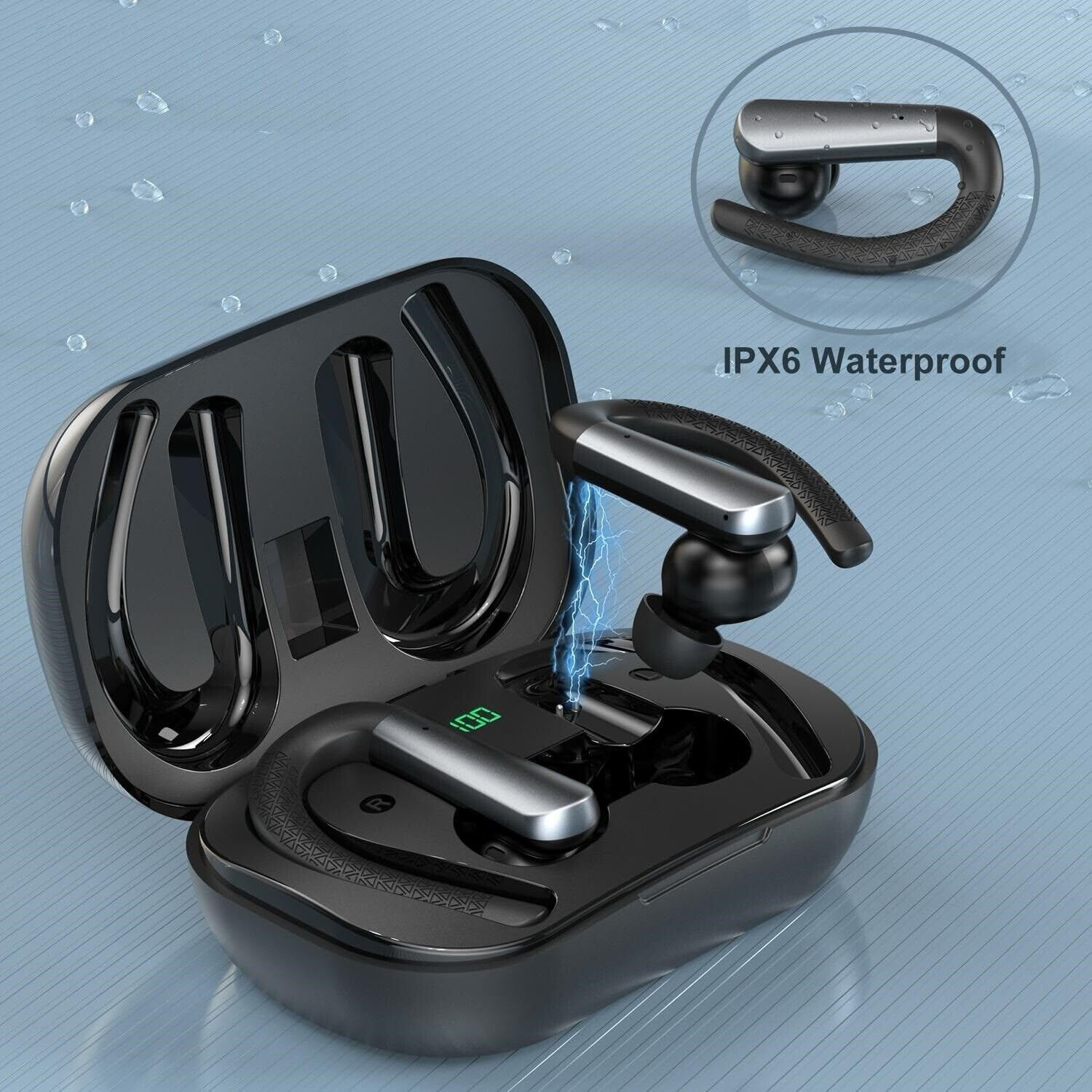
Image: A single SGNICS X13 earbud being placed into its charging slot within the case, illustrating the charging connection.
2. Selecting Ear Tips and Achieving a Secure Fit
The earbuds come with three sizes of silicone ear tips (S/M/L) to ensure optimal comfort and sound isolation. Choose the size that provides the best seal and most comfortable fit for your ears.
- Gently pull off the pre-installed ear tips.
- Select a new ear tip size and push it onto the earbud nozzle until it clicks securely into place.
- To wear, place the earbud into your ear canal and rotate the ear hook over the top of your ear until it sits comfortably and securely.
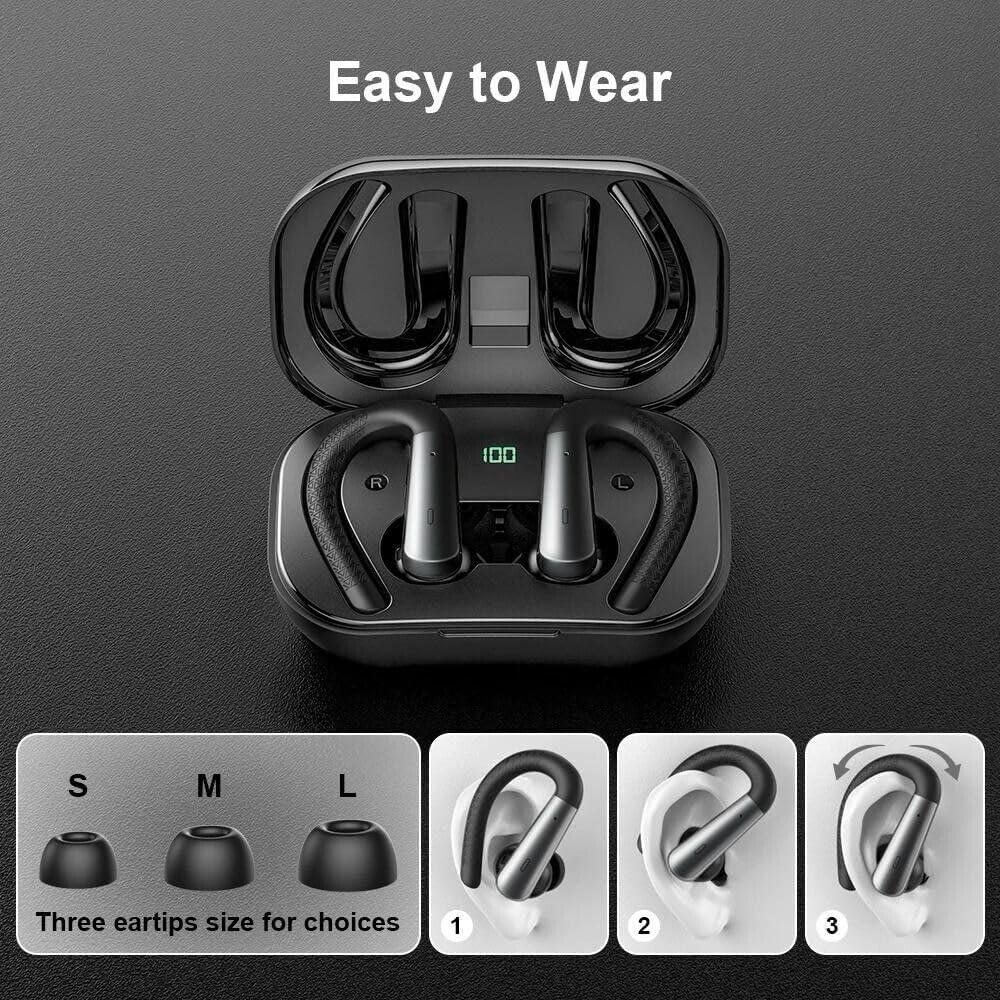
Image: A visual guide showing the three available ear tip sizes (S, M, L) and a three-step illustration on how to properly wear the ear hook earbuds for a secure fit.
3. Bluetooth Pairing
The earbuds utilize Bluetooth 5.3 for a stable and efficient connection.
- Open the charging case. The earbuds will automatically enter pairing mode.
- On your device (smartphone, tablet, etc.), go to the Bluetooth settings.
- Search for "X13 Earbuds" or a similar name in the list of available devices.
- Select "X13 Earbuds" to connect. Once connected, you will hear a confirmation tone.
Note: The earbuds will automatically reconnect to the last paired device when taken out of the case, if Bluetooth is enabled on the device.
Operating Instructions
Touch Controls
The SGNICS X13 earbuds feature touch-sensitive controls for easy management of calls and music playback. Specific touch gestures may vary slightly, but common functions include:
- Play/Pause: Single tap on either earbud.
- Next Track: Double tap on the right earbud.
- Previous Track: Double tap on the left earbud.
- Answer/End Call: Single tap on either earbud during an incoming call.
- Reject Call: Press and hold on either earbud during an incoming call.
- Activate Voice Assistant: Triple tap on either earbud (e.g., Siri, Google Assistant).
- Volume Control: Long press on the right earbud to increase volume, long press on the left earbud to decrease volume.
Call Functionality
Equipped with 4 microphones and environmental noise-canceling technology, the earbuds ensure clear communication during calls, even in noisy environments.
- Ensure both earbuds are connected for optimal call quality.
- Adjust volume using the touch controls or your connected device.
Waterproof Performance (IPX6)
The earbuds are rated IPX6 waterproof, providing protection against strong jets of water. This makes them suitable for intense workouts and use in rainy conditions. They are resistant to sweat and splashes.

Image: The SGNICS X13 earbuds covered in water droplets, demonstrating their IPX6 waterproof and sweatproof capabilities.

Image: The SGNICS X13 earbuds and their charging case, highlighting the IPX6 waterproof feature with a visual overlay.
Note: The charging case is not waterproof. Do not expose the charging case to water or moisture.
Maintenance and Care
- Cleaning: Regularly clean the earbuds, especially the ear tips and charging contacts, with a soft, dry, lint-free cloth. Do not use abrasive cleaners or solvents.
- Storage: When not in use, store the earbuds in their charging case to protect them from dust and damage. Store in a cool, dry place.
- Battery Life: To prolong battery life, avoid fully discharging the earbuds and case frequently. Charge them regularly, even if not in constant use.
- Water Exposure: After exposure to sweat or rain, ensure the earbuds are completely dry before placing them back into the charging case to prevent damage to the charging contacts.
Troubleshooting
| Problem | Solution |
|---|---|
| Earbuds not pairing with device. |
|
| Only one earbud is working. |
|
| Earbuds not charging. |
|
| Poor sound quality or disconnections. |
|
Specifications
| Feature | Detail |
|---|---|
| Model Name | X13 Earbuds |
| Brand | SGNICS |
| Connectivity Technology | Wireless (Bluetooth 5.3) |
| Water Resistance Level | IPX6 Waterproof |
| Battery Life (Earbuds) | Up to 9 Hours |
| Total Playtime with Charging Case | Up to 48 Hours |
| Charging Case Capacity | 500mAh |
| Charging Time (Case) | Approx. 1.5 Hours (USB-C) |
| Microphone | 4 microphones with Environmental Noise Canceling |
| Ear Placement | In Ear with Ear Hooks |
| Control Type | Voice Control, Volume Control, Remote (Touch Controls) |
| Material | ABS+PC |
| Included Components | Cable, Charging Case, Ear Cushions, Eartips (S-M-L) |
| Compatible Devices | iOS 9.0/Android 4.4 or above (iPhone, Samsung Galaxy, etc.) |
Warranty and Support
SGNICS products are designed for reliability and performance. For any issues or inquiries, please refer to the following information:
- Return Policy: This product typically comes with a 30-day refund/replacement return policy from the date of purchase. Please check with your retailer for specific terms.
- Manufacturer Support: For technical assistance, warranty claims, or further information, please contact SGNICS directly. Contact details can usually be found on the product packaging or the official SGNICS website.
- Small Business Support: This product is from a small business brand. Your support is appreciated.
Please retain your proof of purchase for warranty purposes.
Ask a question about this manual
Ask about setup, troubleshooting, compatibility, parts, safety, or missing instructions. Manuals+ will review the question and use this page’s manual context to help answer it.