
Introduction
This manual provides detailed instructions for the proper use, setup, and maintenance of your SGNICS X13 Bluetooth 5.3 Earbuds. Please read this manual thoroughly before using the product to ensure optimal performance and longevity.
Package Contents
Verify that all items are present in your package:
- SGNICS X13 Earbuds (Left and Right)
- Charging Case
- USB-C Charging Cable
- Eartips (S, M, L sizes)
Product Overview
The SGNICS X13 Earbuds feature an ergonomic ear hook design for secure fit during activities, a portable charging case with an LED display, and touch controls for easy operation.

Image: SGNICS X13 Earbuds with ear hooks and their charging case. The earbuds are black with a sleek design, and the charging case is also black with a glossy finish.

Image: The SGNICS X13 Earbuds placed inside their open charging case. A green LED display in the center of the case shows "100", indicating a full charge. The earbuds are securely nestled in their compartments.
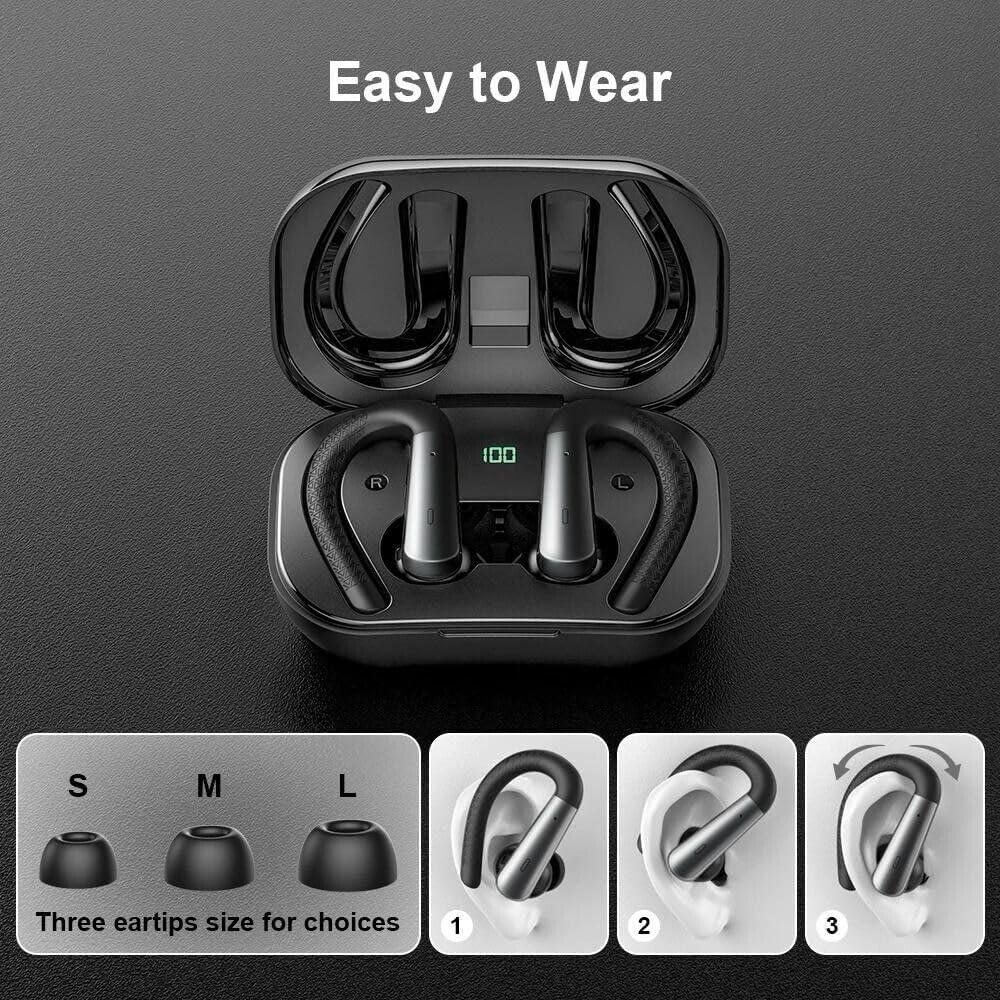
Image: This image illustrates the three included eartip sizes (S, M, L) for user selection. Below, a three-step diagram demonstrates how to correctly wear the earbuds: 1) Insert the earbud, 2) Rotate to secure, 3) Adjust the ear hook for comfort.
Setup
1. Charging the Earbuds and Case
Before first use, fully charge the earbuds and charging case.
- Charging the Case: Connect the provided USB-C cable to the charging port on the case and to a USB power adapter (not included). The LED display on the case will show the charging progress. A full charge takes approximately 1.5 hours.
- Charging the Earbuds: Place the earbuds into the charging case. Ensure they are correctly seated in their respective slots (L for left, R for right). The earbuds will automatically begin charging. The LED display on the case will indicate the charge level of the earbuds.
Fully charged earbuds provide up to 9 hours of playback, and the charging case extends total playtime to approximately 48 hours.
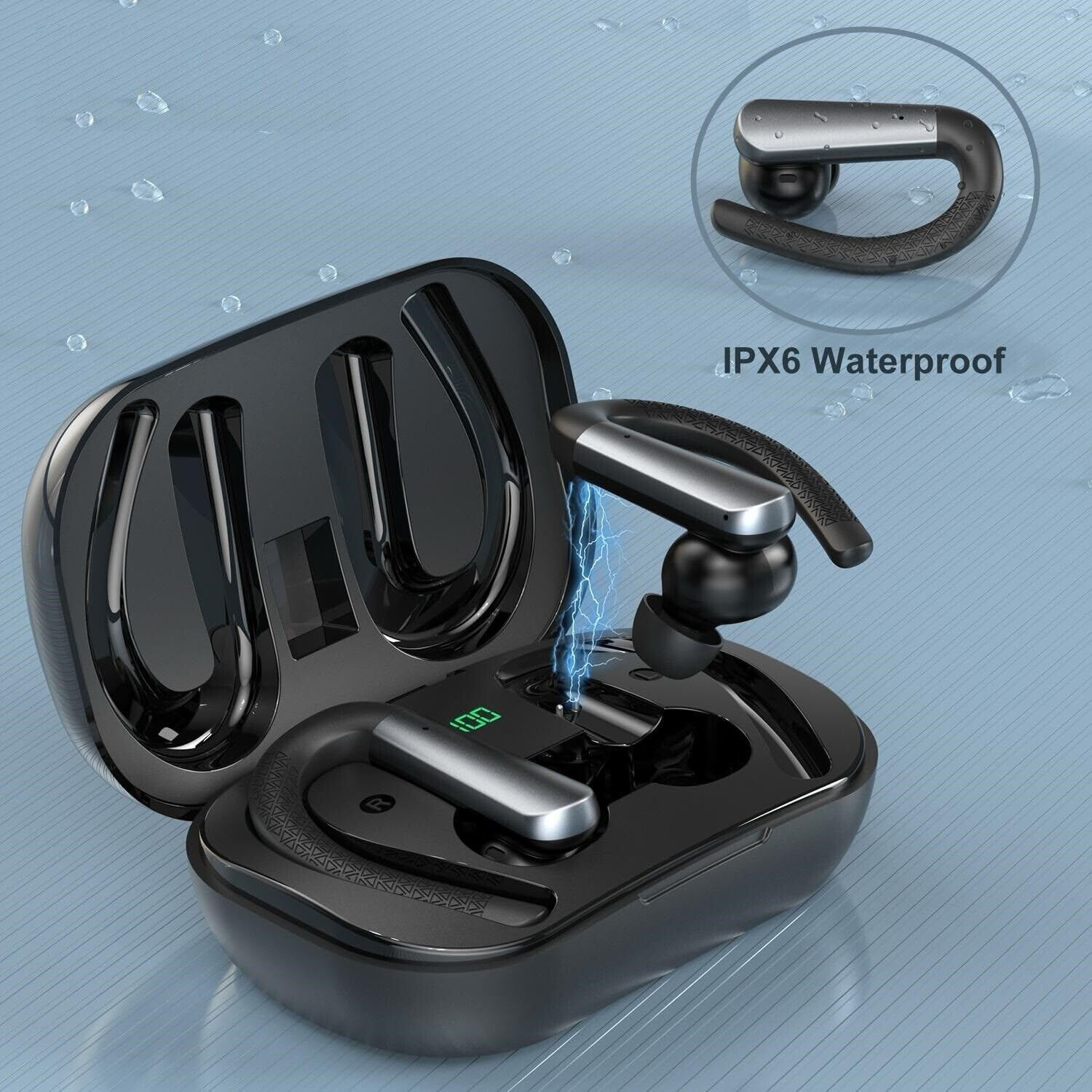
Image: A single SGNICS X13 earbud is shown being charged within its open case. A blue lightning bolt graphic indicates the charging process. The case's LED display shows "100", signifying a full charge.
2. Bluetooth Pairing
The earbuds utilize Bluetooth 5.3 for a stable and fast connection.
- Initial Pairing:
- Open the charging case. The earbuds will automatically power on and enter pairing mode.
- Enable Bluetooth on your device (smartphone, tablet, etc.).
- Search for "X13 Earbuds" in the list of available Bluetooth devices and select it to connect.
- Once connected, you will hear a confirmation tone, and the earbuds will be ready for use.
- Automatic Reconnection: After initial pairing, the earbuds will automatically connect to the last paired device when removed from the charging case, provided Bluetooth is enabled on the device.
Operating Instructions
Wearing the Earbuds
For optimal sound quality and comfort, choose the correct eartip size (S/M/L) and adjust the ear hooks.
- Select the eartips that provide a snug fit in your ear canal.
- Insert the earbud into your ear, then gently rotate it to secure.
- Adjust the flexible ear hook over your ear for a stable and comfortable fit, especially during sports or exercise.
Touch Controls
The earbuds feature touch-sensitive areas for controlling various functions. The exact touch patterns may vary slightly, but common functions include:
- Play/Pause: Single tap on either earbud.
- Next Track: Double tap on the right earbud.
- Previous Track: Double tap on the left earbud.
- Answer/End Call: Single tap on either earbud during an incoming call.
- Reject Call: Press and hold either earbud for 2 seconds during an incoming call.
- Activate Voice Assistant: Triple tap on either earbud.
Making and Receiving Calls
The SGNICS X13 Earbuds are equipped with 4 microphones and Environmental Noise Canceling (ENC) technology to ensure clear call quality.
- Refer to the "Touch Controls" section for answering, ending, and rejecting calls.
- During a call, audio will be routed through the earbuds.
Music Playback
Experience Hi-Fi stereo sound with deep bass. Use the touch controls to manage your music.
- Refer to the "Touch Controls" section for playing, pausing, and skipping tracks.
Maintenance
Proper maintenance ensures the longevity and performance of your earbuds.
- Cleaning: Regularly clean the earbuds, eartips, and charging contacts with a soft, dry, lint-free cloth. Do not use harsh chemicals or abrasive materials.
- Water Resistance: The earbuds are IPX6 waterproof, protecting them from sweat and rain. However, they are not designed for submersion in water. Ensure they are dry before placing them back in the charging case.
- Storage: When not in use, store the earbuds in their charging case to protect them and keep them charged. Store in a cool, dry place away from extreme temperatures.

Image: The SGNICS X13 Earbuds are depicted amidst water droplets, illustrating their IPX6 waterproof and sweatproof capabilities. The earbuds appear durable and resistant to moisture.
Troubleshooting
If you encounter issues, refer to the following common solutions:
- Earbuds not pairing:
- Ensure earbuds are charged and removed from the case.
- Turn off and on Bluetooth on your device.
- Forget "X13 Earbuds" from your device's Bluetooth list and try pairing again.
- No sound:
- Check device volume and earbud volume.
- Ensure earbuds are properly connected to your device.
- Try playing audio from a different application or source.
- Charging issues:
- Verify the USB-C cable and power adapter are working correctly.
- Ensure charging contacts on earbuds and case are clean and free of debris.
Specifications
| Feature | Detail |
|---|---|
| Model Name | X13 Earbuds |
| Brand | SGNICS |
| Connectivity Technology | Wireless (Bluetooth) |
| Wireless Communication Technology | Bluetooth 5.3 |
| Water Resistance Level | IPX6 Waterproof |
| Earbud Playtime | Up to 9 hours |
| Total Playtime (with Charging Case) | Up to 48 hours |
| Charging Case Charge Time | Approx. 1.5 hours (USB-C) |
| Noise Control | Active Noise Cancellation (for calls, Environmental Noise Canceling) |
| Microphone Feature | Yes (4 microphones with ENC) |
| Form Factor | In Ear with Earhooks |
| Material | ABS+PC |
| Compatible Devices | iOS 9.0/Android 4.4 or above (Smartphones, Tablets) |
Safety Information
Please observe the following safety guidelines:
- Do not disassemble, repair, or modify the product.
- Keep the earbuds and charging case away from extreme temperatures, direct sunlight, and open flames.
- Avoid listening at high volume levels for extended periods to prevent hearing damage.
- Keep out of reach of children and pets.
- Do not use the earbuds in situations where inability to hear surrounding sounds could be dangerous (e.g., driving, cycling, walking in traffic).
Warranty and Support
SGNICS products are designed for reliability and performance. For warranty information, technical support, or customer service inquiries, please refer to the contact information provided with your purchase or visit the official SGNICS website.