
SGNICS F57L
SGNICS Smart Watch F57L User Manual
Model: F57L
Introduction
This user manual provides comprehensive instructions for the SGNICS Smart Watch F57L. Please read this manual thoroughly before using the device to ensure proper operation and to maximize its features. This smart watch is designed to track daily activity, facilitate Bluetooth calls, and offer various sports modes, making it an elegant and functional activity tracker for both Android and iOS phones.
Product Overview
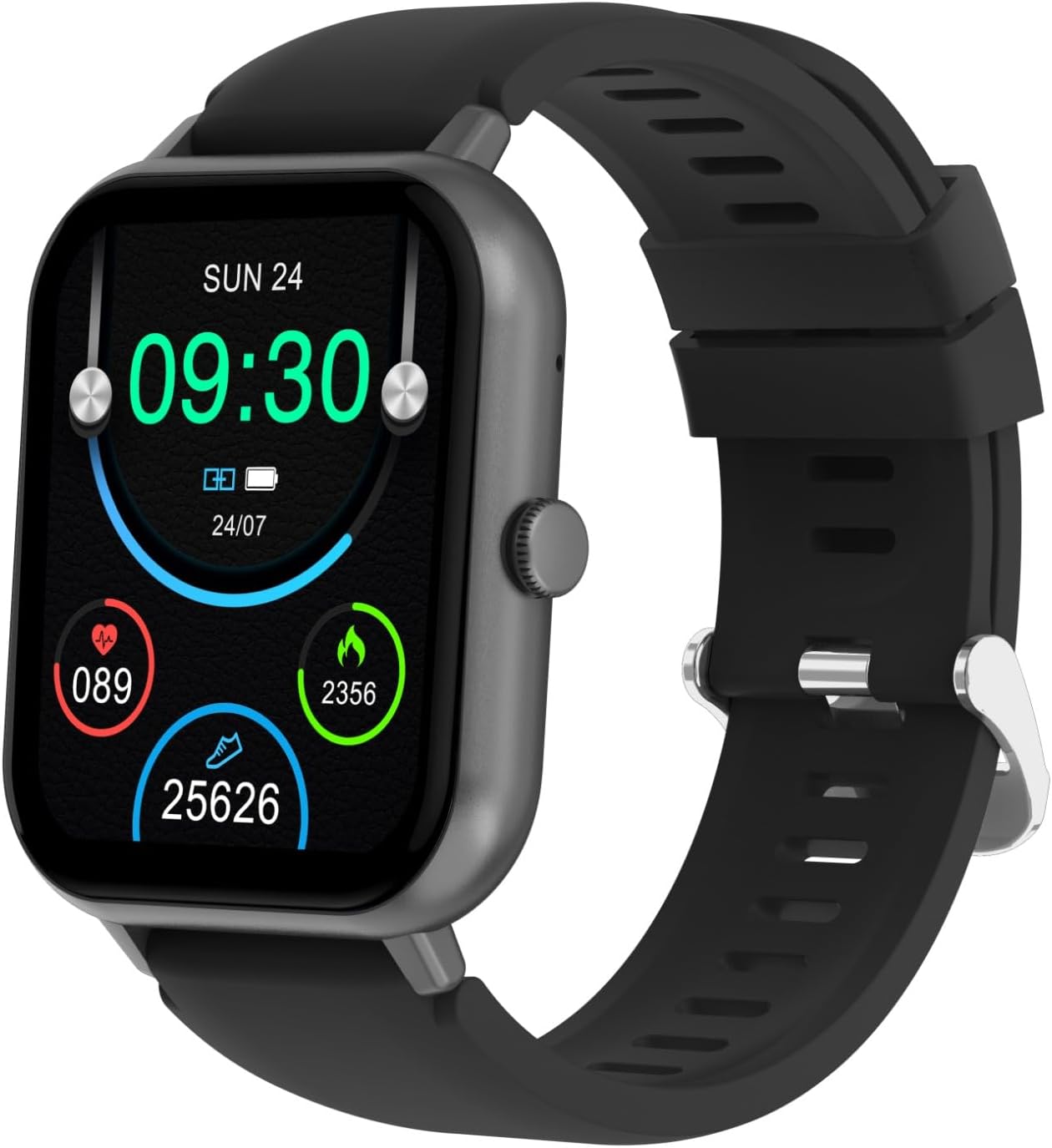
Front view of the SGNICS Smart Watch F57L, displaying the digital time (09:30), date (SUN 24), battery status, heart rate (089), calories burned (2356), and steps taken (25626). The watch features a black strap and a dark grey rectangular body with a single button on the right side.

A close-up view of the SGNICS Smart Watch F57L's 1.91-inch HD display, highlighting the vibrant interface with time, date, and activity metrics. The screen shows a clear, responsive touch surface.

Rear view of the SGNICS Smart Watch F57L, showcasing the integrated heart rate sensor and fitness tracker components. The metallic back panel is visible, along with the attachment points for the watch strap.

Side profile of the SGNICS Smart Watch F57L, illustrating its slim design and the placement of the control button. The black silicone strap is also visible, curving around as if worn on a wrist.
Setup Guide
1. Charging the Device
Before first use, fully charge your SGNICS Smart Watch F57L. Connect the included charging cable to the magnetic charging points on the back of the watch and plug the USB end into a standard USB power adapter (not included) or a computer USB port. The watch display will indicate charging status. A full charge typically takes approximately 2 hours.
2. Downloading the Companion App
To unlock the full functionality of your smart watch, download the dedicated companion application on your smartphone. Search for the app name (usually mentioned in the quick start guide or on the watch screen during initial setup) in the Apple App Store (for iOS devices) or Google Play Store (for Android devices). Install the app and grant necessary permissions.
3. Pairing with Your Smartphone
- Ensure Bluetooth is enabled on your smartphone.
- Open the companion app and follow the on-screen instructions to create an account or log in.
- In the app, navigate to the "Device" or "Add Device" section.
- The app will search for nearby devices. Select "SGNICS F57L" or a similar name from the list of discovered devices.
- Confirm the pairing request on both your watch and smartphone if prompted.
- Once paired, the watch will synchronize time and data with your phone.
Operating Instructions
Basic Navigation
- Power On/Off: Press and hold the side button for a few seconds to power on or off the watch.
- Wake Screen: Raise your wrist or press the side button to wake the screen.
- Touch Screen Gestures:
- Swipe Up: Access notifications.
- Swipe Down: Access quick settings (e.g., brightness, DND mode).
- Swipe Left/Right: Navigate through widgets and main functions (e.g., activity tracking, heart rate, weather).
- Tap: Select an item or confirm an action.
Key Features
- Bluetooth Call: After connecting to your phone via Bluetooth, you can make and receive calls directly from your watch. Access the dialer or call history from the main menu.
- Activity Tracking: The watch automatically tracks daily activities including steps, distance, and calories burned. View your progress on the watch or in the companion app.
- Heart Rate Monitoring: The built-in heart rate sensor continuously monitors your heart rate. Access the heart rate interface on the watch for real-time readings.
- Sports Modes: The watch supports over 50 sports modes (e.g., running, cycling, yoga). Select a mode before starting an activity to track specific metrics.
- Notifications: Receive call, SMS, and app notifications directly on your wrist. Ensure notification permissions are enabled in the companion app.
- Sleep Monitoring: The watch tracks your sleep patterns automatically. View detailed sleep analysis in the companion app.
- AI Voice Assistant: Utilize the integrated AI voice assistant for various commands and queries.
- Custom Dials: Personalize your watch face by choosing from hundreds of dials available in the companion app or by creating your own DIY UI.
Maintenance and Care
- Cleaning: Regularly clean your watch and strap with a soft, dry, lint-free cloth. If necessary, use a slightly damp cloth and then dry thoroughly. Avoid using harsh chemicals or abrasive materials.
- Water Resistance: While the watch is designed for daily wear and may withstand splashes, it is not recommended for swimming or showering. Avoid prolonged exposure to water.
- Temperature: Do not expose the watch to extreme temperatures (very hot or very cold) or sudden temperature changes, as this may affect battery life and performance.
- Storage: When not in use for extended periods, store the watch in a cool, dry place. Ensure it has some charge to prevent deep discharge.
- Strap Care: The silicone strap can be cleaned with mild soap and water. Ensure it is completely dry before reattaching to the watch.
Troubleshooting
| Problem | Possible Solution |
|---|---|
| Watch does not power on. | Ensure the watch is fully charged. Connect it to the charger for at least 30 minutes. |
| Cannot pair with smartphone. |
|
| Notifications are not received. |
|
| Inaccurate activity tracking. |
|
| Screen is unresponsive. | Restart the watch by pressing and holding the side button. If the issue persists, ensure the screen is clean and dry. |
Specifications
| Feature | Detail |
|---|---|
| Model Name | F57L |
| Brand | SGNICS |
| Screen Size | 1.91 Inches |
| Connectivity Technology | Bluetooth |
| Wireless Communication Standard | Bluetooth |
| Battery Cell Composition | Lithium Polymer |
| Material | Zinc |
| Color | Black |
| Special Feature | Activity Tracker, Bluetooth Call, Heart Rate Monitor, Sleep Monitor, 50+ Sports Modes, AI Voice Assistant |
| Included Components | 1 * Band, 1 * Charging Cable, 1 * Smart Watch F57L, 1 * User Manual |
Warranty Information
The SGNICS Smart Watch F57L comes with a 60-day warranty from the date of purchase. This warranty covers manufacturing defects and malfunctions under normal use. It does not cover damage caused by misuse, accidents, unauthorized modifications, or exposure to conditions beyond the product's specifications (e.g., excessive water exposure). Please retain your proof of purchase for warranty claims.
Customer Support
For technical assistance, troubleshooting not covered in this manual, or warranty inquiries, please contact SGNICS customer support. Refer to the contact information provided on the product packaging or the official SGNICS website. When contacting support, please have your product model (F57L) and proof of purchase ready.
For additional resources and FAQs, visit the official SGNICS support page.
Ask a question about this manual
Ask about setup, troubleshooting, compatibility, parts, safety, or missing instructions. Manuals+ will review the question and use this page’s manual context to help answer it.