
TESSAN BND-60/U208D
Contents
TESSAN Mechanical 24-Hour Outlet Timer
Model: BND-60/U208D
1. Introduction
Thank you for choosing the TESSAN Mechanical 24-Hour Outlet Timer. This device is designed to automate the ON/OFF cycles of your indoor electrical appliances, providing convenience and energy savings. With 48 programmable settings within a 24-hour cycle, you can easily manage your routine for various devices.
This timer features dual 3-prong grounded outlets, allowing two devices to be controlled simultaneously. It is suitable for a variety of applications, including lamps, Christmas lights, fans, and other small appliances.

Image 1.1: Two TESSAN Mechanical 24-Hour Outlet Timers.
2. Important Safety Information
Please read and understand all safety instructions before using this product. Failure to follow these instructions may result in electric shock, fire, or property damage.
- Indoor Use Only: This timer is designed for indoor use in dry locations. Do not expose to water or moisture.
- Electrical Rating: Do not exceed the electrical ratings of 125Vac, 60 Hz, 1875W resistive, 10A 1250W tungsten, or 1/2 horsepower. Overloading the timer can cause overheating and fire.
- Grounded Outlets: Ensure the timer is plugged into a properly grounded 3-prong outlet.
- Children and Pets: Keep out of reach of children and pets.
- Unplug When Not in Use: Disconnect the timer from the power outlet when not in use or before cleaning.
- Do Not Disassemble: Do not attempt to disassemble or modify the timer. There are no user-serviceable parts inside.
3. Package Contents
Verify that all items are present in your package:
- TESSAN Mechanical 24-Hour Outlet Timer (2 units)
- Instruction Manual (this document)
4. Product Features
- 24-Hour Cycle: Provides daily recurring ON/OFF scheduling.
- 48 Programmable Settings: Each pin represents a 30-minute interval, allowing precise control.
- Dual 3-Prong Outlets: Control two devices simultaneously.
- High Power Rating: Supports up to 1875W, suitable for various household appliances.
- Manual Override Switch: Easily switch between 'ON' (always on) and 'TIMER' (programmed schedule).
- Compact Design: Does not block adjacent wall outlets.

Image 4.1: Key components of the TESSAN Mechanical Timer.
5. Setup Instructions
5.1 Setting the Current Time
- Rotate the entire dial clockwise until the current time aligns with the 'Current Time' arrow indicator on the timer's face.
- The dial is marked with AM and PM hours. Ensure you set the correct AM/PM time.
5.2 Programming ON/OFF Times
The timer dial has small pins around its circumference. Each pin represents a 30-minute interval.
- To set an 'ON' period: Push the pins down for the desired duration. When the dial rotates to these pushed-down pins, the connected appliance will turn ON.
- To set an 'OFF' period: Pull the pins up for the desired duration. When the dial rotates to these pulled-up pins, the connected appliance will turn OFF.

Image 5.1: Setting ON/OFF intervals using the timer pins.
5.3 Setting the Operating Mode
On the side of the timer, there is a slide switch to select the operating mode:
- 'ON' Position: The timer will bypass the programmed schedule, and the connected appliances will remain continuously ON.
- 'TIMER' Position: The timer will operate according to your programmed ON/OFF schedule.
6. Operating Instructions
- Set Current Time: Follow Section 5.1 to set the current time on the dial.
- Program Schedule: Follow Section 5.2 to push down pins for desired ON times and pull up pins for OFF times.
- Select Mode: Set the side switch to the 'TIMER' position.
- Plug In: Insert the TESSAN timer into a standard 3-prong wall outlet.
- Connect Appliances: Plug your desired appliances into the dual 3-prong outlets on the timer. Ensure the total wattage does not exceed 1875W.

Image 6.1: TESSAN Timer connected to appliances, demonstrating its 1875W power rate.

Image 6.2: Examples of timer usage with a coffee maker and an aquarium.
7. Maintenance
- Cleaning: Unplug the timer before cleaning. Use a dry, soft cloth to wipe the exterior. Do not use liquid cleaners or abrasive materials.
- Storage: Store the timer in a cool, dry place away from direct sunlight and extreme temperatures when not in use.
8. Troubleshooting
| Problem | Possible Cause | Solution |
|---|---|---|
| Appliance does not turn ON/OFF at programmed times. |
|
|
| Timer dial is not rotating or is rotating incorrectly. |
|
|
| Connected appliance is not working. |
|
|
9. Specifications
- Brand: TESSAN
- Model: BND-60/U208D
- Voltage: 125Vac
- Frequency: 60 Hz
- Max Load: 1875W Resistive, 10A 1250W Tungsten, 1/2 HP
- Programmable Intervals: 30 minutes (48 per 24-hour cycle)
- Outlets: Dual 3-Prong Grounded
- Dimensions: 2.6"D x 1.61"W x 3.15"H
- Material: Plastic
- Item Weight: 11.3 ounces
- Indoor Use: Yes
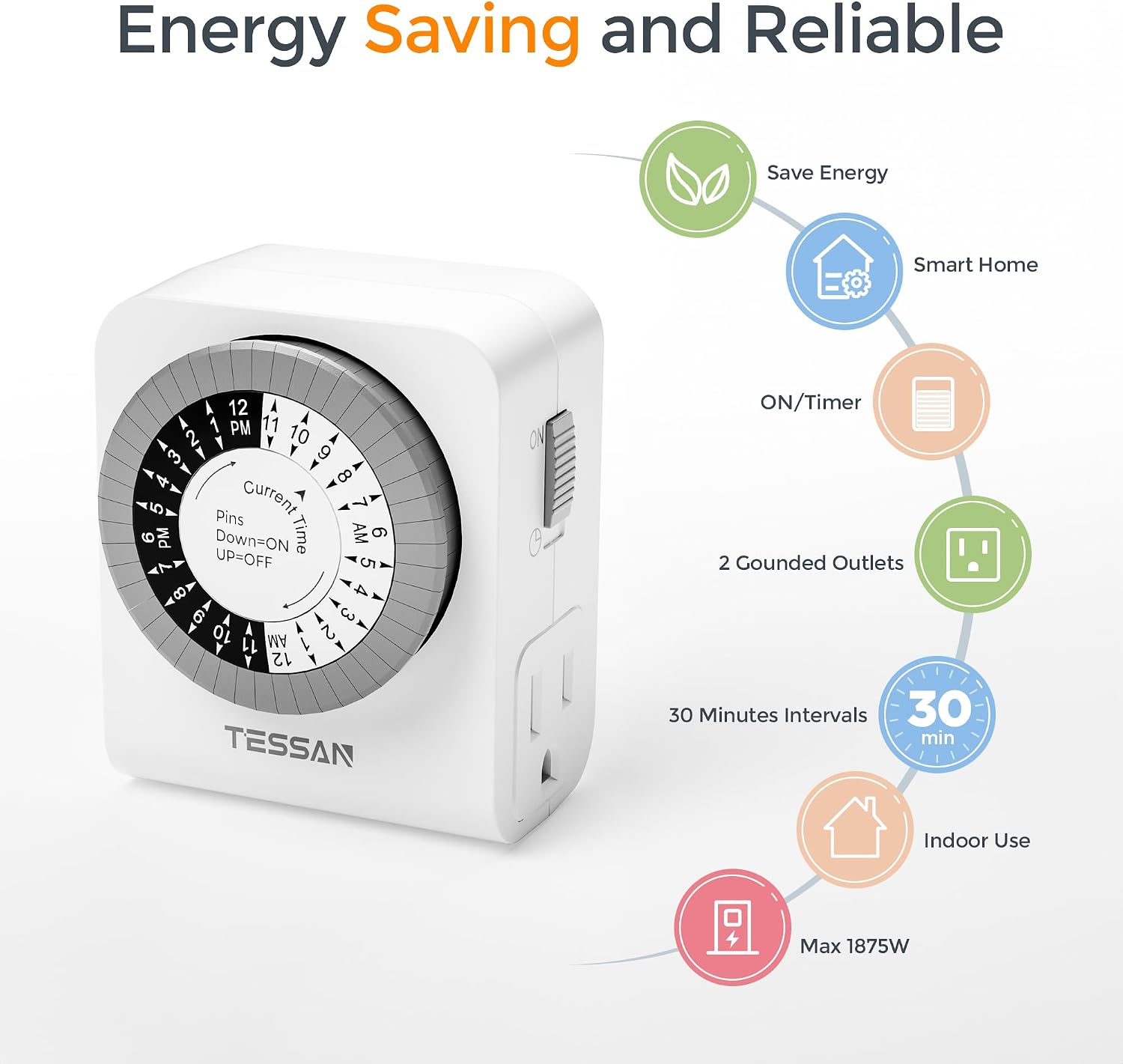
Image 9.1: TESSAN Timer features and specifications overview.
10. Warranty and Support
TESSAN products are designed for reliability and performance. For warranty information or technical support, please refer to the contact details provided with your purchase or visit the official TESSAN website.
Please retain your proof of purchase for warranty claims.
Documents and downloads
Ask a question about this manual
Ask about setup, troubleshooting, compatibility, parts, safety, or missing instructions. Manuals+ will review the question and use this page’s manual context to help answer it.