
1. Introduction
This manual provides detailed instructions for the installation, operation, and maintenance of your LUDOMIDE Crystal Ceiling Fan with Lights. This modern chandelier-style ceiling fan is designed to provide both illumination and air circulation, featuring a low-profile design suitable for various rooms such as bedrooms, dining rooms, and living rooms.

Figure 1.1: LUDOMIDE 20.5 inch Gold Crystal Ceiling Fan with Lights, showcasing its elegant design and integrated lighting.
Key Features:
- Luxury Crystal Chandelier Design: Combines a ceiling-mounted fan with a decorative crystal chandelier, saving space and enhancing room aesthetics.
- Quiet Operation: Equipped with an ultra-quiet DC motor for minimal noise, ensuring a peaceful environment.
- Multiple Speed Settings: Offers 6 adjustable fan speeds to customize airflow for optimal comfort.
- Dimmable and Color Adjustable Light: Features adjustable color temperature (white, natural, warm light) and brightness (10% to 100%) with a memory function.
- Reversible Fan Function: Supports forward rotation for cooling in summer and reverse rotation for air circulation in winter.
- Convenient Control: Operable via both a dedicated remote control and a smartphone application.
- Timer Function: Allows setting an automatic shut-off time for the fan.

Figure 1.2: Overview of key features including remote and app control, memory function, reversible airflow, adjustable brightness, multiple fan speeds, timer, and night light mode.
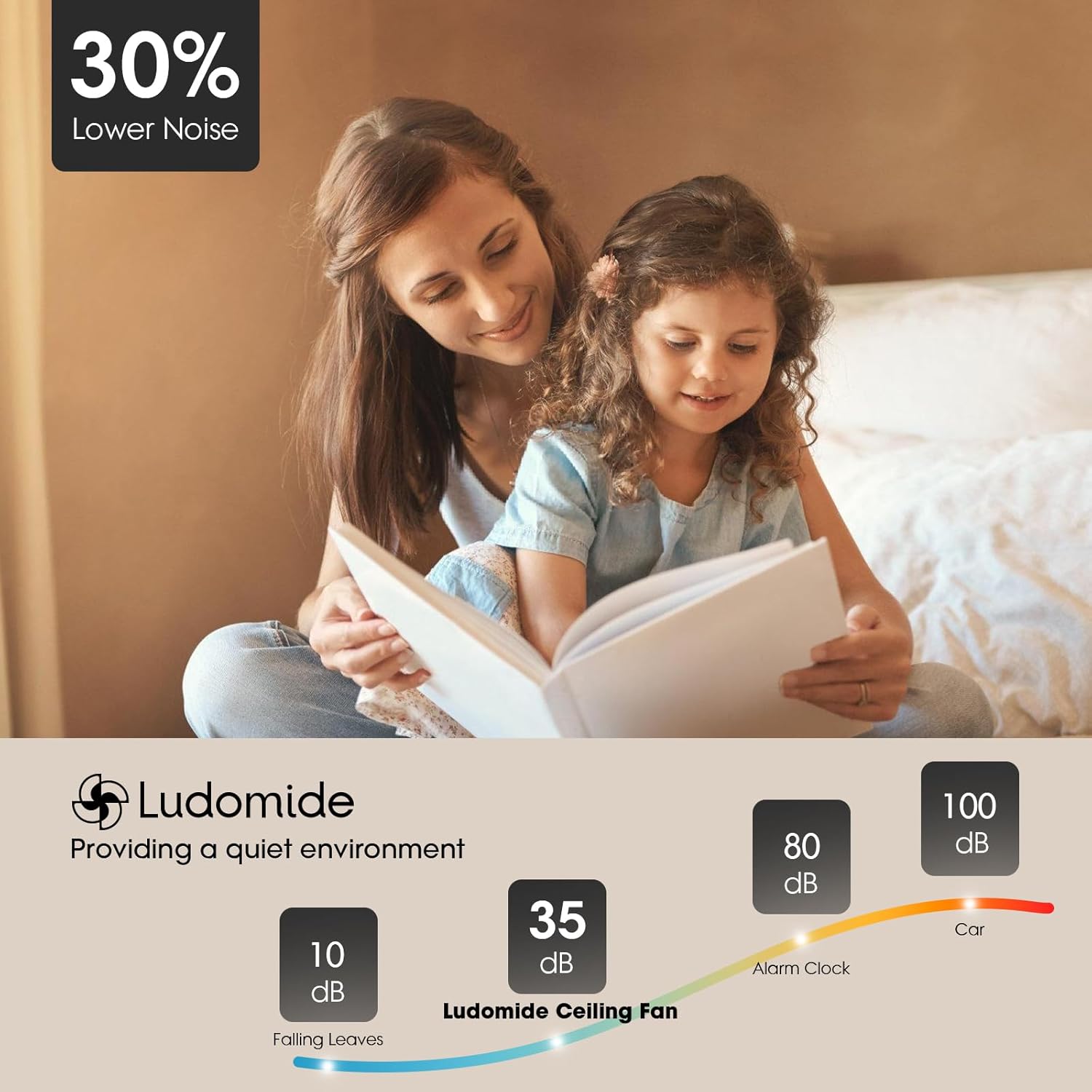
Figure 1.3: Noise level comparison, highlighting the quiet operation of the LUDOMIDE ceiling fan at approximately 35dB.
2. Safety Information
Please read all safety instructions carefully before installation and use. Failure to follow these instructions may result in electric shock, fire, or serious personal injury.
- Always disconnect power at the main circuit breaker before installation or servicing.
- Installation should be performed by a qualified electrician or a trained professional.
- Ensure the mounting structure can support the weight of the fan (approximately 8 pounds).
- Do not bend the fan blades during installation or cleaning.
- Keep hands, hair, and clothing away from moving fan blades.
- Do not operate the fan if any part is damaged.
- This product is designed for indoor use only.
3. Package Contents
Verify that all components are present and undamaged before beginning installation.
- Crystal Ceiling Fan Unit (with integrated LED light kit)
- Remote Control
- Mounting Hardware (screws, wire nuts, etc.)
- Instruction Manual
4. Setup and Installation
Assembly is required for this ceiling fan. Follow these steps carefully for proper installation. It is recommended to have a second person assist during installation.
Installation Steps:
- Prepare for Installation:
- Turn off power at the main circuit breaker or fuse box to avoid electrical shock.
- Clear the work area and ensure you have all necessary tools (screwdriver, wire strippers, ladder, etc.).
- Mount the Bracket:
- Secure the mounting bracket to the ceiling junction box. Ensure the junction box is securely fastened to the building structure and can support the fan's weight.
- Wire the Fan:
- Carefully connect the electrical wires from the ceiling to the fan's wiring according to local electrical codes. Typically, this involves connecting live, neutral, and ground wires. Use wire nuts to secure connections.
- Attach the Fan Unit:
- Lift the fan unit and attach it to the mounting bracket. Ensure it is securely fastened and all screws are tightened.
- Install Crystal Components:
- Carefully attach the crystal components to the fan unit as per the design. Refer to the product images for guidance on crystal placement.
- Final Checks:
- Double-check all electrical connections and ensure no wires are exposed.
- Confirm the fan is securely mounted and stable.
- Restore power at the circuit breaker.
5. Operating Instructions
Your LUDOMIDE Crystal Ceiling Fan can be controlled using the included remote control or a smartphone application.
5.1 Remote Control Operation
The remote control provides full functionality for your ceiling fan and light.
- Power On/Off: Press the power button to turn the fan and light on or off.
- Fan Speed Control: Use the fan speed buttons (1-6) to adjust the airflow.
- Speeds 1-2: Soft wind, ideal for sleep or reading.
- Speeds 3-4: Natural wind, suitable for recreation.
- Speeds 5-6: Cool wind, for exercise or strong cooling.
- Light On/Off: Separate button for light control.
- Brightness Adjustment: Use the dimmer buttons to adjust light brightness from 10% to 100%.
- Color Temperature Adjustment: Cycle through white light, natural light, and warm light settings.
- Reverse Function: Press the reverse button to change the fan's rotation direction (summer/winter mode).
- Timer Setting: Set the fan to automatically turn off after a specified duration (e.g., 2 hours).
- Night Light Mode: Activates a low-intensity light setting for nighttime use.

Figure 5.1: Illustration of the 6 wind speed settings and their recommended uses.

Figure 5.2: Demonstrates the 3 color temperature options and smooth dimming capability.
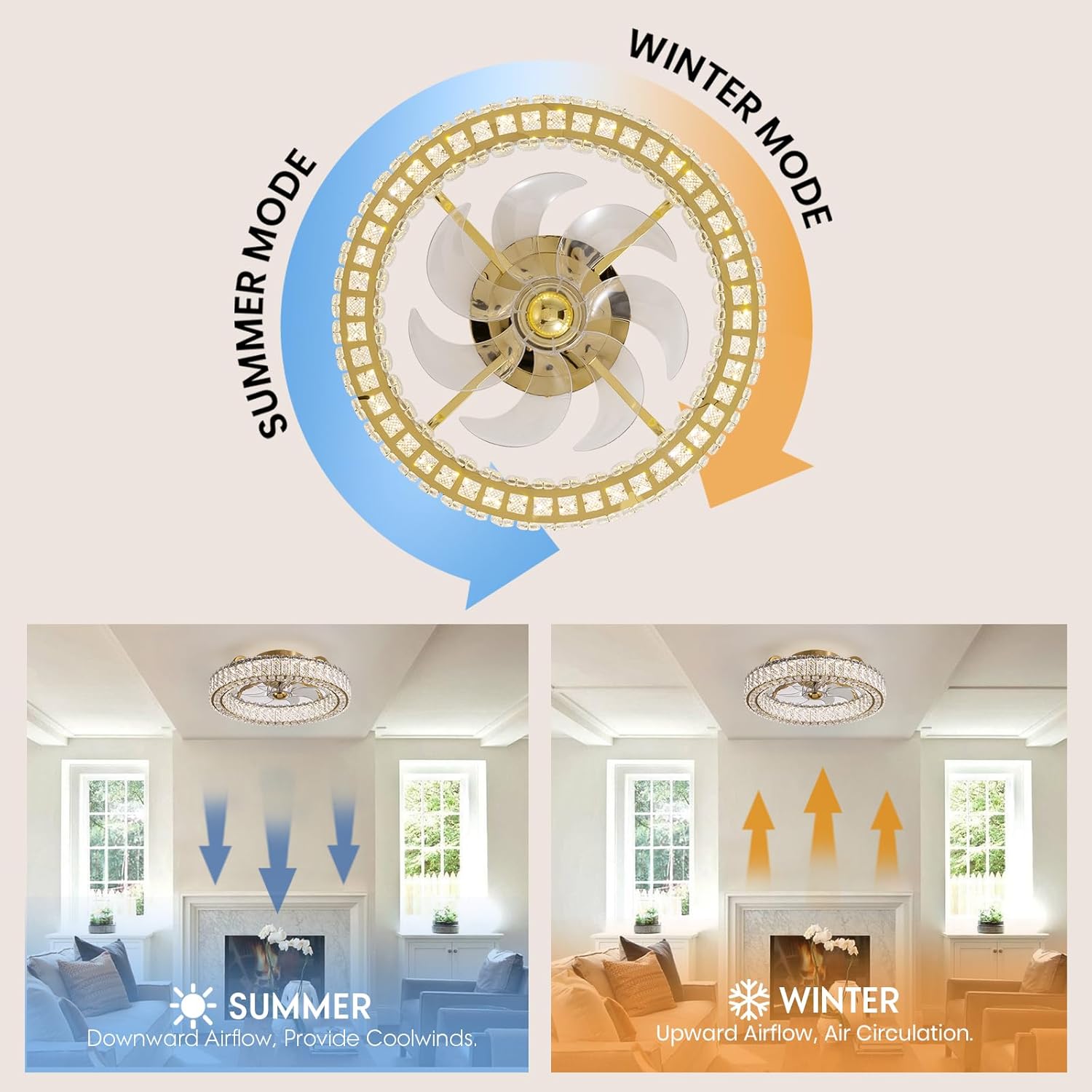
Figure 5.3: Explains the reversible fan function for summer cooling and winter air circulation.

Figure 5.4: Details the night light and memory function, which automatically restores the last light and airflow mode.
5.2 App Control Operation
For advanced control and convenience, download the "FanLampPro" app (as mentioned in customer reviews) on your smartphone.
- Download App: Search for "FanLampPro" in your device's app store and install it.
- Pair Device: Follow the in-app instructions to pair your smartphone with the ceiling fan. This typically involves ensuring Bluetooth or Wi-Fi is enabled and the fan is in pairing mode.
- Control Functions: The app provides similar controls to the remote, including power, fan speed, light brightness, color temperature, reverse function, and timer settings.
6. Maintenance
Regular maintenance ensures the longevity and optimal performance of your ceiling fan.
- Cleaning:
- Before cleaning, ensure the power is turned off at the circuit breaker.
- Use a soft, damp cloth to wipe down the fan housing and blades. Do not use abrasive cleaners or solvents.
- For the crystal components, gently wipe with a soft, lint-free cloth. A mild glass cleaner can be used sparingly if needed, applied to the cloth, not directly to the crystals.
- Blade Balance:
- If the fan wobbles, check that all blade screws are tight and the blades are properly balanced.
- General Care:
- Periodically check all connections and mounting hardware to ensure they remain secure.
7. Troubleshooting
If you encounter issues with your LUDOMIDE Crystal Ceiling Fan, refer to the following common problems and solutions.
| Problem | Possible Cause | Solution |
|---|---|---|
| Fan does not turn on. | No power supply; loose wiring; remote control battery dead. | Check circuit breaker. Ensure all wires are securely connected. Replace remote control batteries. |
| Light does not turn on. | Loose wiring; LED driver issue. | Check light wiring connections. If issue persists, contact customer support. |
| Fan makes clicking noise. | Loose components; unbalanced blades. | Ensure all screws are tight. Check for any obstructions. If noise persists, contact customer support. |
| Remote control not working. | Battery dead; remote not paired. | Replace remote control batteries. Refer to pairing instructions in the full manual (if applicable) or contact support. |
| Fan wobbles. | Loose mounting; unbalanced blades. | Ensure mounting bracket and fan unit are securely fastened. Check blade balance. |
If you are unable to resolve the issue using the troubleshooting guide, please contact LUDOMIDE customer support for assistance.
8. Specifications
Technical specifications for the LUDOMIDE Crystal Ceiling Fan (Model CFL-1191-01).
| Feature | Detail |
|---|---|
| Brand | LUDOMIDE |
| Model Name | CFL-1191-01 |
| Color | 20.5" Gold |
| Material | Acrylonitrile Butadiene Styrene, Crystal, Iron |
| Style | Modern |
| Light Fixture Form | Chandelier |
| Room Type | Bedroom, Dining Room, Living Room, Kitchen, Study Room, Children's Room |
| Indoor/Outdoor Usage | Indoor |
| Power Source | DC |
| Special Feature | Remote Controlled |
| Control Method | App, Remote |
| Light Source Type | LED |
| Finish Type | Painted |
| Shade Material | Crystal |
| Voltage | 240 Volts (DC) |
| Included Components | Light Kit |
| Item Weight | 8 Pounds |
| Wattage | 14 watts |
| Bulb Base | E26 |
| Mounting Type | Ceiling Mount |
| Assembly Required | Yes |
| Product Dimensions | 23 x 8 x 23 inches |
| First Available Date | October 8, 2024 |
9. Warranty and Customer Support
LUDOMIDE is committed to providing excellent customer support and product quality.
- Product Quality Guarantee: LUDOMIDE guarantees the quality of its products.
- Replacement Parts: Satisfactory service is provided, including replacement of damaged parts.
- Customer Support: A 24/7 customer support team is available to provide technical advice and assistance.
- Contact: For any questions or issues during product use, please contact the LUDOMIDE brand service through Amazon. You can visit the official LUDOMIDE store on Amazon for more information: LUDOMIDE Amazon Store.


