
Introduction
Thank you for choosing the Victiv AP50 Tripod Head. This manual provides detailed instructions for the safe and efficient use of your new equipment. Please read this manual thoroughly before operating the product and keep it for future reference. The AP50 is designed for use with cameras, camcorders, smartphones, and tablets, offering stable and flexible positioning for your photography and videography needs.
Safety Instructions
- Always ensure the tripod head is securely mounted to a stable tripod before attaching any equipment.
- Do not exceed the maximum load capacity of the tripod head. Refer to the Specifications section for details.
- Avoid exposing the product to extreme temperatures, moisture, or corrosive substances.
- Keep out of reach of children.
- Do not attempt to disassemble or modify the tripod head, as this may void the warranty and cause damage.
Package Contents
Please check that all the following items are included in your package:
- Victiv AP50 Tripod Head
- Quick Release Plate
- User Manual (this document)
Product Overview
The Victiv AP50 Tripod Head features a robust design for precise camera positioning. Key components include:
- Quick Release Plate: For fast attachment and detachment of your camera.
- Pan Lock Knob: Secures the horizontal rotation.
- Tilt Lock Knob: Secures the vertical tilt.
- Base Mount: Connects to your tripod.
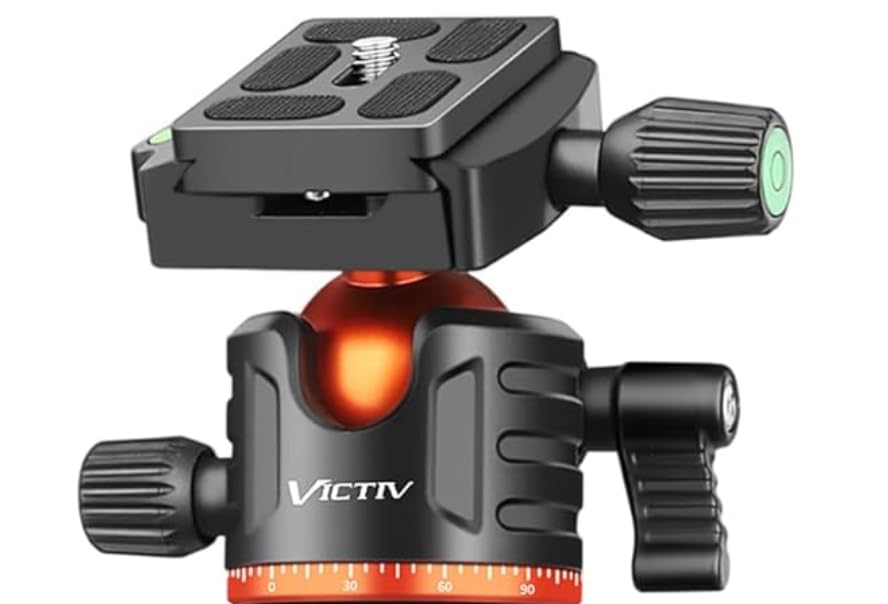
Figure 1: Victiv AP50 Tripod Head. This image displays the overall structure of the tripod head, highlighting its compact design and the quick release plate mechanism.
Setup
1. Attaching the Tripod Head to a Tripod
- Locate the 3/8-inch screw on your tripod's mounting platform.
- Align the base mount of the AP50 Tripod Head with the screw.
- Rotate the tripod head clockwise onto the tripod screw until it is firmly secured. Ensure it is tight enough to prevent wobbling, but do not overtighten.
2. Mounting Your Device (Camera/Camcorder/Smartphone/Tablet)
- Press the quick release lever to detach the quick release plate from the tripod head.
- Attach the quick release plate to the bottom of your camera or device using the 1/4-inch screw. Ensure it is securely fastened. For smartphones/tablets, an adapter (not included) may be required.
- Slide the quick release plate with your device back into the tripod head's receiver until it clicks into place. Verify that the device is securely locked before releasing your grip.
Operating Instructions
Adjusting Pan and Tilt
- Pan Adjustment: Loosen the Pan Lock Knob (typically located at the base of the head) to allow horizontal rotation. Tighten the knob to lock the head in the desired horizontal position.
- Tilt Adjustment: Loosen the Tilt Lock Knob (typically located on the side of the head) to allow vertical tilting. Adjust your device to the desired angle, then tighten the knob to secure it.
Always ensure all knobs are tightened before leaving your equipment unattended to prevent accidental movement or damage.
Maintenance
- Cleaning: Use a soft, dry cloth to wipe the tripod head. For stubborn dirt, a slightly damp cloth can be used, followed by immediate drying. Do not use harsh chemicals or abrasive cleaners.
- Storage: Store the tripod head in a cool, dry place, away from direct sunlight and excessive dust.
- Inspection: Periodically check all screws and moving parts for tightness and smooth operation.
Troubleshooting
| Problem | Possible Cause | Solution |
|---|---|---|
| Device wobbles on tripod head. | Quick release plate not fully secured or tripod head not tight on tripod. | Ensure the quick release plate is clicked into place and the tripod head is firmly screwed onto the tripod. |
| Head does not pan/tilt smoothly. | Lock knobs are too tight or dirt/debris in mechanism. | Loosen lock knobs. Clean the head thoroughly. If issue persists, contact support. |
| Quick release plate is stuck. | Lever not fully disengaged or plate misaligned. | Ensure the quick release lever is fully open. Gently wiggle the plate while pulling. Do not force. |
Specifications
| Feature | Detail |
|---|---|
| Brand | Victiv |
| Model Number | AP50 |
| Folded Size | 3 inches (diameter) |
| Compatible Devices | Camera, Camcorder, Smartphone, Tablet |
| Color | Orange |
| Package Dimensions | 10 x 8 x 6 cm |
| Weight | 260 grams |
| UPC | 760701792566 |
Warranty and Support
For warranty information or technical support, please refer to the official Victiv website or contact your retailer. Keep your purchase receipt as proof of purchase.
