
Frigidaire FGFR3100
Contents
Frigidaire 3 Cu Ft Capacity Built-In Refrigerator User Manual
Model: FGFR3100
Brand: Frigidaire
1. Product Overview
This manual provides essential information for the safe and efficient operation of your Frigidaire 3 Cu Ft Capacity Built-In Refrigerator. Designed for under-counter installation, this compact unit offers convenient storage with modern features.

Image 1.1: Front view of the Frigidaire 3 Cu Ft Built-In Refrigerator.
Key features include a spacious 3 cubic feet capacity, frost-free operation, a secure door lock, LED display for temperature control, and front ventilation for efficient heat dissipation.

Image 1.2: The sleek stainless steel design of the refrigerator.
2. Safety Information
Please read all safety instructions carefully before installation and operation to prevent personal injury or property damage.
- Electrical Safety: Ensure the refrigerator is connected to a properly grounded 110-volt outlet. Do not use extension cords.
- Ventilation: Maintain adequate clearance around the unit for proper air circulation, especially for the front ventilation system.
- Placement: Place the unit on a level, stable surface to prevent tipping and ensure efficient operation.
- Child Safety: The unit features a door lock. Keep keys out of reach of children to prevent entrapment.
- Cleaning: Always unplug the unit before cleaning. Use mild, non-abrasive cleaners.
3. Setup and Installation
3.1 Unpacking
- Remove all packaging materials, including foam and adhesive tape.
- Inspect the refrigerator for any shipping damage. Report any damage immediately to the retailer.
- Clean the interior and exterior of the unit with a soft cloth and mild detergent before use.
3.2 Placement
This refrigerator is designed for under-counter installation. Ensure the installation area meets the following requirements:
- Dimensions: The unit measures approximately 24.4 inches deep, 14.9 inches wide, and 33.9 inches high. Allow sufficient space for proper fit and ventilation.
- Ventilation: The unit features front ventilation. Do not block the front vents to ensure proper heat dissipation.
- Leveling: Use the adjustable leveling legs to ensure the unit is perfectly level. This is crucial for proper door sealing and efficient operation.
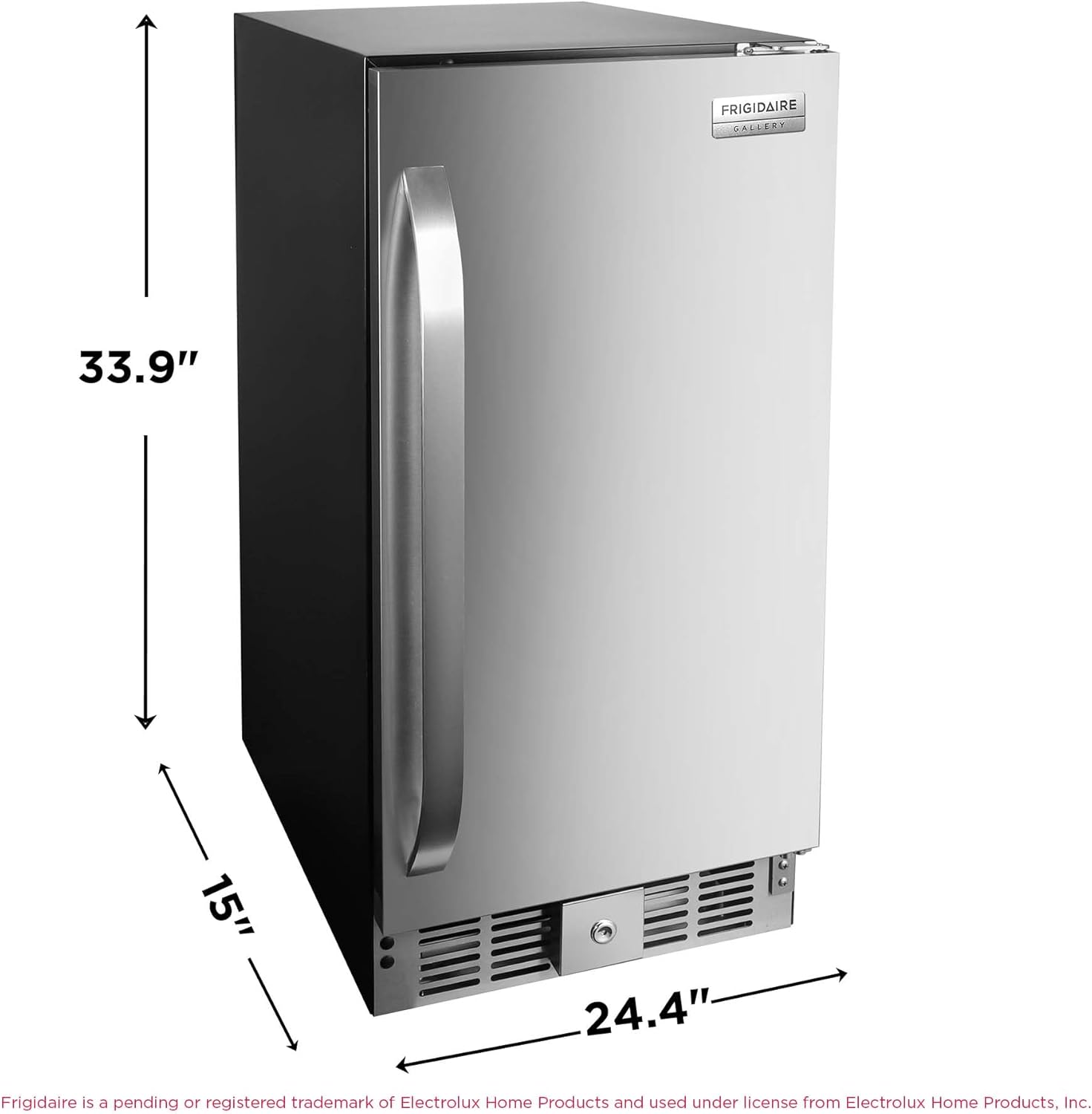
Image 3.1: Product dimensions for installation planning.

Image 3.2: Features including adjustable leveling legs and front ventilation.
3.3 Electrical Connection
Plug the refrigerator into a dedicated, grounded 110-volt AC outlet. Allow the unit to stand upright for at least 2-4 hours before plugging it in to allow refrigerants to settle.
4. Operating Instructions
4.1 Temperature Control
The refrigerator features an LED display and one-touch digital controls for precise temperature management and interior lighting.

Image 4.1: Interior view with the LED digital control panel.
- Press the temperature adjustment buttons on the LED display to set your desired temperature.
- The LED lighting can also be controlled via the digital panel.
4.2 Door Lock Operation
The unit is equipped with a door lock for added security. A key is provided to lock and unlock the door.

Image 4.2: Detail of the door lock mechanism.
- Insert the key into the lock located at the bottom front of the unit.
- Turn the key clockwise to lock the door and counter-clockwise to unlock.
4.3 Storage and Shelving
The refrigerator offers 3 cubic feet of storage capacity with three glass shelves. These shelves can be adjusted to accommodate items of various heights.
- To adjust a shelf, carefully lift it and slide it out. Reinsert into desired shelf supports.
- Ensure items are placed to allow for proper air circulation within the unit.
5. Maintenance
5.1 Cleaning
- Interior: Clean the interior regularly with a solution of mild detergent and warm water. Rinse thoroughly and dry. Remove shelves and drawers for easier cleaning.
- Exterior: Wipe the stainless steel exterior with a soft cloth and a stainless steel cleaner. Avoid abrasive cleaners or scouring pads.
- Door Gasket: Clean the door gasket regularly to ensure a tight seal.
- Condenser Coils: Periodically clean the condenser coils located at the front of the unit to maintain efficiency.
5.2 Defrosting
This refrigerator features a frost-free defrost system, eliminating the need for manual defrosting. Ice buildup is automatically managed by the system.
6. Troubleshooting
| Problem | Possible Cause | Solution |
|---|---|---|
| Refrigerator does not operate. | Not plugged in; circuit breaker tripped; power outage. | Check power cord connection; reset circuit breaker; check household power supply. |
| Temperature is not cold enough. | Temperature setting too high; door opened too frequently; warm food placed inside; poor ventilation. | Adjust temperature setting lower; minimize door openings; allow hot food to cool before placing in unit; ensure front vents are clear. |
| Unit is making unusual noises. | Unit not level; objects vibrating against the unit; normal operating sounds. | Adjust leveling legs; ensure nothing is touching the unit; gurgling/hissing sounds are normal for refrigerant flow. |
| Door does not close properly. | Unit not level; door gasket dirty or damaged; items obstructing door. | Adjust leveling legs; clean or replace door gasket; rearrange items inside. |
7. Specifications
| Feature | Detail |
|---|---|
| Brand | Frigidaire |
| Model Number | FGFR3100 |
| Capacity | 3 Cubic Feet (85 Liters) |
| Dimensions (D x W x H) | 24.4" x 14.9" x 33.9" |
| Item Weight | 66 Pounds |
| Installation Type | Undercounter |
| Defrost System | Frost Free |
| Door Material Type | Stainless Steel |
| Shelf Type | Glass |
| Number of Shelves | 3 |
| Voltage | 110 Volts |
| Special Features | Compact, Door Lock, Front Ventilation, Frost Free, LED Display |
8. Warranty and Support
For warranty information and customer support, please refer to the documentation included with your purchase or visit the official Frigidaire website. Keep your proof of purchase for any warranty claims.
For additional assistance, you may contact Frigidaire customer service. Details are typically available on the manufacturer's website or in the product packaging.
Documents and downloads
Ask a question about this manual
Ask about setup, troubleshooting, compatibility, parts, safety, or missing instructions. Manuals+ will review the question and use this page’s manual context to help answer it.