
1. Safety Information
Please read and understand all safety instructions before assembly, operation, or maintenance of this product. Failure to follow these instructions may result in injury or damage.
- Always unplug the vanity before assembly or disassembly.
- Be cautious of sharp edges and heavy weight during assembly and usage.
- Keep electrical components dry and away from water.
- Do not overload the USB ports or plug sockets.
- Always follow the assembly instructions carefully.
2. Product Overview
This DWVO vanity set includes a 46'' x 24.4'' adjustable LED mirror with 3 color modes, 11 drawers, and a storage stool. It is equipped with 2 plug sockets, 2 USB ports, and a hair dryer rack.
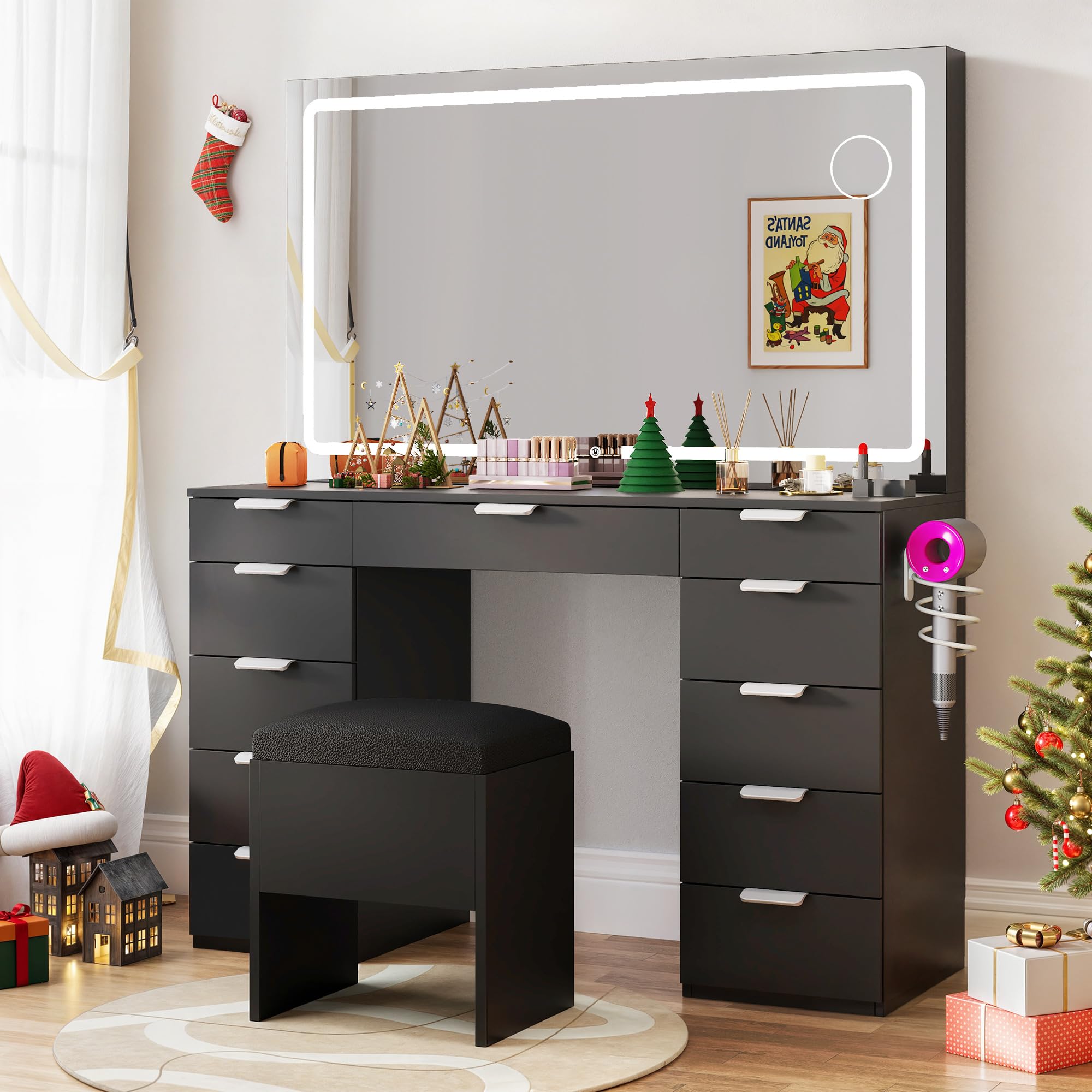
Image 1: DWVO 46-inch Makeup Vanity Set. This image displays the complete vanity set, including the desk with drawers, the adjustable LED mirror, and the accompanying storage stool.
Key Features:
- Adjustable LED Mirror: The mirror measures 46'' x 24.4'' and features an LED strip with 3 color modes, controlled by a touch switch.
- Storage Capacity: The vanity includes 11 drawers for storing items. A storage stool is also provided.
- Integrated Power and USB: Features 2 standard plug sockets, 2 USB ports, and a hair dryer rack for electrical accessories.
- Assembly: The vanity desk dimensions are 46"L x 11.7"W x 55.9"H, and the stool is 15.7"L x 11.1"W x 15.1". All components are labeled, and detailed instructions are included for assembly.
3. Setup and Assembly
The DWVO Makeup Vanity Set requires assembly. Please ensure you have sufficient space and all necessary tools before beginning.
- Unpack Components: Carefully remove all parts from the packaging. Verify that all components listed in the included parts list are present and undamaged.
- Review Instructions: Refer to the detailed assembly instructions provided in the package. Each part and accessory is clearly labeled to assist with the process.
- Follow Step-by-Step Guide: Assemble the vanity desk, drawers, mirror, and stool according to the sequential steps outlined in the manual. Pay close attention to diagrams and warnings.
- Secure Connections: Ensure all screws, bolts, and fasteners are tightened securely. Do not overtighten.
- Mirror Installation: Carefully attach the LED mirror to the vanity desk as instructed. Ensure it is stable and properly aligned.
If any parts are broken or missing, please contact customer support for assistance.
4. Operating Instructions
4.1 LED Mirror Operation
The integrated LED mirror features adjustable lighting modes.
- Power On/Off: Locate the touch switch on the mirror surface. Tap the switch once to turn the LED lights on or off.
- Change Color Mode: With the lights on, tap the touch switch repeatedly to cycle through the 3 available color modes (e.g., cool white, natural, warm yellow).
- Adjust Brightness: Press and hold the touch switch to adjust the brightness level of the LED lights. Release when the desired brightness is achieved.
4.2 Power Outlet and USB Ports
The vanity desk includes built-in power outlets and USB ports for convenience.
- Plug Sockets: Insert standard electrical plugs into the 2 provided sockets to power devices such as hair dryers, curling irons, or other small appliances.
- USB Ports: Connect USB cables to the 2 provided USB ports to charge mobile phones, tablets, or other USB-powered devices.
- Caution: Do not exceed the maximum power rating of the outlets and USB ports. Avoid connecting high-power appliances simultaneously to prevent overloading.
5. Maintenance
Regular maintenance helps prolong the life and appearance of your vanity set.
- Cleaning the Surface: Wipe the wood surfaces with a soft, damp cloth. Avoid abrasive cleaners or harsh chemicals that may damage the finish.
- Mirror Cleaning: Use a glass cleaner and a lint-free cloth to clean the mirror surface. Spray cleaner onto the cloth, not directly onto the mirror, to prevent liquid from seeping into electrical components.
- Dusting: Regularly dust all surfaces, including drawers and the stool, with a dry, soft cloth.
- Electrical Components: Ensure all electrical connections remain dry. If any part of the electrical system becomes wet, unplug the vanity immediately and allow it to dry completely before use.
- Drawer Care: Periodically check drawer slides for smooth operation. Clean any debris that may hinder movement.
6. Troubleshooting
If you encounter issues with your vanity set, refer to the following common troubleshooting steps:
- LED Mirror Not Lighting Up:
- Ensure the vanity is properly plugged into a working power outlet.
- Check if the power cord is securely connected to the vanity.
- Verify that the wall outlet is functional by plugging in another device.
- Gently tap the touch switch to ensure it is responding.
- Power Outlets/USB Ports Not Working:
- Confirm the vanity is plugged in and receiving power.
- Ensure the devices you are trying to power or charge are functional.
- Avoid overloading the outlets; try connecting only one device at a time.
- Drawers Sticking or Not Closing Smoothly:
- Check for any obstructions inside the drawer or on the slides.
- Ensure the drawer is correctly aligned on its runners.
- Verify that the vanity is placed on a level surface.
If these steps do not resolve the issue, please contact customer support.
7. Specifications
| Feature | Detail |
|---|---|
| Brand | DWVO |
| Model Number | MADWVjqHSv |
| Color | Charcoal Black |
| Material | Wood |
| Product Dimensions (D x W x H) | 15.7"D x 46"W x 55.9"H |
| Item Weight | 116.84 Pounds |
| Style | LED Strip with Wood Top |
| Number of Drawers | 11 |
| Mirror Size | 46'' x 24.4'' (Adjustable LED) |
| Power Outlets | 2 Standard Plug Sockets |
| USB Ports | 2 |
| Stool Dimensions (L x W x H) | 15.7"L x 11.1"W x 15.1"H |
8. Warranty Information
Specific warranty details for the DWVO 46-inch Makeup Vanity Set are not provided in the product data. For information regarding warranty coverage, terms, and conditions, please refer to the documentation included with your purchase or contact the manufacturer directly.
9. Customer Support
If you have any questions, require assistance with assembly, or need to report missing or damaged parts, please contact DWVO customer support. Specific contact information was not provided in the product data. Please refer to the packaging or the seller's website for the most current support details.