
1. Introduction
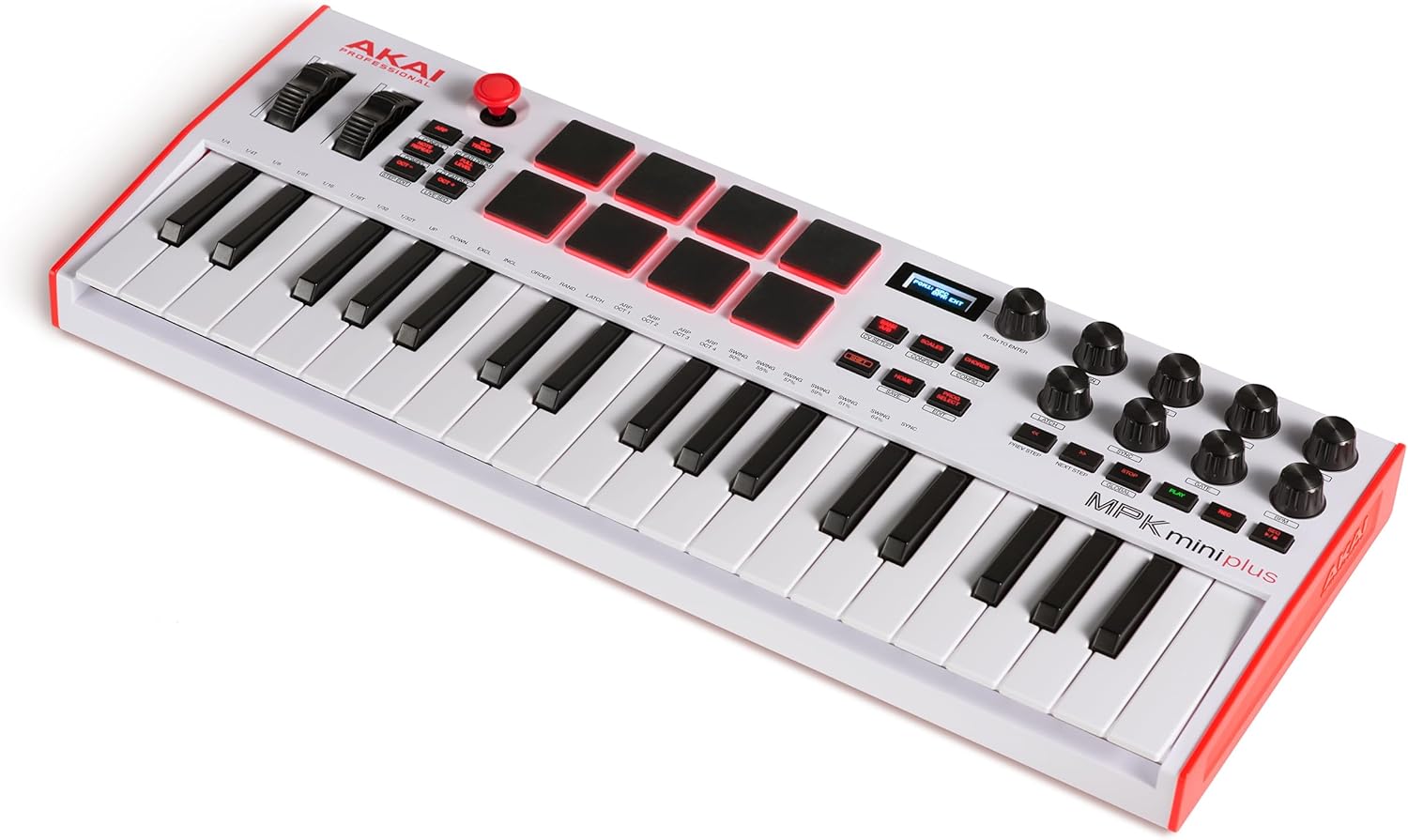
The Akai Professional MPK Mini Plus is a versatile USB MIDI Keyboard Controller designed for music production. It offers enhanced controls for creative expression and expanded hardware integration, all within a compact layout.
This manual provides detailed instructions for setting up, operating, and maintaining your MPK Mini Plus, ensuring you can fully utilize its features for melodic and harmonic creation, beat making, and sound design.
Official Akai Professional MPK Mini Plus Overview Video. This video provides a comprehensive look at the controller's features and capabilities.
2. Setup
To begin using your MPK Mini Plus, follow these steps:
- Connect to Power/Computer: Connect the MPK Mini Plus to your computer using the provided USB cable. The device is USB-powered.
- Software Installation: Install the necessary software from the included Software Download Card. This typically includes MPC Beats, drivers, and other bundled instruments/plugins.
- Driver Installation: Ensure all required drivers are installed for your operating system (Windows / Mac).
- DAW Integration: Open your preferred Digital Audio Workstation (DAW) and configure it to recognize the MPK Mini Plus as a MIDI input device.

The MPK Mini Plus connected via USB to a laptop, demonstrating a typical setup for music production.

Detailed view of the rear panel, highlighting USB, MIDI In/Out, and CV/Gate connections for versatile integration.
3. Operating Instructions
3.1. 37-Key Dynamic Keybed
The MPK Mini Plus features a 37-key Gen 2 dynamic keybed, providing 3 full octaves for expanded melodic and harmonic creation. This allows for two-handed chords, arpeggiation, and laying down solos or soundscapes.
- Pitch Bend & Modulation Wheels: Use the dedicated pitch bend and modulation wheels for expressive control over your sounds.
- XY Joystick: The XY joystick offers additional real-time control for various parameters.
- Octave Up/Down: Easily shift the octave range of the keys using the dedicated Octave Up/Down buttons.

Close-up view of the pitch bend and modulation wheels, along with the XY joystick, offering expressive control.
3.2. 8 MPC Pads
The 8 premium RGB MPC Pads are velocity-sensitive and fully backlit, ideal for dynamic performance, beat making, and drum programming.
- Velocity Sensitivity: Pads respond to how hard you hit them, allowing for expressive drumming.
- RGB Backlighting: Provides visual feedback and enhances performance.
- Bank A/B: Switch between two banks to access 16 different samples or sounds.

A detailed view of the 8 RGB MPC pads, showcasing their backlighting and layout.
3.3. 64-Step Sequencer
The built-in 64-step sequencer allows you to record and compose without a computer. It features one track for drums and one for melodies or chords, with up to 8 notes each.
- Step Edit Mode: Enter notes directly into the sequencer step-by-step.
- Live Sequence Mode: Record your performance in real-time.
- Polyphony: Up to 8 notes per step for complex melodies and chord progressions.

The MPK Mini Plus demonstrating its 64-step sequencer capabilities, ideal for capturing musical ideas.
3.4. Arpeggiator
The powerful standalone arpeggiator can generate exciting melodies and patterns, driven by your external MIDI or modular racks.
- Modes: Select from various arpeggiator modes (Up, Down, Excl, Incl, Order, Rand, Latch).
- Time Divisions & Swing: Adjust the timing and feel of the arpeggio.
- Octave Range: Expand the arpeggio across multiple octaves.
3.5. Chords & Scales Mode
The built-in Chords and Scales modes simplify and enhance your performance, allowing you to generate lush chords and scales with ease.
- Chord Mode: Play complex chords by pressing a single key. Configure chord type (major, minor, triad, etc.) and key.
- Scales Mode: Ensure every note you play is in key, preventing wrong notes. Configure scale type (chromatic, major, minor, harmonic, pentatonic, etc.) and key.
The OLED display and dedicated buttons for Chords and Scales modes, simplifying musical composition.
3.6. Advanced Connectivity
The MPK Mini Plus offers extensive connectivity options for integrating with various studio equipment:
- USB: Connects to your computer for MIDI data and power.
- MIDI I/O: Standard 5-pin MIDI In/Out ports for connecting to external MIDI devices like synthesizers and drum machines.
- CV/Gate: 1/8" (3.5mm) CV outputs and Clock In/Out ports for controlling modular gear.
- Sustain Input: Dedicated 1/4" sustain pedal input for expressive playing.

A clear view of the rear panel, detailing all available input and output ports for comprehensive connectivity.
3.7. DAW Control & NKS Integration
Gain intuitive hardware control over your DAW and seamlessly integrate with Native Instruments software.
- Transport Section: Dedicated buttons for Play, Stop, Record, Rewind, and Fast-Forward for easy navigation within your DAW.
- 8 Assignable Rotary Knobs: Tactile control over DAW parameters like EQ, volume, and automation.
- Native Kontrol Standard (NKS) Integration: Browse and control Native Instruments presets and sound libraries directly from your MPK Mini Plus.
Video demonstrating the NKS integration with Massive X, showcasing hands-on control over sound design parameters.

Visual representation of Native Kontrol Standard (NKS) integration, highlighting compatibility with various Native Instruments plugins.
3.8. Included Software
The MPK Mini Plus comes bundled with a comprehensive software package to kickstart your music production:
- MPC Beats: A powerful DAW based on iconic MPC hardware, featuring thousands of drum samples, loops, and plugin instruments.
- Komplete 15 Select Bundles: Choose one of three curated bundles (Beats, Band, or Electronic) from Native Instruments.
- Splice Creator Plan: Two months of access to the ultimate sample library.
- Reason+: A 6-month subscription to Reason+, a creative bundle for music making.

The MPC Beats software interface, demonstrating its capabilities for beat making and music creation.
4. Specifications
| Feature | Detail |
|---|---|
| Item Weight | 3.08 pounds |
| Product Dimensions | 7.08 x 17.76 x 2.04 inches |
| Item Model Number | MPKMINIPLUSW |
| Color Name | White |
| Compatible Devices | External MIDI Device, PC, Sustain Pedal, Synthesizer |
| Connector Type | USB |
| Hardware Interface | USB 2.0 Type B |
| Supported Software | MPC Beats, Ableton Live Lite, Reason+ (6-month subscription) |
| Material Type | Durable High-Grade Plastic |
| Musical Style | Electronic |
| Instrument Key | MIDI Controller |
| Number of Keyboard Keys | 37 |
| Size | 37 Key |
| Hardware Platform | Windows / Mac |
| Connectivity Technology | USB Type-B Port, 1/8" (3.5mm) CV Outputs, 1/8” (3.5mm) CV Clock In/Out Ports, MIDI DIN In/Out Ports, Sustain Input |
| Special Feature | Backlit Drum Pad, Built-In Arpeggiator, Compact, Digital Display, Integrated Effect, Lightweight, Portable, Programmable, Touch Sensitive Pad, Velocity Sensitive Key |
5. What's in the Box
Your Akai Professional MPK Mini Plus package includes:
- MPK Mini Plus White
- USB Cable
- Software Download Card
- Quickstart Guide
- Safety & Warranty Manual
6. Troubleshooting
If you encounter issues with your MPK Mini Plus, consider the following:
- No Power/Connectivity: Ensure the USB cable is securely connected to both the controller and your computer. Try a different USB port or cable.
- Software Not Recognizing Device: Verify that the latest drivers are installed. Check your DAW's MIDI settings to ensure the MPK Mini Plus is enabled as an input device.
- Pads/Keys Not Responding: Check the velocity sensitivity settings on the device or within your software. Ensure the correct MIDI channel is selected.
- Sequencer Issues: Refer to the Quickstart Guide for detailed sequencer operation. Ensure clock sync settings are correct if using external gear.
- Firmware Update: Check the Akai Professional website for any available firmware updates for your device.
7. Maintenance
To ensure the longevity and optimal performance of your MPK Mini Plus:
- Cleaning: Use a soft, dry cloth to clean the surface of the controller. Avoid abrasive cleaners or solvents.
- Storage: Store the device in a cool, dry place away from direct sunlight, extreme temperatures, and excessive dust.
- Handling: Avoid dropping the device or subjecting it to strong impacts.
8. Warranty & Support
For warranty information, technical support, and additional resources, please visit the official Akai Professional website or refer to the Safety & Warranty Manual included in your package.
You can also visit the Akai Professional Store on Amazon for more products and information.


