1. Introduction
This manual provides detailed instructions for the installation, operation, and maintenance of your CAMECHO Android 13 Car Radio. Please read this manual thoroughly before using the product to ensure proper functionality and safety. This 2 DIN car radio features an 8-core processor, 4GB RAM, and 64GB ROM, offering a high-performance Android 13 operating system on a 9-inch IPS touch screen.

Image 1.1: The CAMECHO Android 13 Car Radio display showing the user interface with various applications.
2. Vehicle Compatibility
This CAMECHO Android 13 Car Radio is designed for specific Volkswagen, Skoda, and Seat models. Please verify your vehicle's compatibility before installation.
- For VW: Passat, Jetta, Touran, Golf (5, 6, V, VI), Polo, Tiguan, Sharan, EOS, Scirocco, Caddy, T5/Transporter, R36 models, Sagitar/Jada/Jetta, Magotan/Magotan V6, Passat B6, Passat B7, Passat NMS, Passat models, Passat CC, Passat TSI, Touran, Golf V, Golf VI.
- For Skoda: Octavia (Combi 06/2004 facelift, II and III), Fabia (Limousine ab 02/2007 bis 2012, Combi ab 04/2007 bis 2012), Praktik ab 2007 bis 2012, Roomster ab 04/2006 bis 2012, Yeti ab 2009 to 2012, Superb/3 Tab 2008 bis 2012.
- For Seat: Altea (ab 05/2004), Toledo (ab 12/2004), Leon (ab 09/2005), Altea XL (ab 04/2007), Alhambra (ab 2010).

Image 2.1: A detailed chart illustrating the compatible car models for the CAMECHO car radio.
3. Package Contents
Please check the package for the following items:
- CAMECHO Android 13 Car Radio Unit (9-inch display)
- AHD Rear Camera
- Power Cables (multiple types for vehicle specific connections)
- RCA Cable
- Camera Input Cable
- Radio Antenna
- Canbus Decoder
- GPS Antenna
- USB Cable
- User Manual (this document)
- Microphone

Image 3.1: Visual representation of the car radio's dimensions and a complete list of accessories included in the package.
4. Setup and Installation
Installation of the CAMECHO Android 13 Car Radio requires technical knowledge. It is recommended to have the unit installed by a qualified professional. Ensure the vehicle's power is disconnected before beginning installation.
4.1. Pre-Installation Check
Before installing, compare your vehicle's existing radio setup with the CAMECHO unit. The unit is designed to integrate seamlessly into compatible dashboards.

Image 4.1: A visual comparison of a car dashboard before and after the CAMECHO car radio installation, highlighting the integrated fit.
4.2. Wiring Connections
- Power Cable: Connect the main power harness to the vehicle's wiring. The Canbus decoder should be integrated as per vehicle requirements.
- RCA Cables: Connect for audio output (e.g., external amplifier) or video input/output.
- Camera Input: Connect the AHD rear camera cable to the designated input.
- GPS Antenna: Mount the GPS antenna in a location with a clear view of the sky, typically on the dashboard or under the windshield.
- Radio Antenna: Connect the vehicle's radio antenna.
- USB Cable: Route the USB cable to an accessible location for connecting external devices.
- Microphone: Connect the external microphone for improved call quality.
5. Operating Instructions
5.1. Basic Operation
- Power On/Off: The unit typically powers on with the vehicle's ignition. A power button may also be present on the unit or steering wheel controls.
- Volume Control: Adjust volume using the on-screen controls or steering wheel buttons.
- Touch Screen: Navigate the interface by tapping, swiping, and pinching on the 9-inch IPS display.
5.2. Android 13 Operating System
The unit runs on Android 13, providing access to a wide range of applications and features. The 8-core processor with 4GB RAM and 64GB ROM ensures smooth performance.

Image 5.1: An overview of the Android 13 operating system, highlighting the 8-core processor, 4GB RAM, and 64GB ROM specifications.
5.3. CarPlay and Android Auto
The unit supports both wired and wireless CarPlay and Android Auto. Connect your smartphone to access navigation, music, calls, and messages via voice control or the touch screen.
- Wireless Connection: Enable Bluetooth and Wi-Fi on your phone and the car radio, then follow the on-screen prompts to connect.
- Wired Connection: Connect your phone via the USB port.
5.4. Mirror Link
Mirror Link allows you to display your smartphone's screen directly onto the car radio's display. This feature supports both iOS (via Wi-Fi) and Android (via Wi-Fi/USB) devices.

Image 5.2: Visual guide to connecting and using Carplay, Android Auto, and Mirror Link features with your smartphone.
5.5. Bluetooth Connectivity
The built-in Bluetooth module enables hands-free calling, phone book synchronization, and audio streaming from your mobile device.
- Pairing: Go to Bluetooth settings on the car radio, enable Bluetooth on your phone, and select the car radio from the list of available devices.
- Hands-Free Calling: Make and receive calls directly through the car radio.
- Audio Streaming: Play music from your phone through the car's speakers.
5.6. FM/RDS Radio
The integrated FM/RDS radio supports a frequency range of 87.50MHz-108.00MHz and allows for storing up to 30 stations. RDS (Radio Data System) provides additional information like station name and song title.
5.7. DSP Audio Settings
Utilize the Digital Sound Processor (DSP) with 36-band or 10-band equalizer settings to customize your audio experience. Adjust frequency, AE, and other sound parameters for optimal sound quality.

Image 5.3: Features including Bluetooth for hands-free communication, FM/RDS radio for broadcast reception, and detailed 36-band DSP audio controls.
5.8. GPS Navigation
The car radio includes a built-in GPS module supporting both online and offline navigation. Connect to Wi-Fi to download maps and receive real-time traffic updates.
5.9. WiFi Connectivity
Connect the unit to a Wi-Fi hotspot or tethering from your phone to access online maps, download applications, stream media, and browse the internet.
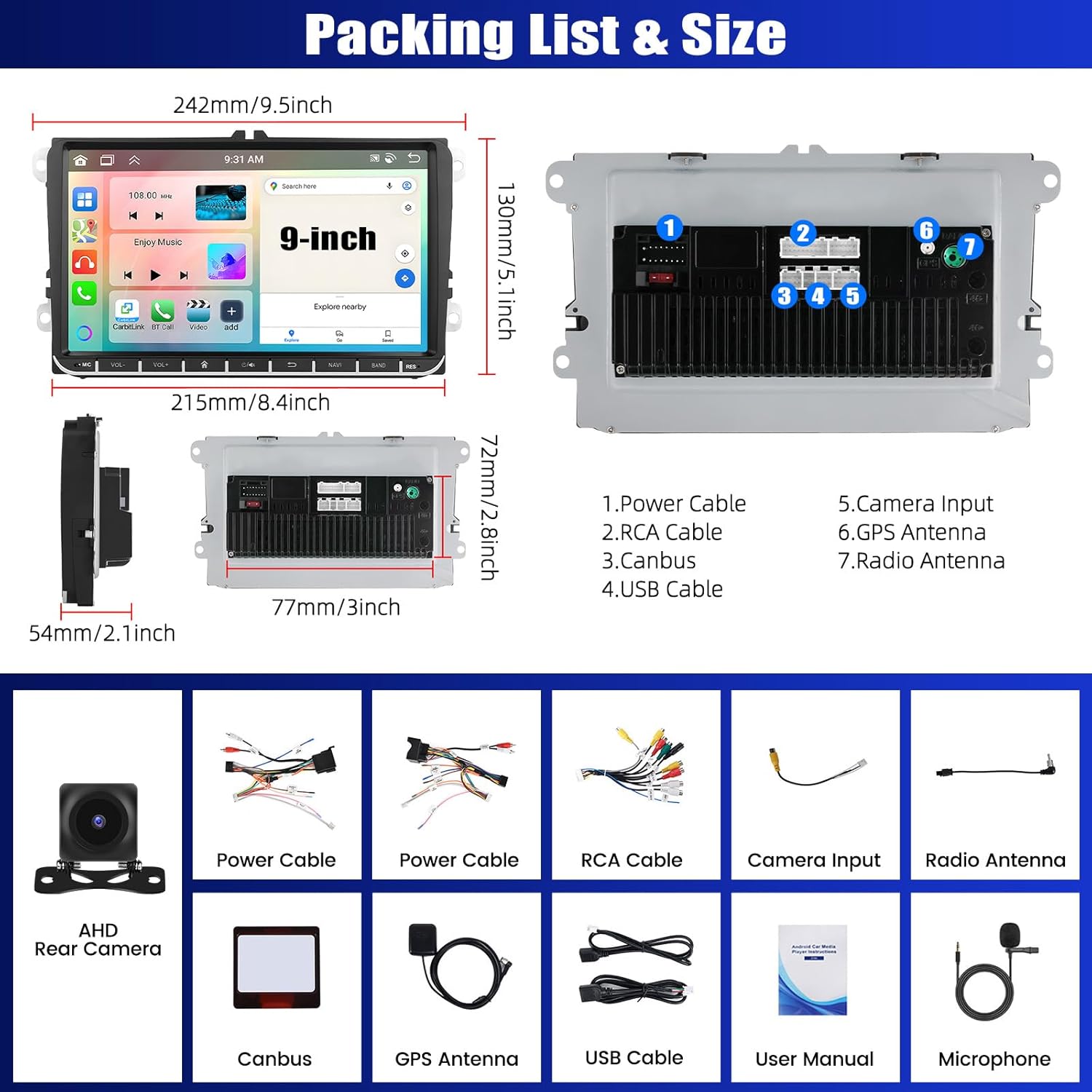
Image 5.4: Demonstrates the WiFi connectivity for internet access and the GPS navigation system with both online and offline map functionalities.
5.10. Steering Wheel Control (SWC)
The unit supports steering wheel controls. You can configure the buttons on your steering wheel to control various functions of the car radio, enhancing driving safety.
5.11. Reversing Camera
The included AHD rear view camera provides an ultra-wide viewing angle, waterproof design, and HD night vision. The display automatically switches to the camera view when the vehicle is in reverse gear.
5.12. 3-Split Screen Function
The 9-inch IPS touch screen supports a 3-split display, allowing you to run up to three applications simultaneously for multitasking.
Image 5.5: Features including the backup camera display, steering wheel control configuration, and the ability to use a 3-split screen for multiple applications.
6. Specifications
| Feature | Specification |
|---|---|
| Operating System | Android 13 |
| Processor | 8 Cores |
| RAM | 4GB |
| ROM (Internal Storage) | 64GB |
| Display Size | 9 Inch IPS Touch Screen |
| Connectivity | Bluetooth, USB, WiFi |
| Special Features | Mirror Link, Carplay, Android Auto, GPS Navigation, FM/RDS Radio, DSP (36/10-band EQ), SWC, Reversing Camera Support, 3-Split Screen |
| Item Weight | 1.32 Kilograms |
| Package Dimensions | 28.9 x 28.7 x 11 cm |
| Model Number | A3859H1MI2-AM39DE-C253 |
7. Maintenance
- Cleaning: Use a soft, dry cloth to clean the screen and unit. Avoid abrasive cleaners or solvents.
- Software Updates: Periodically check for software updates to ensure optimal performance and access to new features.
- Environmental Conditions: Avoid exposing the unit to extreme temperatures, direct sunlight for prolonged periods, or excessive moisture.
8. Troubleshooting
- No Power: Check all power connections and the vehicle's fuse box. Ensure the ignition is on.
- No Sound: Verify speaker connections, volume levels, and audio settings (DSP equalizer).
- GPS Not Working: Ensure the GPS antenna is properly connected and has a clear view of the sky. Check GPS settings for correct region/time.
- Bluetooth/Wi-Fi Connection Issues: Ensure both devices have Bluetooth/Wi-Fi enabled and are in pairing mode. Try restarting both the car radio and your mobile device.
- Touch Screen Unresponsive: Try restarting the unit. If the issue persists, contact customer support.
- Rear Camera Not Displaying: Check the camera's power and video connections. Ensure the vehicle is in reverse gear.
9. Warranty and Support
For warranty information and technical support, please refer to the documentation provided at the time of purchase or contact CAMECHO customer service through their official channels. Keep your purchase receipt as proof of purchase.


