1. Introduction
This manual provides essential information for the setup, operation, maintenance, and troubleshooting of your BOSGAME P4 Mini PC. The BOSGAME P4 is a compact desktop computer designed for various applications, including office tasks, 4K video playback, online education, design work, and light gaming. It features an AMD Ryzen 7 5825U processor, 16GB DDR4 RAM, and a 512GB PCIe SSD, offering efficient performance in a small form factor.

Image: The BOSGAME P4 Mini PC, a compact black device, shown with two Ethernet cables connected to its rear ports, highlighting its network connectivity.
2. What's in the Box
Verify that all items listed below are included in your package:
- 1x BOSGAME P4 Mini PC
- 1x HDMI Cable
- 1x Power Adapter
- 1x User Guide (this manual)
- 1x VESA Mount with Screws
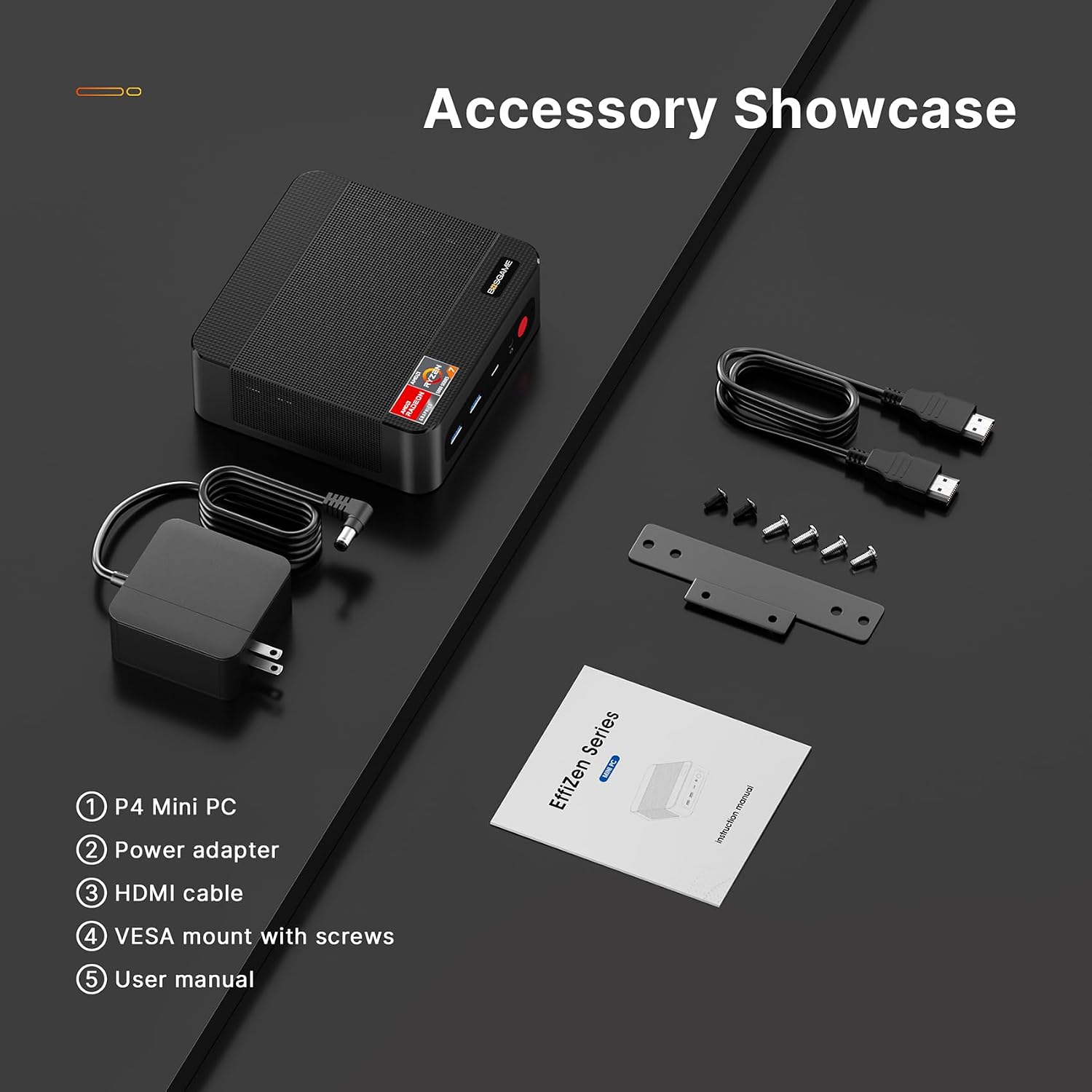
Image: A display of the BOSGAME P4 Mini PC alongside its included accessories: power adapter, HDMI cable, VESA mount with screws, and the user manual.
3. Product Overview
3.1. Front and Rear Panel Layout
The BOSGAME P4 Mini PC features a variety of ports for connectivity. Familiarize yourself with the port layout for proper setup.

Image: A visual representation of the BOSGAME P4 Mini PC's front and rear panels, detailing the location of USB 3.2, USB-C, Audio Jack, Power button on the front, and DC, 2.5G RJ45 LAN, DP, HDMI, and USB 2.0 ports on the rear.
- Front Ports: USB 3.2, USB-C (full-featured with PD 3.0, 4K@60Hz video, 10Gbps data), Audio Jack, Power Button.
- Rear Ports: DC Power Input, Dual 2.5G RJ45 LAN Ports, DisplayPort (DP), HDMI, USB 2.0 ports.
3.2. Internal Structure
The compact design houses essential components for high performance.

Image: An exploded diagram illustrating the internal components of the BOSGAME P4 Mini PC, including the chassis, cooling fan, motherboard, RAM modules, and SSD.
4. Setup Instructions
- Connect Peripherals: Connect your monitor(s) to the HDMI, DisplayPort, or USB-C ports. Connect your keyboard and mouse to the available USB ports.
- Network Connection: For wired internet, connect an Ethernet cable to one of the 2.5G RJ45 LAN ports. For wireless internet, the device supports WiFi 6E.
- Power Connection: Connect the power adapter to the DC power input port on the Mini PC, then plug the adapter into a power outlet.
- Power On: Press the power button located on the front panel of the Mini PC. The system will boot up.
- Initial Setup: Follow the on-screen instructions to complete the operating system setup.
4.1. VESA Mount Installation
The included VESA mount allows you to attach the Mini PC to the back of a compatible monitor or to a wall, saving desk space.
- Attach the VESA bracket to the back of your monitor or desired surface using the provided screws.
- Slide the Mini PC onto the mounted bracket until it securely locks into place.
5. Operating Instructions
5.1. Power On/Off
- Power On: Press the power button once.
- Shut Down: Use the operating system's shutdown procedure. Alternatively, press and hold the power button for 5-7 seconds for a forced shutdown (use only when necessary to prevent data loss).
5.2. Display Configuration
The BOSGAME P4 supports triple 4K display output via HDMI, DisplayPort, and USB-C. You can configure multiple displays through your operating system's display settings.

Image: The BOSGAME P4 Mini PC positioned on a desk, connected to and displaying content across three external monitors, demonstrating its triple display capability.
6. Maintenance and Upgrades
6.1. General Care
- Keep the Mini PC in a clean, dry environment away from direct sunlight and extreme temperatures.
- Ensure proper ventilation by not blocking the air vents.
- Clean the exterior with a soft, dry cloth. Avoid liquid cleaners.
6.2. Storage and Memory Upgrades
The BOSGAME P4 Mini PC offers expansion options for both RAM and SSD storage.

Image: An internal view of the BOSGAME P4 Mini PC's motherboard, highlighting the M.2 PCIe 3.0 x4 SSD slots, indicating expandability for storage.
- RAM: The device has dual-channel DDR4 memory slots and supports up to 64GB RAM.
- SSD: It features two PCIe 3.0 SSD slots, upgradable to 4TB (upgrades not included).
Note: Opening the device for upgrades may require specific tools and technical knowledge. Refer to the detailed upgrade guide (if available) or seek professional assistance to avoid damaging the components or voiding the warranty.
7. Troubleshooting
| Problem | Possible Cause | Solution |
|---|---|---|
| No power / System does not turn on | Power adapter not connected, faulty power outlet, power button issue. |
|
| No display on monitor | Incorrect cable connection, monitor input not selected, faulty cable/monitor. |
|
| No internet connection | Ethernet cable disconnected, Wi-Fi disabled, router issue, driver problem. |
|
| System runs slowly | Too many applications running, insufficient RAM, full storage, overheating. |
|
8. Specifications
| Feature | Detail |
|---|---|
| Model | BOSGAME P4 PRO |
| Processor | AMD Ryzen 7 5825U (8 Cores/16 Threads, up to 4.5GHz) |
| Graphics | AMD Radeon Graphics (8 Cores, 2000MHz) |
| RAM | 16GB DDR4 (Dual-channel, upgradable to 64GB) |
| Storage | 512GB M.2 PCIe 3.0 x4 SSD (2 slots, upgradable to 4TB) |
| Video Output | Triple 4K Display (HDMI, DisplayPort, USB-C) |
| Network | Dual 2.5G Ethernet (RJ45), WiFi 6E, Bluetooth 5.2 |
| USB Ports | 2x USB 3.0, 2x USB 2.0, 1x Full-featured USB-C |
| Audio | 1x Audio Jack |
| Dimensions (LxWxH) | 5.11 x 5.07 x 1.81 inches |
| Weight | 1.19 pounds |
| Operating System | OS (Pre-installed, specific version may vary) |

Image: A detailed close-up of an AMD Ryzen 7 processor chip, specifically the 5800U variant shown, highlighting its specifications including 8 cores, 16 threads, 16MB L3 Cache, 4.40 GHz Max. Boost Clock, and 15W Default TDP. The BOSGAME P4 Mini PC features the similar AMD Ryzen 7 5825U processor.
9. Warranty and Support
BOSGAME is committed to providing reliable products and customer satisfaction.
- Warranty: Your BOSGAME P4 Mini PC comes with a 1-year worry-free guarantee.
- Customer Service: 24/7 customer service is available to assist you with any inquiries or issues.
- Technical Support: Lifetime technical support is provided for your product.
- Contact: For support, please contact us via email at Qingzhuomao@163.com.