
1. Introduction
This manual provides detailed instructions for the installation, operation, and maintenance of your Auxbeam 6 Modes Amber White Series 42-Inch Curved LED Light Bar. Please read this manual thoroughly before installation and use to ensure proper function and safety. Keep this manual for future reference.

Image: Auxbeam 6 Modes Amber White Series LED Light Bar overview.
2. Product Overview
The Auxbeam 42-inch curved LED light bar is designed for off-road lighting applications, offering versatile illumination with its dual-color (amber and white) and multi-mode functionality. It features a durable construction suitable for various environmental conditions.
Key Features:
- 6 Lighting Modes: Includes white driving light, amber fog light, white & amber combo, white flashing, amber flashing, and white & amber sync strobe.
- Memory Function: Automatically restores the last used lighting mode upon power-on.
- High Brightness: Utilizes 3030-SMD LED chips for optimal light output.
- Dual Color Temperature: 6500K white spot beam for concentrated light and 2000K amber flood beam for wider area illumination.
- IP68 Waterproof Rating: Ensures protection against water, dust, and harsh weather conditions.
- Durable Construction: Made with premium 6063 aluminum housing and thickened heat sinks for efficient heat dissipation and extended lifespan (50,000+ hours).
- Built-in EMC: Reduces electromagnetic noise interference.

Image: Illustration of the dual color functionality with white spot and amber flood beams.
3. Package Contents
Verify that all items listed below are included in your package. If any items are missing or damaged, please contact customer support.
- 1x Auxbeam 42-Inch Curved LED Light Bar
- 1x Wiring Harness
- 1x Mounting Kit (includes brackets, bolts, nuts, washers)
- User Guide
- Necessary Accessories (e.g., tie wires, plug covers, fuse covers)
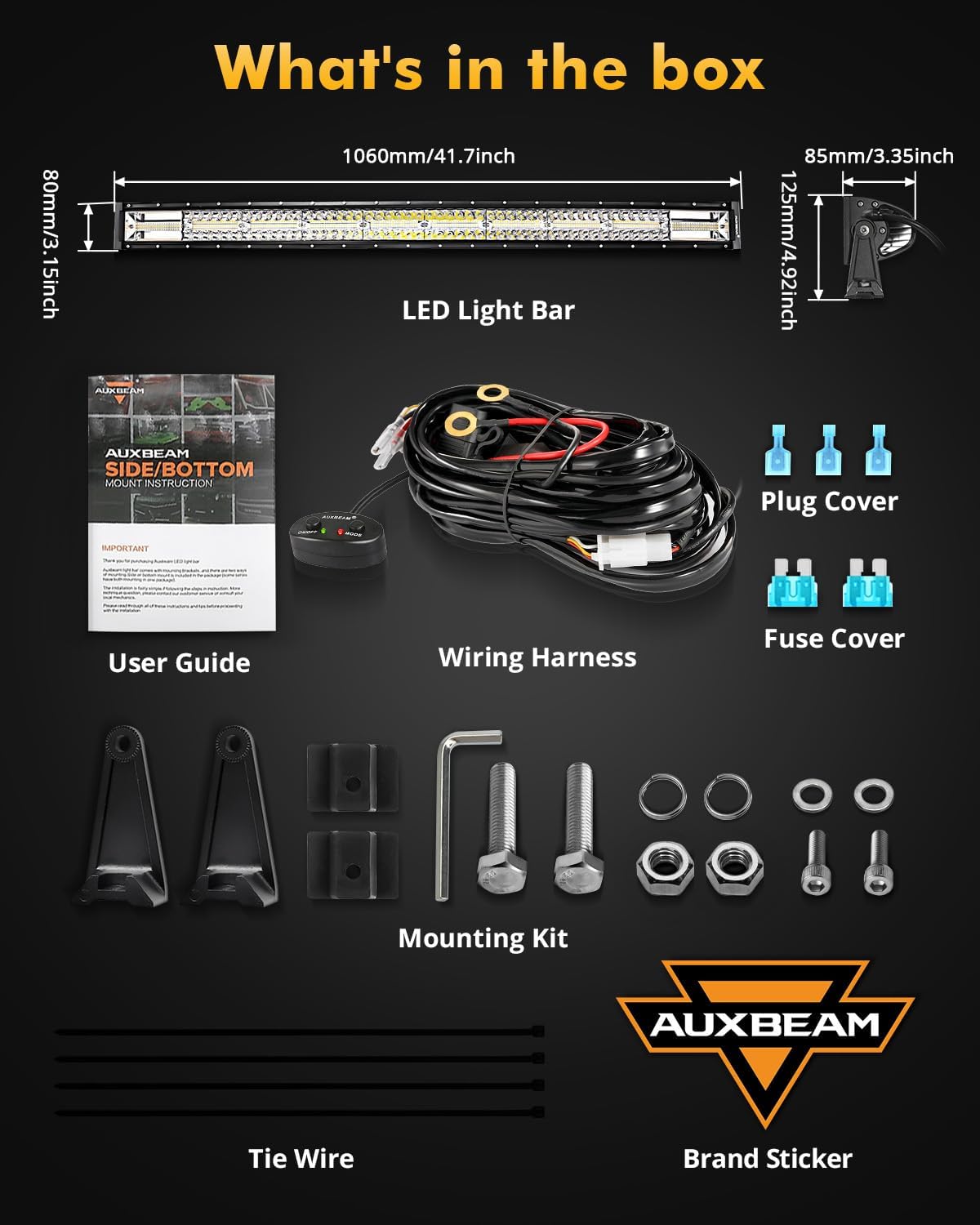
Image: All components included in the product package.
4. Specifications
| Feature | Detail |
|---|---|
| Model Number | ZD000653-VE-FBA |
| Dimensions (L x W x H) | 43.3" x 7.1" x 5.1" |
| Wattage | 240 watts |
| Number of Light Sources | 376 |
| Material | 6063 Aluminum |
| Color Temperature | White: 6500K, Amber: 2000K |
| Waterproof Rating | IP68 |
| Lifespan | > 50,000 hours |
| Operating Voltage | DC 9-32V |
5. Installation
The Auxbeam LED light bar is designed for straightforward installation. A wiring harness kit is included for convenience. Professional installation is recommended if you are unfamiliar with automotive electrical systems.
Installation Steps:
- Mounting: Securely attach the LED light bar to your desired location (e.g., roof rack, A-pillar, bumper) using the provided mounting kit. Ensure the mounting surface is stable and can support the weight of the light bar.
- Wiring Connection: Connect the wiring harness to the light bar. The harness typically includes a relay, fuse, and switch.
- Power Connection:
- Connect the Red Wire to the positive (+) terminal of your vehicle's battery.
- Connect the Black Wire to the negative (-) terminal of your vehicle's battery or a suitable ground point.
- The Yellow Wire is used for the memory function. Connect it as per the wiring diagram to enable this feature.
- Switch Placement: Install the control switch in an accessible location within your vehicle's cabin.
- Test Functionality: After installation, turn on the vehicle and test all lighting modes to ensure correct operation.

Image: Detailed wiring diagram for the LED light bar.
Important: Ensure all connections are secure and properly insulated to prevent short circuits or electrical hazards. The light bar operates on DC 9-32V. Verify your vehicle's electrical system compatibility.
6. Operating Instructions
Your Auxbeam LED light bar features 6 distinct lighting modes controlled by the included switch.
Mode Selection:
- Use the ON/OFF button to power the light bar on or off.
- Press the MODE button to cycle through the 6 available lighting modes:
- White Driving Light / White Spot Light
- Amber Fog Light / Amber Flood Light
- White & Amber Spot Flood Combo Light
- White Flashing Light
- Amber Flashing Light
- White & Amber Sync Strobe Light
Memory Function:
The light bar is equipped with a power-off memory function. It will automatically recall the last used lighting mode when powered on again.
Reset Function:
If you experience any synchronization issues between the light bar and the control switch, press and hold the MODE button for 3 seconds to reset the function and re-synchronize the modes.

Image: Visual representation of the 6 lighting modes and control switch.
Official Product Video:
Video: An official product video from VESTER (seller) demonstrating the Auxbeam 42" Light Bar with its 6 Amber White Series modes. This video provides a visual guide to the light bar's features and operation.
7. Maintenance
Regular maintenance ensures the longevity and optimal performance of your LED light bar.
- Cleaning: Periodically clean the lens and housing with a soft cloth and mild soap solution. Avoid abrasive cleaners that may scratch the lens.
- Inspection: Regularly check all mounting hardware and electrical connections for tightness and corrosion. Tighten any loose bolts and clean any corroded terminals.
- Wiring: Inspect the wiring harness for any signs of wear, fraying, or damage. Replace damaged wiring immediately to prevent electrical issues.
- Waterproofing: Although the light bar is IP68 rated, avoid directing high-pressure water jets directly at the seals for extended periods.
8. Troubleshooting
Refer to the following table for common issues and their solutions.
| Problem | Possible Cause | Solution |
|---|---|---|
| Light bar does not turn on. | No power, loose connection, blown fuse, faulty switch. | Check power source, ensure all wires are securely connected, inspect and replace fuse if necessary, test the switch. |
| Some LEDs are not lighting up. | Damaged LEDs, internal wiring issue. | Contact customer support for assistance. |
| Modes are out of sync or not changing correctly. | Synchronization error with the control switch. | Press and hold the MODE button for 3 seconds to reset the function. |
| Excessive noise on vehicle radio (EMC issue). | Interference from the light bar. | The light bar has built-in EMC to minimize this. If issues persist, ensure proper grounding and check for other sources of interference. |
9. Warranty and Support
Auxbeam provides a 24-month guarantee for this product, covering manufacturing defects and malfunctions under normal use.
For any pre-sales or after-sales questions, technical assistance, or warranty claims, please contact Auxbeam customer service. Our support team is available 24 hours online to assist you.
Your satisfaction is our priority. Please refer to the contact information provided with your purchase or visit the official Auxbeam website for support details.
