
JmGO N1S Ultimate
JMGO N1S Ultimate Triple Laser 4K Projector User Manual
Model: N1S Ultimate
Brand: JmGO
Introduction
The JMGO N1S Ultimate is a state-of-the-art triple laser 4K projector designed to deliver an immersive home theater experience. Featuring 3300 ISO Lumens, Google TV with built-in Netflix, and the FlexiSmart 2.0 Adaptive System, it offers stunning visuals and effortless setup. Its integrated gimbal design provides flexible projection angles, making it suitable for various environments from living rooms to outdoor spaces. This manual provides essential information for setting up, operating, maintaining, and troubleshooting your projector.

Figure 1: JMGO N1S Ultimate Triple Laser 4K Projector.
What's in the Box
Verify that all components are present in the packaging:
- Adaptor
- User Manual
- Remote
- Battery
If any items are missing or damaged, please contact JmGO customer support.
Setup
1. Physical Placement
Place the projector on a stable, flat surface. The integrated gimbal allows for flexible positioning. You can adjust the projection angle horizontally up to 360° and vertically up to 135°.

Figure 2: Projector with 360° horizontal adjustment capability.

Figure 3: Projector with 135° vertical adjustment capability.
Refer to the table below for recommended projection distances based on desired screen size:
| Screen Size (inches) | Distance to Wall (ft/m) |
|---|---|
| 60" | 5.2 ft / 1.8 m |
| 100" | 8.8 ft / 2.7 m |
| 150" | 13.0 ft / 4.0 m |
| 200" | 17.4 ft / 5.3 m |
| 300" | 25.1 ft / 7.9 m |
2. Connectivity
Connect the power adapter to the projector and a power outlet. The projector features multiple input ports for external devices:
- HDMI 2.1 (eARC): For connecting soundbars or AV receivers.
- HDMI: For connecting gaming consoles, Blu-ray players, or other HDMI-enabled devices.
- USB-A 2.0: For connecting USB drives or other peripherals.
- 3.5mm Jack: For connecting external audio devices.

Figure 4: Available input ports on the JMGO N1S Ultimate.
3. Initial Power On & Auto-Calibration
Once powered on, the projector's FlexiSmart 2.0 Adaptive System will automatically perform real-time auto keystone correction and focus for a clear image. It also features smart object avoidance and smart eye protection.

Figure 5: FlexiSmart 2.0 Adaptive System features.

Figure 6: Additional adaptive features for optimal viewing.
Operating Instructions
1. Google TV & Streaming
The JMGO N1S Ultimate comes with Google TV 3.0, providing access to over 10,000 apps and 800+ free channels. It is officially licensed for Netflix, allowing direct streaming without external devices.

Figure 7: Google TV interface with various streaming applications.
Use the included remote control to navigate the Google TV interface. The remote features dedicated buttons for quick access to popular streaming services like Netflix and YouTube.

Figure 8: Remote control for the JMGO N1S Ultimate.
Google Cast is built-in, allowing you to wirelessly cast movies, shows, and photos directly from your phone or tablet to the projector.
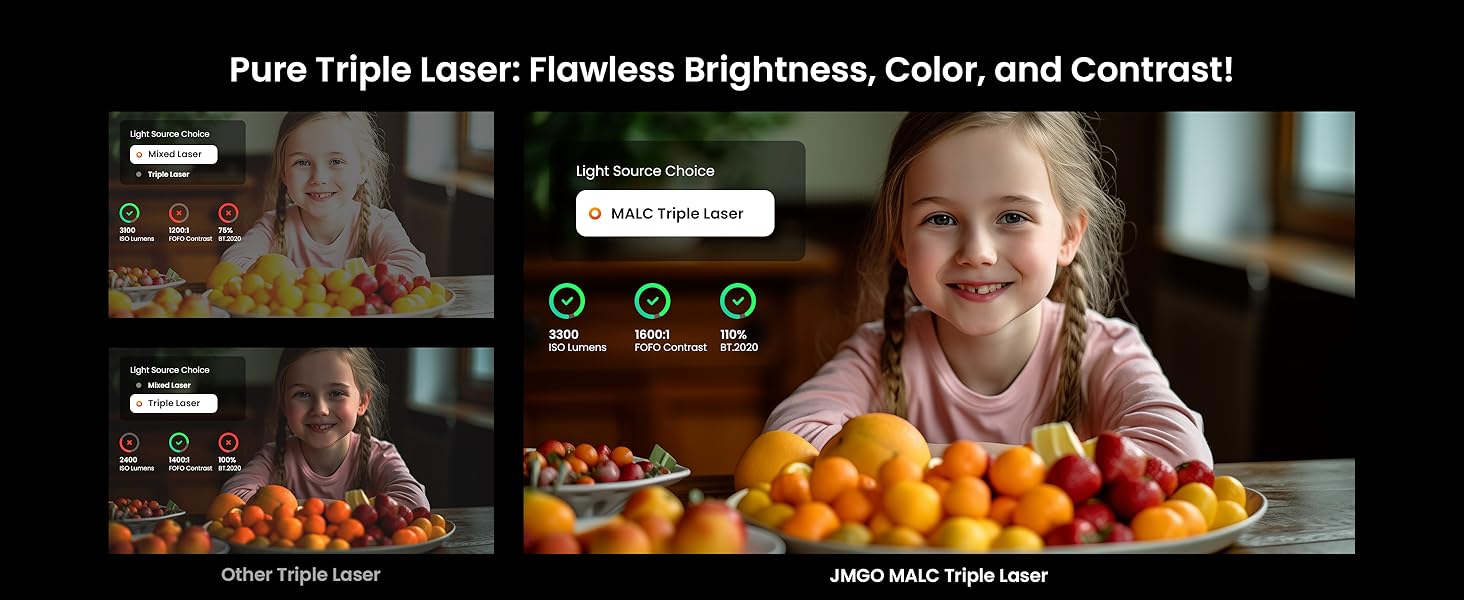
Figure 9: Google Cast functionality for seamless content sharing.
2. Audio Features
Experience rich, immersive sound with the projector's 20W subwoofer and 45Hz ultra-bass. It supports Dolby Digital+ and DTS-HD Master Audio for a superior HiFi experience.

Figure 10: Premium panoramic surround sound for immersive realism.
For a visual demonstration of the sound capabilities, watch the official JMGO video below:
Video 1: "Stream with Ease, JMGO x Google TV" - This video demonstrates the seamless streaming experience and audio quality of the JMGO N1S Ultimate projector.
3. 3D Playback
The projector supports Blu-ray 3D, transforming your visual journey with 3D worlds that bring every scene to life.

Figure 11: Blu-ray 3D support for immersive viewing.
4. Projection Modes
The versatile gimbal allows for various projection modes, including ceiling, wall, and floor projection, adapting to your space and needs.
Figure 12: Flexible projection angles with the integrated gimbal.
For a visual guide on how to utilize the projection modes, refer to the official JMGO video below:
Video 2: "JMGO's Pioneering Smart Gimbal" - This video demonstrates the projector's smart gimbal for flexible projection and auto-adjustment.
Maintenance
1. Lens Cleaning
To maintain optimal image quality, regularly clean the projector lens using a soft, lint-free cloth. Avoid abrasive materials or harsh chemicals that could damage the lens coating.
2. Software Updates
Ensure your projector's software is up-to-date to benefit from the latest features and performance improvements. Connect the projector to a stable internet connection and check for updates in the system settings.
Troubleshooting
1. No Picture / Blurry Image
- Check Power: Ensure the projector is properly connected to a power source and turned on.
- Auto Focus/Keystone: Allow the FlexiSmart 2.0 system to complete its auto-adjustment. If still blurry, try manual focus adjustment in settings.
- Obstacles: Ensure no objects are blocking the projection path. The smart object avoidance feature will attempt to adjust, but a clear path is best.
2. No Sound
- Volume Level: Check the projector's volume level and ensure it's not muted.
- Audio Output: If using external speakers, verify the audio output settings are correctly configured (e.g., HDMI eARC, 3.5mm jack).
- Source Audio: Ensure the content source (e.g., streaming app, connected device) has its volume turned up.
3. Connectivity Issues
- Wi-Fi: Check your Wi-Fi connection in the settings. Ensure the signal is strong and the password is correct.
- Bluetooth: For Bluetooth devices, ensure they are in pairing mode and within range.
- HDMI/USB: Verify cables are securely connected to the correct ports on both the projector and the external device.
Specifications
| Feature | Detail |
|---|---|
| Product Dimensions | 11.57 x 15.51 x 8.66 inches |
| Item Weight | 9.92 pounds |
| Item Model Number | N1S Ultimate |
| Display Resolution | 3840 x 2160 (4K UHD) |
| Brightness | 3300 ISO Lumens |
| Light Source | MALC Triple Laser |
| Contrast Ratio | 1600:1 (FOFO) |
| Color Gamut | 110% Rec. 2020 |
| Color Depth | 10-bit |
| Operating System | Google TV 3.0 (10,000+ Apps) |
| Built-in Streaming | Official Netflix Licensed |
| Audio | 20W Subwoofer, 45Hz Ultra-Bass, Dolby Digital+, DTS-HD Master Audio |
| 3D Support | Blu-ray 3D |
| Adaptive System | FlexiSmart 2.0 (Auto Keystone, Auto Focus, Smart Object Avoidance, Brightness Auto Adaptation, Smart Wall Color Adaption, Lossless Zoom, Eye Protection) |
| Connectivity | Bluetooth, Wi-Fi 6, 2x HDMI (1x eARC), 1x USB-A 2.0, 1x 3.5mm Jack |
| Manufacturer | JMGO |
| Country of Origin | China |
| First Available Date | August 15, 2024 |
Warranty and Support
The JMGO N1S Ultimate Projector comes with a 12-month manufacturer warranty. For any product-related inquiries, technical support, or warranty claims, please contact JmGO Direct customer service.
JmGO is a leader in smart projector technology, committed to providing immersive audio-visual experiences and excellent customer support.
You can find more information and contact details on the JmGO Store on Amazon.

Figure 13: Contact JMGO Customer Service Anytime.
Related documentsN1S Ultimate


Ask a question about this manual
Ask about setup, troubleshooting, compatibility, parts, safety, or missing instructions. Manuals+ will review the question and use this page’s manual context to help answer it.