
Omethey WY-AKL-132D
Omethey Digital-10-12 Gun Safe Instruction Manual
Model: WY-AKL-132D
Introduction
Thank you for choosing the Omethey Digital-10-12 Gun Safe. This manual provides essential information for the safe and effective use of your new gun safe. Please read these instructions carefully before assembly and operation to ensure proper functionality and security. This safe is designed to securely store firearms and other valuables, featuring a digital locking system, removable shelving, and magnetic gun slots.

Image: The Omethey Digital-10-12 Gun Safe shown from the front (closed) and with the door open, revealing the interior storage space for rifles and pistols, along with a top shelf.
Safety Information
Important: Always follow local laws and regulations regarding firearm storage.
- Keep the safe locked at all times when not in use.
- Store keys and passwords in a secure location, away from the safe and out of reach of unauthorized individuals.
- Do not store ammunition inside the safe with firearms unless specifically designed for such storage and permitted by law.
- Ensure the safe is securely mounted to a wall or floor to prevent unauthorized removal or tipping.
- Keep children and unauthorized persons away from the safe.
- Verify the safe is closed and locked after each use.
Package Contents
Before beginning assembly, please verify that all components listed below are present in your package.
- Gun Safe (unassembled panels) x 1
- Emergency Key x 2
- Expansion Screws x 4
- Screw Bag (various screws for assembly)
- Gloves x 1 pair
- Screwdriver x 1
- Magnetic Induction Light x 1
- User Manual x 1
- Magnetic Gun Slots x 3
- 6 Gun Stock x 1
- 4 Gun Stock x 2
- USB Cable x 1
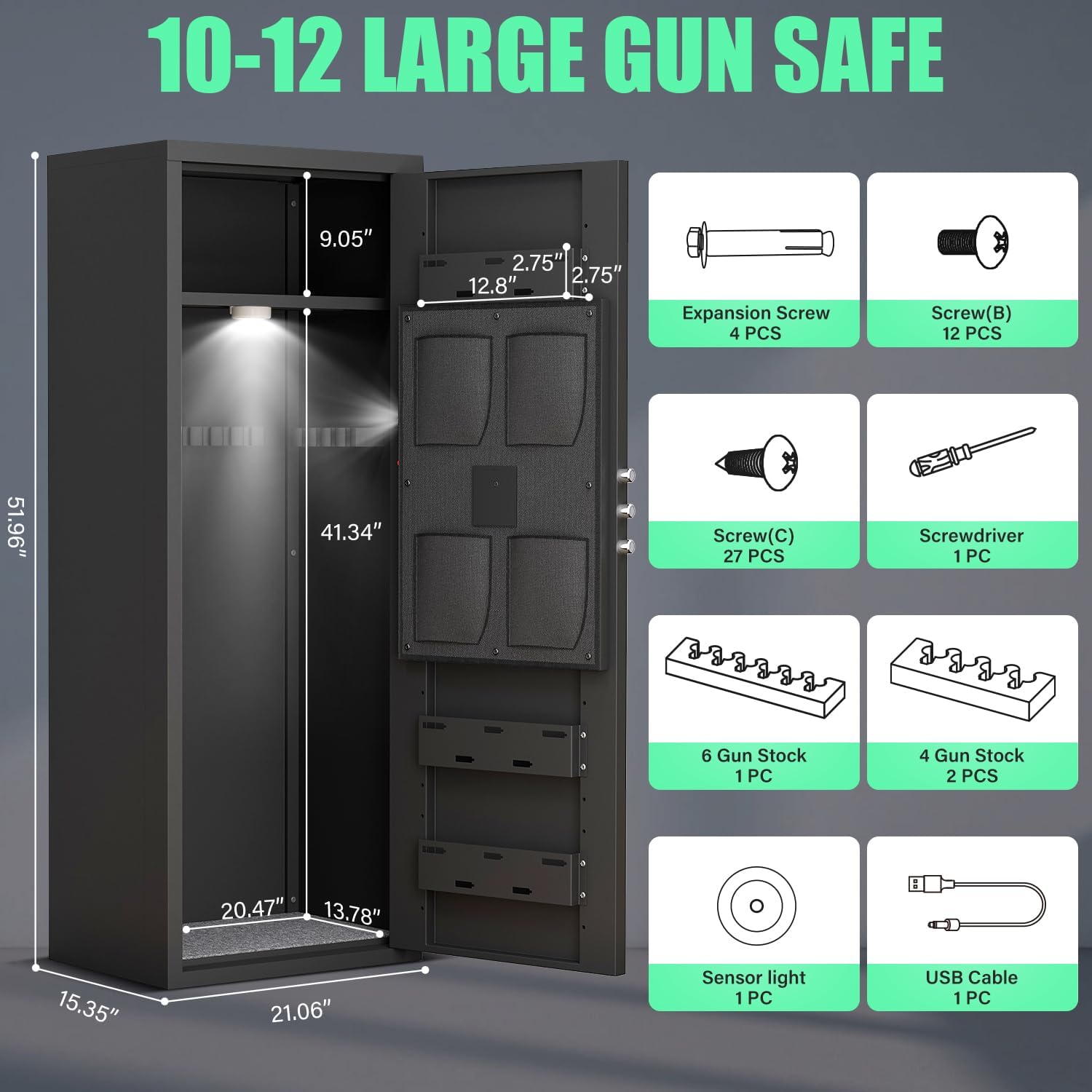
Image: A visual representation of the gun safe's dimensions and a detailed breakdown of all included accessories and hardware, such as screws, keys, and the magnetic induction light.
Setup and Assembly
The Omethey gun safe requires assembly. All necessary parts and tools (screwdriver) are included. For faster installation, a power drill may be used. Follow the steps below carefully.
- Left Plate Installation: Attach the left side panel to the base using the designated screws.
- Right Plate Installation: Attach the right side panel to the base, aligning it with the left panel.
- Door Installation: Secure the door to the assembled side panels, ensuring proper hinge alignment.
- Top Plate Installation: Place and secure the top panel onto the assembled structure.
- Bottom Plate and Ammo Box Installation: Install the bottom plate and any internal ammo box components.
- Fix the Bottom Plate: Ensure the bottom plate is firmly secured.
- Mount the Cabinet: Secure the safe to a wall or floor using the provided expansion screws for enhanced security.
- Shelf and Gun Stock Installation: Install the removable shelf and gun stock holders as desired.

Image: An 8-step visual guide illustrating the assembly process of the gun safe, from attaching side panels to installing internal components and mounting the safe.
Operating Instructions
Unlocking Methods
Your Omethey gun safe offers three methods for access:
- Password + Turn Knob: For quick and regular access. Enter your programmed digital password, then turn the knob to open the safe.
- Emergency Key + Turn Knob: Used for initial setup, if the password is forgotten, or if the battery is depleted. Insert the emergency key, turn it, then turn the knob to open.
- USB Cable + Password + Turn Knob: In case of a dead battery, connect a USB power source to the safe, then enter your password and turn the knob.
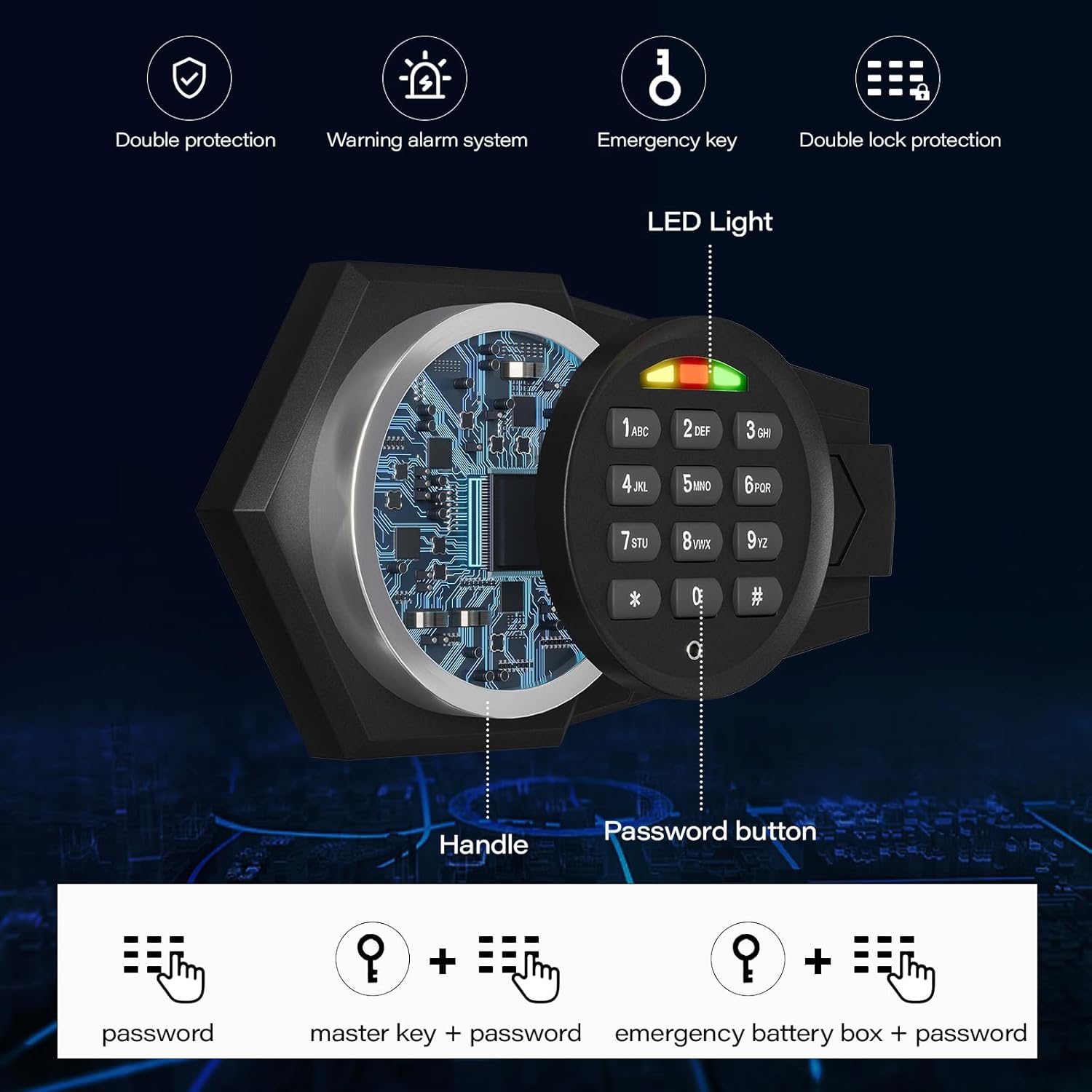
Image: A close-up view of the electronic keypad, highlighting the handle, password buttons, and LED light indicators, along with a visual explanation of the three unlocking methods.
Dual Alarm System and Silent Mode
The safe is equipped with a dual alarm system for enhanced security and a silent mode for discreet operation.
- Vibration Alarm: Activated if the safe experiences significant shaking or movement.
- Input Error Alarm: Triggers after three consecutive incorrect password attempts.
- Silent Mode: This feature allows for quiet operation of the keypad, preventing audible alerts during entry. Refer to the full user manual for instructions on how to activate and deactivate silent mode.

Image: A visual depicting the dual alarm system (wrong password, violent vibration) and the silent mode feature, showing how they contribute to the safe's security and discreet operation.
Features
- Large Storage Capacity: The safe measures H51.96'' x W21.06'' x D15.35'', designed to accommodate 10-12 firearms, including long guns with scopes.
- Removable Shelf: An adjustable shelf allows for flexible storage configurations, accommodating firearms up to 51 inches in height when removed.
- Magnetic Gun Slots: Three magnetic gun slots provide additional secure storage for pistols or other accessories.
- Magnetic Induction Light: An internal light activates upon opening the safe, illuminating the contents for easy visibility.
- Solid Locking Bolts: Features robust 20mm solid locking bolts for enhanced security.

Image: A diagram illustrating the adjustable rifle rack feature, showing how it can be moved to accommodate various firearm lengths, and depicting the capacity for 10-12 different types of firearms.

Image: A comprehensive view highlighting key features of the safe, including the removable shelf, magnetic induction light, magnetic gun slots, metal storage box, LED light, and solid locking bolts.
Maintenance
Regular maintenance ensures the longevity and proper functioning of your safe.
- Cleaning: Wipe the exterior with a soft, damp cloth. Avoid abrasive cleaners or solvents that could damage the finish.
- Lock Mechanism: Do not lubricate the electronic lock mechanism. If the keypad becomes unresponsive, check battery levels.
- Batteries: Replace batteries in the electronic lock annually, or immediately if the low battery indicator appears. Use high-quality alkaline batteries.
- Hinges and Bolts: Periodically check hinges and locking bolts for any signs of wear or obstruction. Ensure they operate smoothly.
- Interior: Keep the interior dry and free of moisture to prevent rust or damage to stored items.
Troubleshooting
| Problem | Possible Cause | Solution |
|---|---|---|
| Safe does not open with password. | Incorrect password entered; dead batteries; keypad malfunction. |
|
| Keypad is unresponsive. | Dead batteries; loose battery connection. |
|
| Alarm sounds unexpectedly. | Vibration detected; multiple incorrect password attempts. |
|
| Door does not close or latch properly. | Obstruction; misaligned door/bolts. |
|
Specifications
| Feature | Detail |
|---|---|
| Brand | Omethey |
| Model Number | WY-AKL-132D |
| Product Dimensions (H x W x D) | 51.96" x 21.06" x 15.35" |
| Lock Type | Electronic Combination Lock, Key |
| Color | Black |
| Material | Alloy Steel |
| Special Features | 3 Magnetic Gun Slots, Alarm System, Magnetic Induction Light, Silent Mode |
| Mounting Type | Wall Mount |
| Item Weight | 58.1 Pounds |
| Alarm Type | Vibration |
| Water Resistance Level | Not Water Resistant |
Warranty and Support
Your Omethey gun safe is covered by a return policy of 30 days from the date of purchase, allowing for refund or replacement. For any questions regarding your safe, assembly, operation, or to report issues, please contact Omethey customer support. Refer to your purchase documentation or the seller's information for specific contact details.
Online Resources: For additional assistance, including instructional videos, please visit the official Omethey store on Amazon: Omethey Store.
Related documentsWY-AKL-132D


Ask a question about this manual
Ask about setup, troubleshooting, compatibility, parts, safety, or missing instructions. Manuals+ will review the question and use this page’s manual context to help answer it.