
OffiGo 71 Inch
OffiGo Electric Standing Desk with 3-Piece Board, 71 Inch - User Manual
Model: 71 Inch Rustic Brown
Introduction
This manual provides comprehensive instructions for the assembly, operation, and maintenance of your OffiGo Electric Standing Desk. Designed for versatility and comfort, this desk allows you to seamlessly switch between sitting and standing positions, promoting a healthier work environment. Please read this manual thoroughly before assembly and use to ensure proper function and safety.

Image: The OffiGo Electric Standing Desk in Rustic Brown, showcasing its spacious surface with multiple monitors and a laptop.
Safety Information
To prevent injury or damage to the product, please adhere to the following safety guidelines:
- Always ensure the desk is properly assembled and stable before use.
- Do not exceed the weight limit of the desk. Refer to the 'Specifications' section for details.
- Keep the work area clear of obstacles to prevent accidents during height adjustment.
- Always use the desk with caution when adjusting the height. Ensure no objects are obstructing the movement of the desktop or legs.
- Keep children and pets away from the desk during operation.
- Do not sit or stand on the desk.
- Disconnect power before cleaning or maintenance.
Package Contents
Please verify that all components are present before beginning assembly. If any parts are missing or damaged, contact customer support.
- Desktop Panels (3 pieces)
- Desk Legs (2 pieces)
- Motor and Control Box
- Control Panel with Memory Buttons
- Power Cord
- Hardware Kit (screws, bolts, tools)
- Integrated Power Strip with USB/Type-C ports
- Headphone Hook

Image: An exploded view showing the main components of the OffiGo Electric Standing Desk, including the desktop panels, legs, and frame.
Assembly Instructions
Assembly is straightforward and can be completed by following the detailed instructions provided in the package. All parts are clearly labeled to assist with the process.
- Unpack and Identify Parts: Carefully remove all components from the packaging and lay them out. Verify against the package contents list.
- Assemble the Frame: Attach the crossbars to the lifting columns (legs) using the provided hardware. Ensure all connections are secure.
- Attach Desktop Panels: Secure the three desktop panels to the assembled frame using the designated screws. Ensure the panels are aligned correctly.
- Install Control Box and Motor: Mount the control box and motor to the underside of the desktop frame as indicated in the diagram. Connect all necessary cables.
- Mount Control Panel and Power Strip: Attach the control panel and the integrated power strip to the desired locations on the desk.
- Connect Power: Plug the power cord into the control box and then into a wall outlet.
- Initial Setup: Perform the initial calibration as described in the operating instructions.

Image: The underside of the desk, highlighting the robust dual beam structure and the motor mechanism for stability and smooth lifting.
Operating Instructions
Electric Height Adjustment
The OffiGo Electric Standing Desk features a smooth electric height adjustment system, allowing you to effortlessly transition between sitting and standing positions.
- Adjusting Height: Use the up (▲) and down (▼) buttons on the control panel to raise or lower the desk to your desired height. The desk can adjust from 29.1 inches to 48 inches.
- Memory Presets: The control panel includes three programmable memory buttons (1, 2, 3). To set a memory position:
- Adjust the desk to your preferred height.
- Press the 'S' (Set) button, then immediately press one of the number buttons (1, 2, or 3). The height will be saved.
- Recalling Presets: Press the corresponding number button (1, 2, or 3) to automatically move the desk to the saved height.

Image: A visual representation of the desk's height adjustment range, showing a user sitting at 29.1 inches and another standing at 48 inches.
Control Panel
The digital control panel provides easy access to height adjustments and memory functions.
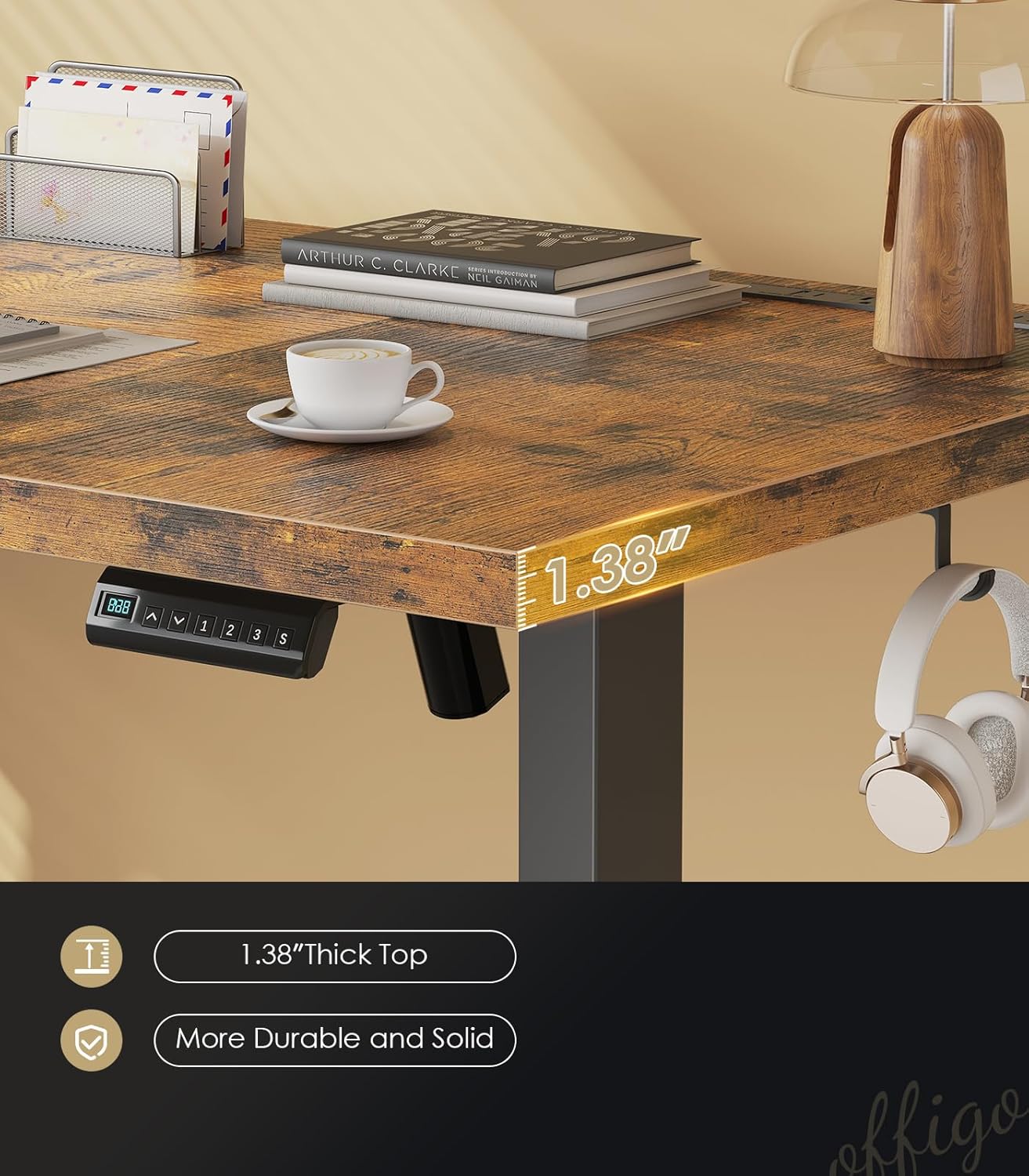
Image: A detailed view of the desk's control panel, featuring a digital height display and buttons for up, down, set, and three memory presets.
Integrated Power Outlets
The desk includes a built-in charging station for convenience.
- AC Outlets: Three 125V/12A AC outlets are available for powering monitors, laptops, and other devices.
- USB Ports: Two USB-A ports (5V/2A) and two Type-C ports (5V/2A) are provided for charging mobile devices.

Image: A close-up of the integrated power strip, showing the AC outlets, USB-A, and USB-C ports in use, with a phone charging.
Maintenance
Regular maintenance ensures the longevity and optimal performance of your standing desk.
- Cleaning: Wipe the desktop surface with a soft, damp cloth. Avoid harsh chemicals or abrasive cleaners. For the frame, use a dry or slightly damp cloth.
- Check Connections: Periodically inspect all screws and bolts to ensure they are tight. Re-tighten if necessary.
- Cable Management: Keep cables organized to prevent entanglement during height adjustments. Utilize the built-in cable management holes.
- Avoid Spills: Protect the electronic components from liquid spills.
Troubleshooting
If you encounter any issues with your OffiGo Electric Standing Desk, refer to the following common solutions:
- Desk Not Moving:
- Check if the power cord is securely plugged into both the desk and the wall outlet.
- Ensure there are no obstructions preventing the desk from moving.
- Perform a reset: Press and hold the 'Down' button until the desk reaches its lowest point, then release and press again until it slightly moves down and up.
- Error Codes on Display:
- Refer to the specific error code in the detailed manual (if provided) or contact customer support.
- Often, a power cycle (unplugging for 30 seconds and plugging back in) can resolve temporary errors.
- Uneven Movement:
- Ensure the desk is on a level surface.
- Check that all frame connections are tight and secure.
If these steps do not resolve the issue, please contact OffiGo customer support for further assistance.
Specifications
Key technical specifications for the OffiGo Electric Standing Desk (71 Inch Rustic Brown model):
| Feature | Detail |
|---|---|
| Brand | OffiGo |
| Model | 71 Inch Rustic Brown |
| Product Dimensions (D x W x H) | 27.5"D x 71"W x 28.3"H |
| Minimum Height | 29.1 inches |
| Maximum Height | 48 inches |
| Tabletop Thickness | 1.38 inches |
| Top Material Type | Engineered Wood |
| Base Material | Alloy Steel |
| Item Weight | 33.29 Kilograms |
| Special Features | Adjustable Height, Integrated Power Outlets (3 AC, 2 USB-A, 2 Type-C) |
| Required Assembly | Yes |
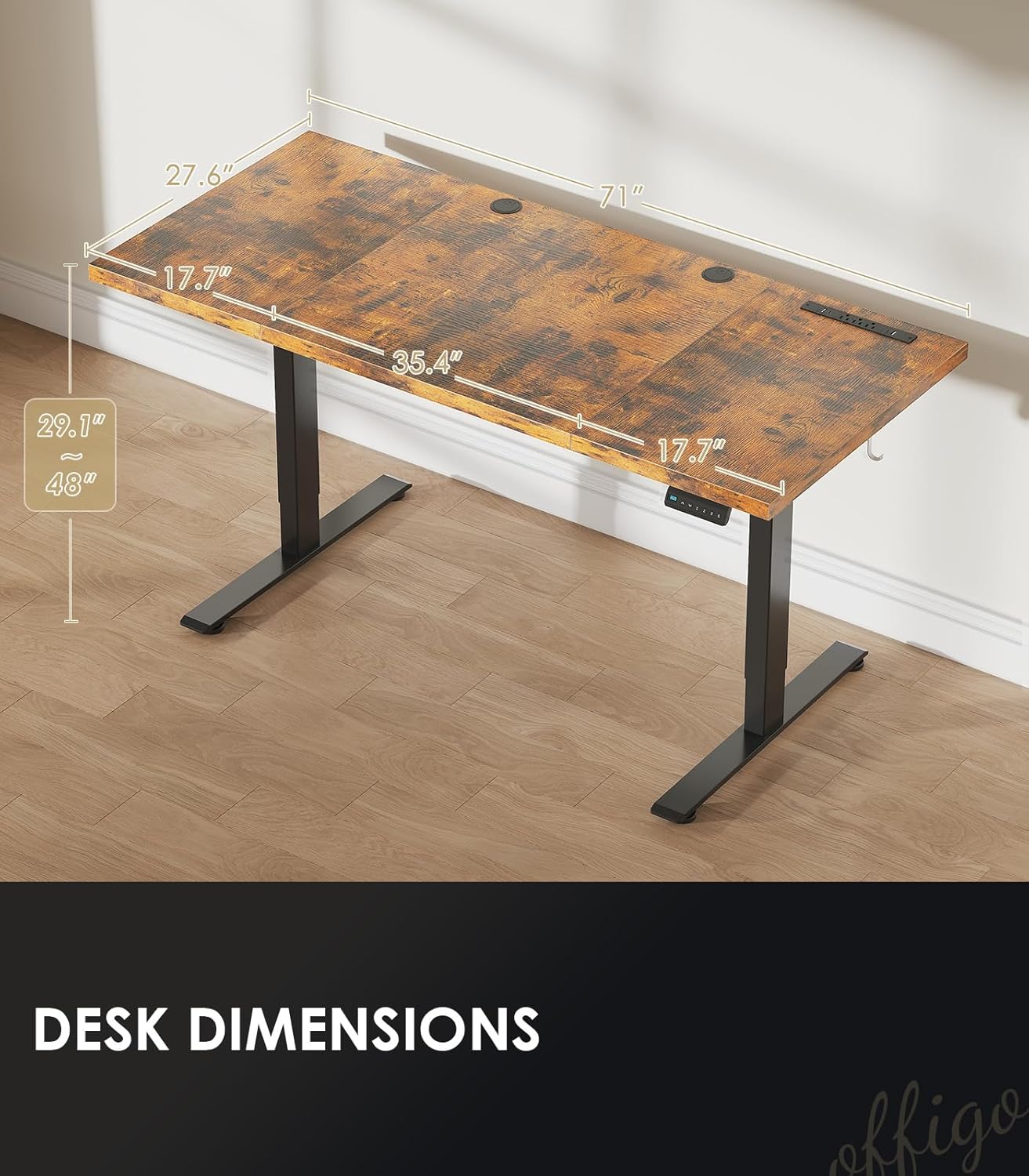
Image: A diagram illustrating the key dimensions of the desk, including length, width, and height adjustment range.
Warranty and Support
Your OffiGo Electric Standing Desk comes with a Limited Warranty. For specific terms and conditions, please refer to the warranty documentation included with your product or contact OffiGo customer support.
For any questions, technical assistance, or warranty claims, please contact OffiGo customer support. Contact information can typically be found on the product packaging or the official OffiGo website.
OffiGo is committed to providing a full range of after-sales service, including installation guidance and maintenance support.
Ask a question about this manual
Ask about setup, troubleshooting, compatibility, parts, safety, or missing instructions. Manuals+ will review the question and use this page’s manual context to help answer it.