
1. Introduction
This instruction manual provides essential information for the safe and efficient use of your WALKERA HM-V200D01-Z-11 Receiver RX2437V B-3. Please read this manual thoroughly before operating the device and retain it for future reference. Proper understanding of these instructions will ensure optimal performance and longevity of your receiver.
2. Product Overview
The WALKERA HM-V200D01-Z-11 Receiver RX2437V B-3 is a critical component designed for remote-controlled models, ensuring reliable communication between your transmitter and the model. This receiver is compatible with various WALKERA models, including the HM-V200D01-Z-11 and RX2437V B-3 systems.
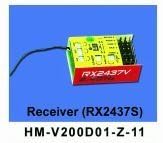
Figure 2.1: The WALKERA HM-V200D01-Z-11 Receiver RX2437V B-3. This image displays the compact design of the receiver, highlighting its connectors and antenna port.
Key features include:
- Compatibility with WALKERA HM-V200D01-Z-11 and RX2437V B-3 systems.
- Designed for reliable signal reception.
- Essential for remote control model operation.
3. Setup
Follow these general steps to set up your receiver. Specific wiring and binding procedures may vary depending on your model and transmitter.
- Mounting: Securely mount the receiver in your model using double-sided tape or a suitable mounting bracket. Ensure it is protected from vibrations and moisture.
- Connections: Connect the receiver to your model's electronic speed controller (ESC), servos, and other components according to your model's specific wiring diagram. Pay close attention to polarity.
- Antenna Placement: Position the antenna(s) away from metal parts and other electronics to maximize signal range and minimize interference. Ensure the antenna is not bent or damaged.
- Binding: Refer to your transmitter's manual for the binding procedure. Typically, this involves powering on the receiver while holding a bind button, then initiating the bind process on the transmitter.
- Pre-flight Check: Before flight, verify all control surfaces respond correctly to transmitter inputs. Check for any loose connections or abnormal behavior.
4. Operating
Once the receiver is properly set up and bound to your transmitter, operating your model involves standard remote control practices. Always ensure a clear line of sight to your model and be aware of your surroundings.
- Power On Sequence: Always power on your transmitter first, then your model (receiver).
- Power Off Sequence: Always power off your model (receiver) first, then your transmitter.
- Range Check: Perform a range check before each flight session to ensure adequate signal strength and prevent loss of control.
- Environmental Conditions: Avoid operating your model in adverse weather conditions such as strong winds, rain, or extreme temperatures, which can affect receiver performance.
5. Maintenance
Regular maintenance helps ensure the reliability and longevity of your receiver.
- Keep Clean: Periodically clean the receiver and its connections to remove dust, dirt, and debris. Use a soft, dry brush or compressed air.
- Inspect Connections: Regularly check all wiring and connectors for signs of wear, corrosion, or looseness. Secure any loose connections.
- Antenna Integrity: Ensure the receiver antenna is not cut, frayed, or kinked. A damaged antenna can significantly reduce range and signal quality.
- Storage: Store the receiver in a dry, cool environment, away from direct sunlight and extreme temperatures, when not in use.
6. Troubleshooting
If you encounter issues with your receiver, consider the following troubleshooting steps:
- No Power:
- Check battery connections and ensure the battery is charged.
- Verify all power cables are securely connected to the receiver and ESC.
- Loss of Signal/Range:
- Ensure the receiver and transmitter are properly bound.
- Inspect the receiver antenna for damage or improper placement.
- Check for sources of interference (e.g., other 2.4GHz devices, large metal objects).
- Perform a range check.
- Erratic Control:
- Re-bind the receiver to the transmitter.
- Check for loose servo connections or damaged servo wires.
- Ensure the receiver is securely mounted and protected from vibration.
If problems persist after attempting these steps, consult a qualified technician or contact customer support.
7. Specifications
| Model Number | HM-V200D01-Z-11 RX2437V B-3 |
| ASIN | B0DC4XNH6M |
| Date First Available on Amazon.co.jp | 2024/08/04 |
8. Warranty and Support
Specific warranty details and direct support contact information are not available in the provided product data. For warranty claims or technical assistance, please refer to the retailer or the official WALKERA website where you purchased the product. Keep your proof of purchase for any warranty-related inquiries.

