1. Introduction
The SVAKOM Trysta Neo is a sophisticated rabbit vibrator designed for targeted G-spot stimulation. It features dual-motor power, a unique rolling G-spot ball, and is fully interactive and app-compatible. This manual provides essential information for the safe and effective use, setup, operation, and maintenance of your device.
2. Product Overview
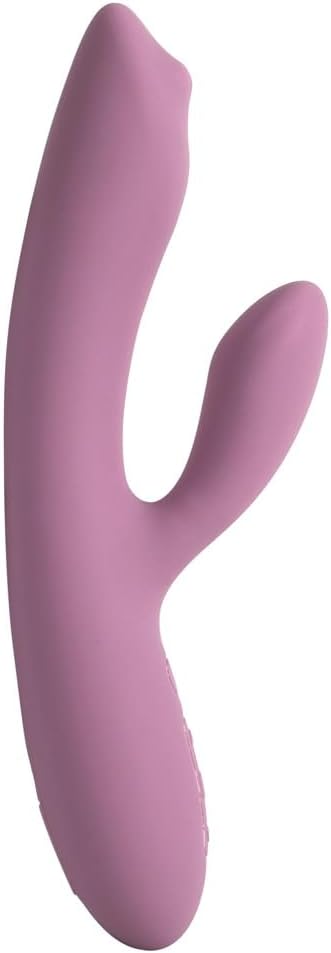
The Trysta Neo is crafted from body-safe silicone and features an ergonomic design for comfortable handling and targeted stimulation. Key features include:
- Dual-Motor Design: Provides powerful vibrations for both internal and external stimulation.
- Rolling G-Spot Ball: A unique mechanical feature for enhanced G-spot targeting.
- App-Compatible: Connects to the SVAKOM app for advanced control and interactive experiences.
- Waterproof: Fully submersible for easy cleaning and use in various environments.
- Travel Lock: Prevents accidental activation during transport.
- Memory Function: Remembers your last used settings for convenience.
3. Setup
3.1 Initial Charging
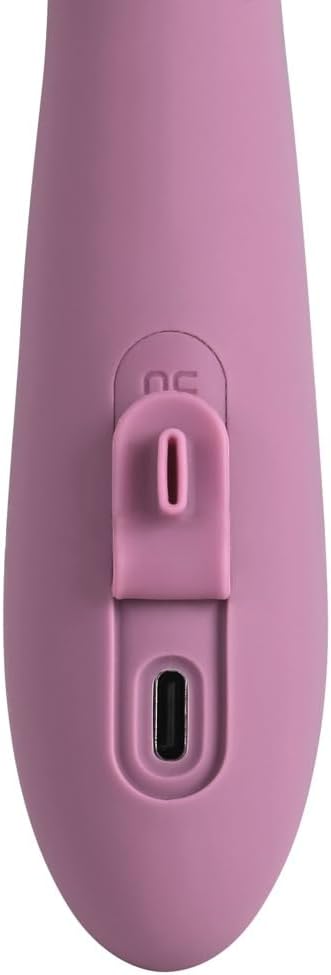
Before first use, fully charge your Trysta Neo. Locate the charging port, typically covered by a silicone flap, at the base of the device. Connect the provided USB charging cable to the port and plug the other end into a USB power source (e.g., computer, wall adapter). The indicator light will show charging status and turn solid when fully charged.
3.2 Initial Cleaning
Clean the device thoroughly before its first use and after each subsequent use. Wash with warm water and a mild, toy-safe soap, or use a specialized toy cleaner. Rinse thoroughly and pat dry with a lint-free cloth.
3.3 App Connection (Optional)
For enhanced control and interactive features, download the official SVAKOM app from your device's app store. Follow the in-app instructions to pair your Trysta Neo via Bluetooth.

4. Operating Instructions
4.1 Power On/Off
- To power on, press and hold the power button (circle with a vertical line) for 2-3 seconds until the device vibrates or the indicator light illuminates.
- To power off, press and hold the power button again for 2-3 seconds until the device stops vibrating and the indicator light turns off.
4.2 Adjusting Modes and Intensity
Use the control buttons located on the device to cycle through vibration modes and adjust intensity levels.
- Press the 'S' button to cycle through different vibration patterns.
- Use the up (▲) and down (▼) arrow buttons to increase or decrease the vibration intensity within each mode.


4.3 Travel Lock Function
To activate the travel lock, press and hold the power button and the 'S' button simultaneously for 3 seconds. The device will briefly vibrate to confirm activation. To deactivate, repeat the process.
4.4 App Control
Once connected to the SVAKOM app, you can control all functions of the Trysta Neo directly from your smartphone. The app offers additional customization options, pre-set patterns, and interactive features.
5. Maintenance
5.1 Cleaning
Always clean your Trysta Neo before and after each use. As the device is fully waterproof, it can be rinsed under warm running water. Use a mild, antibacterial soap or a dedicated toy cleaner. Avoid harsh chemicals, alcohol-based cleaners, or petroleum-based lubricants, as these can damage the silicone material. Rinse thoroughly to remove all soap residue and pat dry with a soft, lint-free cloth.
5.2 Storage
Store the device in a clean, dry, and dust-free environment, away from direct sunlight and extreme temperatures. Keep it separate from other toys made of different materials to prevent potential material degradation or reactions.
6. Troubleshooting
- Device not turning on: Ensure the device is fully charged. If the battery is depleted, connect it to the charger for at least 2 hours.
- Vibrations are weak: The battery may be low. Recharge the device.
- Cannot connect to app: Ensure Bluetooth is enabled on your smartphone and the device is powered on. Try restarting both the device and the app. Check app permissions on your phone.
- Device unresponsive: The travel lock may be active. Refer to section 4.3 to deactivate it.
7. Specifications
| Model Number | 54046900000 |
| Material | Silicone |
| Total Length | 7.2 inches (18.4 cm) |
| Insertable Length | 3.7 inches (9.3 cm) |
| External Stimulator Length | 2.6 inches (6.6 cm) |
| Product Dimensions (L x W x H) | 2.6 x 1.26 x 7.24 inches |
| Weight | 14.11 ounces |
| Battery Type | 1 Lithium Polymer (included) |
| Waterproof Rating | Fully Waterproof |
8. Safety Information
- This device is intended for adult use only.
- Consult a healthcare professional before use if you have any medical conditions, are pregnant, or have recently undergone surgery.
- Discontinue use immediately if you experience any discomfort, pain, or irritation.
- Do not use the device if it appears damaged or if the charging cable is frayed.
- Keep out of reach of children.
- Use only water-based lubricants with this device to avoid damaging the silicone.
9. Warranty and Support
For warranty information, product support, or any inquiries, please visit the official SVAKOM website or contact SVAKOM customer service directly. Please retain your proof of purchase for warranty claims.
SVAKOM Official Website: www.svakom.com