
Fitoncloud 127 Smart Watch
Fitoncloud Smart Watch User Manual
Model: 127 Smart Watch
Introduction
Thank you for choosing the Fitoncloud Smart Watch. This device is designed to enhance your daily life by providing convenient communication features, comprehensive health monitoring, and advanced fitness tracking capabilities. Please read this manual carefully to ensure proper use and optimal performance of your smartwatch.

The Fitoncloud Smart Watch, featuring a large display and comfortable black band.
What's in the Box
Verify that all items are present in the package:
- Smart Watch x1
- Magnetic USB Charger Cable x1
- User Manual x1
- Silicone Band x1

The Fitoncloud Smart Watch and its included accessories within the packaging.
Setup Guide
1. Initial Charging
Before first use, fully charge your smartwatch. Connect the magnetic USB charger cable to the charging contacts on the back of the watch and plug the USB end into a compatible power adapter (not included) or a computer USB port. A full charge typically takes approximately 2 hours.
2. App Installation
Download the "Da Fit" app from your smartphone's app store (compatible with iOS 9.0 or above, Android 5.0 or above). This app is essential for syncing data, customizing settings, and accessing all features of your smartwatch.
3. Device Pairing
To pair your smartwatch with your phone:
- Ensure your phone's Bluetooth is turned on.
- Open the "Da Fit" app and navigate to the "Add Device" section.
- The app will search for nearby devices. Select "G127" (or similar model name) from the list to connect.
- Confirm the pairing request on both your phone and the smartwatch.
Visual instructions for connecting the smartwatch to your smartphone via the Da Fit application.
Operating Instructions
Display and Watch Faces
The smartwatch features a 2.01-inch HD colorful screen with responsive touch sensitivity. You can choose from over 200 watch faces available in the Da Fit app or personalize your watch face using your own photos.

Examples of customizable watch faces available for the smartwatch.
Communication Features
- Bluetooth Calling: With Bluetooth 5.2, you can answer or make calls directly from your smartwatch when connected to your phone.
- AI Voice Control: Utilize the AI Voice assistant to ask questions, control music, check weather, set alarms, and more by speaking to your watch.
- Message Notifications: Receive notifications for SMS, Facebook, WhatsApp, Instagram, X, Telegram, TikTok, Skype, and other applications directly on your watch.

The smartwatch's capabilities for handling calls and displaying message notifications from popular applications.
Health Monitoring
The smartwatch continuously records daily steps, distance, and calorie consumption. It features advanced sensors for 24/7 monitoring of:
- Heart Rate
- Blood Oxygen Levels
- Stress Levels
- Sleep Tracking
- Menstrual Cycle Tracking (for women)
All recorded data can be synced to the Da Fit app for detailed analysis and insights into your health trends.

Overview of the smartwatch's 24/7 health monitoring features.
Sports Modes
The Fitoncloud Smart Watch supports over 120 sports modes, including running, walking, hiking, badminton, cycling, swimming, yoga, and more. It accurately tracks exercise time and calories burned to help you maintain a healthy and active lifestyle.

The smartwatch's ability to track various sports activities and display key fitness metrics.
Additional Functions
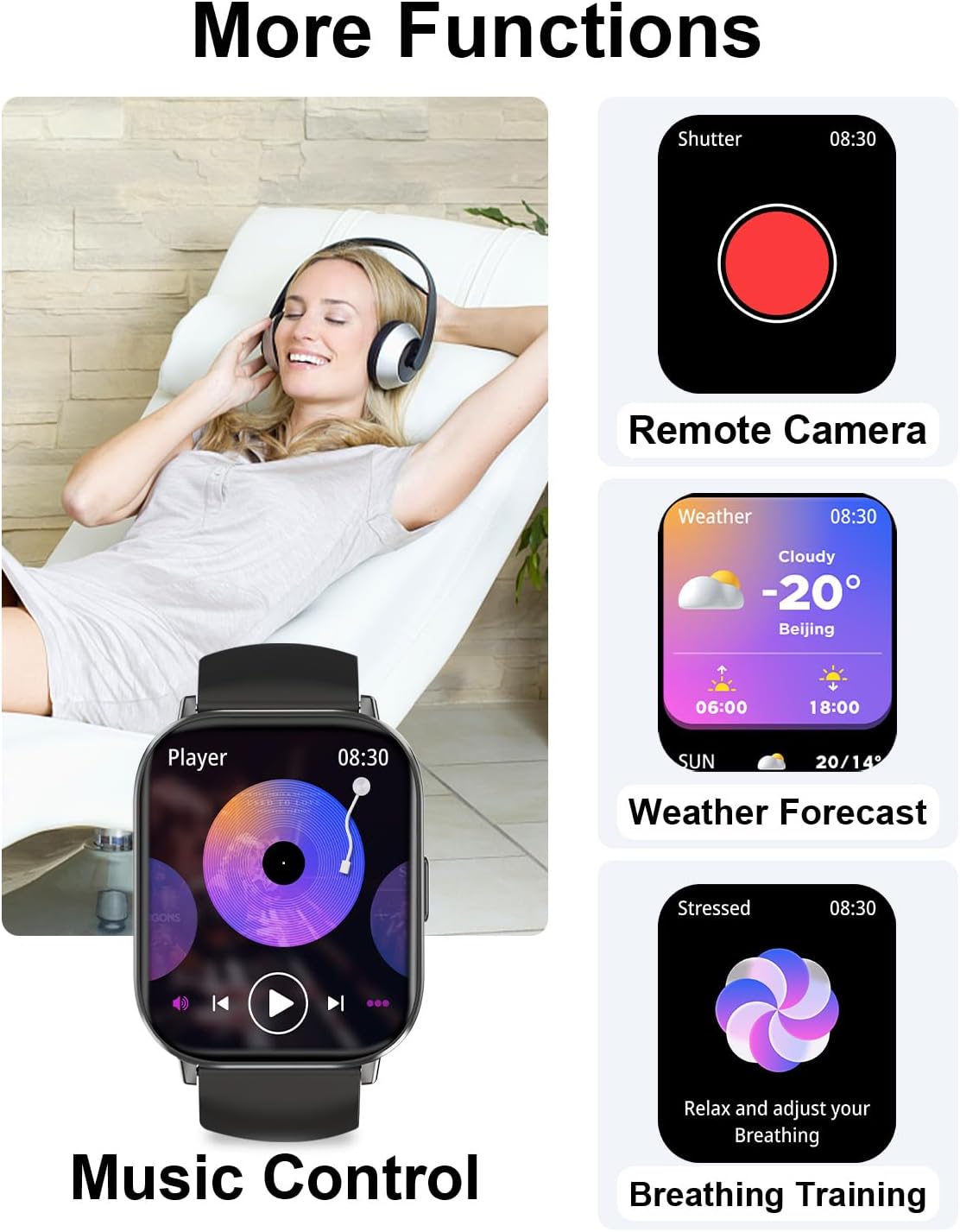
The smartwatch includes several useful tools:
- Remote Camera Control
- Music Control and Playback
- Weather Forecast
- Setting Alarms and Timers
- Stopwatch
- Breather Guide
- Find Phone function
- Medication Reminders
- Sedentary Reminders
- Drinking Reminders

Various additional features available on the Fitoncloud Smart Watch.
Maintenance
Water Resistance
The smartwatch boasts an IP68 waterproof rating, making it suitable for daily activities such as washing hands, face, and engaging in sweaty activities. It is not recommended for diving or prolonged submersion in water.
Cleaning and Care
To maintain your smartwatch, regularly wipe the screen and band with a soft, dry cloth. Avoid using harsh chemicals or abrasive materials that could damage the device.
Troubleshooting
Common Issues and Solutions
- Connectivity Issues: Ensure Bluetooth is enabled on your phone and the smartwatch is within range (8-10 meters). Restart both devices and try pairing again.
- Inaccurate Readings: For health monitoring, ensure the watch is worn snugly on your wrist. For sports tracking, ensure GPS (if applicable via phone) is active and the app is running in the background.
- Battery Draining Quickly: Reduce screen brightness, disable unnecessary notifications, and close background apps on the watch to conserve battery life.
Customer Support
If you encounter any issues not covered in this manual, please contact Fitoncloud customer service through Amazon for assistance. We are available year-round to help you.
Specifications
| Feature | Detail |
|---|---|
| Model Number | 127 Smart Watch |
| Screen Size | 2.01 inches |
| Battery Capacity | 200 mAh |
| Charging Time | Approx. 2 hours |
| Typical Use Battery Life | Up to 3 days |
| Standby Time | Up to 25 days |
| Waterproof Rating | IP68 |
| Connectivity | Bluetooth 5.2 |
| Compatible OS | Android 5.0 & iOS 9.0 Above |
| Product Dimensions | 7.28 x 3.58 x 0.87 inches |
| Item Weight | 0.035 ounces (approx. 1 gram) |

Detailed dimensions and battery performance information for the smartwatch.
Warranty and Support
Fitoncloud is committed to providing high-quality products and customer satisfaction. For any product-related inquiries, technical support, or warranty claims, please reach out to our customer service team via the Amazon platform. We strive to resolve any issues promptly and efficiently.
Please retain your proof of purchase for any warranty-related services.
Ask a question about this manual
Ask about setup, troubleshooting, compatibility, parts, safety, or missing instructions. Manuals+ will review the question and use this page’s manual context to help answer it.