
Rebluum RB-3PT1
Rebluum 2K Solar Security Camera User Manual
Model: RB-3PT1
1. Product Overview
The Rebluum 2K Solar Security Camera (Model RB-3PT1) is a wireless outdoor surveillance solution designed for home and business security. It features 2K Full HD resolution, 360° pan and tilt capabilities, AI-powered human motion detection, and two-way audio. Powered by a built-in 9700mAh battery and a high-conversion solar panel, it offers continuous operation without the need for frequent battery changes or messy wiring.

Figure 1: Rebluum 2K Solar Security Camera with included solar panel and a view of the live feed on a smartphone.
Key Features:
- Wireless Solar Powered: 9700mAh battery with high conversion rate solar panel for continuous power.
- 2K Full HD, 360° Pan and Tilt: 3MP (2048 x 1536) resolution with 355° horizontal and 90° vertical rotation.
- AI Powered Human Motion Detection: Reduces false alarms and allows for customized motion areas.
- Multi-Alarms with Spotlights and Siren: Features voice warning, flashlight warning, and APP push notifications.
- 2-Way Audio: Listen and talk back functionality.
- No Monthly Fees: Supports local storage (up to 128GB SD card, not included) and basic 6-second cloud storage (7 days free).
- Compatible with Alexa: Integrates with smart home devices for voice control.
2. Setup Guide
2.1 What's in the Box
- 1× 3MP Solar PTZ Camera
- 1× Solar Panel
- 1× User Manual
- 1× Warning Sticker
- 2× Stand (1 for camera, 1 for panel)

Figure 2: Unboxing the Rebluum Solar Security Camera. The package includes the camera, solar panel, mounting hardware, charging cable, and user manual.
2.2 Physical Installation
The camera and solar panel are designed for outdoor use and can be wall-mounted or ceiling-mounted. The recommended installation height for the camera is 7-10 feet (2-3 meters) from the ground. Ensure the solar panel is positioned to receive maximum direct sunlight for optimal charging.

Figure 3: The camera and solar panel are designed to withstand various weather conditions, including rain and snow, with an IP66 waterproof rating.
The camera features a simple mounting bracket that allows for easy attachment and removal. The solar panel also comes with a separate stand for flexible positioning.
Video 1: This video demonstrates the process of connecting the Rebluum Wi-Fi security camera, including physical mounting and initial setup steps.
2.3 App Setup and Connectivity
To set up your camera, download the "CloudEdge" app from your smartphone's app store (available for iOS and Android). The camera connects via 2.4GHz Wi-Fi only (5GHz is not supported). Follow the in-app instructions to pair your camera. Ensure your phone is connected to a 2.4GHz Wi-Fi network during setup.

Figure 4: The CloudEdge app is required for camera setup and control.
The app allows you to manage multiple cameras, view live feeds, access recorded history, and configure various settings.
3. Operating Instructions
3.1 Live View and PTZ Control
Access the live feed through the CloudEdge app. You can remotely control the camera's pan (355° horizontal) and tilt (90° vertical) movements to get a comprehensive view of your monitored area. The camera also supports 4X digital zoom.

Figure 5: Remote PTZ control allows for wide area coverage.
3.2 Motion Detection and Alarms
The camera features AI-powered human motion detection, reducing false alarms. You can customize motion detection areas and sensitivity within the app. When motion is detected, the camera can trigger voice warnings, flashlight warnings, and send push notifications to your phone.

Figure 6: Multi-alarm features with spotlights and siren to deter intruders.

Figure 7: Intelligent APP settings allow for adjustable detection areas and sensitivity.
3.3 Night Vision
The camera provides 3MP color night vision, allowing for clear and detailed images even in low-light conditions. The night vision range extends up to 100 feet.

Figure 8: 3MP Color Night Vision provides enhanced detail in the dark.
3.4 Two-Way Audio
Communicate with visitors or deter unwanted guests using the built-in two-way audio feature. You can listen and talk back through the CloudEdge app from anywhere.

Figure 9: Remote access and 2-way audio allow for real-time communication.
3.5 Video Storage
The camera supports local storage via a Micro SD card (up to 128GB, not included). It also offers basic 6-second cloud storage for 7 days, eliminating the need for monthly subscription fees. Stored videos are encrypted for privacy.
4. Maintenance
4.1 Battery Charging
The camera's built-in 9700mAh battery is continuously charged by the high-conversion solar panel. In periods of low sunlight or high usage, the camera can also be charged via a USB-C cable (included).
Figure 10: Non-stop solar powered operation ensures continuous security.
4.2 Weather Resistance
The camera has an IP66 international protection rating, making it waterproof and suitable for outdoor use in various weather conditions.
Figure 11: Upgraded IP66 waterproof design for durability.
4.3 SD Card Management
To access or replace the Micro SD card, carefully open the protective cover on the camera. Ensure the cover is securely closed after managing the card to maintain waterproofing.
5. Troubleshooting
| Problem | Possible Cause | Solution |
|---|---|---|
| Camera frequently disconnects from Wi-Fi. | Weak Wi-Fi signal or interference. | Ensure camera is within range of 2.4GHz Wi-Fi router. Consider a Wi-Fi extender if necessary. |
| Motion detection is too sensitive or not sensitive enough. | Incorrect sensitivity settings or activity zone configuration. | Adjust motion detection sensitivity and customize activity zones in the CloudEdge app. |
| Battery drains quickly. | Insufficient sunlight for solar panel or high motion activity. | Ensure solar panel is in direct sunlight. Reduce motion detection frequency or recording duration if possible. Manually charge via USB-C if needed. |
| Cannot connect to Alexa. | Incorrect Alexa skill setup or network issues. | Verify CloudEdge skill is enabled in Alexa app and linked correctly. Ensure both devices are on the same 2.4GHz Wi-Fi network. |
6. Specifications
| Feature | Detail |
|---|---|
| Model Name | RB-3PT1 |
| Indoor/Outdoor Usage | Outdoor |
| Power Source | Solar Powered and Battery Powered (9700mAh) |
| Connectivity Protocol | Wi-Fi (2.4GHz only) |
| Video Capture Resolution | 3MP (2048 x 1536) |
| Pan & Tilt Range | 355 Degrees (Pan), 90 Degrees (Tilt) |
| Digital Zoom | 4x |
| Night Vision Range | 100 Feet |
| Water Resistance Level | Waterproof (IP66) |
| Storage | Micro SD (up to 128GB), 7-day free 6s cloud storage |
| Two-Way Audio | Yes |
| Motion Detection | PIR Motion Detection, AI Human Detection |
| Compatible Devices | CloudEdge App, Google Assistant, Amazon Alexa, iOS, Android |
7. Warranty and Support
Rebluum offers a 1-year warranty and lifetime technical support for its products. For assistance, please refer to the contact information provided in your product packaging or visit the official Rebluum website.
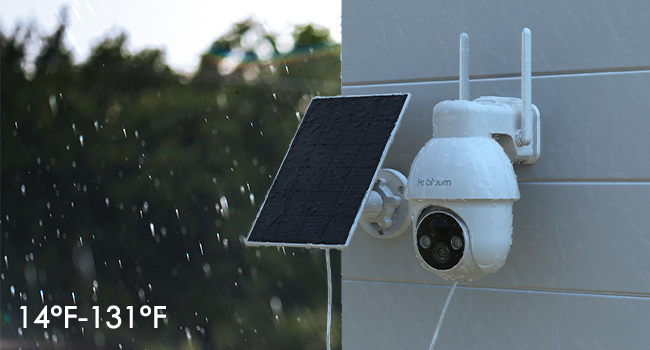
Figure 12: Rebluum provides dedicated customer support.
Related documentsRB-3PT1


Ask a question about this manual
Ask about setup, troubleshooting, compatibility, parts, safety, or missing instructions. Manuals+ will review the question and use this page’s manual context to help answer it.