
1. Introduction
This manual provides detailed instructions for the installation, operation, and maintenance of your TUGARD G30B WiFi Home Security Alarm System. Please read this manual thoroughly before using the system to ensure proper functionality and safety.
The TUGARD G30B is a comprehensive home security solution designed to provide reliable protection for your property. It features a 2.4-inch TFT color screen, supports both WiFi and GSM/2G/4G networks, and is compatible with popular smart home platforms like Alexa and Google Assistant.
Video 1.1: TUGARD G30 Alarm System Hub Instruction. This video provides an overview of the main alarm panel and its features.
2. Package Contents
The TUGARD G30B Home Security Alarm System typically includes the following components:
- 1x G30B Alarm Host (Main Panel)
- 1x PIR Motion Detector
- 4x Door/Window Sensors
- 2x Remote Controls
- 2x RFID Cards
- 1x Wired Siren
- 1x Power Adapter
- Mounting Screws and Fixed Adhesive
- User Manual (this document)
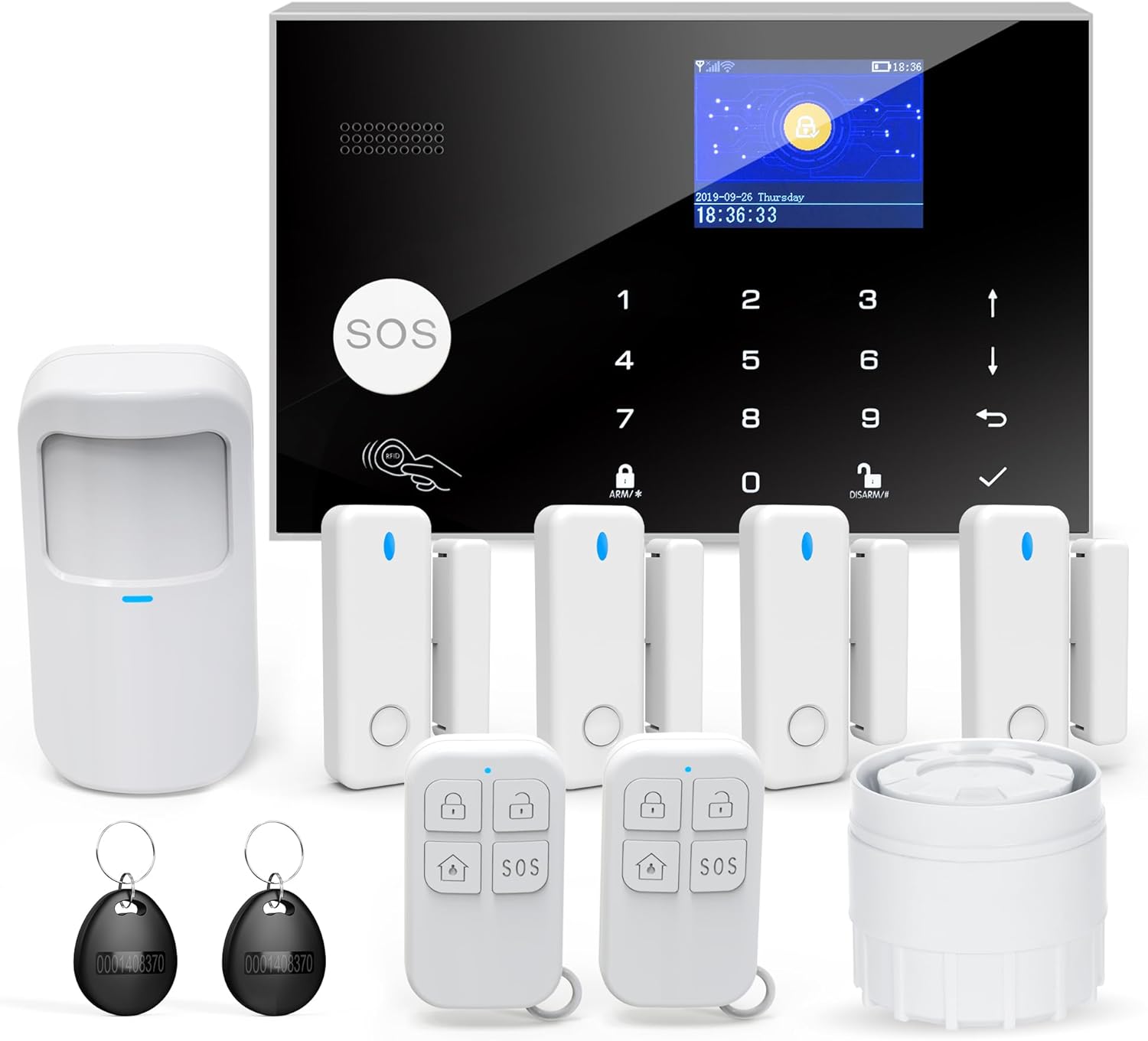
Image 2.1: All components included in the TUGARD G30B Alarm System kit.
Video 2.1: TUGARD G30 Home Alarm System Unboxing. This video demonstrates the unboxing process and shows all included items.
3. Setup
3.1 Host Installation
The alarm host can be fixed to a wall using the provided screws. Ensure it is placed in a central location for optimal sensor communication and within reach of a power outlet.
Video 3.1: G30 Alarm System How to install. This video guides you through the physical installation of the alarm host.
3.2 SIM Card Insertion
The system supports GSM/2G/4G SIM cards (not included) for cellular backup. To insert the SIM card:
- Open the back cover of the alarm host.
- Locate the SIM card slot.
- Carefully insert the SIM card with the chip facing downwards, ensuring it connects with the electronic mainboard.
- Close the cover.
Video 3.2: Home Security Alarm System Insert the Card. This video demonstrates the correct way to insert the SIM card.
3.3 Sensor Placement
Strategically place motion detectors and door/window sensors for optimal coverage. Motion detectors should be installed 2.2 meters high with a 110-degree detection angle, avoiding direct sunlight or heat sources to prevent false alarms. Door/window sensors should be installed on the frame and moving part of the door/window, ensuring the two parts are aligned and close when closed.
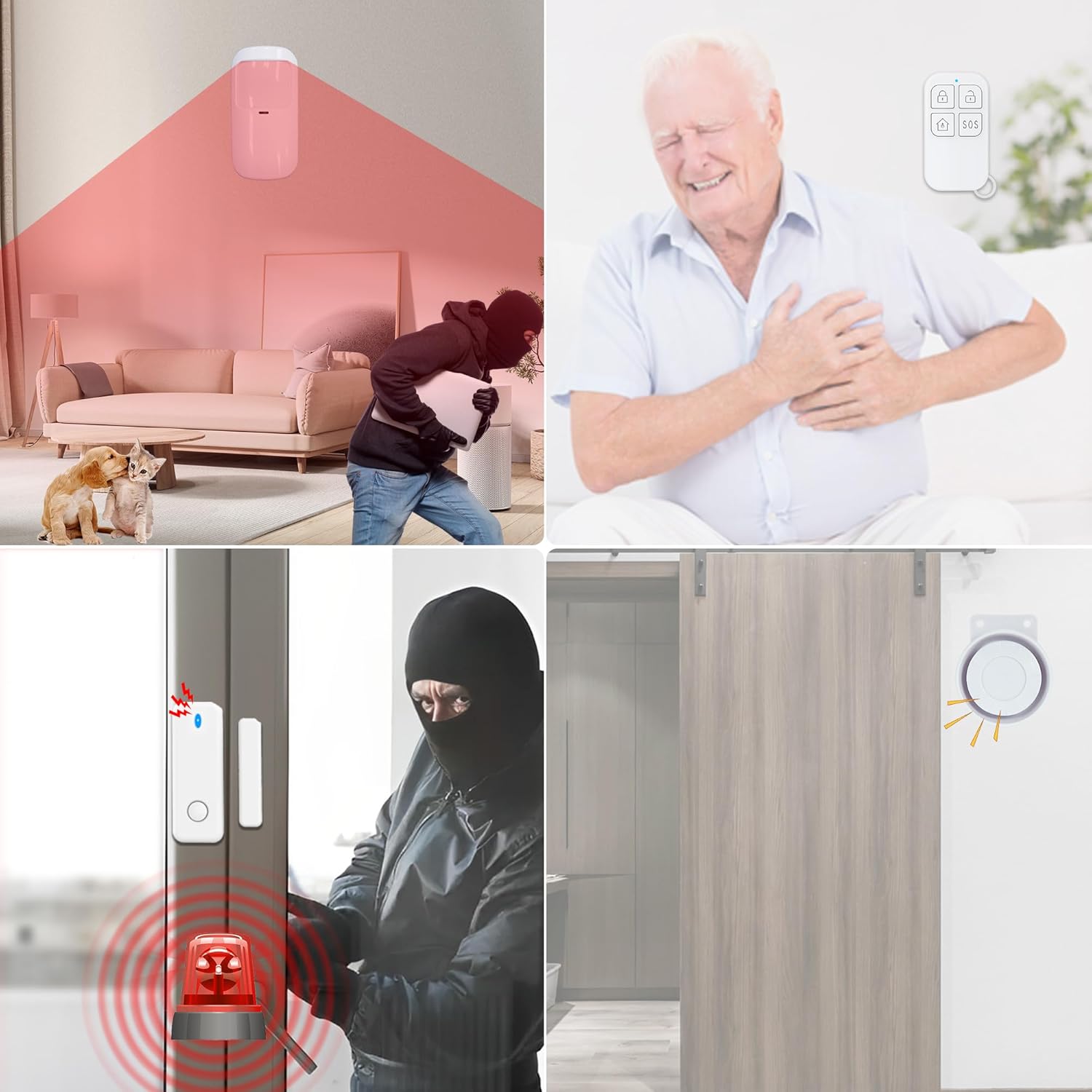
Image 3.1: Example placement of motion and door/window sensors.

Image 3.2: Suggested layout for sensor placement within a home.
4. Operating Instructions
4.1 Keypad Lock Settings
The system features a keypad lock function to prevent unauthorized access to settings. You can quickly switch the keypad lock on or off. To change settings, you will need to enter the system password (initial: 6666) or user password (initial: 1234).
Video 4.1: G30 Alarm System How to Set Keypad Lock. This video demonstrates how to manage the keypad lock feature.
4.2 Pairing Accessories
The system supports smart pairing for various accessories like remote controls, RFID cards, and sensors. When a sub-device is brought near the host, it can automatically recognize the device type for easy pairing.

Image 4.1: Illustration of the smart pairing process for accessories.
Video 4.2: G30 Alarm System How to Pair Smartly. This video demonstrates the smart pairing process for various accessories.
4.3 Network Configuration
The TUGARD G30B system can be configured to your WiFi network using the Smart Life or Tuya app. Ensure your phone's WiFi and Bluetooth are enabled during the configuration process. The system supports 2.4GHz WiFi networks.

Image 4.2: The system supports both GSM and WiFi for reliable connectivity.
Video 4.3: G30 Alarm System Configure Network. This video guides you through connecting your alarm system to your network.
4.4 Arming and Disarming
The system can be armed or disarmed using remote controls, RFID cards, the main panel keypad, or the mobile application. When armed, any triggered sensor will activate the siren and send alerts to your phone.
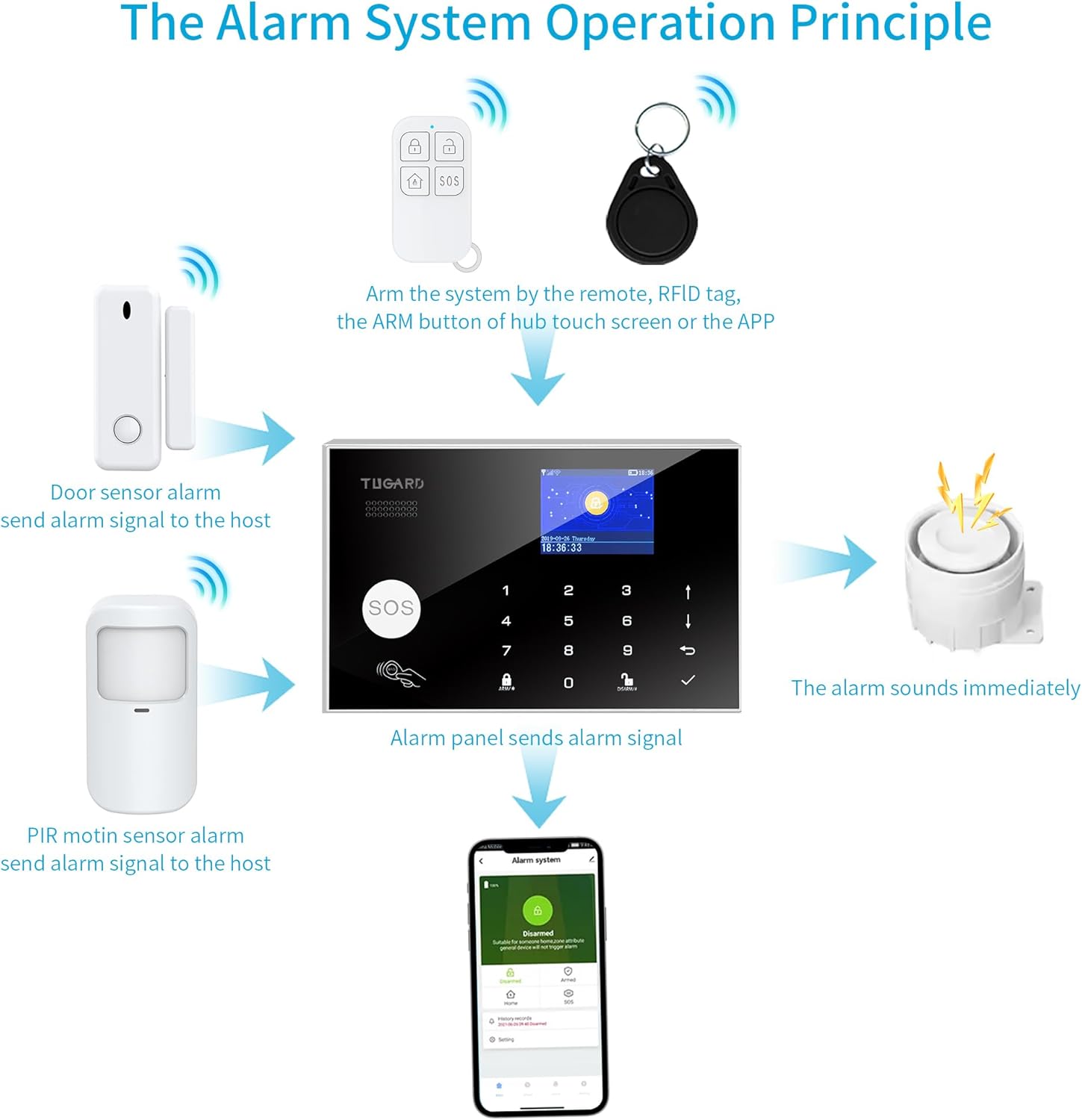
Image 4.3: Flowchart illustrating the alarm system's operation principle.
4.5 Setting Time and Language
You can set the system's time and language preferences through the main menu settings.
Video 4.4: G30 Alarm System How to Set Time and Language. This video demonstrates how to adjust time and language settings.
4.6 Siren Duration Settings
The duration of the siren alarm can be customized through the system settings.
Video 4.5: G30 Alarm System How to Set the Siren Duration. This video shows how to configure the siren's active time.
4.7 Scheduled Arm/Disarm
You can set specific times for the system to automatically arm or disarm, providing convenience and avoiding repeated manual operations.

Image 4.4: Examples of scheduled arming and disarming times.
4.8 Mobile App Control
The system integrates with the "Tuya" and "Smart Life" apps, allowing you to control your alarm system, receive real-time notifications, and check sensor statuses from your smartphone.

Image 4.5: View real-time door/window sensor status and edit names via the mobile app.
4.9 Voice Control
The TUGARD G30B is compatible with Alexa and Google Assistant, enabling voice commands to arm or disarm your security system.

Image 4.6: Control your alarm system using voice commands with Alexa or Google Assistant.
4.10 Emergency SOS Function
In case of an emergency, pressing the SOS button on the main panel or remote control will trigger the alarm and send immediate alerts to pre-set contacts.

Image 4.7: The SOS button provides immediate assistance for the elderly or in emergencies.
5. Maintenance
To ensure the longevity and optimal performance of your TUGARD G30B alarm system, regular maintenance is recommended:
- Battery Check: Periodically check the battery status of all wireless sensors and remote controls. Replace batteries as needed (e.g., CR2032 for sensors, 3 years battery life).
- Cleaning: Gently clean the alarm host screen and sensor surfaces with a soft, dry cloth. Avoid using abrasive cleaners or solvents.
- Signal Strength: Ensure all sensors maintain a strong connection to the main host. Repositioning may be necessary if signal issues arise.
- Firmware Updates: Check the mobile app for any available firmware updates for the alarm host to ensure you have the latest features and security enhancements.
6. Troubleshooting
If you encounter issues with your TUGARD G30B system, refer to the following common troubleshooting steps:
- System Not Arming/Disarming: Ensure remote controls and RFID cards are properly paired. Check the main panel for any error messages.
- False Alarms: Verify motion detector placement to avoid direct sunlight, heat sources, or areas with pets. Check door/window sensors for proper alignment and secure attachment.
- No App Notifications: Confirm the alarm host is connected to WiFi and has a stable internet connection. Check app notification settings on your smartphone and within the Smart Life/Tuya app.
- No Cellular Backup: Ensure a valid and active SIM card is correctly inserted. Check for cellular network coverage in your area.
- Keypad Unresponsive: Check if the keypad lock is active. Enter the correct password to unlock.
For persistent issues, please contact TUGARD customer support.
7. Specifications
| Brand | TUGARD |
| Model Number | ZASD-G30 |
| Color | Black |
| Power Source | Corded Electric |
| Compatible Devices | Smartphone (Alexa, Google Assistant) |
| Item Dimensions (L x W x H) | 7.08 x 4.52 x 0.86 inches |
| Connectivity Technology | Wireless (2.4GHz WiFi, GSM/2G/4G) |
| Installation Type | Screw-In, Self-Adhesive |
| Alert Type | Message, Call, Push Notification |
| Item Weight | 8.5 ounces |
| Voltage | 110 Volts |
| Control Method | Touch |
| Battery Cell Composition | Lithium Ion |
| Maximum Range | 50 Feet (Wireless) |
| Battery Life (Sensors) | 3 years |
| Included Components | 1* alarm host, 1* PIR motion detector, 4* door window sensors, 2* remote controls, 2* RFID card, 1* alarm siren and 1* Adapter |
| Wireless Frequency | 433MHz |
8. Warranty and Support
For warranty information and technical support, please refer to the contact details provided on the product packaging or the official TUGARD website. Keep your purchase receipt as proof of purchase for warranty claims.