1. Product Overview
This manual provides instructions for the AULCMEET AKB75095315 replacement remote control. This remote is designed to be compatible with a wide range of LG LCD, LED, OLED, and 4K Smart TV models. It operates without requiring any prior setup, functioning directly out of the package.
2. Setup
2.1 Battery Installation
The remote control requires two AAA batteries (not included) for operation. No programming or pairing is necessary; simply insert the batteries, and the remote is ready to use.
- Locate the battery compartment cover on the back of the remote control.
- Press down on the tab and slide the cover off.
- Insert two new AAA batteries, ensuring the positive (+) and negative (-) terminals align correctly with the markings inside the compartment.
- Slide the battery compartment cover back into place until it clicks securely.
3. Operating Instructions
3.1 Button Functions
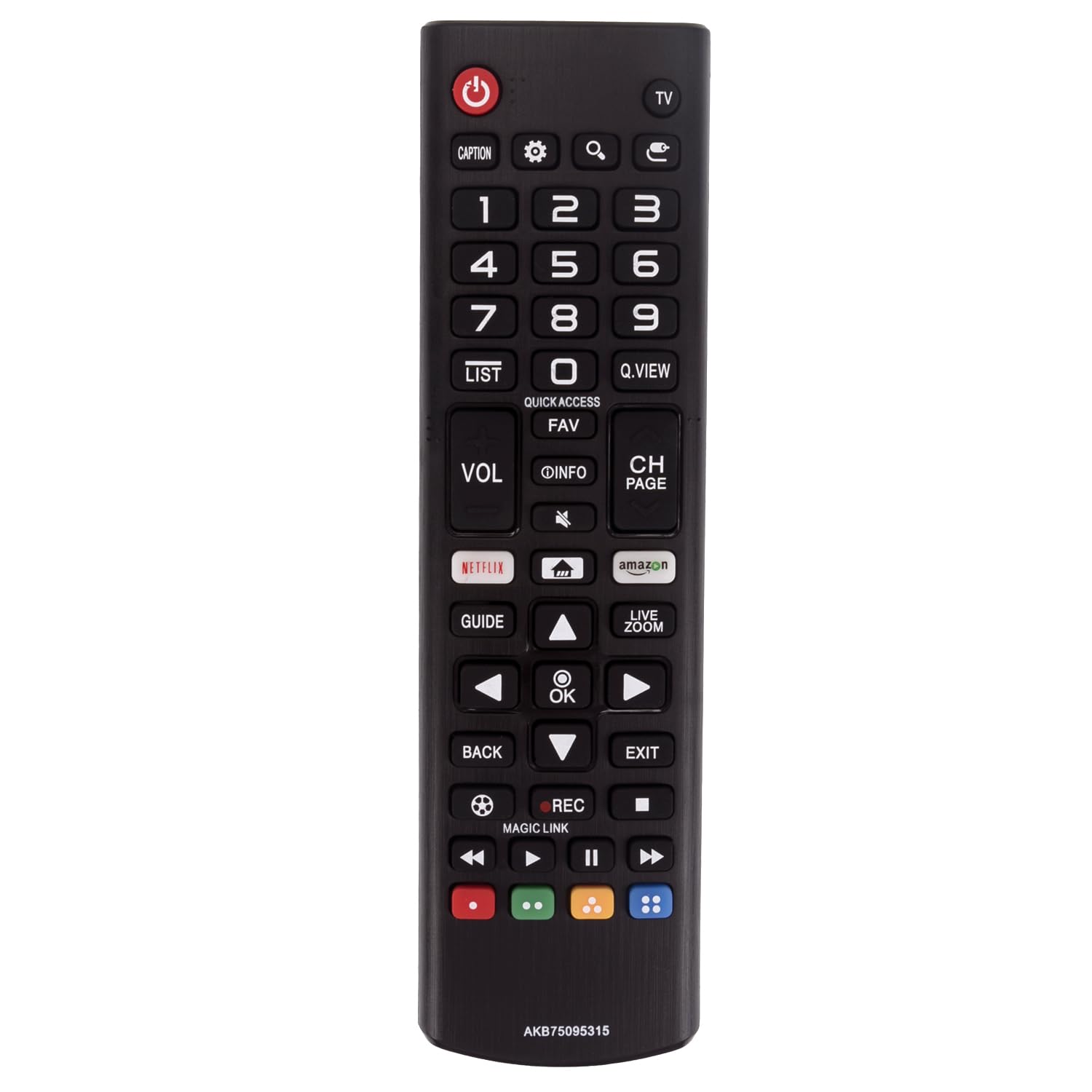
The remote control features a standard layout for intuitive operation of your LG Smart TV. Below is a description of key buttons and their functions:
- Power (Red Circle with Line): Turns the TV on or off.
- TV: Switches the input source to TV mode.
- CAPTION: Activates or deactivates closed captions.
- Settings (Gear icon): Accesses the TV's settings menu.
- Search (Magnifying Glass icon): Opens the search function.
- Input (Arrow into Box icon): Changes the input source (HDMI, AV, etc.).
- Number Buttons (0-9): Directly selects channels or enters numerical values.
- LIST: Displays the channel list.
- Q.VIEW: Quickly switches between previously viewed channels.
- QUICK ACCESS: Provides quick access to frequently used apps or functions.
- FAV: Accesses favorite channels.
- VOL (Volume Up/Down): Adjusts the TV's volume level.
- INFO (i icon): Displays information about the current program.
- Mute (Speaker with X icon): Mutes or unmutes the TV's audio.
- CH PAGE (Channel Up/Down): Changes the TV channel.
- NETFLIX: Direct access to the Netflix application.
- Home (House icon): Returns to the TV's home screen.
- amazon (Amazon Prime Video): Direct access to the Amazon Prime Video application.
- GUIDE: Displays the electronic program guide.
- Navigation Arrows (Up, Down, Left, Right): Navigates through menus and options.
- OK: Confirms selections.
- LIVE ZOOM: Activates the live zoom feature.
- BACK: Returns to the previous screen or menu.
- EXIT: Exits the current menu or application.
- REC (Record): Initiates recording (if supported by TV and external storage).
- MAGIC LINK: Activates the Magic Link feature for related content.
- Media Control Buttons (Rewind, Play/Pause, Fast Forward, Stop): Controls media playback.
- Colored Buttons (Red, Green, Yellow, Blue): Functions vary depending on the TV menu or application.
4. Maintenance
4.1 Cleaning
To maintain the remote control's performance and appearance:
- Wipe the remote control with a soft, dry cloth.
- Do not use liquid cleaners, sprays, or abrasive materials, as these can damage the remote.
4.2 Battery Replacement
Replace batteries when the remote control becomes unresponsive or its range decreases. Always replace both batteries at the same time with new ones of the same type (AAA). Dispose of used batteries responsibly according to local regulations.
5. Troubleshooting
5.1 Common Issues and Solutions
- Remote not responding:
- Check if the batteries are inserted correctly with the correct polarity.
- Replace old batteries with new ones.
- Ensure there are no obstructions between the remote control and the TV's infrared sensor.
- Point the remote directly at the TV's sensor.
- Buttons are unresponsive:
- Clean the remote control, especially around the buttons, to remove any dirt or debris.
- If only specific buttons are not working, the remote may be damaged and require replacement.
- Limited range:
- Replace the batteries.
- Ensure no strong light sources (like direct sunlight) are interfering with the TV's IR sensor.
6. Specifications
6.1 Product Details
| Feature | Detail |
|---|---|
| Brand | AULCMEET |
| Model Number | AKB75095315 |
| Compatible Devices | LG LCD LED OLED 4K Smart TVs |
| Product Dimensions | 6 x 2 x 0.5 inches (15.24 x 5.08 x 1.27 cm) |
| Item Weight | 1.9 ounces (53.86 grams) |
| Color | Black |
| Special Feature | Ergonomic design |
| Max Number of Supported Devices | 1 (Television) |
7. Warranty Information
Specific warranty details for this replacement remote control may vary. Please refer to the product listing or contact the seller directly for information regarding warranty coverage and terms.
8. Support
For further assistance or inquiries regarding your AULCMEET replacement remote control, please contact the seller or manufacturer through the platform where the product was purchased. Provide your order details and a clear description of the issue for efficient support.