

1. Introduction
This manual provides comprehensive instructions for the installation, operation, and maintenance of your MekedeTech DUDUAUTO Car TPMS (Tire Pressure Monitoring System) with external sensors, model DU-TPMS. This system is designed to monitor your vehicle's tire pressure and temperature in real-time, enhancing driving safety by alerting you to potential tire issues. Important: This external TPMS system is designed to be used with DUDUAUTO Car Multimedia systems. Some functions may not be supported when used with other multimedia systems. Please read this manual thoroughly before using the product.
2. Safety Information
- Ensure all components are securely installed to prevent detachment during vehicle operation.
- Do not attempt to disassemble or modify the sensors or monitor, as this may void the warranty and cause malfunction.
- Regularly check tire pressure with a calibrated gauge, as the TPMS is an aid and not a substitute for manual checks.
- Pay attention to all alerts and address tire issues promptly.
- Keep the monitor and sensors away from extreme temperatures and direct sunlight for prolonged periods to ensure optimal performance and longevity.
3. Package Contents
Verify that all items listed below are included in your package:
- 1 x TPMS Monitor (Host Display)
- 4 x External Tire Sensors
- 1 x USB Charging Cable
- 1 x Installation Tool (Wrench)
- 4 x Anti-theft Nuts
- 1 x User Manual

4. Setup
4.1. Monitor Activation
To activate the TPMS monitor, press and hold the power button until the display turns on. The monitor will then be ready to receive data from the sensors.
4.2. Sensor Installation
Install the external sensors onto your vehicle's tire valve stems. Ensure each sensor is tightened securely using the provided anti-theft nuts and wrench to prevent air leakage and theft. The monitor will automatically detect and display the corresponding tire pressure and temperature data once the sensors are installed and the vehicle is in motion or the tires are rotated.


5. Operating Instructions
5.1. Real-time Monitoring
Once installed, the TPMS monitor continuously displays the pressure and temperature for each tire. The display typically shows the front left, front right, rear left, and rear right tire data. This allows for immediate awareness of your tire conditions. The TPMS data can be viewed directly on the desktop after installing the DUDU TPMS APP on your compatible DUDUAUTO Car Multimedia system.

5.2. Alerts and Warnings
The system is equipped with an alarm function. If a tire's pressure or temperature deviates from preset safe ranges, the monitor will flash the corresponding tire's data and emit an audible alert. This immediate notification helps prevent potential accidents and tire damage.
6. Maintenance
- Charging: Recharge the monitor using the provided USB cable when the battery indicator is low. The monitor may also feature solar charging capabilities.
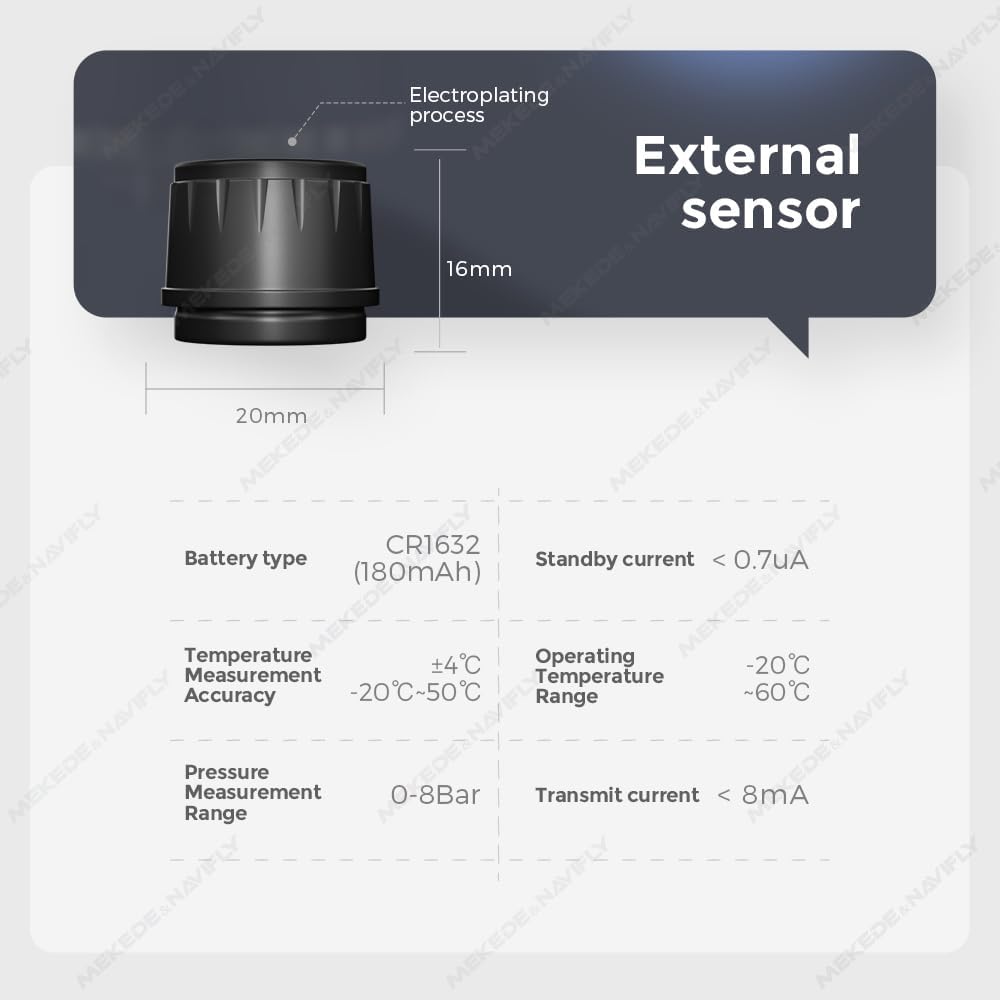
- Sensor Care: Periodically check the external sensors for tightness and cleanliness. Replace sensor batteries as needed (CR1632 type, 180mAh).
- Cleaning: Wipe the monitor and sensors with a soft, dry cloth. Avoid using harsh chemicals or abrasive cleaners.
7. Troubleshooting
- No Signal/Missing Data: Ensure sensors are correctly installed and tightened. Drive the vehicle for a short period to allow sensors to transmit data. Check monitor battery level.
- Inaccurate Readings: Verify tire pressure with a reliable manual gauge. Recalibrate or re-pair sensors if discrepancies persist.
- Alarm Sounds Continuously: Check all tire pressures and temperatures. If a tire is outside the safe range, inflate/deflate or allow to cool. If the alarm persists without apparent cause, consult customer support.
8. Specifications
| Feature | Specification |
|---|---|
| Brand | MekedeTech |
| Model | DU-TPMS |
| Sensor Type | External |
| Sensor Battery Type | CR1632 (180mAh) |
| Sensor Standby Current | < 0.7uA |
| Sensor Transmit Current | < 8mA |
| Temperature Measurement Accuracy | ±4°C (-20°C to 50°C) |
| Operating Temperature Range | -20°C to 60°C |
| Pressure Measurement Range | 0-8 Bar |
| Accuracy (Infineon Chip) | As small as 0.1 Bar |


9. Warranty and Support
For warranty information or technical support, please refer to the contact details provided with your product packaging or visit the official MekedeTech website. Keep your purchase receipt as proof of purchase for any warranty claims.