
Introduction
This instruction manual provides essential information for the proper setup, operation, and maintenance of your K&F CONCEPT Charging Adapter Base for DJI Osmo Pocket 3. Please read this manual thoroughly before using the product to ensure optimal performance and safety.
Package Contents
- 1x K&F CONCEPT Charging Adapter Base for DJI Osmo Pocket 3
- 1x Thumb Screw
- 1x J-type Quick-Release Buckle
Key Features
- Dedicated Design for DJI Osmo Pocket 3: Crafted from durable aluminum alloy, this adapter base is specifically designed for the DJI Osmo Pocket 3. It reorients the charging port, enabling simultaneous filming and fast charging without affecting charging speed.
- Easy Installation: Simply align the charging port of the Pocket 3 with the adapter and plug it in. Press the side safety clips to ensure a secure lock.
- Versatile Mounting Options: Features a standard 1/4" screw hole and an Arca-Swiss type base, making it compatible with most tripods, ball heads, super clamps, selfie sticks, and other camera accessories.
- Magnetic Folding Fingers: Transforms your Pocket 3 into an action camera setup. Use the included thumb screw and J-type quick-release buckle to mount it on headbands, chest straps, backpack clips, or any accessory compatible with folding fingers. The fingers can be folded for compact storage.
Setup Instructions
- Attaching the Adapter Base: Align the Type-C charging port of the K&F CONCEPT adapter base with the charging port at the bottom of your DJI Osmo Pocket 3. Gently push the adapter onto the camera until it clicks into place.
- Securing the Adapter: Ensure the adapter is firmly attached. The side safety clips should engage automatically. You can press the top of these clips to confirm they are locked.
- Mounting to a Tripod or Accessory (1/4" Screw Hole / Arca-Swiss Base):
- For 1/4" screw mounts: Screw the adapter base directly onto any standard 1/4" screw mount (e.g., tripod, monopod).
- For Arca-Swiss compatible mounts: Slide the adapter base into an Arca-Swiss quick-release clamp until it is securely fastened.
- Using Magnetic Folding Fingers (GoPro Style Mount):
- Extend the magnetic folding fingers from the adapter base.
- Attach the included J-type quick-release buckle to the folding fingers using the thumb screw.
- Connect this assembly to any GoPro-compatible mount (e.g., chest strap, backpack clip).
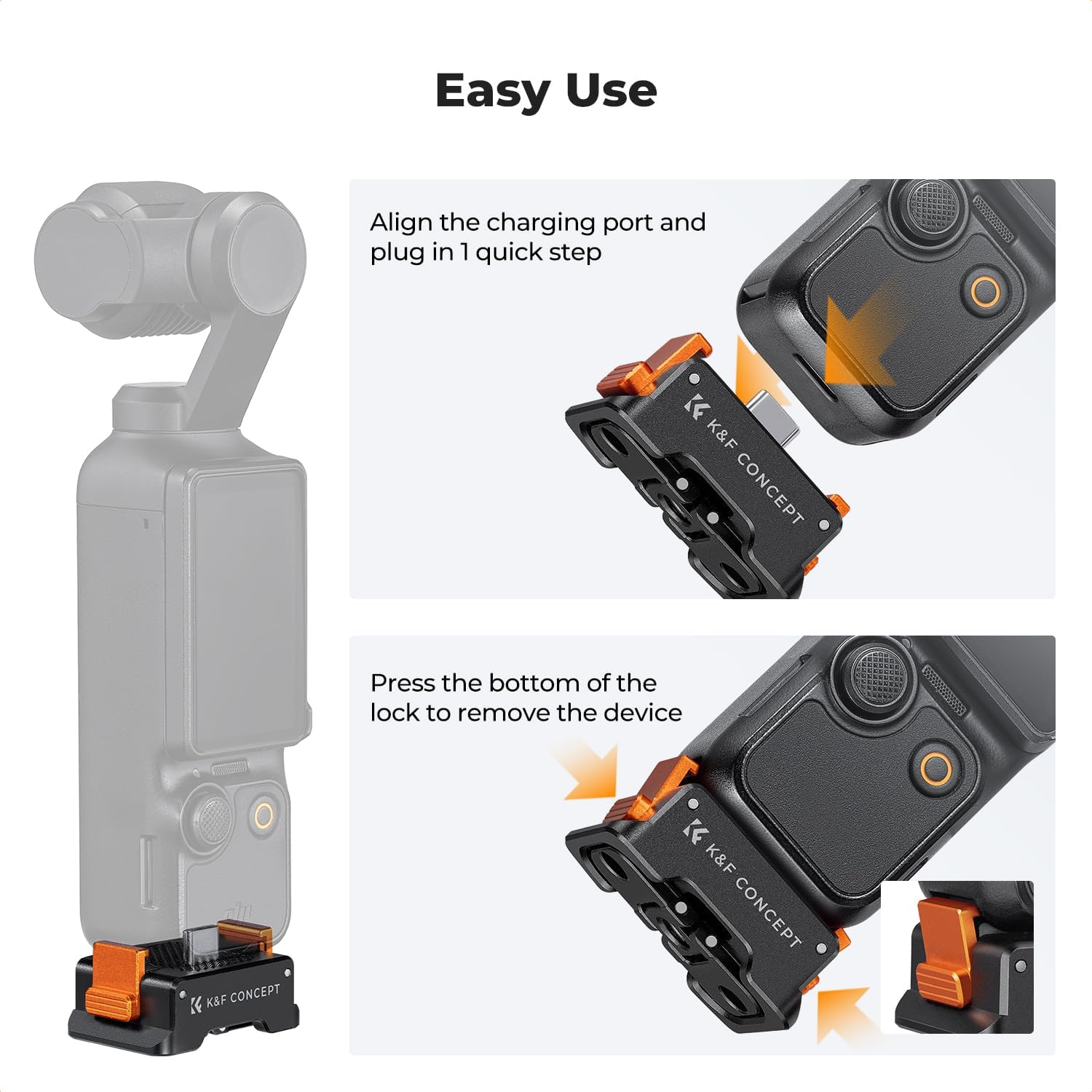
Figure 1: Easy installation by aligning and plugging in the adapter.

Figure 2: The adapter base with magnetic folding fingers for action camera mounting.
Operating Instructions
- Charging: Connect a Type-C charging cable to the port on the adapter base. This allows you to charge your DJI Osmo Pocket 3 while it is mounted and in use. The design ensures charging does not interfere with camera operation.
- Filming While Charging: The adapter base is designed to allow continuous filming even when the DJI Osmo Pocket 3 is connected to a power source via the adapter's Type-C port. This is ideal for extended shooting sessions.
- Quick Release: To remove the DJI Osmo Pocket 3 from the adapter base, press the bottom of the safety clips on the sides of the adapter and gently pull the camera upwards.

Figure 3: Simultaneous charging and filming is possible with the adapter base.
Media Gallery
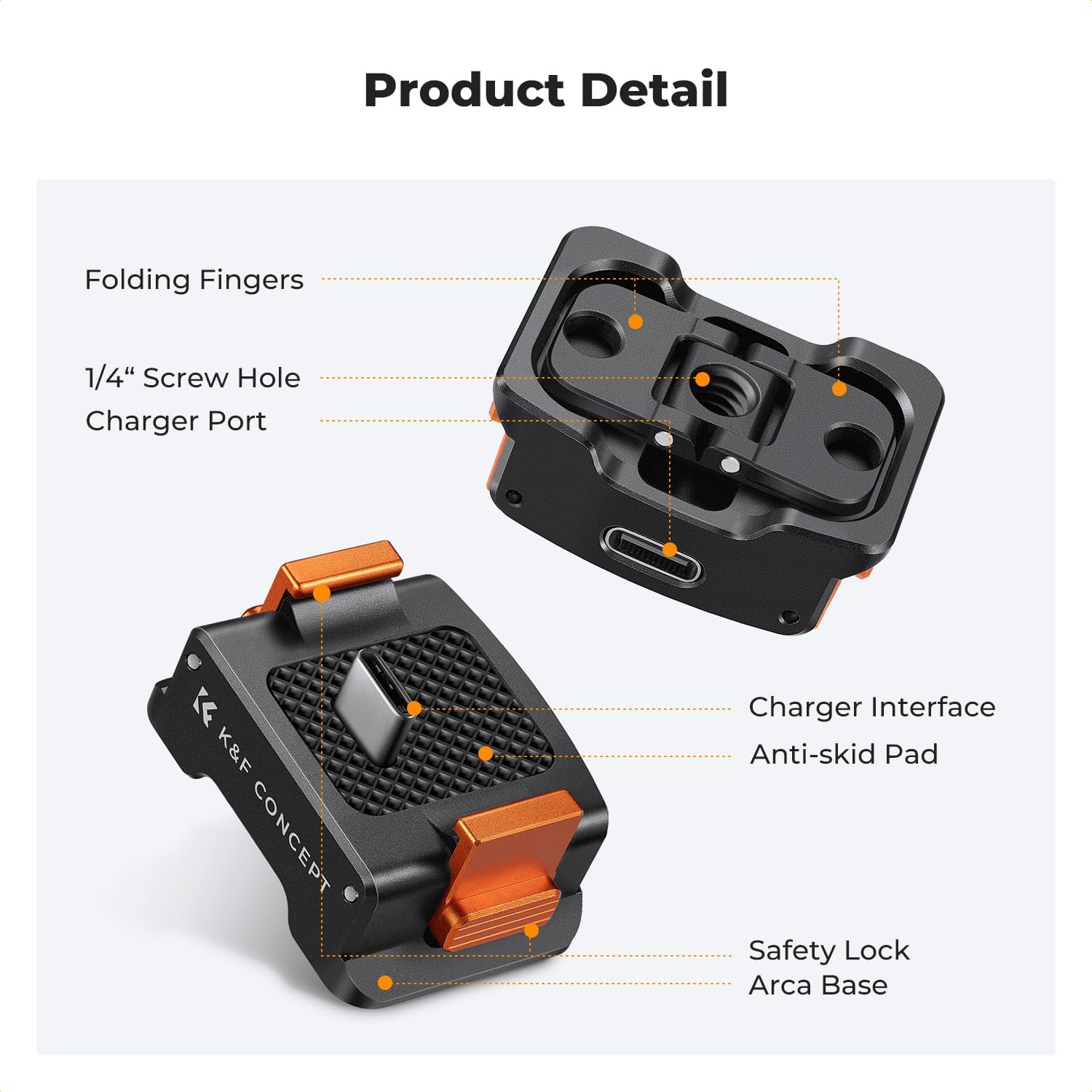
Product overview of the K&F CONCEPT Charging Adapter Base.

The adapter's flip claw design allows mounting on headbands, chest straps, and bike mounts.

Wide compatibility with tripods and other accessories via 1/4" screw hole and Arca-Swiss base.

Durable aluminum alloy construction with integrated USB Type-C port.
Video: Overview of the K&F Concept Charging Adapter Base for DJI Osmo Pocket 3, demonstrating its compact design and charging capabilities.
Video: A comparison of K&F quick release and charging adapters for the Pocket 3, highlighting different features and uses.
Video: Demonstrating the K&F CONCEPT adapter as an all-in-one accessory for the DJI Osmo Pocket 3.
Video: Exploring the unique features of the K&F CONCEPT Pocket 3 mounting base.
Video: A detailed look at how the K&F CONCEPT base can replace multiple setup components for the Pocket 3.
Video: Demonstrating the versatile attachments for the DJI Osmo Pocket 3, including the K&F CONCEPT adapter.
Video: Showcasing favorite travel tripods for action cameras and the Osmo Pocket 3, featuring the K&F CONCEPT adapter.
Specifications
| Brand | K&F CONCEPT |
| Model Number | SKU.2283 |
| Compatible Devices | DJI Osmo Pocket 3 |
| Connectivity Technology | USB Type-C |
| Mounting Type | Plug, 1/4" Screw Hole, Arca-Swiss Standard, Folding Fingers (GoPro Style) |
| Material | Aluminum Alloy |
| Item Weight | 1.76 ounces |
| Package Dimensions | 2.44 x 1.89 x 1.34 inches |
Maintenance
- Cleaning: Use a soft, dry cloth to clean the adapter base. Avoid using harsh chemicals or abrasive materials that could damage the finish or electronic components.
- Storage: Store the adapter in a cool, dry place away from direct sunlight and extreme temperatures. Ensure the folding fingers are retracted when not in use to prevent accidental damage.
- Inspection: Periodically check the adapter for any signs of wear or damage, especially the charging port and mounting points.
Troubleshooting
- Adapter not attaching securely: Ensure the DJI Osmo Pocket 3's charging port and the adapter's connector are clean and free of debris. Apply gentle, even pressure until you hear a click, indicating the safety clips have engaged.
- Charging not working: Verify that the Type-C cable is fully inserted into the adapter's port and connected to a working power source. Check if the DJI Osmo Pocket 3 itself is functioning correctly.
- Folding fingers are stiff: Apply a small amount of silicone-based lubricant to the hinge points if the folding fingers become stiff. Avoid oil-based lubricants.
- Mounting instability: Ensure all screws (e.g., thumb screw for GoPro mount, tripod screw) are tightened appropriately. Check that the Arca-Swiss clamp is fully engaged.
Warranty and Support
For warranty information, technical support, or any inquiries regarding your K&F CONCEPT Charging Adapter Base, please refer to the official K&F CONCEPT website or contact their customer service directly. Keep your purchase receipt as proof of purchase for warranty claims.