
1. Introduction
Thank you for choosing the ZOUPW 100W Portable Solar Panel. This manual provides essential information for the safe and efficient use of your solar panel. Please read it thoroughly before operation and retain it for future reference.
This 100W portable solar panel is designed for outdoor use, offering a high conversion efficiency of 23.5% and robust IP67 waterproof construction. It is suitable for charging portable power stations and various USB devices during camping, RV trips, fishing, or emergency blackouts.

Image: The ZOUPW 100W Portable Solar Panel being used in different outdoor scenarios, including an RV trip, fishing, camping, and during a power outage.
2. Product Features
- High Conversion Efficiency: Equipped with A+ monocrystalline solar cells, achieving up to 23.5% conversion efficiency. 9BB solar panels enhance performance in low light conditions and manage partial shading effectively.
- Lightweight and Portable Design: Weighing approximately 6.72 lbs (3.05 kg), this solar panel folds compactly to 24.13 x 21.06 x 1.77 inches. It features a magnetic handle for easy transport and two adjustable kickstands for stable ground placement and optimal sun alignment.
- Versatile Output and Wide Compatibility: Includes a controller with multiple output interfaces: MC-4, 1x black USB-A, 1x orange QC3.0 USB-A, and 1x QC3.0 USB-C. The complimentary 10ft MC-4 cable (with XT60/ANDERSON/DC5521/DC7909 adapters) ensures compatibility with most portable power stations.
- Durable and IP67 Waterproof: Features an ETFE coating material for waterproof, dustproof, and long-lasting durability, capable of withstanding harsh weather conditions.

Image: A person carrying the ZOUPW 100W Portable Solar Panel, highlighting its lightweight and foldable design. The image also displays the folded size (22.44"x21.26"x1.77") and weight (6.72 lbs).
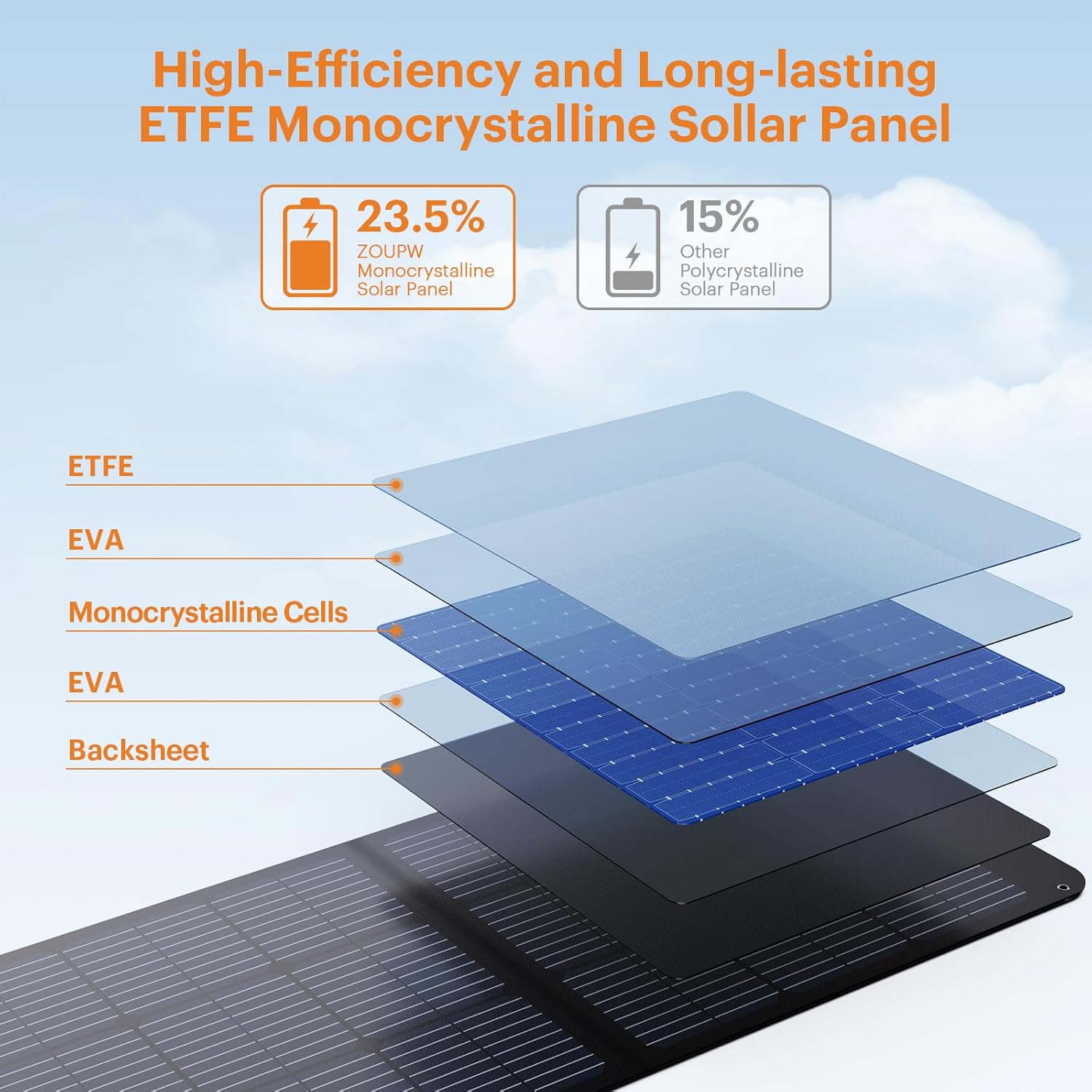
Image: A cross-section diagram of the ZOUPW ETFE Monocrystalline Solar Panel, detailing its construction layers and emphasizing its 23.5% high efficiency compared to 15% for other polycrystalline panels.

Image: A detailed view of the solar panel's construction, illustrating the fiberglass material that contributes to its flexibility and drop resistance.
3. Setup Instructions
- Unfold the Solar Panel: Carefully unfold the solar panel completely.
- Position the Panel: Place the solar panel in a location with direct sunlight.
- Adjust Kickstands: Extend the two adjustable kickstands on the back of the panel. Adjust them to angle the panel directly towards the sun for maximum sunlight absorption. This can be done in approximately 5 seconds.
- Connect to Device: Proceed to the Operating Instructions section for connecting your devices.
4. Operating Instructions
4.1 Connecting to a Portable Power Station
- Locate the MC-4 output cable from the solar panel's controller pocket.
- Use the complimentary 10ft MC-4 cable with the appropriate adapter (XT60, ANDERSON, DC5521, or DC7909) to match your portable power station's input port.
- Connect the MC-4 cable from the solar panel to the adapter, and then connect the adapter to your power station.
- Ensure all connections are secure. The power station should begin charging.
4.2 Charging USB Devices
- Open the controller pocket on the solar panel.
- Connect your USB devices (phones, tablets, laptops, etc.) to the available USB-A (black), QC3.0 USB-A (orange), or QC3.0 USB-C ports on the controller.
- The devices should begin charging automatically.

Image: A diagram illustrating the wide compatibility of the ZOUPW 100W Portable Solar Panel, showing connections to various portable power stations using different adapter types (DC5521, Anderson, XT60, DC7909) and direct USB charging for mobile devices.

Image: A detailed view of the solar panel's integrated controller, showcasing its MC-4 output, USB-A, QC3.0 USB-A, and QC3.0 USB-C ports, along with indicators for short circuit, overvoltage, and overcurrent protection.
4.3 Important Note on Power Station Input Limits
Some portable power stations have a maximum input power limit that may be significantly lower than 100W. Even under optimal sunlight conditions, the power received by your power station will not exceed its maximum input limit. This does not indicate insufficient power output from the solar panel. Always verify your power station's specifications for its maximum solar input power before use.
5. Maintenance
- Cleaning: Regularly wipe the solar panel surface with a soft, damp cloth to remove dust, dirt, or debris. Avoid using harsh chemicals or abrasive materials that could damage the ETFE coating.
- Storage: When not in use, fold the solar panel and store it in a dry, cool place away from direct sunlight and extreme temperatures.
- Water Exposure: The solar panel itself is IP67 waterproof. However, the control box housed in the exterior pocket is not waterproof. To prolong the lifespan of the solar panel, ensure the control box is protected from water exposure and do not submerge the panel in water.

Image: The ZOUPW 100W Portable Solar Panel set up outdoors during rainfall, illustrating its IP67 waterproof and durable ETFE coating designed to withstand harsh weather.
6. Troubleshooting
- No Power Output / Low Charging:
- Ensure the solar panel is in direct sunlight and not shaded by objects.
- Check all cable connections between the solar panel, adapter, and power station/device. Ensure they are secure.
- Verify that your portable power station's input limit is not restricting the power intake (refer to Section 4.3).
- Clean the solar panel surface if it is dirty.
- Device Not Charging via USB:
- Ensure the solar panel is receiving sufficient sunlight.
- Try a different USB port on the controller.
- Test with a different USB cable or device to rule out cable/device issues.
7. Specifications
| Specification | Value |
|---|---|
| Brand | ZOUPW |
| Model | B0DBZ9GM7L |
| Material | Monocrystalline Silicon |
| Maximum Power | 100 Watts |
| Efficiency | 23.5% (High Efficiency) |
| Maximum Voltage | 22 Volts |
| Connector Type | MC4 |
| Folded Dimensions (L x W x H) | 24.13" x 21.06" x 1.77" |
| Item Weight | 6.7 Pounds (approx. 3.05 kg) |
| Included Components | Controller, 10ft MC-4 cable with adapters |
8. Warranty and Support
For warranty information or technical support, please refer to the product packaging or contact ZOUPW customer service directly through the retailer where the product was purchased. Ensure you have your model number (B0DBZ9GM7L) and purchase details available.
The product is certified by TUV, FCC, RoHS, CE, and UKCA, ensuring compliance with international quality and safety standards.


